2:39

Introducing Granola + Zapier | Your meeting notes, now connected with over 8,000 apps
Granola · Productivity · Jul 2025
Superhuman · Oct 2026 · 0:37 · AI-annotated
Superhuman’s 0:37 launch film runs 16 scenes, about 2.4 s each. The product is on screen from the first frame and 1 feature is revealed. There is no explicit call to action; a voiceover carries the film. The video interleaves a locked-off talking head on a beige set with full-screen UI demos, cutting at a brisk ~24 cuts per minute to a 112 bpm pulse. Signature moves are cursor-led micro-interactions on pastel cards (clicks, hovers, flips), a maroon chapter card for the feature title, and a closing logo reveal.
Is this your launch? to your site or press kit.
Granola · Productivity · Jul 2025
Microsoft · AI · Sep 2026
Notion · Productivity · May 2025
A man in a gray shirt walks in from the right and sits on a wooden chair against a beige wall, a leafy plant at left. A white name caption holds in the lower left as he faces the camera and begins to speak.
On-screen text: “Lane Shackleton”, “Head of Superhuman Docs”
Camera: Static
A man in a gray button-up shirt sits in a wooden chair against a plain beige wall, gesturing with both hands as he speaks. A leafy plant stands at the left edge. The framing opens from a medium close to a wider medium shot.
On-screen text: “Lane Shackleton”, “Head of Superhuman Docs”
Camera: Static
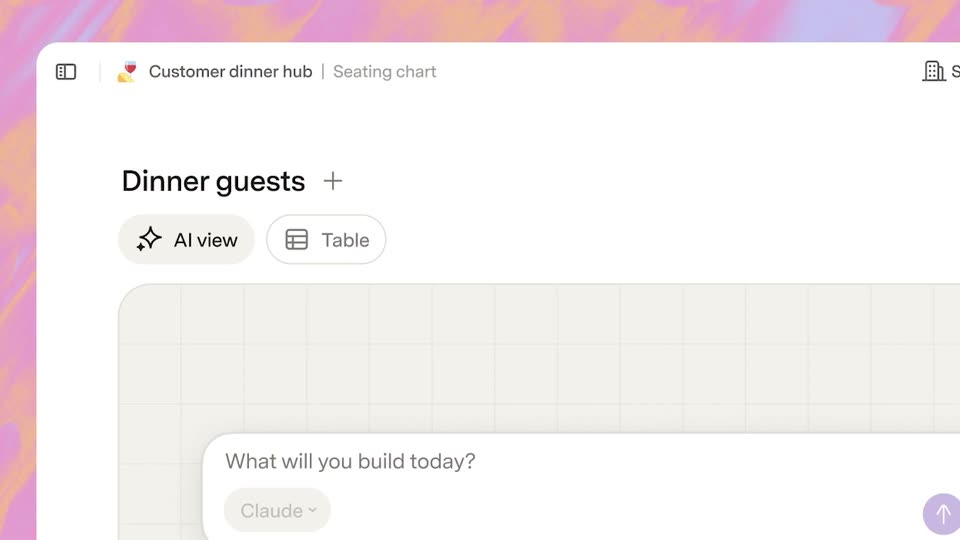
A white table view titled Dinner guests fills the frame over a soft gradient background. A cursor clicks the plus icon beside the title, opening a New view panel with a grid of eight view tiles. The cursor then slides down to the AI view tile at the bottom.
Techniques: Cursor demo
Camera: Push in
A product screen shows a Dinner guests page with AI view and Table toggles. A hand cursor types a prompt into the input box and clicks send, then the empty grid fills with table cards of colored guest dots as the view zooms into the grid.
Techniques: Cursor demo, UI zoom
Camera: Static
A seating chart interface for a customer dinner hub sits on a pink gradient background. Two pink cursors glide across the chart, hovering over guest cards and a circular avatar, while the layout of named cards around table circles stays static.
Techniques: Cursor demo
Camera: Static
A man in a gray collared sweater speaks in a tight close-up against a plain beige wall. His mouth is open mid-sentence and his eyes glance downward as he talks to camera.
Camera: Static
A man in a gray button-up jacket over a white tee stands centered against a plain beige wall, speaking to camera with both hands raised and open, gesturing as he talks.
Camera: Static
Dark maroon field. A thin white line runs across the center with squashed, distorted text at its midpoint. The text expands and sharpens into the words AI views while short horizontal rules fade in above and below it.
On-screen text: “AI views”
Techniques: Kinetic type
Camera: Static
A man in a gray shirt sits in a wooden chair against a plain beige wall, gesturing with open hands as he speaks. A leafy plant fills the left edge while a small caption scales in over the locked-off shot.
On-screen text: “AI views”
Camera: Static
A roadmap topography chart with three colored area curves animates its peaks while a cursor glides across the plot. Hovering over the chart raises a vertical marker and a tooltip listing effort, value and risk values for the date.
Techniques: Morph, Cursor demo
Camera: Static
A seating-chart interface shows an unassigned list of twenty guest cards beside a room map. A cursor clicks the purple Auto seat with AI button, and the cards fly off the list, rotating, to settle around four circular tables while the counter drops to zero.
Techniques: Cursor demo
Camera: Static
Three colorful member cards sit in a light dashboard. A cursor moves to the middle card and flips it to a back side listing stats, then flips it back to the front.
Techniques: Cursor demo
Camera: Static
A man in a gray button-up shirt over a white tee sits in a wooden chair against a plain beige wall, speaking to camera and gesturing with both open hands. A leafy green plant and a black stand frame the left edge.
Camera: Static
A cursor taps plus buttons on a $100 allocation list, the total counting down to $0 as green bill icons drop in and stack beside each row. The view switches to Everyone's votes, showing a takeaway summary and pooled totals with avatars, a column of bills stacking on the left.
Techniques: Cursor demo
Camera: Static
A man in a gray buttoned jacket stands centered against a plain beige wall, speaking directly to camera. He holds a relaxed posture, with a small hand gesture at the start and minimal head movement.
Camera: Static
A light purple app icon with a maroon document glyph starts centered on a pale lavender field, then shrinks and slides left as the SUPERHUMAN Docs wordmark reveals beside it.
On-screen text: “SUPERHUMAN Docs”
Camera: Static