0:30
Explore
Introducing Willow iOS 2.0: Voice Typing on iPhone Without Switching Apps
Willow Voice · Nov 2026 · 0:22 · Full motion · AI-annotated
- Length
- 0:22
- Scenes
- 3 · 7.4 s avg
- Product on screen
- 0:19
- Features shown
- 1
- Voiceover
- Yes
- Views
- 228 on YouTube
as of November 25, 2026
00:00:00 / 00:22:02
- Length
- 0:22
- Scenes
- 3 · 7.4 s avg
- Product on screen
- 0:19
- Features shown
- 1
- Voiceover
- Yes
- Views
- 228 on YouTube
as of November 25, 2026
Willow Voice’s 0:22 launch film runs 3 scenes, about 7.4 s each. The product shows up at 0:19 and 1 feature is revealed. There is no explicit call to action; a voiceover carries the film. A 22 second launch clip for the Willow keyboard app that demos capabilities first and reveals the brand name only on the final card. It opens on a close-up of the keyboard for voice input, runs a multi-feature typing tour with one caption per ability, and closes on a locked-off logo card.
No filming indicatedEstimated needs: 1 capture group — your screens or recordings · 1 official logo — reused across the film · 1 3D passage — build or supply
Is this your launch? to your site or press kit.
More like this



Similar soundtrack
Films whose music sounds like this one, voice left out
1:07

Muse Wonder and Muse Wonder Full: New Models Built for Agentic Tasks
Muse · Electronic, Synthwave
1:00

Introducing Subscribe with Google
Google · Upbeat electronic
2:09
Y Combinator - A1Zap from @a1baseapi is the social network layer for AI apps. Starti
A1Zap · Upbeat electronic
Introducing Willow iOS 2.0: Voice Typing on iPhone Without Switching Apps, scene by scene
· 3 scenes as text
01 · Feature reveal · 0:00–0:05
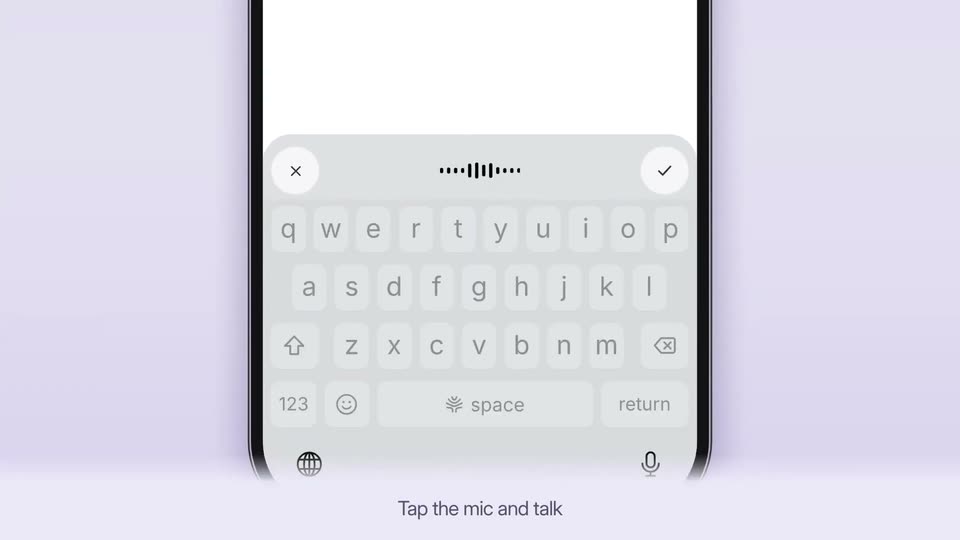
A front-facing phone mockup on a pale lavender background shows a notes screen with a keyboard. The camera zooms into the keyboard, the mic key is tapped, a voice bar with an animated waveform appears above the keys, then fades.
On-screen text: “Tap the mic and talk”
Techniques: UI zoom
Camera: Pull out
02 · Demo · 0:05–0:19
A 3D iPhone mockup floats on a pale lavender background. A hand cursor taps the orange check button, the keyboard slides up, and the camera zooms into the keys to show typed text, a blue swipe path, and an emoji panel, with captions fading in below.
On-screen text: “Straight into Notes. No app switching.”, “Type fast. Autocorrect keeps up.”, “Or just swipe”
Techniques: Cursor demo, 3D mockup, UI zoom
Camera: Pull out
03 · Product intro · 0:19–0:22
A centered white Willow logo and wordmark on a blue gradient background brighten from dim to full opacity over the clip, with a small for iOS caption below. The frame stays locked-off throughout.
On-screen text: “for iOS”
Camera: Static