1:50
Explore
00:00:00 / 02:00:02
- Length
- 2:00
- Scenes
- 60 · 2.0 s avg
- Product on screen
- 0:00
- Features shown
- 7
- Call to action
- 1:55 · 97%
- Voiceover
- Yes
- Views
- 16K on X
as of November 27, 2026
Umbrel’s 2:00 launch film runs 60 scenes, about 2.0 s each. The product is on screen from the first frame and 7 features are revealed. The call to action lands at 1:55 (97% in), over a voiceover. A dark, glossy product film built from 3D cards, floating UI panels and neon text, paced at about one cut per two seconds with a steady 120 bpm pulse. Signature moves are the white oval mask that morphs 2.0 into 2.1, the 3D fan of tagged photos and documents, the spinning globe, and the soft ghost mascots that close the piece.
Footage neededEstimated needs: 7 capture groups — your screens or recordings · 1 official logo — reused across the film · 1 filmed passage — shoot, supply or replace · 3 graphic passages — draw or supply · 22 3D passages — build or supply
Is this your launch? to your site or press kit.
More like this
4:46

Introducing Galaxy Z Fold6 and Z Flip6 | Samsung
Samsung · Jul 2024
1:33


Meet Kimi K3.1 Pro
Moonshot AI · Oct 2026
Similar soundtrack
Films whose music sounds like this one, voice left out
1:00
Motion Graphics Explainer Video for AI Education Platform | BYT
BYT · Upbeat electronic
1:27

David Yu - Introducing Hanji. Turn your scanned, faxed, and handwritten documen
Hanji · Modern electronic, corporate tech
2:09
Y Combinator - A1Zap from @a1baseapi is the social network layer for AI apps. Starti
A1Zap · Upbeat electronic
Umbrel ☂️ - Introducing umbrelOS 2.1. 2.0 made running your home cloud simple. 2, scene by scene
· 60 scenes as text
01 · Product intro · 0:00–0:00
A tilted 3D card shows a dark Photos app with a photo grid, hovering above a green retro device mockup on a white background. The white headline at the top slides up and snaps into focus.
On-screen text: “Back up photos instantly.”
Techniques: 3D mockup
Camera: Pan
02 · Product intro · 0:00–0:01
A dark green 3D card floats between two partially visible cards, its surface ringed by beige retro computers whose screens glow with OS logos. The camera pulls back and sharpens focus as the headline slides in at the center.
On-screen text: “Run any OS”, “within Umbrel.”
Techniques: Kinetic type, 3D mockup
Camera: Pan
03 · Product intro · 0:01–0:02
A vertical stack of feature cards scrolls upward inside a curved white mask. The top tile shows OS icons under the line “Run any OS within Umbrel.”, the next tile holds three round profile photos over a mountain lake with “Multiple accounts”, and below sit a green https toggle and a gray GPU tile.
On-screen text: “Run any OS”, “within Umbrel.”, “Multiple accounts”, “https ON”, “GPU Acceleration”
Camera: Pull out
04 · Product intro · 0:02–0:06
A stack of UI feature cards scrolls inside a white oval mask on black. The mask shrinks and the cards blur, then a large black 2. slides in so the oval reads as 2.0, which shrinks to center and becomes 2.1.
On-screen text: “2.0”, “2.1”
Techniques: Masking, Kinetic type
Camera: Pull out
05 · Product intro · 0:06–0:08
The number 2.1 holds center on a dark purple gradient background. The 2 is pale pink, the 1 is white with a soft glow, and a small dot eases into the gap between them as the decimal point. The frame stays locked off.
On-screen text: “2.1”
Camera: Static
06 · Feature reveal · 0:08–0:13
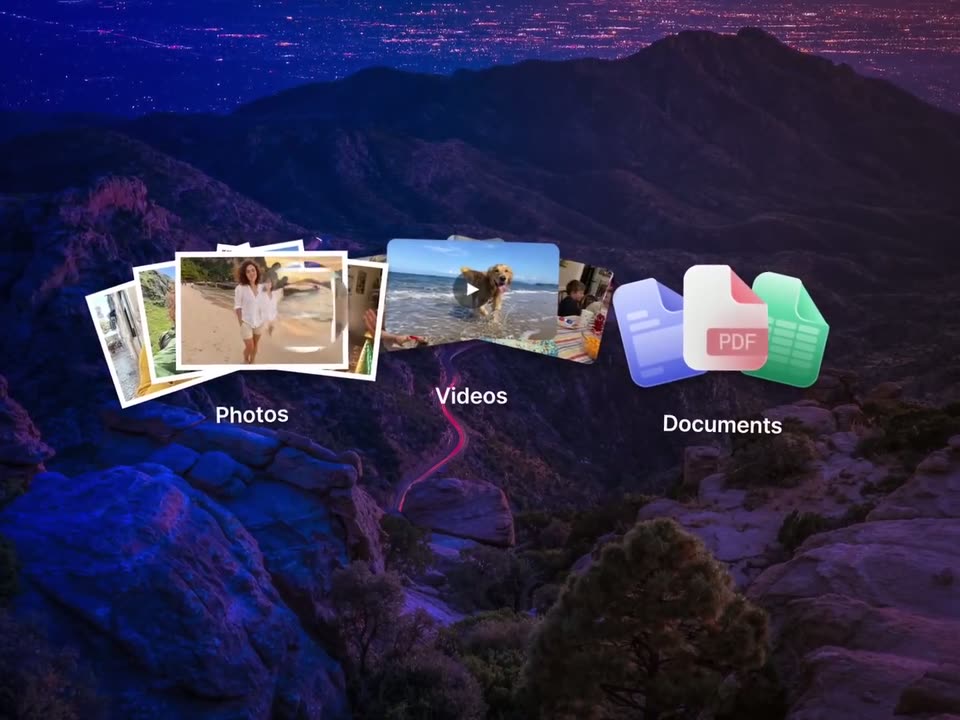
Three 3D icon stacks, fanned photos, video thumbnails, and document files, float over a night mountain landscape with city lights on the horizon, each labeled. A circular search button pulses below, then thin selection rings highlight one photo and one video as the stacks settle.
On-screen text: “Photos”, “Videos”, “Documents”
Techniques: 3D mockup
Camera: Static
07 · Feature reveal · 0:13–0:14
A 3D night mountain vista with a red light-trail road. Floating file icons (PDF, blue and green documents) labeled Documents hover on the right, then clear as the word Type scales in on the left, while a round sparkle button glows purple.
On-screen text: “Documents”, “Type what you”
Techniques: 3D mockup, Kinetic type
Camera: Static
08 · Feature reveal · 0:14–0:15
A purple-lit 3D mountain range at night, city lights on the horizon. White text holds center as a purple sparkle badge and pink script scale in beside it. The view then blurs into a fast pull-back.
On-screen text: “Type what you”, “remember!”
Techniques: Kinetic type, Speed ramp
Camera: Push in
09 · Feature reveal · 0:15–0:17
A dark glassy search card floats over a blurred sunset desktop with a floating glass orb. The query types out as Dad in December 2025, then results populate with Dad, December 2025, Files and Photos chips plus two photo thumbnails, while the camera pulls back from the orb.
On-screen text: “remember!”
Camera: Static
10 · Feature reveal · 0:17–0:19
A dark translucent search panel floats over a blurred photo. The field reads “leo falling off a bike” with a cursor beside it, then the frame pulls back to a “Best matches” row showing a thumbnail of a child on a red bike.
Techniques: UI zoom, Cursor demo
Camera: Pull out
11 · Feature reveal · 0:19–0:20
A dark video player shows a child in a blue helmet riding a red bike and falling onto the grass, while a right-side Info panel lists the date, file, transcript, people, and a Lisbon map. The clip crossfades in at the start.
Camera: Static
12 · Feature reveal · 0:20–0:21
A beach photo of a woman and a long-tail boat floats in 3D perspective over a black dotted field, then breaks into vertical slices that fan apart while thin white lines and dots trace across the image.
On-screen text: “Sun, July 19, 2026”, “Okay.”
Techniques: 3D mockup, Morph
Camera: Static
13 · Feature reveal · 0:21–0:22
A row of beach photos hangs as tilted planes in 3D space on a black dotted grid; the rightmost is sharp color, the rest blurred, while pill tags like 'Anna,' 'Sun hat,' 'Sunglasses' fade in, linked by thin lines to the images.
On-screen text: “Sun hat”, “Anna”, “Sunglasses”, “Long-tail boat”, “Mountains”, “Beach”
Techniques: 3D mockup
Camera: Static
14 · Feature reveal · 0:22–0:22
A fan of beach photos floats in 3D perspective, each marked by pill tags such as Anna, Beach and Mountains joined by thin lines. The cards flip to white document pages, matching the voiceover on photo and document reading.
Techniques: 3D mockup
Camera: Static
15 · Feature reveal · 0:22–0:24
A row of white document pages floats in 3D perspective across a dotted black background, curving like an arc. Dark pill labels with white text drift upward around them, thin lines linking labels to pages, as the whole arrangement slowly rotates.
On-screen text: “28 lines read”, “Check-ups · covered”, “Eye tests · every 2 years”, “Glasses · $250 a year”, “Orthodontics · under 18”
Techniques: 3D mockup, Parallax
Camera: Push in
16 · Feature reveal · 0:24–0:26
A dark dotted backdrop frames a rounded voice note card. Its four transcription lines brighten in sequence as the note plays, while two white waveforms oscillate beneath the card.
On-screen text: “The keys are in the lockbox by the door, code 4719.”, “Oh, and by the way, the Wi-Fi password is reindeer.”, “Towels are in the cupboard in the hallway.”, “Shout if you need anything. Enjoy your stay!”
Techniques: Kinetic type
Camera: Static
17 · Feature reveal · 0:26–0:28
A family selfie on a white field stays still while white rounded rectangles draw themselves around each face in turn. Small labels fade in beneath the boxes, naming the woman, the boy and the man.
Camera: Push in
18 · Feature reveal · 0:28–0:31
A dark photo-library grid in 3D perspective with three circular avatars on the right. Photos lift off the grid and float forward as the rest of the grid blurs, and the Leo avatar gains a selection ring.
Techniques: 3D mockup, UI zoom
Camera: Static
19 · Feature reveal · 0:31–0:33
A small black hub with a wood base sits on a light wooden shelf in a sunlit living room, flanked by ring vases and a wicker basket. The camera slowly pushes in toward the device, ending in a tight close-up of its top.
Camera: Push in
20 · Feature reveal · 0:33–0:37
The camera flies forward through a dark 3D web of glowing nodes and thin lines, the hue shifting from green to purple. White text builds in the center: “Small, specialized,” then “AI models” scales in below, then a tilted rounded badge reading “Running locally” rotates into view.
On-screen text: “Small, specialized”, “AI models”, “Running locally”
Techniques: Particles, Parallax, Kinetic type
Camera: Push in
21 · Feature reveal · 0:37–0:39
A purple neon rounded box holding the white label “Running locally” sits on a dark field with a thin connector line trailing left. It then resolves into a centered neon square badge containing a line-art dome over a wavy line.
On-screen text: “Running locally”
Camera: Push in
22 · Feature reveal · 0:39–0:41
In 3D perspective, a black four-bay NAS rests on a desk mat beside an orange lamp. Its four drive trays, one holding a labeled hard drive, slide back into the body and shut, leaving the numbered front panels flush.
Techniques: 3D mockup
Camera: Push in
23 · Feature reveal · 0:41–0:44
A dark Storage settings panel floats in 3D perspective over a sunset mountain landscape. Its drive list and capacity figures update, then the camera racks focus and the panel blurs out of view.
Techniques: 3D mockup
Camera: Push in
24 · Feature reveal · 0:44–0:47
An angled close-up of a dark FailSafe Mode settings panel on a desktop. The camera pulls focus, then tilts down through the list of RAID options, the first row outlined in orange. A rocky wallpaper glows along the left edge.
Techniques: 3D mockup
Camera: Push in
25 · Feature reveal · 0:47–0:47
A dark 3D globe of Earth fills the lower frame, its horizon lit by an orange glow on the left and a blue atmospheric rim on the right, with a Pacific Ocean label on the surface. A top toolbar with a zoom slider and search field, plus a 405 items count, slide in from the top.
Techniques: 3D mockup
Camera: Static
26 · Feature reveal · 0:47–0:56
The Photos app window opens on a close-up of a 3D globe, then pulls back to reveal the full interface with sidebar and dock. The globe spins, photo clusters tracking continents, then dives into Portugal, flattening into a 2D map before a fast blurred whip out.
Techniques: UI zoom, Speed ramp
Camera: Pull out
27 · Feature reveal · 0:56–0:58
Three 3D file icons, a red PDF, a blue document and a green spreadsheet, float over rippling dark water. The camera pushes in on a gradient orange-to-purple folder, which opens and releases three white pages that tumble outward.
On-screen text: “一”
Techniques: 3D mockup
Camera: Static
28 · Feature reveal · 0:58–0:59
Three white document pages, an invoice, a letter and a budget table, float in 3D over a dark blue water surface, tilt to face the camera, then the view pushes into the central letter.
Techniques: 3D mockup
Camera: Push in
29 · Feature reveal · 0:59–1:01
A document editor on a dark blurred backdrop shows an invoice where a blue cursive signature draws itself along the approval line, then whips to a thank-you letter whose body text fills in line by line. The file tab switches from Invoice.pdf to Letter.docx.
Techniques: Cursor demo
Camera: Pan
30 · Feature reveal · 1:01–1:02
A spreadsheet view of a Lisbon trip budget settles into frame as a cursor moves to a cost cell. The hotel figure and the total recalculate, and the Save button in the top bar turns orange.
Techniques: Cursor demo
Camera: Pull out
31 · Feature reveal · 1:02–1:04
A purple rounded app icon with a white umbrella mark sits centered on a light gray field, soft and out of focus. It sharpens into focus while the dark wordmark Umbrel fades in directly beneath it.
Camera: Static
32 · Feature reveal · 1:04–1:05
Two flat device mockups sit side by side under iOS and macOS labels. The iPhone shows the Umbral app home with an app grid and file folders, while the Mac screen resolves from a blur into a control panel listing local network addresses.
On-screen text: “iOS”, “macOS”
Techniques: Split screen
Camera: Static
33 · Feature reveal · 1:05–1:10
Four device screens in a 2x2 grid, each tagged with an OS name, slide up and settle to show the same connected app on an iPhone, a MacBook, an Android tablet and a Windows laptop. The camera then pushes in slowly on the grid.
On-screen text: “iOS”, “macOS”, “Android”, “Windows”
Techniques: Split screen
Camera: Static
34 · Other · 1:10–1:12
On a dark maroon gradient, the word Plus appears centered in white. So slides in beside it, then much more. scales up on a second line below, completing the phrase.
On-screen text: “Plus so much more.”
Techniques: Kinetic type
Camera: Static
35 · Other · 1:12–1:13
A dark screen holds the headline above a flat voice-memo player card; as the orange playhead advances, each transcribed line lights up in turn while the card and its app-icon dock drift slightly upward.
On-screen text: “Voice memos, transcribed”
Camera: Static
36 · Other · 1:13–1:14
A dark interface centers a vertical video of a smiling woman on a Lisbon street, her words shown in a caption bar at the bottom. The headline 'Videos, captioned' sits above, with a pause control and a thumbnail strip below the frame.
On-screen text: “Videos, captioned”
Camera: Static
37 · Other · 1:14–1:15
A dark machine settings panel fills the frame under a large white headline reading USB and bridged networking in Machines. A cursor flips the Zigbee USB dongle toggle to on while the view slowly zooms in on the panel.
On-screen text: “USB and bridged networking in Machines”
Techniques: UI zoom, Cursor demo
Camera: Static
38 · Other · 1:15–1:16
A phone-shaped device sits on black, its upper half showing a Windows desktop and its lower half a virtual keyboard. A white headline reads 'A touch console for Machines' above it. The frame is locked-off and static.
On-screen text: “A touch console for Machines”
Camera: Static
39 · Other · 1:16–1:17
A dark settings screen sits behind a centered Accessibility card. A cursor drags the Text size slider from left to right, enlarging the right-hand letter, while the Increase contrast toggle stays on. The white headline holds above.
On-screen text: “Now comes in all sizes”
Techniques: Cursor demo
Camera: Static
40 · Other · 1:17–1:17
A dark search panel floats over a blurred night background beneath the static headline and a glowing orb. Its skeleton placeholders resolve into a row of Tokyo night photos and a result count, while the Photos label slides into place.
On-screen text: “Search in any language”
Camera: Static
41 · Feature reveal · 1:17–1:18
On a black screen, white text builds word by word at left of center: “Oh,” holds, then “and” slides in with a motion blur. The line stays still, matching the voiceover beat.
On-screen text: “Oh, and”
Techniques: Kinetic type
Camera: Static
42 · Feature reveal · 1:18–1:20
Black screen, locked-off. White text reads “Oh, and” at center-left, then “one more thing.” fades in and scales up to complete the sentence.
On-screen text: “Oh, and one more thing.”
Techniques: Kinetic type
Camera: Static
43 · Feature reveal · 1:20–1:25
On a cream background, the headline 'Meet Murmur.' sits above two soft 3D blobs, blue and red. The blobs drift from the sides to the center and press together, eyes closing, as tiny device icons pop up. More colored blobs slide in from the frame edges.
On-screen text: “Meet Murmur.”
Camera: Static
44 · Feature reveal · 1:25–1:25
The Umbral App Store page for Murmur is shown tilted in 3D perspective against a dark backdrop. A row of promo cards, each with a headline and a small app screenshot, scrolls left across the middle while version and developer details sit static below.
On-screen text: “Meet Murmur.”
Techniques: 3D mockup
Camera: Pull out
45 · Feature reveal · 1:25–1:26
An angled, soft-focus view of a screen showing the Murmur app store page. Two panels sit side by side: a blue one with a chat screenshot and a green one with a new-agent grid and a green blob mascot. The page header and metadata row hold still.
Camera: Static
46 · Feature reveal · 1:26–1:30
A 'Connect a model' settings screen floats on white. An accordion switches from the ChatGPT option to 'Run a model on this Umbrel', showing a Qwen3.5 4B card and purple download button, then the panel tilts into 3D as a cursor hovers the button.
Techniques: Cursor demo, 3D mockup
Camera: Push in
47 · Feature reveal · 1:30–1:34
Two app windows sit side by side: a dark Hermes Agent profiles list left, a light murmur chat app right. The right pane populates with agent chats as star sparkles pop in, then expands full width as the left slides away, blurring into an Atlas conversation.
Techniques: Split screen, Particles, UI zoom
Camera: Pull out
48 · Feature reveal · 1:34–1:35
A chat app window sits on a cream background; the view zooms into the left sidebar, enlarging the list of colorful agent avatars and names while the right-hand conversation blurs and slides out of frame.
Techniques: UI zoom
Camera: Push in
49 · Feature reveal · 1:35–1:36
A light two-pane chat interface fills the frame. The left column lists agent threads with rounded colored avatars; the right pane shows a bulleted answer. The list refreshes to add a Lisbon weekend thread and the right pane swaps to a day-by-day itinerary.
Techniques: Cursor demo
Camera: Pull out
50 · Feature reveal · 1:36–1:38
A chat app window with a left sidebar of agent names and a group conversation about a Lisbon trip. The view zooms into the conversation, dropping the sidebar so the messages fill the frame.
Techniques: UI zoom
Camera: Push in
51 · Feature reveal · 1:38–1:40
A messaging view with a bulleted library summary cross-dissolves to a dark gradient, where the word 'Don't' fades in at the left edge.
On-screen text: “Don't”
Techniques: Kinetic type
Camera: Push in
52 · Feature reveal · 1:40–1:41
A near-black background with a faint purple glow in the corners holds the white headline centered. The words fade in one after another from left to right, completing the question by mid-clip.
On-screen text: “Don't feel like typing?”
Techniques: Kinetic type
Camera: Static
53 · Feature reveal · 1:41–1:42
A dark interface is shot in extreme close-up, focus locked on a purple Call button with a phone icon, a blurred prompt line below. A white cursor glides in and hovers over the button while the caption holds.
On-screen text: “Don't feel like typing?”
Techniques: Cursor demo
Camera: Static
54 · Feature reveal · 1:42–1:43
Close-up of a dark chat screen: a white cursor rests in the empty field, then a pale lavender ghost-shaped icon with two dark eyes appears on the left while the top bar fills with small icons.
Techniques: Cursor demo
Camera: Pull out
55 · Feature reveal · 1:43–1:51
A dark voice-call screen shows a glowing purple blob mascot; the user's words type out below it word by word. The UI fades, the blob blinks and blushes under a Thinking line, a reply appears, then everything but the blob drops away.
Techniques: Kinetic type
Camera: Push in
56 · Outro · 1:51–1:52
Colorful 3D ghost characters with cute faces jump from the floor and settle into two neat rows on a wooden platform, flanking a glossy blue arch in the center, against a black studio backdrop.
Camera: Push in
57 · Outro · 1:52–1:53
A white wash recedes to reveal a gray wall with a white shelf holding eight small white ghost-like mascots with sleepy faces, arranged around a central arch.
Techniques: Masking
Camera: Static
58 · Outro · 1:53–1:54
A monochrome 3D render of eight sleeping blob characters with closed eyes on a wooden shelf, a brushed metal arch behind them, framed as a polaroid card that tilts and eases smaller against black.
Camera: Pull out
59 · Outro · 1:54–1:55
A tilted white polaroid frame on a black background holds a 3D scene of small rounded gray figures seated on wooden planks around a metallic arch. The frame rotates slightly while a highlight sits on the arch.
On-screen text: “HAM”
Camera: Static
60 · CTA · 1:55–2:00
A black starfield with a glowing planet horizon arcs across the bottom. The white text “Out now.” holds center, then crossfades to “umbrel.com” with a small gray disclaimer line below, before the frame fades to black.
On-screen text: “Out now.”, “umbrel.com”, “Some features shown may vary by hardware.”
Camera: Static