2:14

Teamble launch film
Teamble · Jan 2026
Google’s 1:15 launch film runs 35 scenes, about 2.2 s each. The product shows up at 0:03 and 2 features are revealed. There is no explicit call to action. A dark, near-black launch film for Google Flow Agent built on a single recurring betta fish that travels from reference photo to generated footage. The structure is a hook headline, a product naming card, a long conversational canvas demo (brainstorm, @-mention media, generate ten scenes), a generative-models and restyle beat, a cinematic montage of results, and a locked logo card. Its signature moves are 3D-tilted interface mockups that flatten into the screen, photo tiles that assemble into f
Is this your launch? to your site or press kit.
Teamble · Jan 2026
Figma · Design · May 2025
Films whose music sounds like this one, voice left out
Pitch · Deep house / tech house
Slice · Modern electronic
Polylane · Electronic dance music with funk and disco elements
A dark frame holds a faint blurred warm shape at the right edge. A two-line white headline fades in from left to right across the center, the right words lighting up last.
On-screen text: “Amplify your vision and”, “unlock your best work”
Techniques: Kinetic type
Camera: Static
A white two-line headline holds center on a near-black field. Photo tiles of a desk, a hand, a field and a fiery scene fade up from dim to full, sliding into a grid around the text.
On-screen text: “Amplify your vision and”, “unlock your best work”
Camera: Pull out
A blurred collage of image thumbnails multiplies and fills the dark screen behind a centered white headline. The thumbnails, including a plant photo and a fantasy scene, drift and zoom with motion blur as a small gallery detail view with a back arrow and icons appears at the upper left.
On-screen text: “Amplify your vision and unlock your best work”
Techniques: Parallax
Camera: Pull out
A dark UI window tilted in 3D perspective on a near-black background. A large white headline overlays the window, then clears as the interface populates with a grid of images: a betta fish photo, a fish sketch, pixel-art flowers, and a bedroom.
On-screen text: “Amplify your vision and”, “unlock your best work”
Techniques: 3D mockup
Camera: Pull out
A tilted 3D view of the Flow interface shows a grid of reference images above a prompt bar. A large white headline, Now with Google Flow Agent, appears over it, then the camera zooms into the prompt bar where a cursor hovers over the Agent chip.
On-screen text: “Now with”, “Google Flow Agent”
Techniques: 3D mockup, Kinetic type, UI zoom, Cursor demo
Camera: Push in
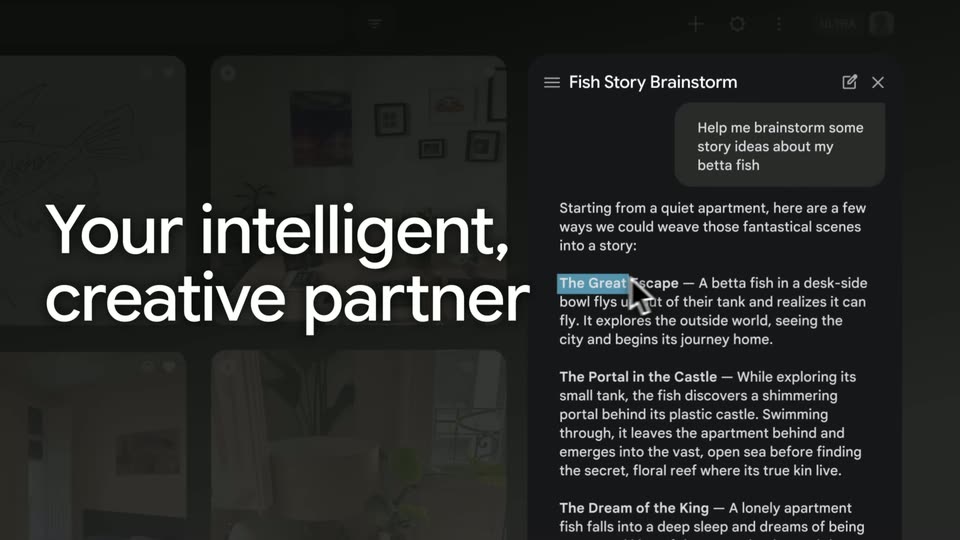
A dimmed grid of image thumbnails fills the left as a chat panel on the right types out story ideas for a betta fish. A cursor highlights the phrase The Great Escape. A large white headline fades in over the thumbnails.
On-screen text: “Your intelligent, creative partner”
Techniques: Kinetic type, Cursor demo
Camera: Pull out
On a near-black gradient background, the white phrase “From idea...” starts blurred and out of focus, then racks sharp while scaling up. A thin rounded-rectangle outline draws itself around the phrase, with a plus sign, two small icons and a circular arrow button fading in at its edges.
On-screen text: “From idea...”
Techniques: Kinetic type
Camera: Static
A dark prompt field on a black background types out the sentence about starting a great escape story, then a white arrow cursor slides in and rests on the circular send button at the lower right.
Techniques: Kinetic type, Cursor demo
Camera: Static
A dark chat panel titled Fish Story Brainstorm tilts in 3D perspective, a user prompt and suggested story alternatives fading in, while interior photo thumbnails stack down the left edge; the camera eases back slightly.
Techniques: 3D mockup
Camera: Pull out
An angled 3D view of a tablet interface displays a chat log and a grid of photos. Large white text reading “...to exhibition” overlays the center of the screen.
On-screen text: “...to exhibition”
Techniques: 3D mockup, Kinetic type
Camera: Pull out
A dark prompt list scrolls down past a column of interior thumbnails on the left, the radio-buttoned entries blurring as they pass. A rounded input bar with a plus, document and slider icons slides up from the bottom edge.
Camera: Push in
A dark rounded input field labeled “add @” with a blinking cursor floats over blurred prompt text, then dissolves to reveal the full interface. The cursor selects “Betta” in the character list, the preview card swaps from a pearl-haired figure to a betta fish in a tank, and the cursor rests on the “Add to Prompt” button.
On-screen text: “7”
Techniques: Cursor demo, UI zoom
Camera: Push in
A dark character-library screen blurs as the cursor taps the white Add to Prompt bar. A tilted rounded card pops into the center, showing the Betta avatar, the words add Betta, and three action icons.
Techniques: Cursor demo
Camera: Static
A dark rounded prompt card floats in 3D perspective over a blurred background card. A fish thumbnail with a play button sits above the text line, where 'add Betta to my' types out with a blinking caret, while a row of icons lines the bottom edge.
Techniques: 3D mockup, Kinetic type
Camera: Static
A close-up of the prompt bar and a floating media card pulls back to reveal the full project browser. The cursor hovers the video list, selects Apartment, the preview switches to a new clip, then the cursor moves to the Add to Prompt button.
Techniques: UI zoom, Cursor demo
Camera: Push in
A dark interface shows a video preview and a dropdown of room clips; the view zooms into the prompt box with two video thumbnails and the text add Betta to my Apartment, as the cursor moves to the send arrow.
Techniques: UI zoom, Cursor demo
Camera: Pull out
A 3D-tilted mockup shows a grid of betta fish clips, photos and a chat panel; white headlines fade over it while the mockup eases from a steep tilt to a flatter angle. The panel swaps for a left icon rail, and a cursor hovers a fish clip at the end.
On-screen text: “Seamlessly blend footage, images, and sounds”, “Direct the action”, “conversationally”
Techniques: 3D mockup, Kinetic type, Cursor demo
Camera: Pull out
A dark media grid with a left icon sidebar fills the frame. A white cursor drags a betta fish video thumbnail out of the grid into a small floating preview card, while a prompt box with a plus icon slides in at the bottom right.
Techniques: Cursor demo
Camera: Push in
A dark prompt bar with a betta fish photo that shrinks to a thumbnail as “Generate this betta fish in 10 different scenes swimming in the air” is typed; the cursor clicks send, and the view cuts to a grid of generated images.
Techniques: Cursor demo
Camera: Static
A dark product canvas holds a flat grid of betta fish photos, a line drawing and room scenes beside a right panel showing a prompt card. The grid then tilts and rotates into 3D space, the cards scattering in perspective while the panel updates.
Techniques: 3D mockup
Camera: Static
A dark app screen displays a grid of betta fish video thumbnails. The tiles resolve from blurred gray placeholders into clear images, the top row first, while a right-hand panel fills its own smaller thumbnail grid.
Camera: Pull out
A strip of rounded photo cards slides left across a dark background, starting with a beach scene where a colorful toy fish enters from the right, followed by a brick wall with a white cube and paper flower, a person at a table, and a building.
Camera: Pan
A horizontal carousel of rounded photo cards slides left on a black background, the cards overlapping in a fanned row, showing sushi, a floral-patterned fish, a frog, a leaping fish and a green field.
Camera: Static
A white headline fades in line by line beside a dark toggle panel, where a cursor flips the Image/Video switch. The view cuts to a 3x3 grid of generated fish images with a side panel; the cursor highlights tiles, dashed crop guides appear, and a larger editor card opens.
On-screen text: “Unlock Google's advanced generative models”
Techniques: Kinetic type, Cursor demo
Camera: Static
A dark interface shows two photo cards on the left, a cathedral and a betta fish, sliding out of frame as a prompt panel with a row of thumbnails and the line 'Change these to film noir style' drifts down to the lower right.
Camera: Push in
A 3x2 grid of six rounded video cards on a dark background plays black-and-white footage of betta fish in various settings, each tagged with a play icon and a percentage. The grid eases to center as a white headline fades in across the middle.
On-screen text: “Giving you complete creative control”
Camera: Pull out
A blurred white two-line headline sits on a dark background, then fades left as a row of video panels rushes past in 3D perspective, receding into the distance.
On-screen text: “Giving you complete creative control”
Techniques: 3D mockup, Parallax
Camera: Static
A row of tilted photo panels, showing betta fish, an industrial interior and a glass building, scrolls left across a black background in 3D perspective, revealing a teal underwater fish shot on the right.
Techniques: Parallax
Camera: Pull out
A horizontal band of rounded photo cards slides left across a black background. The cards show a goldfish, a glass building with a red ring sculpture, a white goldfish with floral markings, and a stone wall.
Camera: Pull out
Three rounded video cards sit in a row on black, each showing a patterned fish in a different setting. The center card, with two fish facing off underwater, scales up while the side cards slide out of frame.
Techniques: UI zoom
Camera: Push in
Two white-finned fish with floral-patterned bodies glide toward each other in a teal underwater scene, their snouts meeting at center. The view opens from a rounded, dark-bordered frame to full screen as they close the gap.
Techniques: Masking
Camera: Static
A multicolored fish with pink, green and orange scales glides across pebbled sand toward the camera, translucent fins trailing. A blurred turquoise sea and pale sky fill the background. The fish casts a soft shadow as it moves.
Camera: Static
A white betta fish with red spots rests on a fern frond amid glossy green leaves, blurred visitors stroll a sunlit garden path behind it. The full-frame shot then crops into a rounded-corner card on black.
Techniques: Masking
Camera: Pull out
A curved display panel fills the frame, showing a betta fish floating over a cathedral interior. The camera pulls back to reveal three side-by-side curved screens on black; the center holds the fish over a green field, the left a greenhouse, the right an ocean.
Techniques: 3D mockup
Camera: Pull out
On a black background, the Google Flow logo and tagline start out of focus and sharpen into a locked-off frame, while a small legal line appears at the bottom.
On-screen text: “Google Flow”, “Your AI creative studio”, “Features vary by Google AI subscription tier and platform (web vs. mobile). 18+.”
Camera: Static