1:06

DJI - Meet DJI Mini 2
DJI · Hardware · Nov 2020
Miora’s 1:50 launch film runs 58 scenes, about 1.9 s each. The product is on screen from the first frame and 5 features are revealed. The call to action lands at 1:42 (93% in), over a voiceover. Built as a feature tour over a single vertical purple-to-amber gradient, alternating flat monospace title cards with 3D-tilted UI mockups and a scrolling strip of generated assets. Signature moves are the black mascot blob peeking from the edges, the black curved swoosh transitions, and the orange rim glow on every floating panel.
Is this your launch? to your site or press kit.
DJI · Hardware · Nov 2020
Runway · AI · May 2026
Samsung · Jul 2024
A purple-to-yellow vertical gradient fills the frame as the word Introducing fades in at center. A small black blob with two white eyes then streaks in from the upper left, growing larger as it zooms toward the viewer.
On-screen text: “Introducing”
Techniques: Kinetic type
Camera: Static
On a purple-to-yellow gradient, the white headline Introducing and the large Miora wordmark slide into place. A small black-and-orange mascot character follows a dotted curved trail from the lower right and lands on the letter o, while TENCENT DESIGN appears below in wide capitals.
On-screen text: “Introducing”, “Miora”, “TENCENT DESIGN”
Techniques: Kinetic type
Camera: Static
A vertical gradient runs from dark purple at the top to bright yellow at the bottom. The white Miora wordmark, its o marked with an orange dot, slides up out of frame, leaving the centered tagline The Agentic Creative Studio in place.
On-screen text: “Introducing”, “Miora”, “The Agentic Creative Studio”
Camera: Static
A warm gradient runs from deep maroon to bright yellow. The white title holds center, then a white 3D prompt card tilts into frame with motion blur, while a dark blurred bar slides across the background.
On-screen text: “The Agentic Creative Studio”
Techniques: 3D mockup
Camera: Push in
A white rounded card floats tilted in 3D perspective over a warm orange-to-red gradient, holding a portfolio layout with a rendered armored soldier. The card rotates and blurs as it moves, a black curved stylus arcs past it, and small orange and white caption tags slide in at the edges.
On-screen text: “MEDIA PORTFOLIO”, “One st”
Techniques: 3D mockup
Camera: Pull out
A stack of white cards fans out in 3D perspective, each titled with a creative discipline and an orange tag, against a red-orange gradient. A small black pill character floats at the right. In the lower left, two white pills reveal the headline, the second line wiping in.
On-screen text: “One studio.”, “Every creative discipline”
Techniques: 3D mockup, Masking
Camera: Static
A centered white monospace headline on a purple-to-orange gradient. The line “From one brief” slides into place, then “to full creative delivery” fades in beneath it on the locked-off frame.
On-screen text: “From one brief”, “to full creative delivery”
Techniques: Kinetic type
Camera: Static
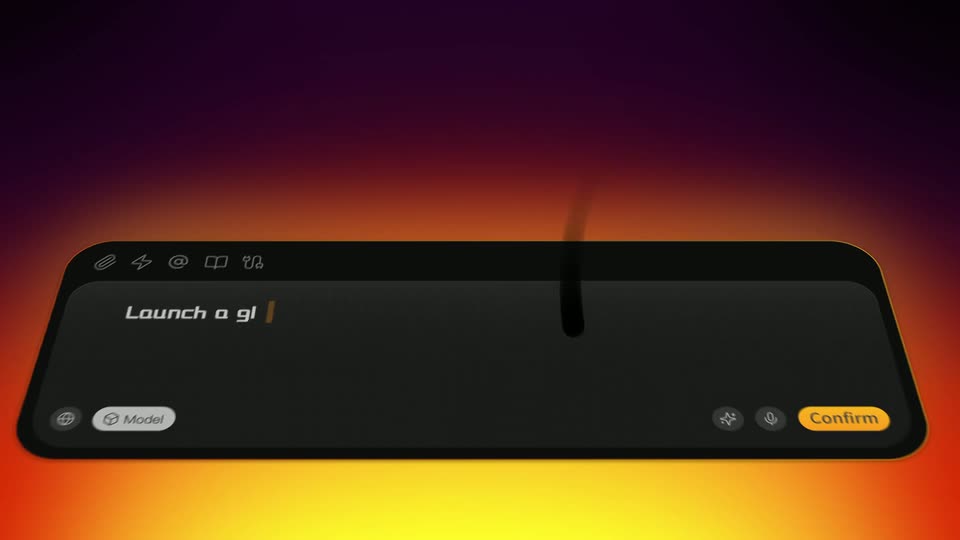
A dark command bar tilts up in 3D against a purple-to-orange gradient as the prompt types out. The Model and Confirm pills slide in from the bottom corners while a black curved line sweeps behind the panel.
Techniques: 3D mockup
Camera: Pull out
A dark rounded command bar floats in 3D perspective over a purple-to-yellow gradient, rimmed with orange glow. A prompt types out letter by letter in the input field while a small black blob peeks from the right edge near the yellow Confirm button.
Techniques: 3D mockup, Kinetic type
Camera: Pull out
A product window on a warm orange gradient: its white canvas animates a red cube icon, motion-blurred blobs and a black mascot blob with a pen, while a dark chat panel fills the right. White caption boxes at the bottom type the headline word by word.
On-screen text: “Miura remembers your assets, taste and methodology.”
Techniques: Kinetic type
Camera: Pull out
A 3D mockup of the Miura app window floats on a purple-to-yellow gradient. On the canvas, glowing red and orange orbs connected by thin lines settle into place as labels fade in, while the camera pulls back to frame the whole window. A caption sits at the lower left.
On-screen text: “Miura remembers your assets, taste and methodology.”
Techniques: 3D mockup, UI zoom
Camera: Static
A glowing pink card holding an orange sphere with a cube icon slides right, uncovering a focused prompt panel and a button on a warm orange gradient. A small black blob character with eyes sits at the lower left.
Techniques: Masking
Camera: Static
A two-panel interface on a warm gradient background. A dark prompt card sits left with a glowing orange Create image button sliding in. The right panel switches from a centered cube icon to a 3D render of a gold smartphone on a dune, with a view slider below.
Camera: Static
A horizontal strip of cards, a 3D phone render, a photo grid, a portrait, a food clip, an illustration and a UI mockup, scrolls left over an orange gradient. A fixed prompt bar with a Confirm button stays on top while orange captions slide in to label each card.
On-screen text: “Miora remembers your 3D preferences”, “Miora remembers your portrait photos”, “Miora remembers your UI/UX design style”
Camera: Pull out
A white list card and a dark command bar with a yellow button slide off the left edge of frame over a purple-to-yellow gradient, leaving the empty background.
Camera: Static
A dark purple to orange gradient fills the locked-off frame. White text reads “What sets Miora apart?” centered, then switches to “UI/UX, 3D, illustration, all on one canvas” as a small black blob with eyes slides across the upper left.
On-screen text: “What sets Miora apart?”, “UI/UX, 3D, illustration”, “— all on one canvas”
Techniques: Kinetic type
Camera: Static
A dark rounded chat panel rotates from a 3D tilt to a flat front view over a warm orange-to-purple gradient, a small black spider mascot perches at its corner, and the prompt 'I need to generate a sci-fi game-style interface' types out in the input line.
Techniques: 3D mockup, Kinetic type
Camera: Pull out
Two flat browser windows sit side by side on an orange-to-red gradient. The left grid fills from color swatches to black-and-white weapon and helmet renders, while the right panel populates into a dark sci-fi character sheet. The camera then zooms into the right interface.
Techniques: Split screen, UI zoom
Camera: Push in
A dark sci-fi dashboard for the VX-7 unit fills the frame, with a 3D armored figure in the central card and data panels flanking it. The view pans left across the layout, sliding the side columns out of frame while the central unit card holds focus.
Techniques: UI zoom
Camera: Pull out
A 3D desk holds a monitor, tablet, phone, keyboard and lamp, each screen showing the same VX-7 product page against a purple-to-orange gradient. A white headline banner with orange glow slides in at the top left.
On-screen text: “Responsive UI. Every screen.”
Techniques: 3D mockup
Camera: Pull out
On a dark purple to orange gradient, white text scales in from “Storyboard to video,” to the full line, then two small dark creatures with eyes peek in from the top edge as the text clears and a bright band rises at the bottom.
On-screen text: “02”, “Responsive UI. Every screen.”, “Storyboard to video, end to end”
Techniques: Kinetic type
Camera: Static
A dark rounded input panel tilts from a 3D angle into a flat, centered position against an orange-to-purple gradient. The prompt types out in the field with a blinking cursor, while a small black creature with white eyes slides in at the lower right.
Techniques: 3D mockup, Kinetic type
Camera: Pull out
A dark prompt box sits on an orange-to-purple gradient as the prompt line types out, two small black scribbled creatures bobbing at the lower right. The box then spins in 3D, flipping to a card showing an armored character.
Techniques: Kinetic type, 3D mockup
Camera: Static
Three vertical poster cards, each topped with the HIR logo and a white robotic suit render, glide up a warm orange-to-purple gradient as a second row of matching cards slides in from the bottom edge.
On-screen text: “HIR”
Camera: Static
A split-screen layout shows a white robot character illustration on the left and a dark chat interface on the right. The left panel features a large black logo that slides down over the robot, which is framed by an orange bounding box. The right panel displays text prompts and a thinking status.
On-screen text: “HIR”
Techniques: Kinetic type, Split screen
Camera: Pan
A hero-info product interface panel resolves from a horizontal motion blur into sharp focus. A red-to-orange gradient armor figure stands on a gradient disc, framed by view, attribute, wireframe and material controls, with a cursor resting on the material selector.
Techniques: Speed ramp
Camera: Pan
A robot on a circular pedestal rotates in the center of a character configuration interface. A cursor clicks material and color swatches in the right panel, and the armor shifts from pink to white, dark carbon, and glossy red.
Techniques: 3D mockup, Cursor demo
Camera: Static
A product configurator screen shows a red and black robot on a pedestal, flanked by attribute and material panels. The panel blurs and slides right, leaving a white field with an orange gradient edge, as a black scribble character dashes across with motion blur.
Camera: Pan
A dark rounded chat-input card rises from the bottom and pulls into focus against a purple-to-orange gradient, its prompt text typing out line by line. A small black blob mascot with eyes and a smile pops in at the lower right corner.
Camera: Pull out
A dark rounded chat input panel sits on a purple to orange gradient. Inside, a prompt types out character by character with a blinking caret, while a small black spider mascot bounces in the lower right corner.
Techniques: Kinetic type
Camera: Static
A dark rounded chat card sits in 3D over a maroon-to-orange gradient, its IRON VANGUARD prompt glowing, a cursor resting on the yellow Confirm button. The card blurs and flips into a blank white card.
Techniques: Cursor demo, Morph
Camera: Static
A browser window on an orange-to-purple gradient shows two storyboard cards. The cards start as solid orange blocks, then grayscale mecha images and white description text fade in. A glowing border pulses around each card, shifting between red and yellow.
Camera: Static
A storyboard app window on a warm gradient backdrop zooms into its canvas. Two gradient placeholder blocks morph into dark shot cards with mech photos and captions, then a text field opens and Massive ha is typed while an Edit text callout appears at the right.
On-screen text: “Edit text”
Techniques: Morph, UI zoom
Camera: Push in
A close-up of a storyboard card with a highlighted text line pulls back to reveal the page of four shots, each with a grayscale mech image, on an orange-to-purple gradient. An 'Edit text' callout floats at the top; a mascot icon and thumbnail sit at the bottom.
On-screen text: “Edit text”, “After clicking the text script edit button, the text can be edited directly.”
Techniques: UI zoom, 3D mockup
Camera: Pull out
In a design editor, a selected rectangle on a white canvas holds an orange-to-pink gradient that crossfades into a photo of a robot seen from behind in a desert. A white vertical toolbar with line icons, ending in a lightning bolt, sits at the left edge.
Techniques: Morph
Camera: Static
A white editor canvas holds a selected black-and-white image of an armored robot in a ruined landscape, framed by orange corner handles. A vertical toolbar of line icons runs down the left edge over an orange-to-purple gradient. The image's sky darkens and flying ships appear between frames.
Camera: Static
A light editor screen shows a left icon rail and a selected generated image of a white mech standing in a smoky battlefield. The view zooms into the image until it fills the frame, revealing red-lit drones overhead.
Techniques: UI zoom
Camera: Push in
A white armored robot stands in a dark industrial hangar, then jumps upward with a blue glow at its feet. The camera swings to a top-down angle, then a low 3D view as the robot lifts a circular disc device with a blue center.
Techniques: 3D mockup
Camera: Pull out
A 3D rendered armored figure is shown in a dark environment, then the scene cuts to a gradient background with the text 'Specialist Skills, on demand' centered in white.
On-screen text: “Specialist Skills, on demand”
Camera: Static
A white headline sits centered on a warm gradient that fades from dark plum at the top to bright orange below. A small dark dot and a dark pill drift at the edges. Near the end the frame blurs horizontally as a vertical light bar wipes in from the left, carrying the text out.
On-screen text: “Specialist Skills, on demand”
Techniques: Speed ramp, Masking
Camera: Static
A blurred dark chat panel sharpens as the camera zooms in on a question card with five answer options. Option B, Content creation, becomes highlighted while a small black mascot with eyes drifts along the right edge over an orange gradient.
Techniques: UI zoom
Camera: Push in
A dark UI panel with a multiple-choice question blurs and transitions out as a red gradient sweeps across the screen.
Camera: Static
A white skill card on a purple-to-orange gradient fills in: icon and title pop in, the description types out, and the toggle flips on as a pen sweeps off. A dark prompt pill with an orange Create button sits below; a small eye-blob peeks above.
Techniques: Kinetic type
Camera: Static
A purple-to-orange gradient fills the frame as white skill cards with toggle switches float in 3D depth. Dark pill buttons labeled Create hover beside each card, and a small doodle face bobs near the center while the camera drifts across the layout.
Techniques: 3D mockup, Parallax
Camera: Static
A grid of white skill cards floats in 3D perspective over a purple-to-orange gradient, each with a dark prompt bar and orange Create button. A small black spider mascot with red eyes crawls rightward across the frame.
Techniques: 3D mockup
Camera: Static
A grid of white skill cards floats on a purple to orange gradient. A small black spider mascot darts across the cards, leaving a dark motion trail, while the frame slowly pushes in on the central video-specialist card.
Techniques: UI zoom
Camera: Pan
Two tilted UI panels float over an orange gradient, starting out of focus. A prompt bar types “Do you need to save the Skill you just used?” above a grid of saved skill cards; a small black spiky mascot sits at right, then the shot blurs as the panels drift.
Techniques: 3D mockup
Camera: Pan
A dark purple to orange gradient fills the frame. A white monospace headline scales in on the left, a second line slides in below it, then the Miora app window tilts up from the bottom as a 3D mockup.
On-screen text: “Miora learns how you create-”, “not just what you like.”
Techniques: Kinetic type, 3D mockup
Camera: Pan
A tilted Miora app window floats in a 3D space ringed by small icon tiles over a red-orange gradient. The camera zooms into the mecha asset inside the document while two caption lines sit at the bottom.
On-screen text: “Miora is no scattered file fragments”, “It's your one-click 'asset organizer'”
Techniques: 3D mockup, UI zoom, Parallax
Camera: Push in
A 3D-rendered astronaut in white and black armor with a gold visor scales up and rotates toward the front against a light gray background, as a gray 02 and black label fade in at left and an Image Assets badge appears below.
On-screen text: “02”, “PIONER UNT”, “Image Assets”
Techniques: 3D mockup
Camera: Push in
A white armored robot with blue glowing accents stands with its back to camera in a smoky battlefield, small red-lit drones flying overhead. The shot opens on a blurred frame where a large 02 and PIONER UNT label scale on the left, then resolves to the clear render. A Video Clips badge sits locked in the lower left.
On-screen text: “02”, “PIONER UNT”, “Video Clips”
Techniques: Kinetic type
Camera: Pan
A 3D modeling app viewport shows a white and black robot with orange and blue accents on a black background, view gizmo at top left. A white pill label reads Game 3D Models at bottom left. The frame blurs and wipes right to a magenta panel.
On-screen text: “Game 3D Models”
Techniques: 3D mockup
Camera: Static
A purple-to-orange gradient fills the frame behind oversized white serif type that drifts leftward. A white Text button sits at the lower left while a dark icon sidebar slides in from the right edge, then the type blurs into a horizontal wipe.
On-screen text: “ALL CREATIVE ASSETS — IMAGES, VIDEO, COPY, 3D MODELS, UI ELEMENTS — TOGETHER ON ONE CANVAS”
Techniques: Kinetic type, Masking
Camera: Static
A static dark dashboard UI shows a unit profile with a central 3D soldier render, flanked by data panels and equipment lists. A 'Game UI' label sits in the bottom left corner.
On-screen text: “Game UI”
Camera: Static
A design app canvas on a light gray field holds scattered concept-art cards of a white robot, each tagged with an orange pin. The camera drifts across the board, then whips past the panels in a fast blurred pan, the 02 card swelling as it zooms.
Techniques: UI zoom, Speed ramp
Camera: Pan
A blurred app window streaks out of frame left over a purple-to-orange gradient. White text reads “Made for creators.” as a second line slides in beneath it. The lines then swap to “The Creative Agent with Memory.” while a small black blob with white eyes drifts in from the right.
On-screen text: “Made for creators.”, “Built for the work that matters.”, “The Creative Agent with Memory.”
Techniques: Kinetic type
Camera: Static
On a purple-to-orange gradient, the headline 'The Creative Agent with Memory.' exits upward as a small black doodle character with eyes hops in. The 'Visit miora.design' pill slides up and the 'Miora / Get started' button scales up, glows, then darkens.
On-screen text: “The Creative Agent”, “with Memory.”, “Visit”, “miora.design”, “Miora”, “Get started”
Techniques: Kinetic type
Camera: Static
On a dark-to-amber gradient, a black penguin with an orange scarf pops into the 'o' of the white Miora wordmark, its scarf flutters, while TENCENT DESIGN sits in spaced caps below.
On-screen text: “Miora”, “TENCENT DESIGN”
Techniques: Kinetic type
Camera: Static