0:53
Explore
Smart Commerce - Meet Stord AI
Stord · Jan 2026 · 0:57 · AI-annotated
- Length
- 0:57
- Scenes
- 39 · 1.5 s avg
- Product on screen
- 0:00
- Features shown
- 7
- Voiceover
- Yes
00:00:00 / 00:57:19
- Length
- 0:57
- Scenes
- 39 · 1.5 s avg
- Product on screen
- 0:00
- Features shown
- 7
- Voiceover
- Yes
Stord’s 0:57 launch film runs 39 scenes, about 1.5 s each. The product is on screen from the first frame and 7 features are revealed. There is no explicit call to action; a voiceover carries the film. Built as a fast feature montage: a logo sting, then a rapid run of UI and live-action beats each announcing one AI capability with a glowing gradient card, then a stylized text manifesto and a held logo. The signature moves are the iridescent hexagon mark, the neon-bordered cards scaling over footage, and chromatic-glitch text that snaps from scrambled to clean, all cut on a steady ~105 bpm pulse.
Footage neededEstimated needs: 4 capture groups — your screens or recordings · 1 official logo — reused across the film · 9 filmed passages — shoot, supply or replace · 4 graphic passages — draw or supply · 2 3D passages — build or supply
Is this your launch? to your site or press kit.
More like this

1:14

What is GitHub Spark? Introducing a brand new way to build powerful, AI assisted applications
GitHub · Developer tools · Oct 2024
1:07

Similar soundtrack
Films whose music sounds like this one, voice left out
0:52

Hebbia - Introducing the biggest change to AI products since ChatGPT. Enter t
Hebbia · Electronic dance music
0:57

Introducing Google AI Ultra: The best of Google AI in one subscription
Google · Upbeat electronic dance-pop with funk and hip-hop influences
1:04

Touchmark - Market for future inference capacity
Touchmark · Electronic dance music with a retro-futuristic, high-energy style
Smart Commerce - Meet Stord AI, scene by scene
· 39 scenes as text
01 · Product intro · 0:00–0:02
A white hexagon wipes open onto a dark field as seven neon outline icons light up in a row around a glowing gradient hexagon mark. The mark solidifies white, then a white hexagon closes in to frame the blue Stord logo and wordmark.
On-screen text: “Stord”
Techniques: Masking
Camera: Push in
02 · Product intro · 0:02–0:03
Aerial footage of a white truck at a warehouse dock sits inside a rainbow-glowing polygon that shrinks to a bright point. The Stord mark and white wordmark flash in, then the wordmark extends to StordAI with a gradient AI.
On-screen text: “Stord”, “StordAI”
Techniques: Masking
Camera: Static
03 · Product intro · 0:03–0:05
On black, the StordAI logo (hexagon mark plus wordmark) holds center. The “AI” letters begin pixelated with rainbow fringing, then snap to solid white as a small lens flare glints across the top of the wordmark.
Techniques: Light sweep
Camera: Static
04 · Product intro · 0:05–0:07
On a black field, a white hexagonal mark and a pink-to-green diamond snap into place at center as a bright light burst flares between them and dims. The logo assembles from partial shapes into the full brand sign.
Techniques: Light sweep
Camera: Pull out
05 · Feature reveal · 0:07–0:07
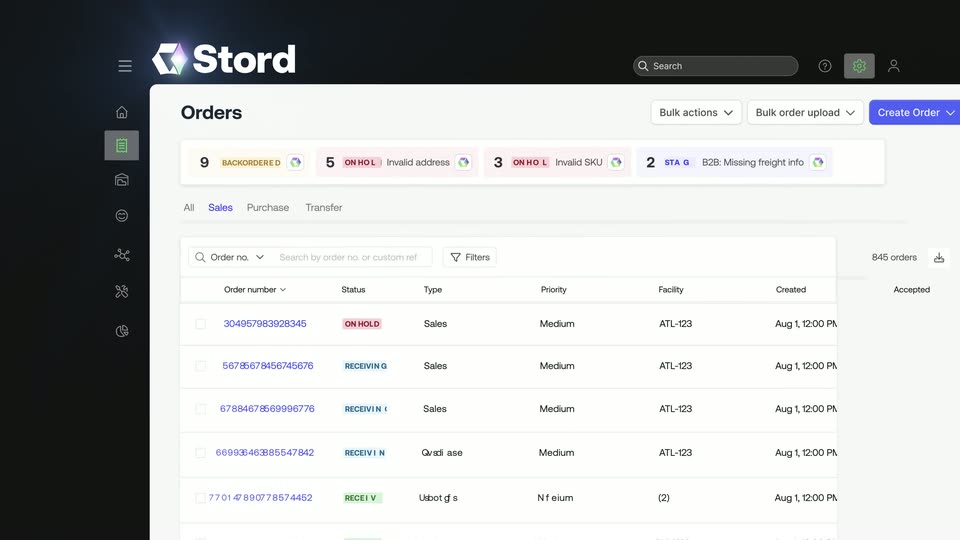
The Stord orders dashboard eases in from a blur and locks centered on a dark backdrop, the glowing Stord mark top left. Exception cards refresh at the top as a large black cursor arrow glides across the order table.
Techniques: Cursor demo
Camera: Pull out
06 · Feature reveal · 0:07–0:08
A dark icon sidebar sits left of a light Orders panel. A black cursor hovers the hexagon badge in the backordered row, then the view reframes right to reveal a side card showing a Generate Recommended Updates button.
Techniques: Cursor demo, UI zoom
Camera: Pan
07 · Feature reveal · 0:08–0:10
A white Suggestions for Backorder modal sits over a dimmed Orders list. Its body text resolves from scrambled characters into a clean sentence, while a black cursor drifts in to point at the highlighted words.
Techniques: UI zoom, Cursor demo
Camera: Pull out
08 · Feature reveal · 0:10–0:12
A white modal titled Suggestions for Invalid Address floats over a dimmed Stord dashboard. A cursor glides to the close icon and the modal slides left, uncovering the order list with an ON HOLD badge.
Techniques: Cursor demo
Camera: Pull out
09 · Feature reveal · 0:12–0:13
A Stord dashboard on a black background. The white inventory adjustments panel slides in from the right, its heading and table rows settling into alignment, while a cursor drifts down across the empty table.
Camera: Pull out
10 · Feature reveal · 0:13–0:17
A black cursor clicks the glowing Summarize button on a white toolbar. The view reframes wider as a dark StordAI panel slides in over an order table, its summary text typing out line by line to a signed-off report.
Techniques: Cursor demo, UI zoom, Kinetic type
Camera: Pull out
11 · Other · 0:17–0:18
An aerial view looks down on a parking lot with two trailers and a dumpster, then cuts to a forklift driver in a yellow vest steering past a pallet of boxes, then to a tight shot of hands typing on a keyboard.
Camera: Push in
12 · Other · 0:18–0:19
Low-angle close-up of two hands with French-manicured nails typing, a black keyboard in the foreground and a white one behind. A TOYOTA wordmark slides across the frame while the fingers keep moving.
On-screen text: “TOYOTA”
Techniques: Kinetic type
Camera: Static
13 · Feature reveal · 0:19–0:21
A product form shows a Brand field set to Best Brand and a Product Description field. A cursor types Electric toothbrush into the description box, then the view zooms down to an auto-fill prompt with a gradient hexagon icon and Cancel and Save buttons.
Techniques: Cursor demo, UI zoom
Camera: Static
14 · Feature reveal · 0:21–0:24
A close-up of the Auto-fill Hazmat Information button glows with a rainbow gradient as a cursor hovers over it. The frame zooms out to reveal the full Edit Hazmat form with pre-filled fields, then the cursor moves to the blue Save button.
Techniques: UI zoom, Cursor demo
Camera: Pull out
15 · Feature reveal · 0:24–0:24
A white Edit Hazmat form card with filled fields and a blue Save button sits over a dark dotted grid. A cursor rests on Save, then the card fades out to reveal a 3D warehouse aisle with shelving and a small robot.
Camera: Pan
16 · Feature reveal · 0:24–0:26
Locked-off high-angle view of a warehouse aisle; rows of shrink-wrapped pallets each bear a black round badge with a green check. A glowing green-to-blue banner with a cube logo and the caption Products approved for shipping scales in at center.
On-screen text: “Products approved for shipping”
Techniques: Light sweep
Camera: Push in
17 · Feature reveal · 0:26–0:26
A neon line-art shopping cart icon glows at the center of a dark background. It scales up from a small blurred shape into a sharp rainbow gradient of pink, blue, yellow and green. A static caption is held in the frame.
On-screen text: “Products approved for shipping”
Camera: Static
18 · Feature reveal · 0:26–0:28
A white cart summary card on a dark background shows rolling total-price digits while its labels resolve from garbled to readable. A cursor hovers at the top right. A second white card, an estimated delivery date form, slides in from the left and overlaps the cart card.
Techniques: Cursor demo
Camera: Pull out
19 · Feature reveal · 0:28–0:29
A white shipping form UI fades into a dark banner displaying a delivery date. The banner shrinks into a horizontal strip, revealing a 3D render of a conveyor belt carrying boxes.
On-screen text: “Estimated delivery: 04/05/26”
Techniques: UI zoom, 3D mockup, Masking
Camera: Push in
20 · Feature reveal · 0:29–0:31
A cardboard box rides a black conveyor belt in a busy warehouse, then the view cuts to a curved blue-railed belt carrying boxes toward the camera, then to a close-up of a dark monitor showing a status line with a green checkmark.
Camera: Push in
21 · Feature reveal · 0:31–0:32
A warehouse roller conveyor with orange belts runs toward the camera between cardboard boxes. A dark card with a glowing gradient border hovers above the belt, holding white rule text and a gradient hexagon logo on the right.
On-screen text: “Automation Rule:”, “• $100 Order Threshold”, “Add free gift”
Camera: Static
22 · Feature reveal · 0:32–0:33
A warehouse roller conveyor with orange belts runs past open cardboard boxes. A glowing holographic panel with a neon border floats in the upper left, showing an automation rule and a logo. The camera drifts slowly along the line.
On-screen text: “Automation Rule:”, “• $100 Order Threshold”, “Add free gift”
Camera: Push in
23 · Feature reveal · 0:33–0:34
A warehouse conveyor carries cardboard boxes past a worker in a yellow vest. A dark translucent panel on the right shows the automation rule text and a green-purple hexagon logo, all held static.
On-screen text: “Automation Rule:”, “Add free gift”, “• Hold order”, “Wait for inventory replenish”
Camera: Static
24 · Feature reveal · 0:34–0:36
A delivery person in a blue shirt carries a box from a white van toward a blue house while three neon-bordered cards stack in on the left, the top reading “Package Delivered / 7 Automation Rules applied” and two rule cards fading in below it.
On-screen text: “Package Delivered”, “7 Automation Rules applied”, “Automation Rule:”, “• Hold order”, “Wait for inventory replenish”, “Automation Rule:”, “• New Customer”, “Add custom insert”, “Add free gift”
Camera: Pan
25 · Feature reveal · 0:36–0:37
A neon rainbow-outlined map of the United States sits on a slowly rotating wireframe globe against black. A rounded card with a gradient border floats over the western states, showing a Demand Planning heading and two product recommendation bullets.
On-screen text: “Demand Planning”, “Product recommendations:”, “• Order 150 units of Product A”, “• Order 100 units of Product B”
Techniques: 3D mockup
Camera: Static
26 · Feature reveal · 0:37–0:38
A white isometric warehouse with trucks and robots sits on a dark floor, a glowing gradient-bordered card in front counting from 0% to 13% under the label Operational Efficiencies. The scene cuts to a hand holding a phone whose screen shows a Demand Planning card against a dark, particle-filled background.
On-screen text: “Operational Efficiencies”, “13%”
Techniques: 3D mockup
Camera: Push in
27 · Feature reveal · 0:38–0:40
A hand holds a phone with an inbox app against blurred asphalt, while a neon-edged badge floats in front, its label switching from Email Updates to Agentic AI. The shot then cuts to a dark starfield of scattered colored particles.
On-screen text: “Email Updates”, “Agentic AI”
Techniques: Light sweep, Particles
Camera: Push in
28 · Other · 0:40–0:41
On a black field, white bold titles crossfade at center: a faint 'Stord AI' brightens, gives way to 'Warehouse Management System', then 'Stord AI' again. A faint vertical dotted column glows behind the text while a sparse swarm of tiny colored particles drifts outward.
On-screen text: “Stord AI”, “Warehouse Management System”, “Stord AI”
Techniques: Kinetic type, Particles
Camera: Push in
29 · Other · 0:41–0:42
Centered white headline on a black field backed by a faint radial dot mandala with a green glow. The wordmark scales in, then cuts to a second headline of equal size, both locked off.
On-screen text: “Stord Parcel”, “Estimated Delivery Date”
Camera: Static
30 · Other · 0:42–0:43
A glowing hexagonal mesh logo in iridescent purple and green fills the dark frame, with the white title centered over it. The text flickers with a red-blue chromatic glitch before snapping into clean focus.
On-screen text: “Shipment Tracking”
Techniques: Kinetic type
Camera: Static
31 · Other · 0:43–0:44
A radial mandala of glowing teal dots pulses and zooms outward like a tunnel on a black field, its bright core flaring behind centered white words that swap from “Shipment Protectipp” to “Unbox” to “Return Agent”.
On-screen text: “Shipment Protectipp”, “Unbox”, “Return Agent”
Techniques: Kinetic type, Particles
Camera: Push in
32 · Other · 0:44–0:45
Centered white headlines sit over a glowing green mandala and star pattern. The text swaps from Customer Data Platform to Inventory Placement, then shrinks to Smart Commerce while the dotted star holds center.
On-screen text: “Customer Data Platform”, “Inventory Placement”, “Smart Commerce.”
Techniques: Kinetic type
Camera: Push in
33 · Other · 0:45–0:45
The phrase Smart commerce. appears in perspective on a dark gray field, glowing with red and blue chromatic edges while it scales slightly into place.
On-screen text: “Smart commerce.”
Techniques: Kinetic type
Camera: Static
34 · Other · 0:45–0:46
The phrase 'Smart commerce.' glows in the center of a dark background, surrounded by a horizontal light flare and a rainbow chromatic aberration effect. The text scales slightly.
On-screen text: “Smart commerce.”
Techniques: Kinetic type
Camera: Static
35 · Other · 0:46–0:47
On a black background, a small glowing rainbow phrase reads 'Smart commerce.' centered in the frame. It is then replaced by the larger white phrase 'Loud results.' with a soft halo glow, also centered.
On-screen text: “Smart commerce.”, “Loud results.”
Techniques: Kinetic type
Camera: Static
36 · Other · 0:47–0:48
The text “Loud results.” sits centered on a white background, with “Loud” in a green-to-purple gradient and “results.” in black. A colorful audio waveform pulses along the bottom, its vertical bars changing height.
On-screen text: “Loud results.”
Camera: Static
37 · Other · 0:48–0:49
White centered text on a black field. “Only with” snaps in with a brief skew and settles into a locked frame, then “StordAI” joins the line to complete the tagline.
On-screen text: “Loud results.”, “Only with”, “StordAI”
Techniques: Kinetic type
Camera: Static
38 · Outro · 0:49–0:53
On a black background, a bright beam sweeps across the white Stord wordmark while thin hexagonal wireframes fade out. A gradient AI then fades in beside it, leaving the softly glowing logo centered and still.
On-screen text: “Only with”, “Stord AI”
Techniques: Light sweep, Kinetic type
Camera: Static
39 · Outro · 0:53–0:57
A black field holds the StordAI wordmark centered and locked off, remaining static for the full duration of the clip.
On-screen text: “StordAI”
Camera: Static