1:13

Introducing Aleph 2.0 | Runway
Runway · AI · May 2026
AgentSky · Aug 2026 · 1:07 · AI-annotated
AgentSky’s 1:07 launch film runs 31 scenes, about 2.2 s each. The product is on screen from the first frame and 4 features are revealed. The call to action lands at 1:02 (92% in), over a voiceover. The video interleaves a live-action founder against a green wall with fast-cut motion graphics on dotted grids, moving from a one-line pitch into three feature demos (one API, playground benchmarking, add-ons) and a URL close. Signature moves are drop-in entrances, scrolling icon rows, typewriter headlines, and counting-up cost cards.
Is this your launch? to your site or press kit.
Runway · AI · May 2026
Discord · Consumer · Oct 2020
Pika · AI · Oct 2026
A woman in a white blazer and blue top sits centered against a dark green wall, a leafy plant to her left and a framed painting to her right, smiling as she speaks. A nameplate and a bottom caption hold still over the locked-off shot.
On-screen text: “Xiaoyin Qu”, “Founder, agentsky.dev”, “founder of AgentSky”
Camera: Static
A white chair drops into a teal room with a burst of tan particles that then fall in a vertical stream. The chair settles low in frame as a vase and framed beach painting stay fixed on the wall, and a name and title caption is held static.
On-screen text: “Xiaoyin Qu”, “Founder, agentsky.dev”
Techniques: Particles
Camera: Static
A woman in a blue blouse and white cardigan drops fast into a white chair against a teal wall, her body blurred mid-motion, then settles seated with arms flung wide and mouth open. A potted plant and a framed abstract painting stay still in the background.
Camera: Static
A woman in a cream blazer and light blue blouse sits centered before a dark green wall, speaking to camera with a plant and framed painting behind her. She spreads her arms wide, then settles as white sheets of paper drift past on the right.
On-screen text: “FOURSHIG”
Camera: Static
A woman in a white blazer and blue blouse speaks to camera against a green wall, gesturing with both arms raised then lowered. A name lower third appears on the left and the AgentSky logo scales in on the right.
On-screen text: “Hi this is Xiaoyin”, “Xiaoyin Qu”, “Founder, agentsky.dev”, “AgentSky”, “founder of AgentSky”
Techniques: Kinetic type
Camera: Push in
A woman in a white blazer sits against a green wall, gesturing with open palms as she speaks. A white subtitle sits at the bottom, then a large white headline with a blue last word scales up past the camera.
On-screen text: “Xiaoyin Qu”, “Founder, agentsky.dev”, “we are the OpenRouter but for agents”, “OpenRouter for Agents”
Techniques: Kinetic type
Camera: Static
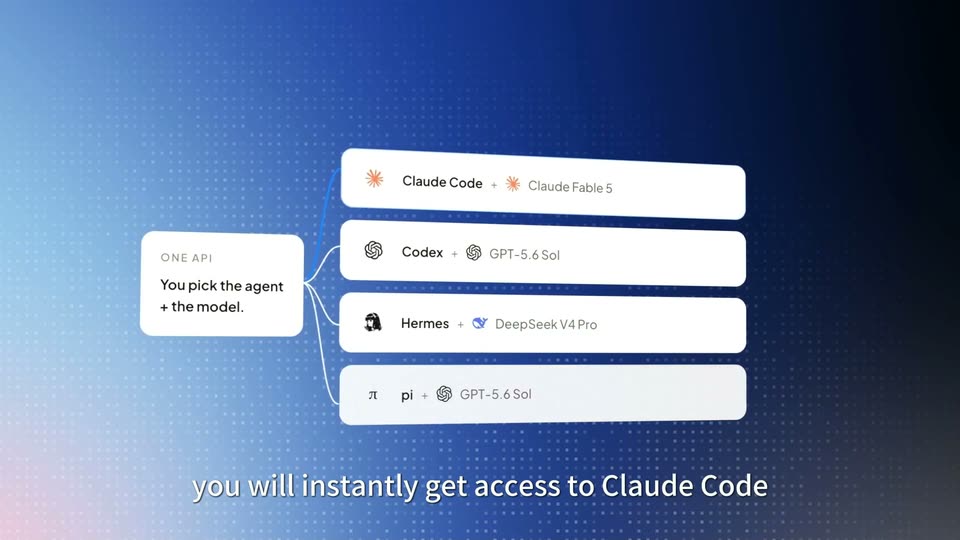
A white ONE API card sits left on a blue dotted grid; curved lines branch right to four white bars that pop in one by one, each pairing an agent with a model. A bottom caption swaps from the first line to the second.
On-screen text: “ONE API”, “You pick the agent + the model.”, “with one simple API”, “you will instantly get access to Claude Code”
Camera: Static
On a plain off-white background a row of flat icons slides in from the right and settles at center: an orange rounded square with a white starburst, a blue terminal-cloud icon, and a black-and-white manga girl face.
On-screen text: “you will instantly get access to Claude Code”
Camera: Static
Agent icons (orange asterisk tile, blue terminal cloud, anime portrait, blue whale, black flame) scroll left across white, each labeled below as it passes center. At 2s, cut to the founder in a white blazer speaking to camera against a green wall, subtitled.
On-screen text: “Codex”, “Hermes”, “DeepSeek Harness”, “and all the popular agents in the cloud”
Camera: Static
A woman in a white blazer and blue top speaks to camera against a dark green wall, a potted plant to her left and a framed painting to her right. She opens both palms in a shrug gesture while a white subtitle line sits at the bottom of the frame.
On-screen text: “and all the popular agents in the cloud”
Camera: Static
A blue sky with white clouds holds a scattered cluster of agent icons that fade in and float in place: a black pixel mark, an anime girl head, a square, a slashed circle, a cloud terminal, an orange starburst and a blue whale. A white caption sits at the bottom.
On-screen text: “and all the popular agents in the cloud”
Camera: Push in
A radial grid of dark agent cards recedes into the background in 3D perspective. The center white tile, with a blue logo and the name Codex, brightens with a Planning tag above it as the outer tiles fade up from black. A white caption holds at the bottom.
On-screen text: “you can either have one for yourself or”
Techniques: 3D mockup
Camera: Static
A dark grid of dim agent icons fills the frame. Three white cards slide in left to right, each under a status pill (Planning, Coding, Designing), linked by arrows: Codex with a blue chat icon, Claude Code with an orange pixel robot, Hermes with a black pixel figure.
On-screen text: “you can either have one for yourself or”, “thousands for your software factory”
Camera: Static
A dark interface shows three agent cards, Codex, Claude Code, Hermes, under Planning, Coding, Designing labels, then cuts to a woman in a white blazer gesturing before a green wall. White captions roll at the bottom and a large two-tone Agent Playground title appears over her.
On-screen text: “Is DeepSeek's new agent better than Claude Code”, “with Agent Playground by AgentSky”, “Agent Playground”, “you'll be able to answer that question”
Camera: Static
On a pale dotted background, the sentence you'll be able to answer that question types out letter by letter in large black bold type, ending on a cursor bar, while a smaller gray caption of the same line sits at the bottom.
On-screen text: “you'll be able to answer that question”, “you'll be able to answer that question”
Techniques: Kinetic type
Camera: Static
A light gray dotted grid fills the frame. A bold black sentence sits centered with a blinking cursor at its end, while a faint white copy of the same line fades out at the bottom.
On-screen text: “you'll be able to answer that question”
Camera: Static
A blue dotted gradient fills the frame as dozens of circular app icons drift in and gather into a loose cluster at center. A white caption at the bottom reads “go to playground”, then swaps to a larger “select DeepSeek Agent, Cloud Code”.
On-screen text: “go to playground”, “select DeepSeek Agent, Cloud Code”
Techniques: Particles
Camera: Static
A circular cluster of small AI app icons sits on a blue dotted backdrop as a cursor picks a whale logo and an orange starburst icon on the right, then clicks a blue Connect GitHub button. The headline and bottom caption type in.
On-screen text: “DeepSeek Harness vs Claude Code”, “select Deepseek Agent, Claude Code”, “connect your GitHub”
Techniques: Kinetic type, Cursor demo
Camera: Pull out
A blue dotted field shows a ring of small tool logos left and the DeepSeek and Claude icons right, joined by lines to a GitHub badge. White title and caption sit top and bottom. A light streak runs along the lines as the frame zooms in.
On-screen text: “DeepSeek Harness vs Claude Code”, “connect your GitHub”
Techniques: Light sweep
Camera: Pull out
A white app window with traffic-light dots floats over a green dotted landscape. The heading and a comparison bar sit above a text field that types out a task phrase, while a GitHub status line and a round send button hold still. A white caption runs along the bottom edge.
On-screen text: “ask a real task that you actually work on”
Techniques: Kinetic type
Camera: Static
A white app window mockup floats over a green desktop, tilted in 3D perspective. The window rotates and drifts, revealing a two-column agent comparison with code operations and timestamps. White subtitle captions swap at the bottom of the frame.
On-screen text: “ask a real task that you actually work on”, “be able to benchmark those agents based on time, cost”
Techniques: 3D mockup
Camera: Pan
A flat browser mockup of the AgentSky orchestrator floats over a green dotted-hills backdrop. The central cost comparison card counts its figures up from $0.000 to $0.101 and $0.455 while the rest of the interface blurs and dims, then the camera zooms in on the card.
On-screen text: “be able to benchmark those agents based on time, cost”, “performance and more”
Techniques: UI zoom
Camera: Static
A white “Your Agent” card with an orange starburst icon sits centered on a light gray field. Small white icon tiles drift in as the card gains a blue outline with radiating ticks and a badge steps from +2 to +4. The caption swaps to “but we also have add-ons”.
On-screen text: “we give you agents with models built in”, “but we also have add-ons”
Camera: Static
A white agent card with an orange icon and 'Your Agent' label, ringed by thin lines, sits centered above a monospace caption. The card shrinks and slides up as its sublabel becomes 'claude-opus-4-5', while a large bold 'ADD-ONS' title slides in at center and a smaller gray label appears top-left.
On-screen text: “but we also have add-ons”, “ADD-ONS”
Techniques: Kinetic type
Camera: Static
On a pale gray field, the bold black ADD-ONS title holds top-left as a white agent card slides up into place. A Tools heading sharpens in, then a grid of pastel tool icons pops in row by row, with Image to Video briefly emphasized.
On-screen text: “ADD-ONS”
Camera: Static
A flat grid of pastel rounded tool icons with small labels sits beneath a centered Tools heading. A bold black ADD-ONS label anchors the top left, and a white model bar floats above. The bottom row icons fade in over the second half.
On-screen text: “ADD-ONS”
Camera: Static
A light gray slide with the title ADD-ONS. The heading Channels fades from gray to black, then rounded app icons appear row by row with labels: Slack, WhatsApp, iMessage, Telegram, Discord; Microsoft Teams, Web, API, CLI, Agent-to-Agent; Email, Webhook, Messenger, SMS, More Channels.
On-screen text: “ADD-ONS”, “Channels”
Camera: Static
A grid of app icons under the “ADD-ONS” heading is covered by a fast-expanding cloud of blue pixelated blocks.
On-screen text: “ADD-ONS”, “Channels”
Techniques: Particles
Camera: Static
As a black headline exits the top, a white panel slides up over a dotted blue gradient, pairing a black API code block with a chat input. A prompt types into the field, a cursor clicks the send button, and a done pill appears below.
On-screen text: “ADD-ONS”
Techniques: Kinetic type, Cursor demo
Camera: Static
Rows of small colorful app icons populate a white background and scroll sideways, framing the centered headline that types in and scales up, with a smaller white copy of the same line along the bottom.
On-screen text: “Go to agentsky.dev”
Techniques: Kinetic type
Camera: Static
A black end card holds the AgentSky logo and the URL agentsky.dev while the tagline One API, Every Agent wipes in from left to right, then holds still.
On-screen text: “One API, Every Agent”, “agentsky.dev”
Techniques: Masking
Camera: Static