
0:46
Explore
Update: Introducing AI Style Transfer for 3d scenes with Spline
Spline · Jun 2023 · 0:40 · Full motion · AI-annotated
- Length
- 0:40
- Scenes
- 48 · 0.8 s avg
- Product on screen
- 0:33
- Features shown
- 1
- Voiceover
- No
- Views
- 27K on YouTube
as of November 27, 2026
00:00:00 / 00:40:18
- Length
- 0:40
- Scenes
- 48 · 0.8 s avg
- Product on screen
- 0:33
- Features shown
- 1
- Voiceover
- No
- Views
- 27K on YouTube
as of November 27, 2026
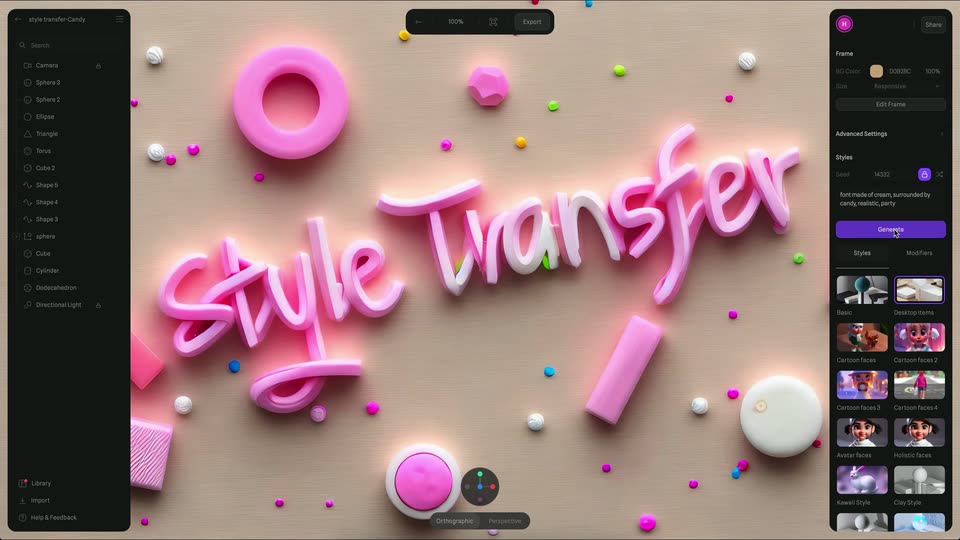
Spline’s 0:40 launch film runs 48 scenes, about 0.8 s each. The product shows up at 0:33 and 1 feature is revealed. There is no explicit call to action. A locked-off screen-capture montage in which one 3D scene is restyled in place, cut at a fast, even tempo, with before/after split panels as punctuation. The product name is withheld until the end, where 3D Spline letters and the iridescent logo close the loop.
No filming indicatedEstimated needs: 5 capture groups — your screens or recordings · 1 official logo — reused across the film · 3 3D passages — build or supply
Is this your launch? to your site or press kit.
More like this

1:33

Lovable - Introducing a smarter Lovable that is 71% better at solving complex t
Lovable · Developer tools · Jan 2026
0:19

Similar soundtrack
Films whose music sounds like this one, voice left out
0:22
Privy - 1/ Introducing: Privy Home A secure control layer for embedded wallet
Privy · Electronic dance music with tropical influences
0:30
Sketch - 🆕 Our next major update is here — and it’s got glass in it. Yep, tha
Sketch · Lo-fi hip-hop
1:39

BRAVIA Theatre U Product video | Sony Official
Sony · French House, Nu-Disco, Eurodance, and Lo-fi Hip-Hop
Update: Introducing AI Style Transfer for 3d scenes with Spline, scene by scene
· 48 scenes as text
01 · Hook · 0:00–0:00
A 3D design tool interface: a dark object list left, a styles panel with a Generate button right. The center canvas shows the word design as pink clay tubes on a pink gradient, with floating tube shapes around it. A cursor hovers near the Generate button. Locked-off frame.
Camera: Static
02 · Hook · 0:00–0:00
A dark design-tool window fills the frame, its central canvas showing the word design as orange tube lettering on a pink gradient, flanked by orange ribbons and green moss spheres. Left and right panels list shapes and style thumbnails, a cursor rests on the Generate button.
Camera: Static
03 · Hook · 0:00–0:01
A locked-off view of a 3D design tool interface. The central canvas shows the word design built from white ribbed tubes dotted with black points, set in perspective against a warm orange backdrop, flanked by dark side panels listing shapes and style thumbnails.
Camera: Static
04 · Hook · 0:01–0:01
A dark 3D editor UI remains static, framing orange tube letters that spell design in perspective. Side panels list objects and style options, with a Generate button and thumbnail grid on the right.
Techniques: 3D mockup
Camera: Static
05 · Hook · 0:01–0:02
A dark 3D design tool interface frames a canvas where the word design forms from cream wood-grain tube letters, surrounded by green curled tubes on a blurred orange background. The right panel's style thumbnails scroll down slowly.
Camera: Static
06 · Hook · 0:02–0:02
A static product interface: a dark left layer panel and a dark right styles panel frame a coral 3D viewport where the word design sits in ribbed tube letterforms among wavy tubes and spheres. A white cursor drifts left toward the Modifiers tab on the right panel.
Techniques: Cursor demo
Camera: Static
07 · Hook · 0:02–0:03
The 3D word design in the canvas shifts from rainbow to matte clay while a prompt fills in on the right panel. The full editor layout stays locked off, with side panels and top bar unchanged.
Techniques: 3D mockup, Cursor demo
Camera: Static
08 · Hook · 0:03–0:04
A locked-off view of a 3D design tool's interface shows a viewport with white puffy tube letters spelling design over a cloudy blue sky, flanked by a left object list and a right styles panel with a seed field and Generate button.
Camera: Static
09 · Hook · 0:04–0:04
A 3D design tool fills the screen. The central viewport shows the word 'design' formed from green rope-like tubes, with floating spheres and falling droplets on a blurred green backdrop. Dark layer and settings panels flank it; a cursor rests on the right. The frame holds still.
Camera: Static
10 · Hook · 0:04–0:05
A locked-off screen of a 3D design tool: a dark layer list on the left, a styles panel with a Generate button on the right, and a canvas of white clay cursive 'design' on moss. A cursor hovers over Generate.
Techniques: Cursor demo
Camera: Static
11 · Demo · 0:05–0:06
A 3D kitchen scene in the editor viewport shifts from warm terracotta to soft white as the cursor selects a new style preset in the right panel, while the layer list stays fixed on the left.
Techniques: 3D mockup, Cursor demo
Camera: Static
12 · Demo · 0:06–0:07
A pastel 3D kitchen scene fills the center viewport of a dark editor interface. A left object list and a right panel of style thumbnails flank it. The right panel scrolls down while a cursor hovers over a thumbnail.
Techniques: Cursor demo
Camera: Static
13 · Demo · 0:07–0:08
A 3D kitchen interior rendered in a soft watercolor style fills the center of a design tool, flanked by a dark object list on the left and a grid of style thumbnails on the right. A cursor glides across the thumbnails, hovering over Watercolor 1 and Watercolor 3.
Techniques: Cursor demo
Camera: Static
14 · Demo · 0:08–0:09
A 3D editor screen shows a pink kitchen full of cakes and furniture in perspective; a blue selection box around the refrigerator fades out as the object list on the left updates.
Techniques: 3D mockup
Camera: Static
15 · Demo · 0:09–0:09
A static view of a 3D design app: a pink fluid ribbon sculpture fills the purple canvas, a dark layer list sits on the left, and a grid of style thumbnails lines the right edge, with zoom and export controls at the top.
Camera: Static
16 · Demo · 0:09–0:10
Full-screen view of a 3D editor: a left layer list, a center canvas with a blue and purple ribbon on a pink backdrop, and a right grid of style thumbnails. The cursor rests on the Fluid Style tile. The frame holds static.
Camera: Static
17 · Demo · 0:10–0:11
A flat product interface shows a blue 3D ribbon render in the center viewport, flanked by a dark layer panel on the left and a grid of style thumbnails on the right, with a cursor resting on the Fur Style tile.
Techniques: Cursor demo
Camera: Static
18 · Demo · 0:11–0:11
The 3D design app interface sits static: a layer list on the left, a grid of style thumbnails on the right, and a beige ribbon mesh floating on a pink canvas in the center viewport.
Camera: Static
19 · Feature reveal · 0:11–0:13
A 3D design tool screen shows a tan viewport with cursive 3D text reading Style Transfer and scattered candy shapes. A cursor moves across style thumbnails on the right panel as the text and shapes recolor from cream and orange to pink and white.
Techniques: 3D mockup, Cursor demo
Camera: Static
20 · Feature reveal · 0:13–0:13
A 3D editor interface fills the frame, a peach viewport holding white brush lettering and floating primitives. The right panel switches from the Style tab to Modifiers, unfolding lighting and shadow options as a cursor hovers over the tab.
Techniques: Cursor demo
Camera: Static
21 · Feature reveal · 0:13–0:15
Two rounded panels sit side by side on black, each framing a 3D number 8 built from pipes. The left shows the colorful original on beige; the right shows a white and tan version on pink sand. A white arrow points between them, with captions beneath each panel.
On-screen text: “Original”, “Generated Image”
Techniques: Split screen
Camera: Pull out
22 · Feature reveal · 0:15–0:16
Two panels sit side by side on black: the left shows a colorful pipe-built letter B on a gray backdrop, the right shows the same letter as dark industrial pipes in an orange desert scene. A white arrow points between them, with captions Original and Generated Image below.
On-screen text: “Original”, “Generated Image”
Techniques: Split screen
Camera: Static
23 · Feature reveal · 0:16–0:18
A split screen compares two 3D renders of a pipe-built letter S. The left panel holds the colorful original on a gray field; the right shows a metal version in a desert as the sun moves across the horizon. A white arrow points between them, with captions below.
On-screen text: “Original”, “Generated Image”
Techniques: Split screen
Camera: Static
24 · Feature reveal · 0:18–0:19
The editor interface sits locked: a dark object list fills the left panel, a styles panel with thumbnails fills the right, and the center viewport shows a 3D cartoon girl with blue pigtails and a yellow shirt ringed by dark spheres. A cursor rests in the empty gray space.
Techniques: 3D mockup
Camera: Static
25 · Feature reveal · 0:19–0:21
A dark 3D modeling interface frames a stylized cartoon girl with white pigtails and an orange top, centered against a warm bokeh background. A layer list sits on the left and a settings panel with a purple Generate button on the right, all held on a locked-off frame.
Camera: Static
26 · Feature reveal · 0:21–0:22
A dark editor interface frames a 3D anime girl in a sunset viewport; her hair and outfit recolor from blue and yellow to white and black while the side panels stay fixed and a cursor hovers over the Generate button.
Camera: Static
27 · Feature reveal · 0:22–0:22
A dark 3D graphics app interface centers a pink bunny with a gold crown and blue bow tie in the viewport. A cursor hovers over a purple button in the right Styles panel as a loading spinner spins.
Techniques: Cursor demo
Camera: Static
28 · Feature reveal · 0:22–0:23
A dark editor interface surrounds a 3D render of a white bunny with a pink bow on a pink backdrop. A cursor rests on the purple Generate button in the right settings panel, which lists styles and seed values.
Techniques: Cursor demo
Camera: Static
29 · Feature reveal · 0:23–0:24
A 3D modeling interface displays a pink cartoon bunny with a crown and bow tie, a dark sphere inside a wireframe cube, and side panels listing objects and material options.
Camera: Static
30 · Feature reveal · 0:24–0:25
A 3D design tool interface frames a pink crowned bunny plush on a pink stage, surrounded by floating confetti shapes, with dark side panels listing scene objects and art styles. A cursor hovers over the style thumbnails on the right.
Techniques: Cursor demo
Camera: Static
31 · Feature reveal · 0:25–0:25
A locked-off view of a 3D design tool interface. A cartoon girl with pink hair and an orange hat holding a flower basket sits on the central canvas, flanked by a layer tree on the left and a styles panel on the right.
Camera: Static
32 · Feature reveal · 0:25–0:26
A dark brown interface frames a 3D render of a cartoon girl in a white hat holding a flower basket, flanked by a scene list on the left and a settings panel on the right. A cursor moves from the prompt field to the purple Generate button and presses it.
Techniques: Cursor demo
Camera: Static
33 · Feature reveal · 0:26–0:27
A locked-off view of a 3D style app: a cartoon girl in an orange hat holding a flower basket fills the center canvas, with a layer list left and a styles panel right. A cursor rests on the purple Generate button as the left list slides.
Techniques: Cursor demo
Camera: Static
34 · Feature reveal · 0:27–0:28
A dark 3D tool interface frames a girl holding a basket in the center viewport. She shifts from a white clay model to a colored render with a pink floral backdrop as the left object list scrolls and a cursor rests on the purple Generate button.
Techniques: Cursor demo
Camera: Static
35 · Feature reveal · 0:28–0:28
A 3D cartoon girl in an orange hat and green dress holds a flower basket in the central viewport of a dark modeling interface. A cursor hovers over the purple Generate button in the right panel.
Techniques: Cursor demo
Camera: Static
36 · Feature reveal · 0:28–0:29
A 3D design app fills the frame, a cartoon girl holding a flower basket centered in the viewport. The cursor moves from a style thumbnail to the Generate button, and the girl's outfit and the sunset backdrop shift to a new style.
Techniques: Cursor demo
Camera: Static
37 · Feature reveal · 0:29–0:31
A 3D editor interface stays locked off while the four-legged robot in the center viewport shifts from cool gray to warm brown lighting. Left scene tree and right style panel with a purple Generate button frame the model, which holds a static pose.
On-screen text: “Kawoll Style”
Techniques: 3D mockup
Camera: Static
38 · Feature reveal · 0:31–0:32
A 3D scene editor interface shows a dark quadruped robot standing on a wet street in the central viewport, flanked by a layer list on the left and a settings panel on the right. The frame holds still on the locked-off view.
Camera: Static
39 · Feature reveal · 0:32–0:33
A 3D editor interface frames a gray four-legged robot standing in a snowy field. Left and right panels list scene objects and render settings. A cursor moves across the right panel to the Depth of Field option. The viewport and robot stay static.
Techniques: 3D mockup, Cursor demo
Camera: Static
40 · Feature reveal · 0:33–0:33
A 3D editor viewport shows a four-legged steampunk robot in dark metal and cream legs standing on rippled desert sand under an orange sunset. Dark side panels list layers and environment settings, and the frame stays locked off.
Techniques: 3D mockup
Camera: Static
41 · Product intro · 0:33–0:34
A static screen capture of the Spline editor shows white 3D letters spelling Spline resting on a peach surface, while the right panel's grid of style thumbnails scrolls downward.
Camera: Static
42 · Product intro · 0:34–0:35
The Spline app fills the frame with a dark left layer panel, a top export bar and a right panel. The right panel swaps from a long thumbnail gallery to a settings view with a purple Generate button, while the cursor hovers a selected style. The central viewport shows the 3D word Spline, first as glossy blue letters over a peach backdrop, then as matte white and pink letters on a peach surface with soft shadows and small props.
Techniques: Cursor demo
Camera: Static
43 · Product intro · 0:35–0:37
A screen capture of the Spline app shows extruded 3D letters spelling Spline on a gray canvas, flanked by light and style panels. The cursor clicks the purple Generate button; the render switches from silver metal on a light floor to gold on a dark floor.
Techniques: Cursor demo
Camera: Static
44 · Demo · 0:37–0:38
Full-screen capture of a 3D design app, locked off. A pink and white wavy field of capsule shapes fills the viewport, with a dark asset panel on the left and a settings panel with style thumbnails on the right. The cursor drifts down and clicks the Modifiers tab while the zoom readout ticks from 686% to 680%.
Techniques: Cursor demo
Camera: Static
45 · Demo · 0:38–0:38
A cyan and white capsule cluster in 3D perspective fills the viewport of a design tool, framed by dark sidebars and a right-hand settings panel. A cursor drifts off the purple Generate button into the empty right area.
Techniques: Cursor demo
Camera: Static
46 · Demo · 0:38–0:39
A full screen of a 3D design app frames a pink, fluffy object built from rounded capsules, one outlined in blue. Dark sidebars and a settings panel with style thumbnails flank the viewport. A cursor drifts near the top right edge.
Techniques: Cursor demo
Camera: Static
47 · Outro · 0:39–0:40
The word Spline is centered in white text on a black background.
On-screen text: “Spline”
Camera: Static
48 · Outro · 0:40–0:40
The brand logo, a small iridescent circle of blue, pink and yellow, holds fixed at the center of a black frame.
Camera: Static