3:05
John Kim - Introducing Paraform Agents, powered by our Hiring Intelligence. Eve
Paraform AI · Sep 2026
Shaders’s 0:52 launch film runs 35 scenes, about 1.5 s each. The product is on screen from the first frame and 4 features are revealed. There is no explicit call to action; a voiceover carries the film. The video is a rapid montage of Dutch-angled 3D product screens and kinetic type cards, cutting at about 32 cuts per minute to a 140 BPM pulse. Its signature moves are the tilted 3D perspective on every interface, rim-lit spheres and morphing blobs that carry the transitions, and glitch-fringed type for feature titles.
Is this your launch? to your site or press kit.
Paraform AI · Sep 2026
Google · AI · May 2025
A dark 3D software viewport shows a chrome, ribbon-like logo model wrapped in a glass ring, framed by blue bounding-box lines and red and green axis lines. The camera orbits the model while a white cursor arrow drifts across the scene, with a properties panel and icon toolbar lining the edges.
Techniques: 3D mockup, Cursor demo
Camera: Static
A tilted 3D view of the Shaders website pulls back and rotates, revealing the dark hero panel with its headline and a row of framework logos on the left, and a polished metallic ribbon mesh with a cursor icon on the right, set over a faint grid.
Techniques: 3D mockup, Parallax
Camera: Push in
A tilted 3D view of the Shaders landing page on a dark background. A blue light beam sweeps diagonally across the hero headline and the row of tech logos while the frame holds a Dutch angle.
Techniques: 3D mockup, Light sweep
Camera: Static
A dark sphere with a soft rim glow shifts its light from pink to blue behind a centered “v3” label. The label holds still while the colored edge of the sphere changes hue. The frame stays locked.
On-screen text: “v3”
Camera: Static
A dark sphere with a soft blue-to-pink gradient glow fills the frame. The white text v3 sits centered on it, static, while the colored glow shifts subtly around the edges.
On-screen text: “v3”
Camera: Static
A tilted, out-of-focus close-up of a sunset scene with large serif text snaps into a locked-off wide frame. Palm trunks frame a glowing horizon over rippling water, while the headline and two supporting lines sit centered and still.
On-screen text: “v3”, “NOVA SCOTIA — EST. 1911”, “Arrive slowly.”, “Nine rooms, one long tide, and nowhere you need to be.”
Techniques: Parallax
Camera: Pull out
A split frame. The left half is a dark maroon field where a soft magenta blob drifts and brightens, overlaid with a white serif quote and a small product card. The right half is a white Canva sign-in form that stays still, then blurs out of focus.
On-screen text: “Every discovery begins as a stray note.”, “Dr. Amara Chen – Head of Research, Verdant Bio”
Techniques: Split screen, UI zoom
Camera: Static
A dark 3D scene shows a glassy green extruded form rotating in perspective, lit by a green glow. Large italic text reads HEAVY ROTATION at left, with a small FPS HUD panel below it.
On-screen text: “HEAVY ROTATION”, “Every discovery”, “begins as a stray note.”, “D:. Amara Chen - Head of Research, Verdant Bio”
Techniques: 3D mockup
Camera: Static
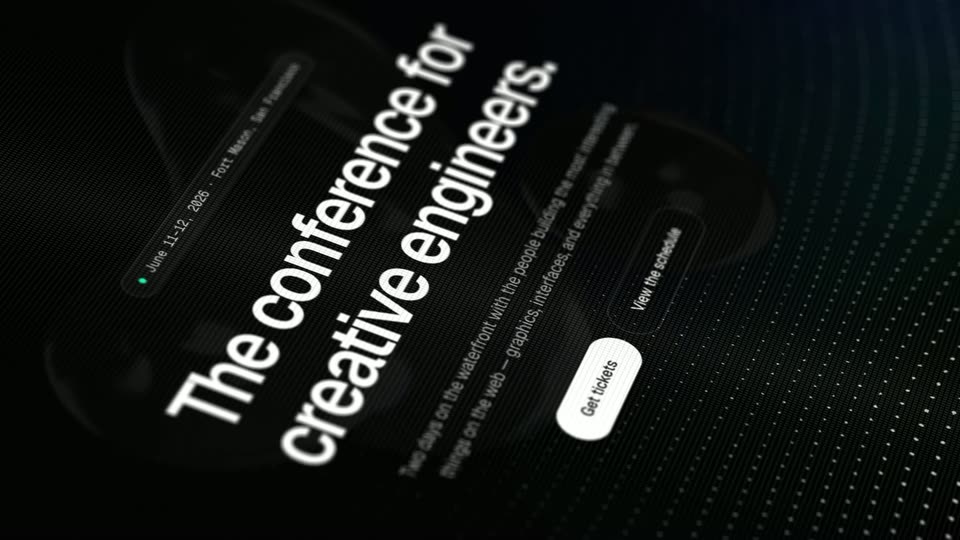
A dark conference landing page tilts in 3D perspective with shallow depth of field. The white headline stays sharp at center while the date tag, body copy and buttons blur at the edges. A dotted grid recedes into the dark background as the camera drifts slowly.
Techniques: 3D mockup
Camera: Pan
A dark design editor screen shows a 3D logo of four glowing rounded squares on a black canvas, with a device list panel on the right. A cursor moves up the panel as the width field changes from 1080 to 1280.
Techniques: Cursor demo
Camera: Static
A dark navy 3D blob floats left of center over a glowing blue gradient. The word design sits across it in large white lowercase type, held still while the background glow shifts softly.
On-screen text: “design”
Camera: Static
A single lowercase word sits centered on black over a soft magenta and amber glow that drifts and brightens behind it. The letters hold their position while the light streaks shift from left to top, a locked-off kinetic type card.
On-screen text: “design”, “explore”
Camera: Static
A dark design editor, set in tilted 3D perspective, pulls back across its canvas. The frame opens on a selected 'explore' text block over a warm gradient, then widens to reveal a large 'design' word and a 'v3' label, with a properties panel fixed on the right.
Techniques: 3D mockup, UI zoom
Camera: Pan
A slightly angled close-up of a dark shader editor shows an open context menu over a blue React atom logo. A white cursor glides down the menu and rests on the Duplicate entry.
Techniques: Cursor demo
Camera: Static
A dark editor sidebar and two React logo panels sit in a tilted 3D layout. A terminal window labeled Claude Code slides in front of the left panel as the cursor moves right. The camera rolls the scene into a slanted perspective.
Techniques: Cursor demo, 3D mockup
Camera: Static
A terminal window in 3D perspective sits over a website with a green gradient circle, the prompt line types out a command while the camera pans to reveal the page behind. The view then blurs into a scan-lined close-up of the website.
Techniques: 3D mockup, Parallax, UI zoom
Camera: Push in
Split staging: a white marketing column with the headline and stats pans left on the left, while a green finance dashboard in 3D tilt floats on the right with rounded cards for balance, payment and yield. The two layers drift at different speeds.
On-screen text: “Money, in motion.”
Techniques: 3D mockup, Parallax
Camera: Static
A dark faceted 3D object with a glowing striped interior rotates and tumbles against a black background with a purple streak of light, while the large white title TypeGPU with red and cyan fringing and corner brackets holds still below it.
On-screen text: “TypeGPU”
Techniques: 3D mockup
Camera: Static
A locked-off close-up of a dark screen shows the large white word SPECTRA held still across the top while iridescent rainbow blobs in a grid behind it continuously morph between clover and ribbon shapes. Small white list labels sit beneath the grid, and a scanline texture covers the frame.
On-screen text: “SPECTRA”
Techniques: Morph
Camera: Static
A folded 3D form with a glowing purple edge tumbles in the center over a dark field of vertical light streaks. The white text 3x smaller stays fixed at the bottom.
On-screen text: “3x smaller”
Camera: Static
A dark esports website hero sits in slight 3D perspective over a faint grid floor. A red panel carries the bold italic white headline, while white and red light beams sweep across it and a HUD grid with corner brackets and a moving green-dot map fills the right side.
On-screen text: “WE DON'T”, “QUEUE. WE HUNT.”, “SAT 07.18 18:00 CEST”
Techniques: Light sweep
Camera: Static
A dark shader library grid sits in 3D perspective while a cursor hovers the Holographic tile, highlighted with a blue border. The view then zooms into that tile, which expands to fill the frame with an iridescent rainbow cube on a gradient background.
On-screen text: “EDON'T”, “UEUE.WE HUNT.”, “TORNINE”, “SAT 07.1818:00 CEST”, “1920×1080”
Techniques: 3D mockup, Cursor demo, UI zoom
Camera: Push in
A dark documentation page on a tilted monitor opens under a sliding teal pixel-mosaic, revealing a rainbow holographic 3D card. The page then scrolls down to the Component: Glass section as a white cursor arrow hovers over the next-lesson card.
Techniques: Masking, Cursor demo
Camera: Static
A title card reads 'Component: Glass' over a static screen capture of the shader editor. The canvas shows a pink hexagonal glass shape with orange circles and a red play button, two cursors resting on it, layer and property sidebars on each edge.
On-screen text: “Component: Glass”, “A brief look at the Glass component, useful for creating popular liquid-glass effects.”
Camera: Static
A pricing page sits in 3D perspective, the dark Scale plan card in sharp focus while the side cards blur. The camera zooms into the card, settling on the feature list and the Start scaling button.
Techniques: 3D mockup, UI zoom
Camera: Push in
A tilted tablet screen on a black background shows a translucent folded ribbon in pink, purple and green that keeps morphing its folds, with a white headline and subtext fixed on the right side.
On-screen text: “Ideas take shape faster than your team.”, “Prototypes in your hands by week two, not a deck of promises.”
Techniques: 3D mockup, Morph
Camera: Static
A tilted close-up of a display shows a soft white blob floating over a green and teal gradient. Vertical white text on the right edge slides into place beside smaller body copy. The camera holds a static, angled framing on the screen.
On-screen text: “Crafted alongside your team.”
Camera: Static
Macro close-up of a laptop screen at a shallow angle, showing an orange gradient panel with soft blob shapes and a rotated headline. The camera drifts and tilts across the display, racking focus between the orange and a green panel below.
On-screen text: “Ready for the real world.”
Camera: Static
A faceted 3D gem rotates in the center, shifting from purple to magenta, while the white headline “Ship magic” sits behind it. The gem refracts and duplicates the letters inside its faces against a dark background with soft color bokeh.
On-screen text: “Ship magic”, “Ready for the real world.”
Camera: Static
A dark effect-library panel sits in 3D perspective, a grid of labeled thumbnails under a toolbar. A white cursor glides up to the ObjectTracker tile, which highlights with a bright white border.
Techniques: 3D mockup, Cursor demo
Camera: Static
A tilted monitor shows a design canvas of orange and red gradient blocks covered in white crosshairs and blue selection handles. A white cursor rests on a dark block. The frame holds still while the interface labels stay fixed at the edges.
Techniques: 3D mockup
Camera: Static
A close-up of a dark design canvas with a blue gradient sphere. A cursor drags a “shaders” folder icon to the center as the view zooms in and red horizontal and vertical alignment guides cross the frame. A blurred side panel sits at the right edge.
Techniques: Cursor demo, UI zoom
Camera: Static
A tilted 3D view of the Shaders design tool shows a folder icon and the word shaders selected on a glowing gradient canvas, a cursor hovers over it, then the camera pulls back as the gradient shifts from blue to pink and orange.
Techniques: Cursor demo, 3D mockup
Camera: Static
A dark circle with a soft glowing rim sits centered on a gradient field that shifts from pink to blue. The white shaders wordmark and icon hold steady in the middle while the rim colors rotate slowly.
On-screen text: “shaders”
Camera: Static
A black screen holds the word “shaders” at center, which scales up from a small size to full height over the clip. The brand logo appears on the same black field, completing the sign-off.
On-screen text: “shaders”
Techniques: Kinetic type
Camera: Static