
0:22
Explore
00:00:00 / 00:37:15
- Length
- 0:37
- Scenes
- 13 · 2.9 s avg
- Product on screen
- 0:35
- Call to action
- 0:36 · 98%
- Voiceover
- No
- Views
- 6.7K on YouTube
as of November 27, 2026
Spline’s 0:37 launch film runs 13 scenes, about 2.9 s each. The product shows up at 0:35. The call to action lands at 0:36 (98% in). A rapid-cut montage of 3D projects inside the Spline editor, alternating viewport zooms with timeline scrubs and cursor-driven keyframe drags. Pastel gradient glass renders on lavender fields, cut to a steady beat, closing on the wordmark and URL.
No filming indicatedEstimated needs: 2 capture groups — your screens or recordings · 1 official logo — reused across the film · 1 3D passage — build or supply
Is this your launch? to your site or press kit.
More like this

2:42

Introducing GPT-6 Astra: the most intelligent and aligned model in the world.
OpenAI · AI · Sep 2026
2:06

Autodesk Flow Studio - AI video has a control problem. Most AI tools generate in 2D. Filmma
Autodesk · Design · Aug 2026
Similar soundtrack
Films whose music sounds like this one, voice left out
0:38
Zora - The world’s attention market is now live on Solana.
Zora · Electronic dance music
0:36


Photoroom - 🚀 Today Photoroom is announcing the next generation of AI photo-editi
Photoroom · Modern funk, disco, and electronic dance music (EDM)
0:28
Skydive - Your AI coworkers now have an office. @getskydive is open to everyon
Skydive · Electronic dance music
Introducing Timeline - A new way to animate in 3D with Spline, scene by scene
· 13 scenes as text
01 · Hook · 0:00–0:09
A 3D editor window on a purple background shows three gradient spheres bouncing above a gradient disc. The view zooms into the viewport until only the canvas and timeline remain, then a cursor drags a keyframe along the track as the spheres keep bouncing.
Techniques: 3D mockup, UI zoom, Cursor demo
Camera: Push in
02 · Demo · 0:09–0:10
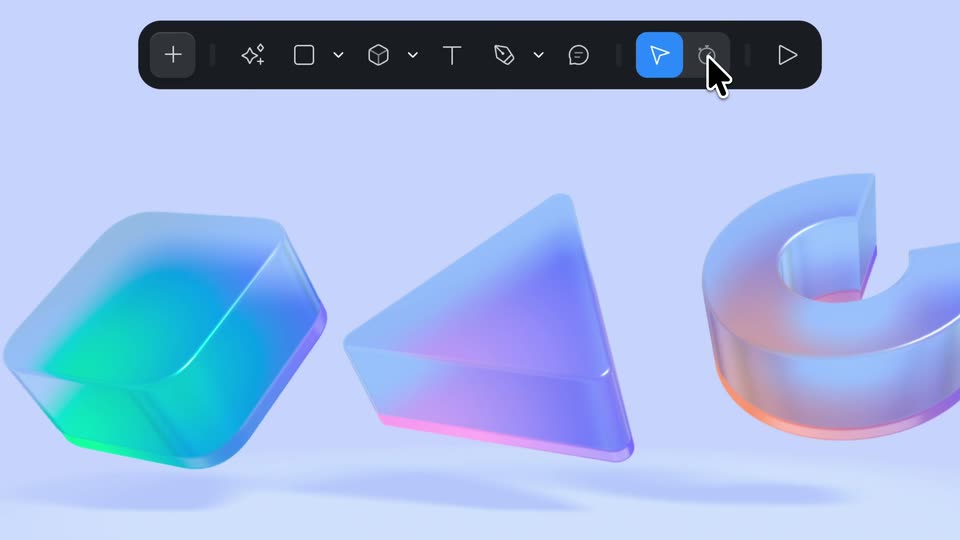
A 3D design canvas on a lavender field shows a glassy teal cube, a blue triangular prism and a pink C-shape floating in perspective. A flat dark toolbar sits at the top while a cursor glides right and clicks the blue timer icon, and the frame eases into a slow zoom.
Techniques: Cursor demo, UI zoom
Camera: Push in
03 · Demo · 0:10–0:13
A full-screen view of a 3D animation tool: a glass cube, pyramid and C-shaped ring float over a pale blue grid. The timeline playhead scrubs right as the shapes rotate and the frame counter ticks from 141 to 177.
Camera: Static
04 · Demo · 0:13–0:15
A glossy 3D object made of two interlocking gradient rings, purple fading to pink, floats centered on a pale lavender background. A small cyan sphere hovers at the upper right. The whole object rotates slowly in place.
Camera: Static
05 · Demo · 0:15–0:17
The interface of a motion design app fills the screen. A glossy purple-pink torus with a blue sphere rotates in the 3D viewport as the timeline playhead runs, then it cuts to a bouncing balls scene with gradient spheres, a capsule, and green keyframe curves.
Techniques: Cursor demo
Camera: Static
06 · Demo · 0:17–0:22
The product's 3D editor fills the frame. A cursor drags keyframe points on the bottom timeline, and the gradient spheres in the central viewport reposition in sync, the wireframed sphere dipping toward the disc and rising again.
Techniques: Cursor demo
Camera: Static
07 · Demo · 0:22–0:24
A dark 3D editor fills the frame; in the center viewport a pink sphere rolls across two crossed gray bars atop a cone, while the timeline playhead scrubs right along blue keyframe curves.
Camera: Static
08 · Demo · 0:24–0:26
A dark 3D design app fills the frame, locked-off. In the central viewport three pink dotted spheres roll across a gray rounded platform while the timeline playhead and curves scrub left to right. Side panels and a bottom graph editor stay static.
Camera: Static
09 · Demo · 0:26–0:29
A 3D design tool interface frames a translucent glass cube in the viewport, filled with swirling green and pink liquid, while the white word Motion rotates inside as the cube turns.
On-screen text: “Motion”
Techniques: 3D mockup
Camera: Static
10 · Demo · 0:29–0:33
Inside a 3D editor viewport, white extruded text reading Keyframes & Curves sits on a gray grid. The viewport camera orbits and pushes in as the lower line turns green and the view flattens to a front angle, while the timeline playhead scrubs across the bottom.
On-screen text: “Keyframes”, “& Curves”
Techniques: 3D mockup, UI zoom
Camera: Static
11 · Demo · 0:33–0:35
A locked-off view of a 3D design tool shows an iridescent glass tube undulating in the central viewport, framed by dark side panels. A cursor drags the timeline playhead rightward, scrubbing the animation as the tube's wave reshapes.
Techniques: Cursor demo, Morph
Camera: Static
12 · Product intro · 0:35–0:36
A small iridescent orb of pink, blue and green gradients sits centered on a black field and scales up, then gives way to the white “Spline” wordmark centered on screen, with the URL “spline.design” appearing beneath it.
On-screen text: “Spline”, “spline.design”
Camera: Static
13 · CTA · 0:36–0:37
A black screen displays the white text 'spline.design' centered in the frame. The text remains static and locked throughout the clip.
On-screen text: “spline.design”
Camera: Static