1:12

supermemory - Introducing the supermemory company brain A super employee with all
Supermemory · Jul 2026
Spline · Mar 2023 · 1:00 · Full motion · AI-annotated
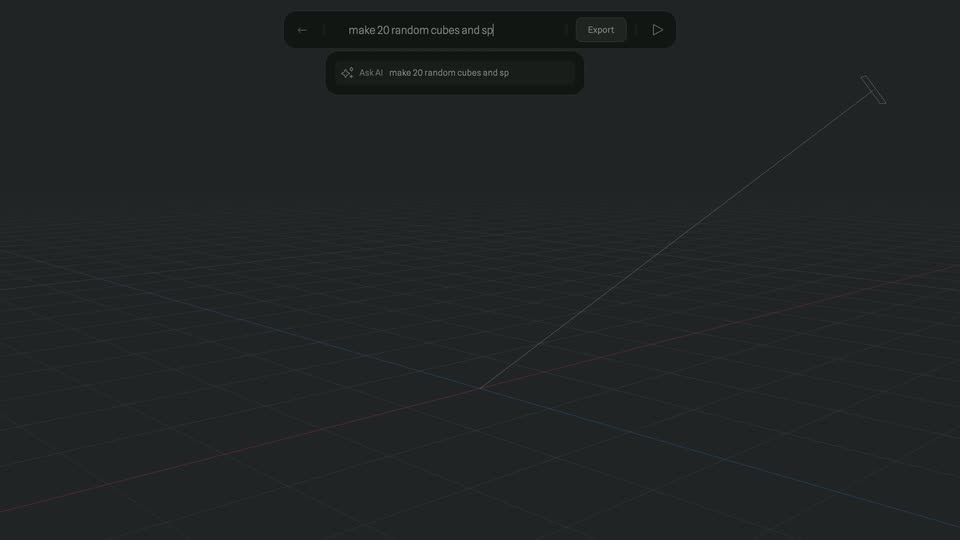
Spline’s 1:00 launch film runs 34 scenes, about 1.8 s each. The product is on screen from the first frame. There is no explicit call to action. The video opens and closes on the Spline AI wordmark and fills the middle with a rapid montage of prompts typed into the editor's top command bar, each one instantly generating or restyling a 3D scene. Its signature moves are the sparkle Ask AI chip, the suggestion dropdown, and the viewport morphing between dark editor UI and clean export renders at a fast cut rate.
Is this your launch? to your site or press kit.
Supermemory · Jul 2026
Alex · B2B · Jan 2025
A rounded purple outline holds a small sparkle icon and the white monospace text Spline AI, centered on a black field with a faint violet glow behind it.
On-screen text: “Spline AI”
Camera: Static
A dark 3D editor viewport with a wireframe grid. A top command bar opens an autocomplete list of asset names; the list closes and a prompt is typed into the bar while a settings panel slides in from the right.
Camera: Pull out
Framed by dark side panels, a 3D editor viewport shows a cluster of colored primitives, a yellow and green cube with a selection gizmo up front. The camera drifts right as a cursor hovers mid-viewport.
On-screen text: “4”
Camera: Static
A dark 3D editor fills the frame. A cursor types AI commands into the top bar, a suggestion dropdown drops below, and a cluster of colored cubes and spheres in the perspective viewport spreads, rotates and scatters. Side panels list objects and material settings.
Techniques: Cursor demo
Camera: Pull out
A 3D design tool interface with side panels frames a viewport of colorful cubes and spheres on a gray plane. A cursor types in the top command bar, 'pla' becomes 'play', the dropdown of library actions refreshes, and the shapes animate in the viewport.
Techniques: Cursor demo
Camera: Static
A 3D perspective view of colorful cubes and spheres scattered on a tilted gray plane that rotates slowly. A flat Export toolbar sits at the top and a white cursor drifts right across the dark void as the camera orbits the scene.
Techniques: 3D mockup, Cursor demo
Camera: Static
A dark 3D grid workspace with a flat prompt bar at the top. The bar shows the prompt “make a golden star” above an “Ask AI” chip. The chip vanishes, the bar reads “The cake is might be a lie”, and two white cursors appear in the grid.
Techniques: Cursor demo
Camera: Static
A yellow 3D star with a transform gizmo floats in a dark 3D workspace. A cursor types prompts into the top command bar, an AI suggestion list drops down, then the side panels and grid fade out, leaving the star centered as the view reframes closer.
Techniques: Cursor demo, UI zoom
Camera: Pull out
A rounded yellow 3D star turns slowly at the center of a flat dark gray field. A small dark toolbar with an Export button and a cursor rest near the top edge while the star rotates to reveal its volume.
Techniques: 3D mockup
Camera: Static
A dark 3D editor screen with a green floor plane on a grid. A red truck and a green sphere tree materialize in the viewport. Left and right panels list the generated objects and settings, and a top command bar holds the text prompt.
Techniques: 3D mockup
Camera: Static
A 3D editor viewport shows a red low-poly car among green trees. A cursor moves from the top command bar into the scene as the camera pulls back to reveal more trees, then the play button lights blue.
Techniques: Cursor demo, UI zoom
Camera: Static
A low-poly forest of green trees and a red car sits on a flat green plane in 3D perspective. The camera orbits slowly around the scene while a small dark Export toolbar and a cursor stay fixed near the top.
Camera: Push in
A 3D design tool interface fills the frame, its center canvas holding blue spheres and the white 3D word PROMPT. A dark command palette opens at the top, a typed prompt line appears, then switches to Processing the bits. Side panels list objects and settings.
Camera: Static
A locked-off view of a 3D editor: the viewport centers the word PROMPT in extruded white-pink type amid blue glass spheres in wireframe boxes, while the top prompt bar types a command and side panels list objects and settings.
On-screen text: “PROMPT”, “Fog”
Camera: Static
A 3D design tool interface fills the frame. A blue viewport holds the word PROMPT in extruded white letters, ringed by a circle of blue spheres, with a transform gizmo beside it. Dark sidebars list objects and settings on both edges. The frame stays locked off and static.
Camera: Static
Soft 3D spheres in pink, green, yellow and orange drift through a hazy pink void, with a few clear bubbles. A dark command bar at the top types a prompt, then a second bar shows a status line as the field slowly pushes forward.
Techniques: Parallax
Camera: Pull out
A 3D editor viewport of soft pink spheres and thin wireframe cubes sits under a slim dark command bar with a prompt field and Export button. A blue rail and a dark settings panel slide in from the sides as tool icons fill the top bar.
On-screen text: “Making neural connections”
Camera: Pull out
A screen capture of a 3D design app with a dark asset list on the left and a settings panel on the right. A prompt bar at the top types a request, then a white word “Hello” scales up in the central viewport over a field of pink spheres, while the side panels scroll to a highlighted item.
Camera: Pull out
A 3D design tool fills the frame, a pink viewport of spheres around a white Hello label. A dark command palette lists an AI prompt, then the spheres swap for colorful cubes as the viewport flips from orthographic to perspective.
Techniques: Morph, 3D mockup
Camera: Static
A 3D scene editor on a pink grid with scattered colored cubes. The top autocomplete dropdown closes, the cubes rotate, and a white 3D text object scales up in the center.
Camera: Static
A 3D design tool viewport fills the screen: colorful cubes float on a pink grid while the white word Hello scales up in the center. Side panels list objects and properties that update as the scene plays.
On-screen text: “Hello”
Techniques: Kinetic type, 3D mockup
Camera: Static
A 3D editor on a dusty pink background holds scattered colorful cubes with a white “Hello” text floating at center. The top command bar types “use a pastel pink color palette” as an AI suggestion dropdown fades in above it. The frame stays locked off.
Camera: Static
The Spheres editor screen with a 3D viewport of pink and white cubes drifting and rotating around a red Hello text. The camera is locked. The cursor glides across the UI and clicks a cube, which highlights in the left list and shows transform gizmos plus its properties in the right panel.
Techniques: Cursor demo
Camera: Static
Pink 3D cubes and dodecahedrons float and drift outward around the centered word Hello on a pale pink field. A small dark Export pill sits at the top edge while the shapes rotate in perspective.
On-screen text: “Hello”
Techniques: 3D mockup, Kinetic type
Camera: Static
A coral 3D room with arched alcoves, hanging globe lamps and a glowing pink AI sign on a bench. A dark command bar floats at the top; its dropdown of shape options collapses, the bar types a prompt, and the camera pulls back to reveal the full set.
Techniques: 3D mockup
Camera: Pull out
A red 3D room with arched alcoves, hanging spheres and a red sofa. A large 3D letter A sits on the sofa while a vertical bar forms beside it. A dark command bar with placeholder text and an Export button floats at the top.
On-screen text: “A”
Techniques: Kinetic type, 3D mockup
Camera: Static
A 3D design tool screen frames a coral room viewport with a bench, spheres and a large AI letter. A dropdown of library items closes as a prompt types out in the top bar, while dark side panels hold settings and material lists.
Camera: Pull out
A 3D scene editor fills the frame, dark sidebars and a top toolbar framing a warm orange room with a bed and a large letter A. A dark dropdown menu expands in the center, listing Add options, while toolbar icons appear across the top.
Camera: Static
A warm amber 3D interior render fills a design tool's viewport, framed by dark side panels listing layers and material assets. The camera slowly orbits the room, revealing a chair, hanging sphere lamps, palm fronds and a staircase around a large AL monogram on a bed.
Techniques: 3D mockup
Camera: Static
A locked-off full screen of a 3D text tool, with dark side panels and a top prompt bar where the phrase types out and an Ask AI hint pops in. The center viewport holds a static isometric desk scene of pink paper with white extruded placeholder text surrounded by a donut, headphones, phone and pencils.
Techniques: 3D mockup
Camera: Static
A dark 3D design app screen. The top command bar receives typed prompts, briefly opening an AI command list. In the center viewport, a 3D desk scene holds large white 3D text “YOUR TEXT HERE”, selected with a transform gizmo as the right panel shows its text properties.
Camera: Static
A dark 3D editor viewport shows white 3D letters reading YOUR TEXT HERE over a desk scene with a donut, headphones and scissors, a transform gizmo at the center. The word TEXT scales up while the side panels stay still.
Techniques: Kinetic type
Camera: Static
A black void holds a small pill button with a violet outline and a soft purple glow. A sketchy double border and jittery lettering settle into a crisp monospace wordmark with a sparkle icon.
On-screen text: “Spline AI”
Techniques: Morph
Camera: Static
Centered on black, a purple pill outline holds a sparkle icon and the words Spline AI; it contracts into a small multicolor gradient orb that glows violet.
On-screen text: “Spline AI”
Techniques: Kinetic type, Morph
Camera: Static