0:23


Moonshot - Introducing Moonshot Packs. Rip, reveal, and collect. Memecoins hav
Moonshot · Consumer · Jun 2026
Autodesk Flow Studio · Aug 2026 · 2:06 · AI-annotated
Autodesk Flow Studio’s 2:06 launch film runs 61 scenes, about 2.1 s each. The product shows up at 1:55 and 4 features are revealed. The call to action lands at 2:00 (95% in), over a voiceover. The video is built as one continuous mini-movie: a fantasy battle trailer is revealed to be a 3D robot's set, and the robot then demos the 3D Editor and Canvas (camera moves, scene generation, video-to-animation, canvas tweaks) inside a single self-aware skit that ends with the product reveal and a CTA card. Its signature move is intercutting polished cinematic renders with the raw editor UI (viewport, panels, timeline), held together by the goggled robot mascot, fast 152 bpm cutting and ember-l
Is this your launch? to your site or press kit.
Moonshot · Consumer · Jun 2026
Higgsfield AI · Sep 2026
Close-up of a black bird with a pale ringed eye perched on grey rocks under an overcast sky. It lowers its head, then lifts off and flies away to the upper left, wings blurring, while the rocky foreground holds in frame.
Camera: Push in
A dark eagle glides across a grey, cloud-filled sky above a stone castle on the coast. The camera pushes forward over mossy rocks, revealing the tower as the bird banks toward the center.
Techniques: Parallax
Camera: Push in
A stone castle sits on a cliff under a heavy gray sky. A dragon flies in from the left over massed armies, while fires and smoke rise from a burning village. The camera pulls back to reveal the full extent of the battlefield.
Camera: Static
Low camera at ground level follows armored legs wading through a muddy battlefield, then rises to reveal knights in blue tabards with a crossed-sword emblem clashing with large ogres, mud splashing, ending on a wide shot of the battle line.
Techniques: Parallax
Camera: Push in
A low, ground-level shot of a muddy battlefield. Armored legs and leather boots of soldiers stand in wet mud, one foot sinking into a puddle. A blurred blue object fills the foreground, then the frame settles on the feet.
Camera: Push in
A helmeted knight in a blue surcoat screams and swings a mace in the foreground, surrounded by a dense mass of armored soldiers on a muddy battlefield. The handheld camera shakes with heavy motion blur, matching the rapid combat.
Camera: Pan
A knight in dark armor and a plumed helmet charges through a blurred army, a large dark creature and a white splash erupting behind him. The handheld camera shakes with heavy motion blur and orange embers drift in the background.
Camera: Static
A 3D-rendered fortress battle: a black dragon banks over a spiked wall toward a tower that shoots a vertical beam of light. Armored warriors with axes and round shields clash on the muddy slope below while fires and smoke rise. The camera tracks low and fast through the melee.
Camera: Push in
A close-up holds on a man in a dented steel helmet and chainmail, his dirt-streaked face frozen in awe as he stares upward, mouth open. Blurred armored figures and soft bokeh fill the background. The frame eases back slightly to widen the field.
Camera: Pull out
A robot knight in a tricorn hat and dark cape stands silhouetted in a ruined, ivy-covered archway at sunset. The camera pushes in from a wide shot to a medium shot, revealing his blue and tan armor. Swords and a shield stick from the stone steps.
Techniques: Parallax
Camera: Push in
A small robot in a blue beret and tattered cape stands in a sunlit stone archway, seen from behind. It spins to face the camera, raises both arms in a dramatic pose with a sword, then turns and walks away as the camera pushes in.
On-screen text: “100”
Camera: Push in
A 3D robot wearing a blue beret and large round goggles stands in a misty rocky landscape lit by warm light. It turns from profile to face the camera, spreading its arms wide and opening its mouth to deliver a line.
Camera: Static
A grinning four-armed robot in a beret stands on a dark wireframe grid. It tilts its head and lowers its raised open hands to its sides over a short beat.
Camera: Static
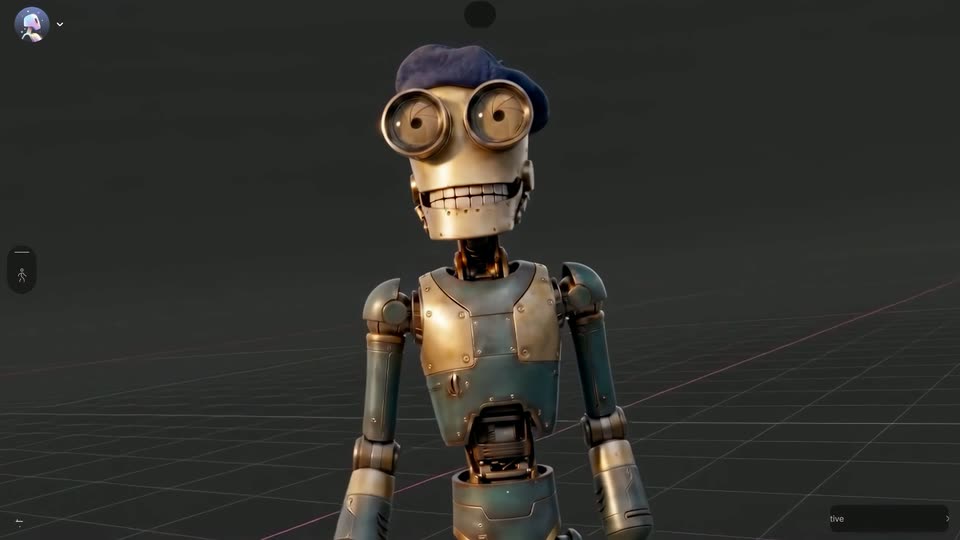
A 3D robot with a blue beret, goggle eyes and a toothy grin stands on a dark grid floor inside the editor viewport. The camera stays locked off while the robot tilts its head, grins, and lifts one hand to its chin in a thinking pose.
Techniques: 3D mockup
Camera: Static
A steampunk robot with a blue beret and scarf stands in a 3D editor viewport, its mouth opening and closing. The dark grid floor gives way to a warm cobblestone ground as the camera angle shifts slightly.
Camera: Static
A brass robot with goggle eyes, a blue beret and scarf stands on a cobblestone grid floor under a warm light beam. The locked-off frame sits inside the 3D editor viewport, framed by a left icon toolbar, a top tab pill and a bottom AI input bar.
Techniques: 3D mockup
Camera: Static
A dark 'Select Camera Move' panel of video thumbnails floats over a 3D scene of a goggled robot in a beret under a stone arch at sunset. The cursor moves to the top-left thumbnail, popping a 'Live 3D' tooltip, as the frame zooms in and the robot turns to point.
Techniques: Cursor demo, UI zoom
Camera: Push in
A 3D knight in a blue cloak stands silhouetted atop a stone staircase beneath a ruined arch, backlit by a golden sunset. Swords are planted in the steps, a round shield rests at the base. The camera slowly dollies out, widening the frame to reveal drifting mist.
Camera: Pull out
The app canvas shows a 3D robot with camera-lens eyes and a blue beret against a sunlit stone arch, framed by the toolbar and prompt bar. The view then switches to the 3D editor, where a purple wireframe pyramid and two colored spheres sit on a grid floor.
Camera: Static
The editor canvas shows a sunlit ruined arch with a cloaked figure, overlaid by a purple camera frustum and two spheres that shift as a cursor drags keyframe diamonds on the timeline below. A small preview window in the lower right mirrors the shot without the gizmos.
Techniques: Cursor demo
Camera: Static
A 3D editor viewport fills the frame, showing a skeletal robot with a blue beret and goggles on a gray grid floor. The robot lifts both arms and waves. A cursor glides to the bottom input bar and an upload panel slides up.
Techniques: Cursor demo
Camera: Static
A dark prompt panel floats in a gray 3D viewport beside a goggled robot. The camera pushes in on the panel as a battlefield prompt fills the text field, then a cursor moves to the send button at the panel's corner.
Techniques: UI zoom, Cursor demo
Camera: Push in
A 3D editor viewport shows a goggled robot figure in a beret standing on a wireframe grid; a burning war-torn diorama flares on the left while the editor chrome, top toggle and bottom prompt bar stay fixed.
Camera: Static
The 3D Editor viewport shows a brass robot with a blue beret standing on a grid floor amid a burning battlefield, flames and smoke behind it. The figure gains a dark cape, then raises a long sword as the charred ruins on the right intensify. Thin UI chrome frames the view: a 3D Editor/Canvas toggle on top, a tool rail on the left, an Ask AI prompt bar and a Queue 0 active pill at the bottom.
On-screen text: “3D Editor”, “Canvas”, “Ask AI anything...”, “Queue 0 active”
Camera: Push in
A 3D robot in a blue beret and scarf stands on a dark grid floor, gesturing with its arms. On the left, an Animation Selector panel lists motion-capture thumbnails; the cursor hovers the first clip as a Live 3D tag appears.
Techniques: Cursor demo
Camera: Static
The dark 3D editor shows an Animation Selector panel left and a beret-wearing robot on a grid floor right. The view zooms into the first thumbnail, a studio take with a yellow skeleton overlay on a person, as the robot slides out of frame.
Techniques: UI zoom
Camera: Push in
Low-angle static shot in a lit studio. A man in black holds a long cardboard box, a yellow skeletal tracking line with white joint markers overlaid on his body. He drops the box to the floor and raises a black pole upright, the lines tracking his motion.
Camera: Static
A 3D robot knight wearing a blue beret and tattered cape stands in a burning ruin. It holds a sword that catches fire, then raises the glowing blade while flames, smoke, and floating embers fill the battlefield.
Techniques: Particles
Camera: Push in
A gold robot with a blue beret and binocular camera eyes talks in a dark 3D editor viewport, its jaw and head moving over a gray grid floor. The editor chrome frames the view: a top tab bar, a left icon rail, and a bottom prompt field.
Camera: Static
A 3D robot on a dark grid floor animates its arms and head beside an angled Animation Selector panel of video clips. A cursor hovers over the Live and 3D toggle on the living room thumbnail as the scene holds.
Techniques: 3D mockup, Cursor demo
Camera: Static
A 3D editor viewport shows a robot on a dark grid floor beside an angled Animation Selector panel of video thumbnails. The view zooms into the living room thumbnail, reframing into a 3D room where two figures in plaid shirts hold sticks.
Techniques: 3D mockup, UI zoom
Camera: Push in
A man in plaid pajamas and a red checkered shirt tied at the shoulders lunges forward with a broom in a vintage living room. He holds a snarling, attacking stance, mouth open, while the camera holds a static wide shot framed by blurred foreground props.
Camera: Static
A low-angle close-up holds on a worn brown leather boot as it steps down onto rocky, dusty ground. The impact throws up a cloud of dust and a shower of glowing sparks, lit by a warm orange haze on the right.
Techniques: Particles
Camera: Static
A grinning robot in a blue beret and dark cape strides forward through a burning battlefield, swinging a broad sword. Flames and smoke fill the background while glowing embers drift through the air. The camera tracks the figure as it advances.
Techniques: Particles
Camera: Static
A 3D orc face fills the frame in low light, a blade crossing the lower foreground. The lighting lifts as the jaw drops into a snarl, exposing fangs and crossed tusks. Embers drift through the dark background.
Techniques: Particles
Camera: Push in
A tight close-up frames a yellow character’s large goggled eyes beneath a blue beret. Warm firelight flickers across the lenses while soft orange flames drift in the blurred background, and the head shifts slightly forward.
Camera: Static
A 3D rendered battlefield shows a large armored orc with a cleaver facing a tiny toy soldier, embers drifting through smoke. The editor chrome fades in: a left toolbar, a 3D Editor and Canvas toggle, and an AI prompt bar, while the ground becomes a wireframe grid.
Techniques: 3D mockup, Particles
Camera: Static
Inside a 3D editor viewport, a large green orc stands in a T-pose on a dark grid floor while a small beret-wearing character beside it shifts its arms and head. The app's tabs, left toolbar, and AI prompt bar remain locked around the scene.
Techniques: 3D mockup
Camera: Static
A dark 3D editor viewport with a grid floor frames a large green orc, arms outstretched, traced by a white selection lasso, next to a small skeleton in a blue beret. The orc splits into two figures while the lasso remains on the right copy.
Techniques: Morph
Camera: Static
A dark editor UI shows a 3D zombie warrior figure centered over a Make anything card. The left 3D viewport pane collapses, reframing the view onto the full-width canvas as the card widens and the model stays centered.
Techniques: UI zoom
Camera: Static
The left node menu fades out, reframing the dark interface on a video card that shows a green orc with arms spread. A cursor glides to the up-arrow send button as the prompt line fills in.
Techniques: Cursor demo
Camera: Push in
A 3D orc character stands in a video panel on a dotted black background. A cursor sits at the panel's corner as it resizes from wide to narrow, the character scales down and re-centers, and the prompt line plus toolbar labels slide out of view.
Techniques: Cursor demo
Camera: Pull out
Two interface panels fade in on a black dotted grid. The left shows a 3D warrior model in a wireframe box; the right shows a battle video still with a play button and a prompt box. A curved line with a plus node connects the two.
Camera: Static
A 3D rendered battlefield shows a goggled robot in a beret holding a sword, facing a large spiked creature amid fiery ruins and drifting embers. A semi-transparent editor panel with a prompt box and a time scrubber overlays the right side, then fades to reveal the full scene.
Techniques: Particles
Camera: Push in
A 3D robot wearing a beret and a tattered dark cape stands holding a sword, facing a spiked-helmet warrior seen from behind. Behind them a battlefield burns, smoke billows and embers drift through the air as the camera holds a low angle.
Techniques: Particles
Camera: Static
A 3D-rendered close-up shows a cloaked figure in a blue cap, seen from behind, extending a segmented metal arm to the chin of a green-skinned, horned character in fur and armor. Embers drift through the dark air, then the shot fades to black.
Techniques: Particles
Camera: Static
A burning ruin fills the frame as silhouetted figures move through the flames, one raising a weapon overhead. Embers and sparks drift through the smoky air while dark debris blurs the foreground, adding depth to the chaotic, fast-moving scene.
Techniques: Particles, Parallax
Camera: Static
A burning battlefield opens wide on a small robot charging a large spiked-helmet orc. The camera cuts to a close-up of the orc's roaring face, then pulls back as the beret-wearing robot parries the orc's sword beside a wooden cart.
Techniques: Particles
Camera: Pull out
A dark 3D canvas shows a single image card of a robot and monster fighting, with a generate menu open and a cursor hovering; the camera then pulls back to reveal several more fight-scene cards linked by dotted lines.
Techniques: Cursor demo, UI zoom, 3D mockup, Parallax
Camera: Pan
Low-angle 3D render of a knight in silver armor and a hunched orc locking blades, a winged dragon silhouette spreads behind them under storm clouds, and a fireball bursts at their feet. The camera drifts slowly forward.
Camera: Static
Two armored fighters lock a broad blade between them on a burning battlefield, backlit by a huge sun and rolling fire. The camera pushes in as the left fighter staggers backward through the flames.
Camera: Pull out
A dark 3D editor interface shows a fiery render of a warrior holding a raised sword, with playback controls and a prompt bar. The view zooms rapidly into the flames, dissolving into a blur of orange light.
Techniques: UI zoom
Camera: Push in
A close-up of an editor's timeline shows a white playhead line sliding right along a second-marked ruler. Tracks for Character and Enemy run below while a bright orange fire glow flares across the top of the frame.
Camera: Static
A metallic robot in a dark beret and tattered cape lunges forward, one arm extended as if hurling something, on a burning battlefield. Orange embers drift through the smoke in a low, tilted framing.
Techniques: Particles
Camera: Push in
A green-skinned, tusked character with white head stripes and a fur collar is held at close range by a mechanical arm pressing a blaster to its mouth. Its eyes widen and jaw drops as the weapon jolts, sending small sparks flying against a dark background of blurred orange lights.
Techniques: Particles
Camera: Push in
A green orc with white head stripes and a fur collar grips a metal weapon as embers drift. The camera whips to a gold-armored warrior tumbling on the dirt, where a second orc drives a spear into him.
Camera: Static
A green ogre with white tusks and a brown leather harness lies on its back across dark, wet earth, limbs splayed. A high camera angle holds as dust and twigs drift around him, settling into stillness.
Camera: Pull out
A robot wearing a beret and round goggles stands centered against a burning orange sky. A tattered black cape flutters at its side while embers drift through the air. The low-angle frame holds on the figure over a field of dark rubble.
Techniques: Particles
Camera: Static
A robot knight in a cape raises a sword over a burning medieval battlefield at sunset, then turns and walks into the field of fallen soldiers as the camera pulls back. White headline and subline fade in centered.
On-screen text: “AI you fully control.”, “Introducing 3D Editor & Canvas”
Camera: Static
On a near-black background, a pastel iridescent 3D icon spins from edge-on to face forward, revealing the AUTODESK Flow Studio wordmark beside it. A rounded Try It button and the URL flowstudio.com sit below the lockup, all locked off.
On-screen text: “Try It”, “flowstudio.com”, “AUTODESK”, “Flow Studio”
Techniques: 3D mockup
Camera: Static
A skeleton robot in a blue beret and scarf sits in a director's chair on a dark grid floor, turning from profile to face the camera and talking while gripping a sword, as a green orc lies on the ground. The camera pulls back slightly.
On-screen text: “Try It”, “flowstudio.com”, “AUTODESK”, “Flow Studio”, “00”
Camera: Pull out