0:33
Best SaaS Product Launch Ad Video | LangEase
LangEase · Jun 2025
Higgsfield AI · Sep 2026 · 0:59 · AI-annotated
Higgsfield AI’s 0:59 launch film runs 44 scenes, about 1.3 s each. The product shows up at 0:04 and 5 features are revealed. The call to action lands at 0:57 (96% in), over a voiceover. Structured as a logo-led feature reel: a 3D and live action hook, a browser framed logo reveal, then stacked headline driven feature blocks that pair low poly blocking with photoreal output in split screens and tilted 3D cards on pastel gradients. Pacing runs fast at about eight cuts a minute on a pulsing beat, with heavy all caps type and the recurring magenta cylinder and blocky figure as the visual signature.
Is this your launch? to your site or press kit.
LangEase · Jun 2025
Loom · Productivity · Jan 2024
A 3D gray platform with black legs sits on a pale blue field, a magenta cylinder resting on its top edge. The cylinder rises while the platform slides down and left out of frame, the camera holding the cylinder near the top.
Techniques: 3D mockup
Camera: Static
A magenta 3D cylinder bearing a white play triangle hovers against a pale sky beside a concrete building corner. The cylinder spins and morphs into a ring as the structure grows larger on the left.
Techniques: Morph
Camera: Static
A person in a pink shirt and cap jumps from the corner of a concrete building, falling head-first toward the camera. The shot is a low, tilted angle against a pale sky, with a bright sun ringed by a rainbow halo and a rainbow arc on the building edge.
Camera: Static
A close-up tracks a swimmer's torso and legs in a bright pink one-piece suit as the body moves vertically through clear, overexposed water. Bubbles and light refraction drift across the frame against a white background.
Camera: Static
A 3D perspective view of gray and teal planes with a pink cylinder pulls back as the 3D text lockup and Higgsfield logo scale in with selection gizmos and sticker icons, then the frame widens to reveal the scene inside a green-bordered browser window.
On-screen text: “JUTSU”, “3D”, “Powered by GPT-6 ASTRA”, “Higgsfield”
Techniques: 3D mockup, Kinetic type, UI zoom
Camera: Pull out
A browser window frames the Higgsfield app; inside its dark 3D viewport, large green 3D letters “3D JUTSU” and the “Higgsfield” logo sit over a wireframe grid with a 3D cursor and hand icon. The composition scales and lifts up out of frame above the timeline bar.
Techniques: 3D mockup, Kinetic type
Camera: Static
A dark rounded prompt field sits on a near-black background crossed by faint lines. The phrase 'FPV drone shot of a moving car' types in letter by letter, the final word in lime green while the rest stays white.
Techniques: Kinetic type
Camera: Static
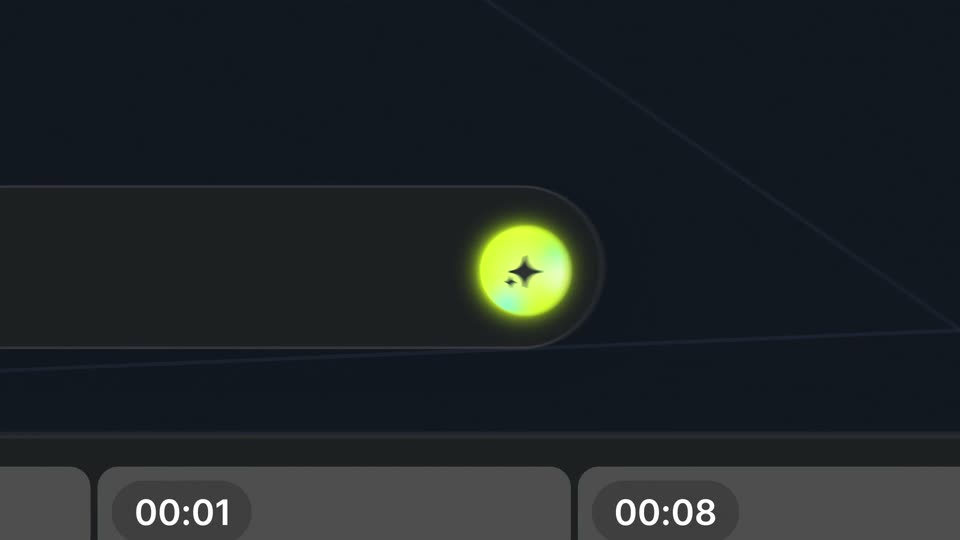
A dark rounded UI pill holds a glowing yellow-green sparkle icon on the right while a pixelated wipe of small yellow squares sweeps left across it; a caption reads FPV drone shot of a moving car. Two white timestamp pills sit along the bottom.
On-screen text: “FPV drone shot of a moving car”, “00:01”, “00:08”
Techniques: Particles
Camera: Static
A dark message panel hovers over a receding grid floor in 3D perspective. A yellow status line counts up from 91s to 205s beside “Creating scene...”, the agent glyph fading from a yellow S to a flat square, while a bottom bar reads “Higgsfield 3D Scene Builder”.
On-screen text: “00:01”, “00:08”
Techniques: 3D mockup
Camera: Push in
It opens in a browser window, then zooms into a low-poly 3D night street as the camera dollies forward behind a white car with red taillights, flanked by tan buildings and lamps. A toolbar and timeline frame the view.
Techniques: UI zoom, Parallax
Camera: Push in
A low-poly 3D street with a dark car fills a rectangular window over a yellow-to-cyan gradient, while a smaller bottom-right window shows the same street photorealistic with a red car. A black bold caption reads FROM 3D BLOCKING below.
On-screen text: “Higgsfield 3D Scene Builder”, “FROM 3D BLOCKING”
Techniques: Split screen
Camera: Pull out
A four-panel grid splits the frame: top left holds a low-poly 3D blocking of a car on a street, bottom right the same street as a photoreal red car driving, while bold text animates in as FROM 3D BLOCKING and TO FINAL GENERATION on white and gradient panels.
On-screen text: “FROM 3D BLOCKING”, “TO FINAL GENERATION”
Techniques: Split screen, Kinetic type
Camera: Static
A 3D street blocking sits top left while a red car drives past a torii gate in live action bottom right, on a pale gradient field. The caption FROM 3D BLOCKING scales in under the render and TO FINAL GENERATION slides in at the center.
On-screen text: “FROM 3D BLOCKING”, “TO FINAL GENERATION”
Techniques: Split screen, Kinetic type
Camera: Static
A 2x2 grid shows a low-poly 3D street top left and a realistic 3D street with a red car bottom right, both moving forward. Black text reads FROM 3D BLOCKING and TO FINAL GENERATION.
On-screen text: “TO FINAL GENERATION”, “FROM 3D BLOCKING”
Techniques: Split screen, Kinetic type
Camera: Static
A white split screen pairs a low-poly car blockout (top left) with a photorealistic red car render (bottom right). Black all-caps captions slide and scale as the blockout shrinks to a corner and the final render expands to fill the frame.
On-screen text: “FROM 3D BLOCKING”, “TO FINAL GENERATION”
Techniques: Split screen, Kinetic type
Camera: Push in
A four-quadrant split compares rough 3D blocking renders with final photoreal car renders in the corners, while a black headline sits top right and a smaller caption bottom left. The panels slide and the flat backgrounds flip between white, pale yellow and a teal gradient.
On-screen text: “FROM 3D BLOCKING”, “TO FINAL GENERATION”
Techniques: Split screen, Kinetic type
Camera: Static
A four-panel layout holds two 3D renders, a dark blocky city and a hilly landscape with red trees, in perspective. Black sans-serif text reads FROM 3D BLOCKING and TO FINAL GENERATION, the first scaling and the second sliding across the cream background.
On-screen text: “FROM 3D BLOCKING”, “TO FINAL GENERATION”
Techniques: Split screen, Kinetic type
Camera: Static
Centered dark pill bar on a soft yellow-to-green gradient. The white prompt text fades from grey to full white, and the lime icon at the right end resolves into a glowing black four-pointed star.
On-screen text: “create horror scene with sick camera motion”
Camera: Static
A dark prompt bar holds a horror-scene prompt, then a glowing orange 3D mesh, controller-like, materializes behind it on a green and magenta gradient as the bar turns translucent.
Techniques: 3D mockup
Camera: Static
An isometric 3D house model with a blue camera path and arrows runs through its rooms as the view pans and zooms along the route. A yellow box highlights a camera node, then a dark settings panel slides in from the right listing focal length and position values.
On-screen text: “// TOTAL”, “CAMERA CONTROL”
Techniques: 3D mockup, Cursor demo
Camera: Push in
A white headline reads TOTAL CAMERA CONTROL over an isometric 3D room with blue and yellow camera gizmos. A dark properties panel on the right shows focal length falling from 25 mm to 21 mm as the perspective shifts, a white cursor hovering on the fields.
On-screen text: “//TOTAL”, “CAMERA CONTROL”
Techniques: 3D mockup, Cursor demo
Camera: Pull out
A 3D interior viewport with a blue camera path and a properties panel on the right. The camera pushes in on the dark RENDER pill with a yellow sparkle icon while the white //TOTAL CAMERA CONTROL label holds in the top left.
On-screen text: “//TOTAL”, “CAMERA CONTROL”
Techniques: 3D mockup, UI zoom
Camera: Pan
A defocused frame of warm orange and red blobs snaps into a flat gray field. A green plus sits in the center while blue, red, green and white polygons crowd the edges.
Camera: Static
A diagonal split divides the frame: left, a flat blue-and-green illustration where rectangles assemble into a seated figure; right, a woman in a black top on a patterned rug beside a green bottle. She lifts a hand to her head as the shapes build.
Techniques: Split screen
Camera: Pull out
A diagonal split pairs a low-poly 3D room with two blocky avatars at a table on the left with live-action of two women sitting on the floor of a dim, high-ceilinged room on the right. The 3D half rotates and widens across the clip.
Techniques: Split screen
Camera: Pull out
A tilted low-poly illustration of a group around a table fills the left half while live-action women sit and laugh on the right, the two panels meeting along a diagonal edge.
Techniques: Split screen
Camera: Pull out
A split screen pairs a flat vector illustration of a living room on the left with live footage of a group on a couch on the right. Both halves slowly pull back to reveal the ceiling fan and the full room as the people smile.
Techniques: Split screen
Camera: Pull out
A split screen pairs a flat-shaded low-poly 3D room on the left with a live-action kitchen on the right, both showing a person opening a fridge in sync. Black corner labels read //INPUT and OUTPUT //, and the camera is locked off.
On-screen text: “//INPUT”, “OUTPUT //”
Techniques: Split screen
Camera: Pull out
A split layout on a soft yellow-to-pink gradient shows a flat illustration of a figure at a door top left and a live clip of a woman in a pink shirt in a wood hallway bottom right. Corner labels //INPUT and OUTPUT // stay fixed while both panels move.
On-screen text: “OUTPUT //”, “//INPUT”
Techniques: Split screen
Camera: Static
A pale green field splits into two diagonal panels: a low-poly 3D figure in a dark room top-left and a masked figure holding a chainsaw in the rain bottom-right, both playing at normal pace. Black labels // INPUT and OUTPUT // sit still at the corners.
On-screen text: “// INPUT”, “OUTPUT //”
Techniques: Split screen
Camera: Static
A man in a plaid shirt stands with his back to the camera in a bright kitchen, a woman in a yellow top at the island. He raises a phone, its screen framing the woman, then the shot tightens on the screen with his face blurred in front.
Camera: Pull out
A pair of hands holds a smartphone in the foreground, its screen showing a room with a shelf. Behind it, a rounded video panel plays footage of a man moving through the same room. The black headline sits centered at the top on a soft yellow-to-teal gradient.
On-screen text: “CONTROL RIGHT”, “FROM YOUR PHONE”
Camera: Static
Two hands hold a phone horizontally in front of a rounded frame showing a kitchen. The woman in the kitchen turns and reaches for the counter while the phone screen holds a wide view of the cabinets. The black headline sits above.
On-screen text: “CONTROL RIGHT”, “FROM YOUR PHONE”
Camera: Static
Two hands hold a phone in landscape, its screen playing an animating 3D model of a furnished room. Behind it, a rounded live-action clip pans across a kitchen where a man in a plaid shirt stands. A static black headline sits above on a pale gradient background.
On-screen text: “CONTROL RIGHT FROM YOUR PHONE”
Techniques: 3D mockup
Camera: Static
Two video panels tilt and rotate in 3D perspective over a pale gradient; the left plays live action of a woman in red on a checkered floor, the right a matching low-poly 3D render, with a bold black headline top left.
On-screen text: “INSANELY COMPLEX MOVES”
Techniques: Split screen, 3D mockup
Camera: Push in
On a pale gradient, two tilted panels sit side by side: a live-action woman in red over a white box, and a low-poly red figure on a checkered floor. The panels rotate and zoom in 3D perspective while a small cube slides in between them.
On-screen text: “INSANELY”, “COMPLEX”, “MOVES”
Techniques: 3D mockup, Split screen, Parallax
Camera: Static
A soft rainbow gradient sits on a white background behind a two-line black headline. A rounded video card below plays live-action footage of a woman in a white top moving through a blue-locker hallway, the card tilting into 3D as the shot cuts from walking to running.
On-screen text: “INTRICATELY”, “CRAFTED SCENES”
Techniques: 3D mockup
Camera: Static
A black two-line headline sits above a rounded 3D frame showing a low-poly room. A figure in a teal top and yellow trousers stands mid-room as the camera slowly orbits, revealing the white walls, gray floor and a desk with a laptop.
On-screen text: “INTRICATELY”, “CRAFTED SCENES”
Techniques: 3D mockup
Camera: Static
A rounded window on a white background holds a 3D-rendered locker room: a tennis player in a white dress swings a racket beside blue lockers and wooden benches while the camera moves around her. A black two-line headline stays locked above the window.
On-screen text: “INTRICATELY”, “CRAFTED SCENES”
Camera: Static
A rounded frame holds a 3D corridor where a woman in white and a man in dark walk past floating geometric shapes, a yellow cone and white and blue blocks. The view rotates between two angles while a black headline stays locked at the top on a pastel gradient.
On-screen text: “INTRICATELY CRAFTED SCENES”
Camera: Static
A centered black headline reads INTRICATELY CRAFTED SCENES above a rounded video window. Inside, a 3D corridor shows a tennis player in a white dress walking toward a court while a man in a dark tracksuit waves and steps out of frame right.
On-screen text: “INTRICATELY CRAFTED SCENES”
Camera: Static
A 3D tennis player in a white dress walks out of a gray tunnel toward a crowded, lit stadium court, seen from behind inside a tilted rounded frame on a pale gradient background. The black heading stays fixed above the frame.
On-screen text: “INTRICATELY CRAFTED SCENES”
Camera: Static
A rounded frame on a pastel gradient holds a 3D tennis court seen from behind the player. The scene morphs from a photorealistic blonde player in a white dress to a low-poly yellow block figure, while the black headline stays locked at the top.
On-screen text: “INTRICATELY CRAFTED SCENES”
Techniques: Morph
Camera: Static
A low-poly orange cylinder figure with a sphere head holds a yellow racket on a green and blue tennis court while the camera orbits past rows of multicolored cylinder spectators. Two lines of white text stay fixed at the center of the frame.
On-screen text: “3D JUTSU AVAILABLE NOW ON HIGGSFIELD.AI”, “POWERED BY GPT-6 ASTRA”
Camera: Static