
0:36
Explore
Demo April 24
Shortbread · May 2024 · 1:03 · Full motion · AI-annotated
- Length
- 1:03
- Scenes
- 17 · 3.7 s avg
- Product on screen
- 0:00
- Features shown
- 3
- Voiceover
- No
- Views
- 392 on YouTube
as of November 26, 2026
00:00:00 / 01:03:14
- Length
- 1:03
- Scenes
- 17 · 3.7 s avg
- Product on screen
- 0:00
- Features shown
- 3
- Voiceover
- No
- Views
- 392 on YouTube
as of November 26, 2026
Shortbread’s 1:03 launch film runs 17 scenes, about 3.7 s each. The product is on screen from the first frame and 3 features are revealed. There is no explicit call to action. The video is built as three consecutive feature demos, each opened by a bold rounded caption tag that jumps from the bottom-right to the top-left corner, with hard black-flash cuts separating the segments. Its signature moves are rapid zoom-ins on a single UI control followed by a zoom-out to reveal the generated result, all set over a near-black interface punctuated by a magenta selection frame.
No filming indicatedEstimated needs: 3 capture groups — your screens or recordings
Is this your launch? to your site or press kit.
More like this


Demo April 24, scene by scene
· 17 scenes as text
01 · Feature reveal · 0:00–0:00
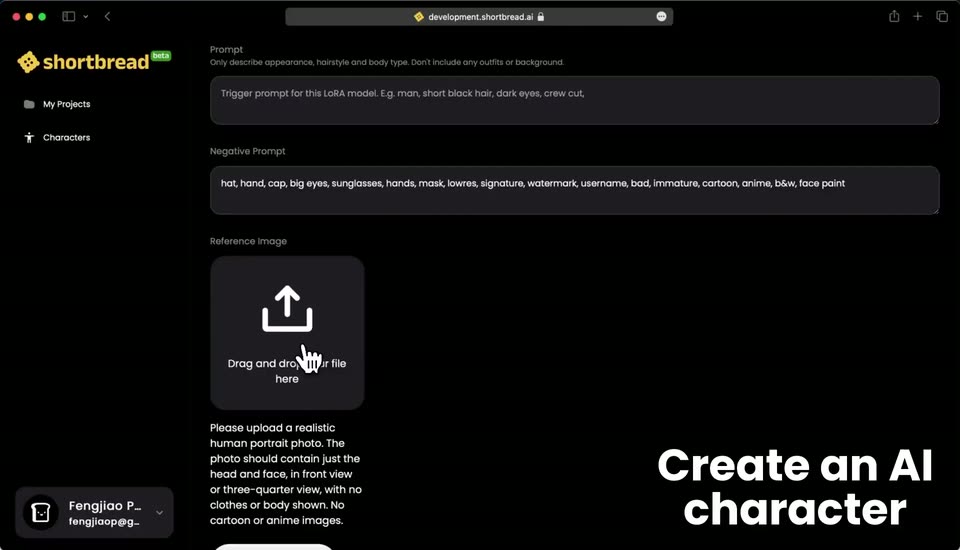
A dark web app interface for shortbread shows a character-creation form with prompt fields and a reference-image upload box; a hand cursor hovers over the upload tile while the white headline 'Create an AI character' fades in at the bottom right.
On-screen text: “Create an AI character”
Techniques: Kinetic type
Camera: Static
02 · Feature reveal · 0:00–0:06
A dark web app opens a file picker; a portrait photo is selected and uploaded into the reference field. The view then zooms into the prompt box, where the words 'woman, long blonde hair, wavy hair, caucasian' are typed letter by letter.
On-screen text: “Create an AI character”
Techniques: Cursor demo, UI zoom
Camera: Push in
03 · Feature reveal · 0:06–0:09
A dark web interface settles into place, showing prompt fields and a small reference portrait of a blonde woman. A cursor clicks the generate button, and a larger AI-generated portrait of the same woman fades in on the right beside a loading spinner.
On-screen text: “Create an AI character”
Techniques: Cursor demo
Camera: Pull out
04 · Feature reveal · 0:09–0:10
A dark web app shows a reference portrait beside a generated preview of a blonde woman. The view scrolls to a loading spinner with a cursor hovering, while a white caption sits bottom right.
On-screen text: “Create an AI character”
Techniques: Cursor demo
Camera: Static
05 · Feature reveal · 0:10–0:11
A dark browser window of the shortbread app fills the frame. Three portrait cards of a blonde woman stack and scroll in the center, then collapse into a single centered portrait. A white caption holds in the lower right corner.
On-screen text: “Create an AI character”
Camera: Static
06 · Feature reveal · 0:11–0:13
A dark app window shows a vertical stack of generated portraits of a blonde woman. The frame zooms into the bottom row of pill buttons, where a hand cursor hovers over the middle one. The white caption 'Create an AI character' holds at the right edge.
On-screen text: “Create an AI character”
Techniques: UI zoom, Cursor demo
Camera: Push in
07 · Feature reveal · 0:13–0:16
A dark browser window shows the Shortbread “Create a Character” page. A grid of photo cards of a blonde woman fades in from left to right beneath the heading, while a white caption “Create an AI character” holds in the lower right corner.
On-screen text: “Create an AI character”
Camera: Pull out
08 · Feature reveal · 0:16–0:19
A dark browser window shows the shortbread app with a grid of blonde-woman photos and prompt tags, scrolling up past the address bar and header. A fixed white caption reads Create an AI character in the bottom right.
On-screen text: “Create an AI character”
Camera: Pan
09 · Feature reveal · 0:19–0:20
A dark character-training screen with a grid of blonde woman photos and prompt boxes cuts through a black flash to a drawing app showing a line sketch of a seated woman beside a color palette. Headlines swap from bottom-right to top-left.
On-screen text: “Create an AI character”, “Draw your panels with AI”
Camera: Static
10 · Feature reveal · 0:20–0:24
The view reframes from the full editor into a close-up of a line-art panel: a woman sits on a bed while a book is drawn into existence beside her. A magenta selection frame and a bottom toolbar with a stroke slider stay fixed beneath a gray caption tag.
On-screen text: “Draw your panels with AI”
Techniques: UI zoom
Camera: Push in
11 · Feature reveal · 0:24–0:25
A dark AI image panel scrolls upward on the right, revealing prompt fields and a storyboard slider, while a color picker floats over a black line sketch on the left under a gray caption box.
On-screen text: “Draw your panels with AI”
Camera: Pan
12 · Feature reveal · 0:25–0:29
A screen recording of a comic tool: a character preset and prompt are typed into the Panel Editor fields on the right while a line-art sketch sits on the canvas. At 3s the view zooms out to reveal the finished line-art panel of a woman reading on a bed, framed in magenta.
On-screen text: “Draw your panels with AI”
Techniques: UI zoom
Camera: Pull out
13 · Feature reveal · 0:29–0:34
The app screen shows a line-art sketch of a woman on a bed in a magenta frame. The view zooms into the right panel as the Use Storyboard toggle flips off and a white highlight presses Generate. It zooms out, the sketch becomes a colored render, then fades to black.
On-screen text: “Draw your panels with AI”
Techniques: UI zoom, Cursor demo
Camera: Push in
14 · Feature reveal · 0:34–0:55
A dark editor panel sits beside an anime illustration of a seated woman. A cursor drags the variation slider, paints white masks over the lap and arm, types a prompt, and clicks Redraw, turning the masked regions into a red skirt and a blue shirt.
On-screen text: “Make adjustments with AI”
Techniques: UI zoom, Cursor demo
Camera: Pull out
15 · Feature reveal · 0:55–0:57
A stylized 3D woman in a blue top sits on a bed holding a small white card, under a dark caption reading “Make adjustments with AI”. A vertical wipe slides the scene left to reveal a dark AI panel with a prompt field and action buttons beside her.
On-screen text: “Make adjustments with AI”
Techniques: Split screen
Camera: Static
16 · Feature reveal · 0:57–0:59
Close-up of a dark settings panel beside a canvas holding a magenta selection box. The cursor moves from the Modify button to the gradient Redraw button as the panel scrolls down slightly. A white caption sits in the top left.
On-screen text: “Make adjustments with AI”
Techniques: Cursor demo
Camera: Static
17 · Feature reveal · 0:59–1:03
An AI image editor screen zooms out from a tight crop to the full window. An anime-style illustration of a woman on a bed sits in a magenta selection box on the left; a dark panel with sliders and a gradient Redraw button fills the right.
On-screen text: “Make adjustments with AI”
Techniques: UI zoom
Camera: Pull out