1:38
Harjot Gill - Your engineering team is about to snap. And your AI coding agent is m
CodeRabbit · Apr 2026
Hone · Oct 2026 · 3:43 · AI-annotated
Hone’s 3:43 launch film runs 37 scenes, about 6.0 s each. The product is on screen from the first frame and 2 features are revealed, with social proof. The call to action lands at 3:31 (94% in), over a voiceover. A locked-off office talking head anchors the piece, cut against dark product UI and kinetic type cards at a steady mid-tempo. Signature moves are the split-screen presenter-plus-panel layout, the sliding tick-mark week timeline, and the rotating dashed dial that punctuates transitions.
Is this your launch? to your site or press kit.
CodeRabbit · Apr 2026
Praxis · B2B
Runway · AI · Sep 2026
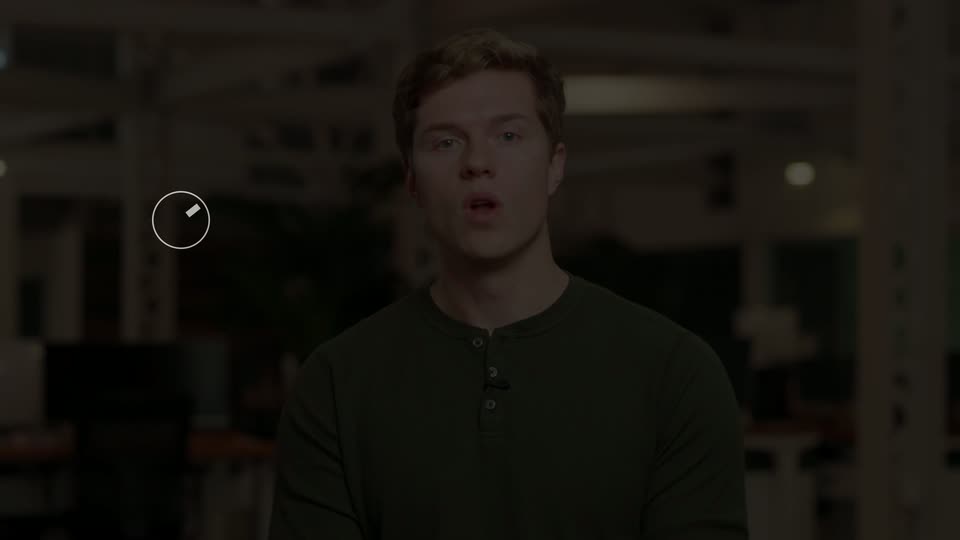
A young man in a green henley speaks to camera in a softly blurred open office. A lower-third caption fades in at the lower left, showing his name and title beside a small green dot and a thin rule line.
On-screen text: “Moritz Stephan”, “Co-founder, Hone”
Camera: Static
A dark stage holds a soft green light bloom that drifts slowly across the right side, framed by a halo of fine radial dashes. The centered headline 'Introducing Engines' stays static while the glow breathes behind it.
On-screen text: “Moritz Stephan”, “Co-founder, Hone”, “Introducing Engines”
Camera: Push in
A blond man in an olive green henley addresses the camera in a static medium shot, set against a blurred open office with desks, monitors and plants. He speaks with small hand gestures while a static title holds on screen.
On-screen text: “Introducing Engines”
Camera: Static
A man in an olive green henley stands centered in a blurred open office, speaking to camera on a locked-off shot. White lower-left captions with small icons swap in sequence to match his words.
On-screen text: “Chatbots answer questions”, “Agents complete tasks”, “Engines own outcomes”
Camera: Static
A young man in a green henley shirt speaks to camera from the center of a shallow-focus office. Desks, plants, and white structural beams blur behind him while the locked-off medium shot holds steady as he talks.
Camera: Static
A presenter in a green henley stands centered against a blurred office. The frame splits: a light gray panel opens on the left holding a vertical line of four clock icons with step labels, while the presenter shifts right and keeps speaking.
On-screen text: “An Engine”, “Learns how you work”, “Gets to work”, “Tracks the results”, “Adapts”
Techniques: Split screen
Camera: Pan
Split screen: a man in a green henley talks on the right against a blurred office, while a pale panel on the left holds a vertical four-step list. A green node fills and steps down the line, turning each label from gray to black as it activates.
On-screen text: “An Engine”, “Learns how you work”, “Gets to work”, “Tracks the results”, “Adapts”
Techniques: Split screen
Camera: Static
A young man with short blond hair in a green henley speaks to the camera, centered at medium close-up. The background is a blurred open office with white beams, plants and desks. The camera holds a steady locked-off frame while he talks.
Camera: Static
A dark browser window shows a chat onboarding flow; a purple cursor types an answer, then clicks through dropdown options as the list scrolls down. Integration cards for Salesforce, Snowflake, Gong, Zendesk, Teams and Gmail appear, each flipping to Linked.
Techniques: Cursor demo
Camera: Pull out
A dark browser mockup of the Brain interface sits on a green gradient. A node graph's counters tick up and its activity log fills, then a cursor clicks the Knowledge tab, swapping in a scrolling list of new rows before a chat prompt appears.
Techniques: Cursor demo
Camera: Static
A dark chat interface sits in a browser window. A cursor types a guidance line into the message field, then clicks the green send button. The empty prompt view transitions to a two-message thread, with a green '2 evals added' badge appearing under the bot's reply.
Techniques: Cursor demo
Camera: Static
A man in a green henley stands centered in a softly lit office, speaking to camera and gesturing with his hands. Desks and structural beams sit blurred in the background. The shot is a static medium close-up.
Camera: Static
A dark browser window on a green gradient background shows a web app with a left sidebar. A circular loader of gold tick marks rotates in the center while status text cycles through working states, then the view switches to a workflow diagram of connected nodes.
Camera: Static
Split screen: a presenter in a green henley talks on the right while a dark Google Calendar on the left builds, a lime meeting block and a proposal card slide in, then the left panel dissolves to a full live shot.
Techniques: Split screen
Camera: Static
A young man in an olive henley sits centered in a blurred open office, speaking to camera. As he talks, two faint white labels, Week 1 and Week 2, fade in on the right side of the frame.
On-screen text: “Week 1”, “Week 2”
Camera: Static
On a black field, bold week labels slide left along a thin tick-mark ruler. Week 1 leads in bright white, then exits left as the dimmed Week 2 takes the center and a third label enters from the right edge.
On-screen text: “Week 1”, “Week 2”, “Week 3”
Techniques: Kinetic type
Camera: Push in
A Slack window showing the #renewals channel and an approval card sits on black beneath a tick-mark timeline, while large Week 1 and Week 2 labels slide in overhead. The window then slides left as a second window enters from the right.
On-screen text: “Week 1”, “Week 2”
Techniques: Kinetic type
Camera: Static
A dim week timeline with Week 2 in white sits above a flat chat app window that eases into frame. The timeline drifts left while the sidebar fills with channels and direct messages, red badges count up, and a top-bar counter climbs to 80 managers and 214 briefs.
On-screen text: “Week 1”, “Week 2”, “Week 3”
Techniques: Parallax
Camera: Pan
A dark header with Week 1 to Week 4 labels and tick marks slides left over a row of product panels. A white chat panel exits left as a black status card with a dashed circle and the line Things are running smoothly slides in, layers moving at different speeds.
On-screen text: “Week 1”, “Week 2”, “Week 3”, “Week 4”
Techniques: Parallax
Camera: Pan
A black timeline with tick marks slides left so the bold white 'Week 4' title settles center frame, while 'Week 3' and 'Week 2' exit the left edge. Below, a rounded card holds concentric rings of pale yellow dashes around a centered status line.
On-screen text: “Week 2”, “Week 3”, “Week 4”, “Things are running smoothly. No asks from you.”
Camera: Pan
A man in a green henley stands in a warm-lit open office and speaks to camera. Small text overlays slide in at the edges, listing week labels and a short status line.
On-screen text: “Week3”, “Week4”, “Things are running”, “smoothly. No asks from you.”
Camera: Static
A young man in a green henley speaks directly to the camera in a medium close-up. He is centered in a softly blurred office with desks, plants, and structural beams behind him.
Camera: Static
On a black background, a green circle icon sits left of the white line 'Owns an outcome,' which sharpens from a soft blur. Below it, a thin outlined circle icon and the gray line 'not a legacy process.' fade in. The frame stays locked off throughout.
On-screen text: “Owns an outcome,”, “not a legacy process.”
Camera: Static
A young man in a green henley speaks to camera in a blurred office, then the scene cuts to a dark product screen. A dotted gold arc frames a left caption and a right card shows a retention line chart with three stat tiles.
On-screen text: “Owns an outcome,”, “not a legacy process.”
Camera: Static
Split screen on black. Left, a dark dial with rotating yellow ticks and a center feed that crossfades short status lines. Right, an Outcome card with a green retention chart that extends, a white tooltip pill popping in, and the headline number and bottom stats ticking up.
Techniques: Split screen, Kinetic type
Camera: Static
A young man in an olive henley speaks to camera in a dim office, desks and monitors blurred behind him. The shot then cuts to a black slide where the line “Under the hood” appears under a small green bullet point.
On-screen text: “Under the hood”
Camera: Static
A black title card builds a numbered list top to bottom under a small “Under the hood” header. Each row draws a thin rule, shows a green numeral and a label that brightens from gray to white; the previous numeral dims to gray as the next row lands.
On-screen text: “Under the hood”, “01”, “Self-modifying harnesses”, “02”, “Long-horizon credit assignment”, “03”, “Counterfactual replay”
Techniques: Kinetic type
Camera: Static
A young man in a green henley talks to camera in an open office, desks and monitors soft behind him. A numbered feature list headed “Under the hood” is overlaid on the frame. The locked-off shot slowly pushes in toward the end.
On-screen text: “• Under the hood”, “01”, “Self-modifying harnesses”, “02”, “Long-horizon credit assignment”, “1”
Camera: Static
A man in a green henley shirt stands centered in a softly blurred office, speaking directly to the camera with a lavalier mic clipped to his collar. Near the end, a white panel with a dark circle and a gray bar slides in from the left edge.
Camera: Pan
A split screen pairs a light left panel, where a black circle of morphing white shapes sits above a green-highlighted label swapping through use case terms, with a man in a green henley speaking to camera in a blurred office.
On-screen text: “• Engines live with customers”, “Funnel optimization”, “Procurement”, “Deal sourcing”, “Asset management”, “Financial risk”, “Product and customer delivery”
Techniques: Split screen, Morph, Kinetic type
Camera: Static
A man in a green shirt speaks to the camera in a blurred office, gesturing with his hands.
On-screen text: “• Engines live with customers”, “Product and customer delivery”
Camera: Static
A man in a green henley shirt speaks to the camera in a medium close-up, centered against a blurred office backdrop with desks, monitors and plants. He holds eye contact and talks about benchmark scores and model impact.
Camera: Static
A young man in a green henley shirt sits centered in a softly blurred office, speaking to camera. The locked-off medium close-up holds steady as he talks and lifts his right hand in a small gesture around the second second.
Camera: Static
A young man in a green henley speaks to camera against a blurred office background. In the lower left, the white hone.com URL with a green dot logo and an external-link arrow holds still while a thin dotted line draws in beneath it.
On-screen text: “hone.com”
Camera: Static
A pale mint circle with a thin dark outline and a small dark dash at the top sits on a light field. It fills to solid bright green, the outline and dash vanish, and a white URL stays at the right of the circle.
On-screen text: “hone.com”
Camera: Static
A black HONE wordmark in a bold geometric sans sits centered on a pale off-white field. The frame stays locked off and the logo holds perfectly still for the full duration.
On-screen text: “HONE”
Camera: Static
A black frame holds as a centered wordmark reading HONE and the brand logo sit static in the middle of the screen, locked-off with no motion, marking the sign-off of the piece.
On-screen text: “HONE”
Camera: Static