0:30

Dreamscale Datasets is now live! | Dreamscale Labs (YC F26)
Dreamscale Labs · Industrials
Pulse · Feb 2026 · 0:36 · Full motion · AI-annotated
Pulse’s 0:36 launch film runs 14 scenes, about 2.6 s each. The product is on screen from the first frame and 4 features are revealed. There is no explicit call to action. The video is one continuous cursor-driven tour that hops between a node canvas and three dashboard screens, framed as a tilted 3D monitor over a leafy backdrop. Its signature moves are the smooth zooms and pans into stat cards, the curved connector lines linking app tiles, and the bright green numerals on near-black panels.
Is this your launch? to your site or press kit.
Dreamscale Labs · Industrials
Screen Studio · Mar 2025
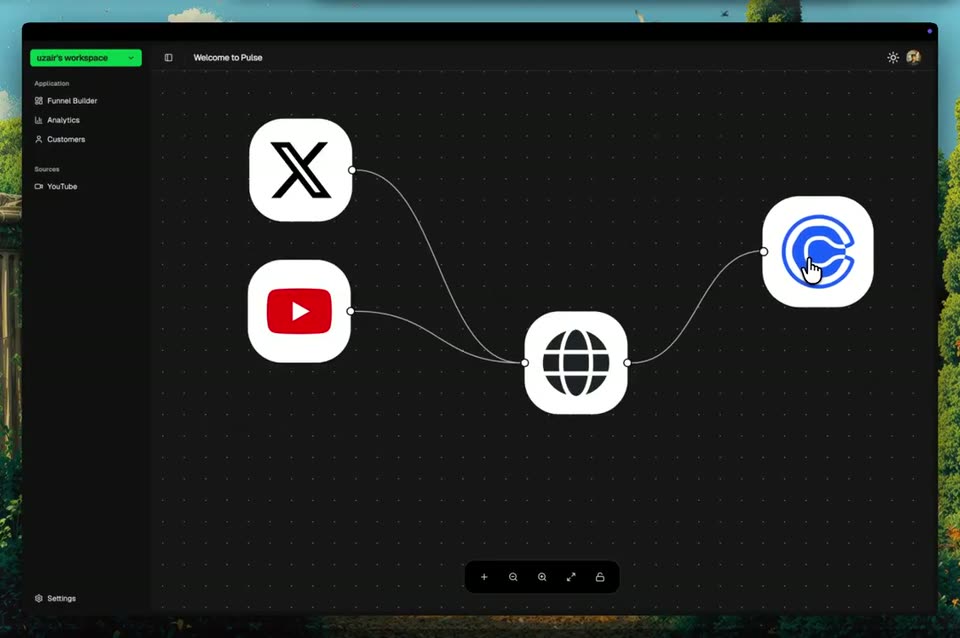
A dark canvas links white tiles for X, YouTube, a globe and a blue C icon with lines. The cursor hovers the blue tile, which lifts with a ring, then the view zooms to the bottom toolbar as the cursor clicks the plus button and an 'Add node' tooltip appears.
Techniques: Cursor demo, UI zoom
Camera: Push in
A dark integration search panel sits centered on a dotted grid, its list of app names scrolling upward as a white cursor glides down the rows. Large flat app icons for X, YouTube and Meta anchor the background, joined by thin curved connector lines.
Techniques: Cursor demo
Camera: Pan
A dark dotted grid holds three white app icons, X, YouTube and a globe, linked by thin curved lines. A dark search panel listing integrations appears over the center, dimming the icons, then fades out. A cursor drifts to the list and hovers a row.
Techniques: Cursor demo
Camera: Static
On a dark dot grid, X, YouTube and Instagram icons sit left of a globe icon, joined by curved lines. A translucent integration list fades out, the cursor clicks Instagram, a line draws to the globe and the cursor clicks it. The frame blurs and slides down.
Techniques: Cursor demo
Camera: Pan
A dark analytics dashboard fills the screen. A white hand cursor clicks the Analytics row in the left sidebar, the header swaps to Website Analytics and a Visitors Trend panel fades in behind large X, YouTube, and globe icons joined by curved lines.
Techniques: Cursor demo
Camera: Static
A dark analytics dashboard sits in 3D perspective over a green backdrop. The view zooms into the stat cards and source tabs as a cursor clicks through them, turning the trend line pink, then pulls back to the full screen and moves to the sidebar.
Techniques: 3D mockup, UI zoom, Cursor demo
Camera: Static
A dark dashboard on a tilted screen shifts from a Website Analytics chart to a Contacts table with a crossfade, while a white cursor hovers the Customers menu item. A leafy outdoor scene sits behind the angled display.
Techniques: 3D mockup, Cursor demo
Camera: Static
A dark contacts dashboard pans left to right across the screen. Stat cards for total contacts, conversion time and repeat rate sit above a table of customer rows with colored source badges. A white cursor hovers over a metric card as the view slides.
Camera: Pan
A dark contacts dashboard floats over a 3D landscape backdrop. The frame starts tight on metric cards and the table, pulls back to the full layout with sidebar, the cursor moves across rows and a sidebar item, then zooms back into the top metrics.
Techniques: UI zoom, Cursor demo
Camera: Pull out
A dark analytics dashboard fills the frame. A cursor clicks the YouTube entry in the left sidebar, and the main panel crossfades from a contacts table to a YouTube Dashboard showing two stat cards and a line chart that draws in from left to right.
Techniques: Cursor demo
Camera: Push in
A dark YouTube dashboard appears blurred, then the frame tightens on the right side as a cursor taps a metric dropdown that opens a list and closes again, the panel coming into sharp focus over a green photo edge.
Techniques: UI zoom, Cursor demo
Camera: Pan
A dark analytics dashboard transitions from a list view to a grid of four video thumbnails, each with a conversions badge, above a table of views, clicks and conversions. A cursor rests beside the View toggle on the right.
Techniques: Morph, Cursor demo
Camera: Pan
A dark analytics dashboard shows a row of video thumbnails with conversion badges above a table of Views, Clicks and Conversions. A white cursor arrow glides steadily down the right edge of the table, passing each row.
Techniques: Cursor demo
Camera: Static
A dark YouTube dashboard fills the screen. The view starts tight on a views-and-conversions table, a cursor opens the workspace dropdown, then the frame zooms out to reveal the full layout: a stats row, a line chart, and a strip of top converting video thumbnails.
Techniques: Cursor demo, UI zoom
Camera: Pull out