1:03
Explore
Psst, dark mode is here. If you're running youtube lead gen offers then you need to setup some tracking for your content, because YouTube dashboard only tells views. Pulse makes it easy by giving… | Pulse
Pulse · 0:36 · Full motion · AI-annotated
- Length
- 0:36
- Scenes
- 11 · 3.3 s avg
- Product on screen
- 0:00
- Features shown
- 4
- Voiceover
- No
00:00:00 / 00:36:17
- Length
- 0:36
- Scenes
- 11 · 3.3 s avg
- Product on screen
- 0:00
- Features shown
- 4
- Voiceover
- No
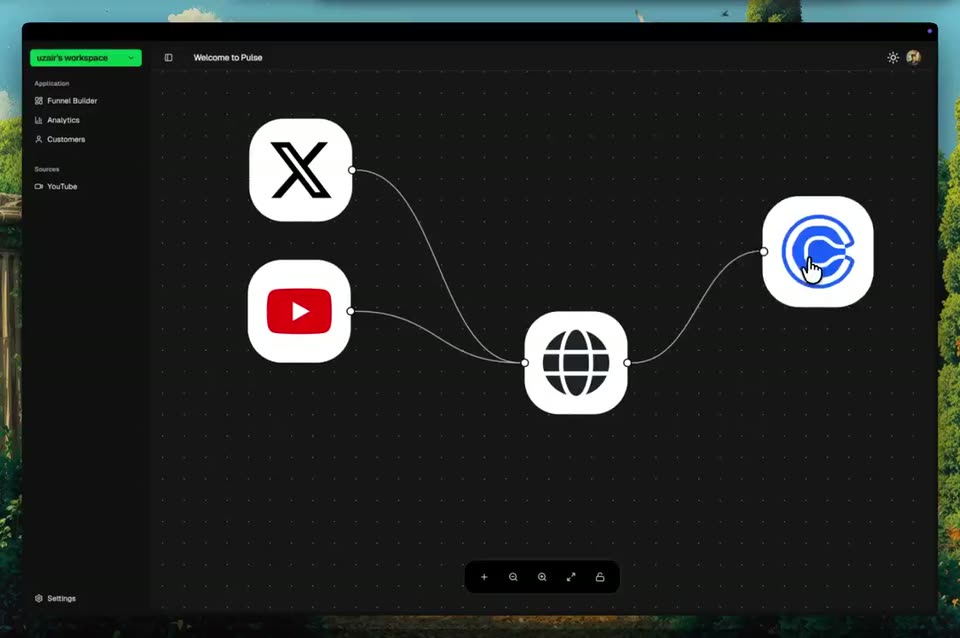
Pulse’s 0:36 launch film runs 11 scenes, about 3.3 s each. The product is on screen from the first frame and 4 features are revealed. There is no explicit call to action. The video is a single continuous UI tour that walks from the funnel-builder canvas into the analytics, contacts and YouTube dashboards, using 3D tilts and fast zooms to keep a static interface feeling alive. Its signature moves are the near-black dot-grid canvas with curved connector lines, the floating app window over a blurred nature wallpaper, and motion-blur zoom-outs that reframe each view.
No filming indicatedEstimated needs: 2 capture groups — your screens or recordings · 1 graphic passage — draw or supply · 2 3D passages — build or supply
Is this your launch? to your site or press kit.
More like this

0:23

Anton Osika - Today, we’re launching Drafts in @Lovable. Build a new feature, try
Lovable · Developer tools · Nov 2026
0:18
Screen Studio - Screen Studio 3.1 is here Introducing Masks: Blur sensitive data or
Screen Studio · Mar 2025
Psst, dark mode is here. If you're running youtube lead gen offers then you need to setup some tracking for your content, because YouTube dashboard only tells views. Pulse makes it easy by giving… | Pulse, scene by scene
· 11 scenes as text
01 · Feature reveal · 0:00–0:03
A dark dot-grid canvas shows four white app tiles, X, YouTube, a globe and a blue C, linked by curved lines. The cursor moves to the blue tile, then the view zooms in as it hovers the plus button in the bottom toolbar, popping a green ACTION tag.
Techniques: Cursor demo, UI zoom
Camera: Push in
02 · Feature reveal · 0:03–0:07
On a dark dotted canvas, an integration search panel opens over a flow of connected tiles. The cursor glides down the list, rows highlight and the list scrolls, then the panel fades out leaving the X, YouTube and globe nodes linked by curved lines.
Techniques: Cursor demo
Camera: Pan
03 · Feature reveal · 0:07–0:08
On a dark dot-grid background, three white rounded-square icons (X, YouTube, globe) are joined by thin curved lines with node dots. A hand cursor hovers as a search panel listing integrations pops in beside them, then disappears.
Techniques: Cursor demo
Camera: Static
04 · Feature reveal · 0:08–0:13
A dark dotted canvas shows X, YouTube and a globe tile. A search dropdown fades out as the cursor selects Instagram, the Instagram tile drops in, then the cursor drags a curved connector line from it to the globe.
Techniques: Cursor demo
Camera: Static
05 · Feature reveal · 0:13–0:14
A dark dotted canvas shows X, YouTube and Instagram icons joined by thin curves to a globe icon. The frame pulls back to reveal the Pulse dashboard and left sidebar, while a hand cursor glides onto the Analytics menu item.
Techniques: UI zoom, Cursor demo
Camera: Pan
06 · Feature reveal · 0:14–0:19
A dark analytics dashboard tilts in 3D perspective with floating X, YouTube and globe icons, then the camera pushes in to a flat view. A cursor drifts over the stats and the view zooms onto the line chart before pulling back to the tilted screen.
Techniques: 3D mockup, Cursor demo, UI zoom
Camera: Static
07 · Feature reveal · 0:19–0:25
A dark analytics dashboard on a tilted screen set against a desktop wallpaper of trees and sky. A cursor moves through the interface as the view reframes from a zoomed analytics panel to the full Contacts table.
Techniques: Cursor demo, UI zoom, 3D mockup
Camera: Pull out
08 · Feature reveal · 0:25–0:27
The screen crossfades from a contacts table into a YouTube dashboard view as the titles “Welcome to Pulse” and “YouTube Dashboard” fade in. A hand cursor clicks the top-right “Video views” dropdown, opening a menu listing Video views, Link clicks and Conversions.
On-screen text: “Welcome to Pulse”, “YouTube Dashboard”
Techniques: UI zoom, Cursor demo
Camera: Push in
09 · Feature reveal · 0:27–0:29
A dark analytics dashboard scrolls downward, the line chart and open metric dropdown sliding up out of frame while a data table with Views, Clicks and Conversions columns scrolls into view. A white cursor rests at the right edge.
Camera: Pan
10 · Feature reveal · 0:29–0:30
A dark dashboard shows a row of video thumbnails with conversion badges above a data table listing views, clicks and conversions. A white cursor arrow drifts down and right across the table's right edge.
Techniques: Cursor demo
Camera: Static
11 · Feature reveal · 0:30–0:36
A dark dashboard is shown in close-up on a conversions table, then a fast zoom-out with motion blur reveals the full YouTube Dashboard screen set in 3D perspective, a cursor moving over the rows.
Techniques: UI zoom, Speed ramp, 3D mockup, Cursor demo
Camera: Pull out