2:00

Introducing Notetaker
Wispr Flow · Aug 2026
Runway’s 1:10 launch film runs 35 scenes, about 2.0 s each. The product shows up at 0:01 and 7 features are revealed. The call to action lands at 0:57 (82% in), over a voiceover. The video is built as a chain of typed prompts: a dark pill types a command, the frame hard-cuts to the result, and the next prompt retypes over the new footage, closing on a tagline card, a URL, and the logo. Keep the pale gray field, the typing caret, and the prompt-to-result cut as the signature moves, and let each feature land in one or two shots at a steady 122 bpm pace.
Is this your launch? to your site or press kit.
Wispr Flow · Aug 2026
Duolingo · Consumer · Sep 2024
Films whose music sounds like this one, voice left out
Bambu Lab · Modern electronic
Aucert · Upbeat corporate electronic
Confido Health · Modern electronic, cinematic
A flat gray rounded rectangle with a small circular icon on its left edge fades into the center of a plain pale background, holding still.
Camera: Static
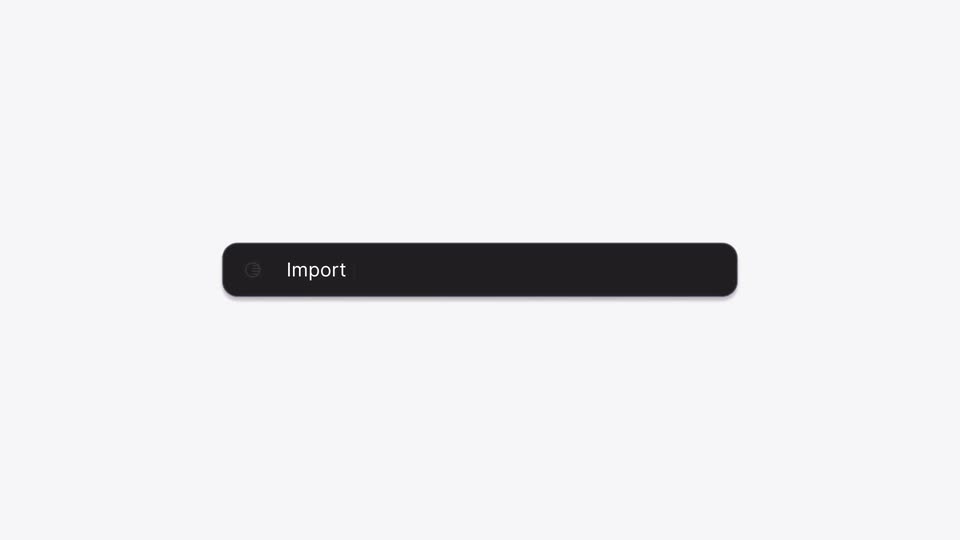
A dark rounded prompt bar sits centered on a light gray background, a small globe icon at its left. The words “Import city street” type out with a blinking caret, then a cut lands on a live-action Tokyo street shot with glitchy RGB fringing on the edges.
On-screen text: “Import city street”
Techniques: Kinetic type
Camera: Static
A forward tracking shot glides down a sunlit Tokyo side street toward the Skytree. A dark rounded prompt bar floats mid-frame, typing out the words Make it look more cinematic beside an Add button.
Techniques: Kinetic type
Camera: Push in
A narrow Tokyo side street framed by low buildings, the camera gliding forward toward the distant Skytree tower. A white van drives away down the center lane as shop signs and a karaoke banner pass by on the sides.
Camera: Static
A Tokyo street with the Skytree in the distance. A dark command pill types “Remove object” beside an Add button, then a cursor clicks the streetlight, a purple outline traces the pole, and the light vanishes.
Techniques: Cursor demo
Camera: Static
A forward dolly move down a narrow Tokyo alley, the Tokyo Skytree rising in the hazy distance. A white van drives away down the center lane while storefront signs and lanterns slide past the frame edges at different speeds.
Techniques: Parallax
Camera: Static
A dark rounded prompt bar floats over a hazy Tokyo street with the Skytree in the distance. The prompt text types out left to right while a small Add button sits at the right edge.
Techniques: Kinetic type
Camera: Static
A dark rounded prompt bar floats centered over a painted garden path. The prompt reads “Generate a lush garden” with a blinking caret, the right button switches from Add to Regenerate, and a white cursor drifts around the bar.
On-screen text: “カラオク”, “丸井”
Techniques: Cursor demo
Camera: Static
A dark rounded panel sits centered over a painted mountain landscape. Inside, a prompt line reads “Generate a lush garden” beside a Regenerate button that scales gently; a back arrow and pagination dots sit below, with a cursor parked at the panel's lower right.
Camera: Static
A dark prompt bar floats over a classical painting of two red-robed men. The bar shows the typed prompt Generate a lush garden and a Regenerate button. A cursor moves to the button and clicks it, the button scaling on press. The frame stays locked.
Techniques: Cursor demo
Camera: Static
A 3D rendered garden with pale statues in a blue pool sits behind a floating dark prompt bar. The bar holds the prompt line and a Regenerate button that pulses with a scale, while a white cursor hovers over the pagination dots.
Techniques: Cursor demo
Camera: Static
A dark rounded prompt bar floats centered over a Van Gogh style painting of a courtyard with orange roofs and strolling figures. The prompt text sits left of a gray Regenerate button that pulses with a subtle scale, while a white cursor rests over the pagination dots below.
Techniques: Cursor demo
Camera: Static
A dark rounded prompt bar reading Generate a lush garden with a Regenerate button hovers centered over a generated image. The backdrop cuts from a stone wall and trees to a canal under a starry sky with floating planets. A cursor rests by the pagination dots.
Camera: Static
A dark rounded prompt bar reading Generate a lush garden with a Regenerate button stays locked in the center as the full-frame background dissolves from a dense field of colored spheres into a sunlit garden with a pond. A white cursor rests near the pagination dots.
Techniques: Morph
Camera: Static
A dark rounded prompt bar reading “Generate a lush garden” with a Regenerate button stays locked at center while the illustrated backdrop behind it cuts from a flower field and red barn to a teal sunset canyon. The Regenerate button pulses with a scale.
Camera: Static
A dark prompt card reading “Generate a lush garden” sits centered over a full-frame artwork. A cursor hovers the pagination dots as the Regenerate button pulses and the background transitions from a crayon drawing to a painted lake landscape.
Techniques: Cursor demo
Camera: Static
A dark prompt bar sits centered over a 3D garden that crossfades from a stylized green grove into a warm stone courtyard with arches and lanterns. The cursor rests beside the pagination dots while the Regenerate button pulses.
Camera: Static
A dark prompt panel with a Regenerate button floats over a 3D garden scene. A cursor moves across the panel's dot indicators and arrows.
Techniques: Cursor demo
Camera: Static
Over a locked-off 3D jungle ruins vista, a dark prompt bar shows 'Generate a lush garden', then types 'Scale in over time' and 'Fade in text Infinite Worlds'; the bar vanishes and a yellow serif headline fades in.
On-screen text: “Infinite Worlds”
Techniques: Kinetic type
Camera: Static
A sunlit jungle of overgrown stone ruins fills the frame with the yellow title centered. A blue editor selection box holding a clip of a woman with a camera slides across the title, then clears to reveal it again.
On-screen text: “Infinite Worlds”, “1”
Techniques: Kinetic type, Cursor demo
Camera: Static
A rectangular clip of a smiling man holding a camera plays over a lush jungle backdrop. A blue selection box and cursor surround the clip, then the box vanishes. Large yellow serif letters flank the clip on both sides.
On-screen text: “Ir”, “ds”
Techniques: Cursor demo
Camera: Static
A man in a white t-shirt holds a camera lens against a blue sky as a dark input bar overlays the center. The text Green screen character types out letter by letter inside the bar next to an Add button.
On-screen text: “Green screen character”
Techniques: Kinetic type
Camera: Pull out
A green-tinted man turns and lifts a hand against a cloudy blue sky. A dark rounded input bar pops in across his face, a caret types a short prompt that is then cleared and retyped, and an Add button sits at the right edge.
Techniques: Cursor demo
Camera: Push in
Low-angle shot of a laughing man in a beanie against a cloudy sky, the footage shifting from a green tint to natural color. A dark rounded prompt bar appears at the center, typing 'Blur background' then 'Black and white background, Robert Capa', with an Add button at the right.
Camera: Static
A man in a black beanie and white tee laughs and turns in profile before a blurred monochrome backdrop. A dark rounded prompt bar floats in front of him and types out the words Generate a city skyline, ending on an Add button.
Techniques: Kinetic type
Camera: Static
A dark rounded prompt bar with the typed prompt and a Regenerate button sits centered over a watercolor city. The backdrop regenerates from a wide skyline to a close rooftop view while the bar and its text scale in. A white cursor rests at the bar's lower right corner.
Techniques: Kinetic type, Cursor demo
Camera: Static
A dark rounded prompt bar reading “Generate a city skyline” with a Regenerate button stays centered as the full-frame background switches from a sunset street photograph to a green anime pagoda illustration.
Camera: Static
Inside a video editor preview, a painted village image regenerates into a busy city street scene. A translucent dark prompt bar hovers over the center showing the prompt text and a Regenerate button, with a pointer arrow to its right.
Techniques: Morph
Camera: Static
Inside a video editor, the prompt bar with 'Generate a city skyline' stays centered while the canvas cycles through generated city styles: live-action street, illustrated isometric city, painterly towers, photorealistic skyline. A cursor rests beside the bar, then the whole interface zooms out into a small window on a gray field.
Techniques: UI zoom
Camera: Pull out
A faded video editor interface dissolves into a plain light gray field. The gray headline Edit video using text sits centered and stays fixed for the rest of the clip.
On-screen text: “Make video using text”
Camera: Static
A plain light background holds one centered line of text. The first word crossfades from Edit to Generate to Make while the words video using text stay fixed in place.
On-screen text: “Edit video using text”, “Generate video using text”, “Make video using text”
Techniques: Kinetic type
Camera: Static
A pale gray field holds a centered gray line reading “Make video using text”, which is replaced by a second line with a URL. The frame stays locked and the text remains still throughout.
On-screen text: “Make video using text”, “Get early access at runwayml.com”
Camera: Static
A light gray card holds the centered line “Get early access at runwayml.com” for three seconds, then the gray Runway logo, an R mark with the wordmark, appears centered as the sign-off.
On-screen text: “Get early access at runwayml.com”
Camera: Static
The black Runway logo holds center on a pale gray field. A dark rounded input bar drops in beneath it, a caret types the words next to a mic icon while an Add button sits at the right, then the bar vanishes, leaving the logo alone.
Techniques: Cursor demo
Camera: Static
The Runway logo, an R icon beside the lowercase wordmark, sits centered on a pale gray field and slowly fades to white across the locked-off frame.
On-screen text: “runway”
Camera: Static