1:24

Upstash - Introducing Upstash Blob - serverless file storage for humans and age
Upstash Blob · Sep 2026
Wispr Flow · Aug 2026 · 2:00 · AI-annotated
Wispr Flow’s 2:00 launch film runs 38 scenes, about 3.2 s each. The product shows up at 0:10 and 7 features are revealed. The call to action lands at 1:43 (86% in), over a voiceover. The video cuts fast, about eleven cuts a minute, between live-action kid skits in office and classroom sets, cream UI cards, and crayon hand-drawn explainers, with each feature announced by a caption and then demoed in a floating transcript card. Signature moves are the transcript bubbles that type in sync with the kids' speech, blur whip transitions between skits, and the straight-faced kid-CEO delivery that keeps the corporate parody deadpan.
Is this your launch? to your site or press kit.
Upstash Blob · Sep 2026
Runway · AI · Sep 2022
Films whose music sounds like this one, voice left out
Sable · Upbeat electronic
Vexo · Upbeat electronic
Canva · Upbeat electronic dance music
A boy in a dark suit and green tie stands in a metallic elevator, holding a phone to his mouth. The shot opens on a blurred door edge, then settles. A white card on the right types out his sentence, with a black waveform pill below.
On-screen text: “I'll do grilled cheese for lunch.”
Techniques: Kinetic type
Camera: Static
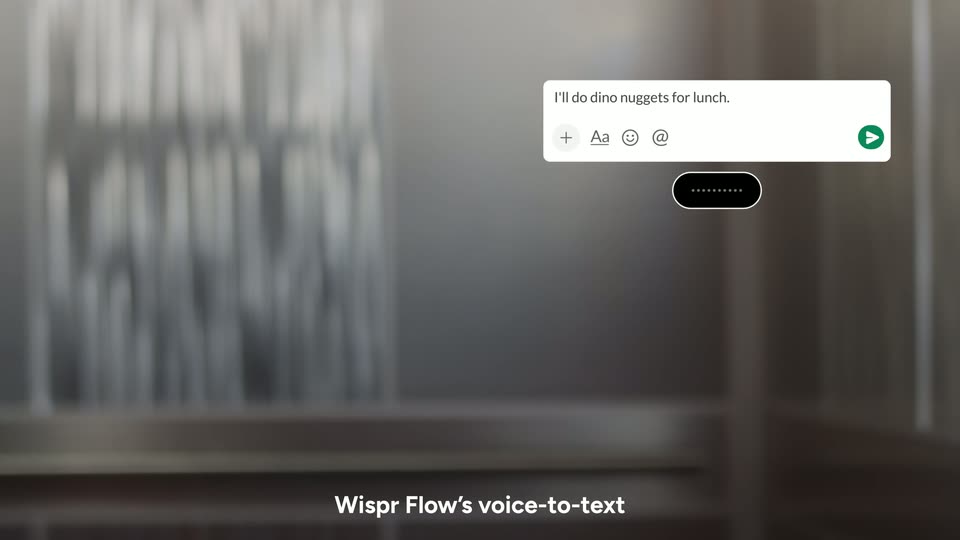
A boy in a black suit and teal tie holds a phone to his mouth and speaks. A white transcription card on the right shows his words, changing from grilled cheese to dino nuggets as he corrects himself, with a black waveform pill below.
Camera: Push in
A blurred kitchen interior fills the frame while a white message composer floats in the upper right, holding the typed line and a green send button. A black dotted pill hovers just below it. A white caption fades in at the bottom center.
On-screen text: “Wispr Flow's voice-to-text”
Camera: Static
A hand-drawn crayon poster titled “Our Company Values” sits on a light wooden desk, showing kids sharing a cookie and a green dino biting a keyboard. A white caption “Wisp Flow’s voice-to-text” sits at the bottom edge while the camera holds still.
On-screen text: “Wisp Flow's voice-to-text”, “I'll do dino nuggets for lunch.”
Camera: Static
A locked-off close-up of a printed sign reading 'It's been 0 days since our last accident' beside a stick-figure icon, then a cut to a wide classroom where a bespectacled boy in a blue shirt throws his arms open in excitement at his laptop.
On-screen text: “is so smart.”, “I never have to use a keyboard again!”
Camera: Static
A boy with glasses sits at a cluttered desk, gesturing toward an open laptop while speaking. A white World's Best Son mug, toy dinosaurs and papers fill the foreground; another child blurs in the background. Locked-off medium shot, shallow depth of field.
On-screen text: “I never have to use a keyboard again!”
Camera: Pan
A boy in a dark school suit sits at a desk with a laptop, abacus, and a mug of colored pencils. He types, then looks up and gestures with open hands while speaking, as the camera slowly pushes in.
On-screen text: “And now”, “Wispr Flow has a new meeting recorder called Notetaker”
Camera: Push in
On a light gray field, the Wispr Flow logo assembles at center: the waveform mark fills in, the bold wordmark holds, and a lighter 'Flow' plus a gray 'NOTETAKER' line fade in to its right and below. A small white caption sits static along the bottom edge.
On-screen text: “Wispr Flow has a new meeting recorder called Notetaker”
Camera: Static
The black Wispr Flow waveform logo and NOTETAKER tagline sit centered on a light gray gradient, with the white caption and it kicks grass. locked at the bottom. The logo block slides upward, revealing a UI window card with traffic-light dots and a serif Big Words Club title rising from the lower edge.
On-screen text: “and it kicks grass.”
Camera: Static
A white app window titled Big Words Club sits on a cream background, Transcript tab active. A hand-drawn Emma avatar appears at right as transcript bubbles type in word by word. The camera zooms and scrolls down as more speaker avatars pop in with colored names, ending in a blur.
Techniques: Kinetic type, UI zoom
Camera: Push in
A young girl sits at a desk with a laptop in a classroom, speaking to the camera. A dark notification banner with a meeting button appears at top left as a cursor moves toward it. White caption text reads at the bottom.
On-screen text: “Before you join a meeting”, “Notetaker gives you a pre-read.”
Techniques: Cursor demo, Kinetic type
Camera: Static
A dark meeting card titled Playground Expansion sits centered on a light background. It scales up, revealing the pre-read brief line by line, as white captions swap in at the bottom. The card blurs and slides out left to close.
On-screen text: “Notetaker gives you a pre-read.”, “It tells you who you're talking to”, “and what you're talking about.”
Techniques: UI zoom
Camera: Push in
A young girl in a black vest sits at a wooden desk with a black laptop, talking to camera in a poster-covered classroom. The shot opens out of focus and sharpens as white subtitles appear along the bottom.
On-screen text: “It's perfect”, “because I'm always way too busy to prepare.”
Camera: Static
A bespectacled girl in a white turtleneck sits at a wooden table and speaks to the camera. A white transcript card on the right types out the question, while a dark call bar with a red end-call button is pinned at the bottom.
Camera: Push in
A boy in a green shirt and tie speaks on a video call, softly out of focus, while a white transcript card on the right types his answer word by word. The scene cuts to a girl with glasses as a new speaker line appears.
Techniques: Kinetic type
Camera: Static
A girl with glasses and a cream turtleneck talks on the left in a wood-walled room. A floating white card on the right shows a live transcript, typing her words as she speaks, with a call control bar at the bottom.
Camera: Static
A young girl in a white collared shirt sits at a wooden desk in a classroom, hands clasped, talking and smiling toward the camera. A closed black laptop faces her. The frame is locked-off and static.
On-screen text: “Once the meeting is done”
Camera: Static
A light background shows the word Summary with a star icon and a cursor. The scene transitions to a white UI window titled Birthday Planning Committee with tabs and a search bar. A bottom caption updates to match the voiceover.
On-screen text: “Once the meeting is done”, “Summary”, “I get a quick summary”, “based on the meeting I had.”
Techniques: Cursor demo, Morph
Camera: Static
A white app window on a gray background shows a meeting summary titled Birthday Planning Committee. The content scrolls upward, revealing key points and decisions made, while a white caption sits at the bottom.
On-screen text: “based on the meeting I had.”
Camera: Static
A white app window sits on a light gray backdrop, showing a meeting summary. The Summary tab is active above a one-minute-read block, a key points list, and a decisions list, with a Resume button and an Ask anything field at the bottom. The frame holds still.
Camera: Static
A young boy in a dark suit and green tie sits at a conference table, hands clasped, speaking to the camera behind a laptop. A white mug and two wall posters frame him. Static camera, subtitles at the bottom swap once mid-scene.
On-screen text: “Plus, Notetaker learns everything from my meetings”, “so I can just ask it questions.”
Camera: Push in
A young boy in a dark blazer and green tie sits at a classroom desk, talking toward a MacBook. A white search bar overlay types his question character by character with a blinking caret. The shot stays locked off.
On-screen text: “Across all my sales calls, what could I do better?”
Camera: Static
A light app window shows a call list sidebar and a chat pane. The view zooms into the pane as a Sales Coaching Summary types out; the last bullet, Stop saying “Bazinga.” (31 meetings), lands on a peach highlight with a caret, and a white caption appears below.
On-screen text: “I can't say “bazinga” anymore?”
Techniques: UI zoom
Camera: Push in
A young boy in a suit and patterned tie sits at a desk, talking animatedly to a laptop whose lid faces the camera. He gestures with both hands, then leans in close, and the frame ends in a fast blur.
On-screen text: “Oh, come on!”, “That's my favorite word!”
Camera: Static
A boy in a green shirt and tie stands at a desk with a laptop, talking to camera. A white speech bubble reading What did I miss? pops in at the left and slides right toward the laptop as captions play at the bottom.
On-screen text: “What did I miss?”, “If your naptime ever runs late”, “just click”, “What did I miss?”
Camera: Pull out
A boy in a green shirt and tie stands at a school desk beside a laptop and abacus. A white chat card floats on the left, its bulleted notes filling in line by line. Subtitles caption the bottom of the frame.
On-screen text: “What did I miss?”, “Notetaker will fill you in.”
Camera: Pull out
A young boy in a dark suit and green tie sits in an office, speaking to the camera. A white transcript card floats at the right, filling in his words one by one as he talks. Round call controls sit at the bottom center.
Camera: Static
A boy in a video call lifts a printed photo of himself riding a dinosaur into the left of frame. A transcript panel on the right adds a new line from Joni. A control bar with mic, camera and red end-call buttons sits at the bottom.
Camera: Static
A young girl in glasses and a white turtleneck sits at a desk, talking to the camera against a wood wall. A white transcript card floats on the right, its lines typing out in sync with her speech while call controls sit below her.
Camera: Static
A child holds up a crayon drawing of a roaring T-rex during a video call, with call controls at the bottom. A white transcript card on the right types out the conversation. The scene cuts to a plain light background with the caption 'Here's the deal.'
On-screen text: “Here's the deal.”
Techniques: Kinetic type
Camera: Pull out
A hand-drawn figure in an orange shirt sits on a pink chair with a green laptop, expression shifting from smile to frown. A pink name panel pops in, then an orange thought bubble cycles through a summary list, an email, and a record folder, each marked with red errors.
On-screen text: “Here's the deal.”, “If you're meeting note taker”, “it's wrong everywhere.”, “Your summary.”, “Your follow up email.”, “Your permanent record.”, “EVERYWHERE!”
Camera: Static
A hand-drawn figure in glasses sits on a pink chair, holding a green laptop and a phone with two avatar cards. A thought bubble shows an orange PERMANENT RECORD folder. A SHOW + TELL panel slides in from the right, and the caption EVERYWHERE! sits at the bottom.
On-screen text: “EVERYWHERE!”
Camera: Pan
A hand-drawn sketch shows a seated person on a laptop, with arrows linking two avatar cards to speaker labels on a notes card. Green squiggle lines draw in as a checkmark and a thumbs-up icon pop in with small orange bursts.
On-screen text: “But Wispr Notetaker gets your words”, “and your speakers right.”
Camera: Pan
A hand-drawn doodle of a person at a laptop with a speech bubble gives way to a plain card where serif headlines appear word by word above Zoom, Meet and Teams icons. A cursor clicks a pill button reading wispr.ai/notetaker, then a cut to kids at a meeting table.
On-screen text: “Meeting notes you can finally trust.”, “Notetaker works wherever you do.”, “wispr.ai/notetaker”, “Nelson, what are you doing?”
Techniques: Kinetic type, Cursor demo
Camera: Static
A child sits at a conference table beside a teddy bear and a woman, in front of a whiteboard of hand-drawn quarterly goals. The shot cuts to a man in a blue shirt sketching a green dinosaur on the board as two girls watch.
On-screen text: “Nelson, what are you doing?”
Camera: Static
A bespectacled boy with paint on his hands stands beside a wooden easel holding a colorful child's drawing, shrugging with open palms as he talks. The medium shot slowly pushes in against a backdrop of white drapes.
On-screen text: “What?”, “I thought you said this was an all hands.”, “Kids these days.”
Camera: Static
A girl in glasses and a white headband sits at a table before a whiteboard of handwritten goals, then drops her hand over her face in a facepalm. A child beside her holds a pink lollipop wand. The caption reads Kids these days.
On-screen text: “Kids these days.”
Camera: Static
The black Wispr Flow waveform logo and wordmark hold centered on a pale gray radial gradient. A gray NOTETAKER tagline fades in beneath the wordmark, then the frame stays locked.
On-screen text: “NOTETAKER”
Camera: Static