0:56
Introducing the new Notion AI
Notion · Productivity · Sep 2024
Sable · Jul 2026 · 1:57 · AI-annotated
Sable’s 1:57 launch film runs 16 scenes, about 7.4 s each. The product is on screen from the first frame and 2 features are revealed. The call to action lands at 1:27 (74% in), over a voiceover. The video is built as a comedy skit that frames product demos: live-action beats with a plush-headed mascot alternate with full-screen Notion walkthroughs, joined by blur-focus and offset transitions. Pacing is slow and conversational at a mid-tempo, with the mascot's deadpan delivery, a named yellow cursor, and bold headline cards as the signature moves.
Is this your launch? to your site or press kit.
Notion · Productivity · Sep 2024
Dydema · Consumer · Oct 2026
Ramp · Finance · Sep 2026
A man and a figure in a white fluffy ball head with a drawn-on face sit at a table before a bookshelf. The man waves and speaks as a lower-third names him; a blur cut tightens to the ball head, whose mouth moves, then returns to the two-shot.
On-screen text: “Nim Ravid”, “CEO, Sable”
Camera: Pull out
A dark scene holds two floating panels: a meetings list left and a video call tile right. The view reframes from a tight crop to the full layout as the list fills with rows, a small caller tile appears at lower left, and call controls fade in at lower right.
Techniques: UI zoom
Camera: Pan
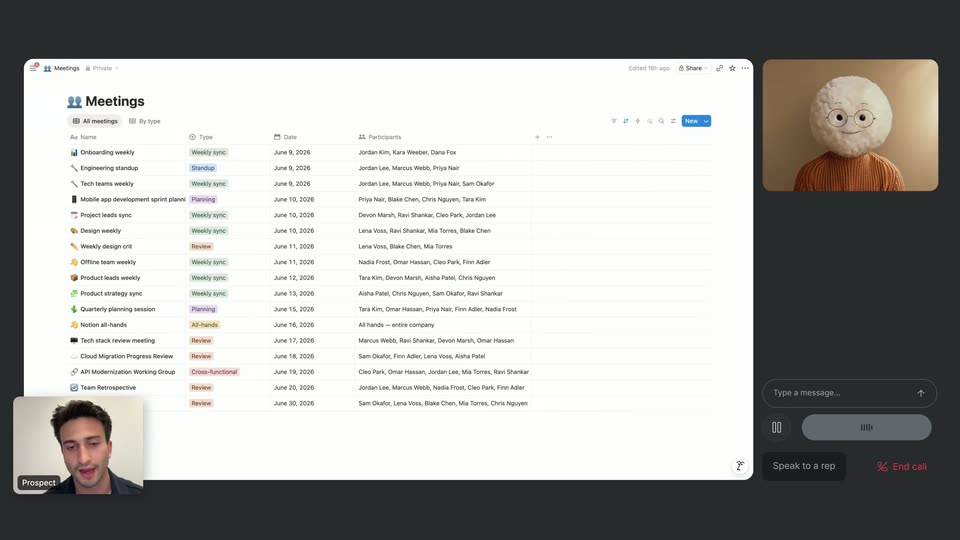
A flat Notion meetings list fills the left, a video-call panel with a white plush llama the right, and a small speaker tile bottom left. A chat bubble types the prospect's question, then a cursor tagged Aidan enters the list under a new top headline.
On-screen text: “Aidan has realtime browser control”
Techniques: Cursor demo
Camera: Static
A dark screen shows a Notion meetings workspace beside a chat panel with a 3D character and a small video tile. A yellow cursor named Aidan clicks through the interface, starting a recording, generating a summary, and switching meetings while chat messages appear.
On-screen text: “Aidan has realtime browser control”
Techniques: Split screen, Cursor demo
Camera: Static
A meeting screen fills the frame, with a video call tile labeled Prospect at lower left and a plush character avatar at upper right. A cursor types a prompt into the AI chat, then clicks the Summary tab to reveal action items, ending on a hover of the Email button.
Techniques: Cursor demo
Camera: Static
A man in a dark navy cardigan sits at a wooden table in front of a bookshelf, talking to camera and gesturing with his hands. At the end, the shot cuts to a blurred white settings screen with a left sidebar.
Camera: Static
A dimmed Notion workspace shows an open Preferences panel. A cursor labeled Aidan travels down the account sidebar, outlining each menu item in turn with an orange border, from Preferences to Notion AI. The clip ends with a quick blur and offset.
On-screen text: “Aidan”
Techniques: Cursor demo
Camera: Pan
A blurred Notion recording view sharpens into a full Sable Studio screen: a Meetings database, an Engineering standup page, and a video feed of Max. A cursor clicks to insert an AI meeting-notes block, then the frame blurs out.
Techniques: Masking, Cursor demo
Camera: Pan
A heavily blurred Notion interface pulls into focus, settling on a Resources page that holds a file upload bar above a grid of video thumbnails. A mouse cursor sits idle over the grid.
Camera: Pan
A locked-off view of a product dashboard shows a video grid behind an open upload modal. A hand-drawn hand holding a phone and the bold headline 'Hello, Custom Agents.' appear over the center.
On-screen text: “Hello, Custom Agents.”
Camera: Static
The Knowledge page flips from a grid of video and document cards to a list of sources. Checkboxes on the Notion Help Center and Notion Developer Docs rows tick and the rows take on a tan outline while the cursor hovers in the left sidebar.
Techniques: Cursor demo
Camera: Static
A light product interface shows a node graph on a dotted canvas. The graph expands downward as new labeled nodes and connecting lines appear one after another, while a cursor hovers the Context Graph item then moves to the Back to Brain button.
Techniques: Cursor demo
Camera: Static
A dotted canvas in a Sable workspace builds a node graph: thin lines draw outward from a central Notion Brain chip as labeled note cards pop in around it, then the view pulls back to reveal the full window.
Camera: Static
Four people sit at a wooden table before a wall of bookshelves, facing camera. They speak in turn, the man on the right, then the woman, then the man on the left who lifts his hand. A static medium shot holds as the group looks up.
Camera: Static
A person in a brown ribbed turtleneck talks while wearing a large white fluffy round head with a sketched face and glasses, framed in a studio with spotlights and an orange curtain. The shot cuts to a plain cream screen with a small dark mark at center.
On-screen text: “O”, “O”
Camera: Static
The Sable logo, a person glyph beside the wordmark, fades in from a faint tinted state to solid black at the center of a pale gray field. The small URL withsable.com sits at the bottom. The frame holds still for the rest of the clip.
On-screen text: “withsable.com”
Camera: Static