
1:46
Explore
00:00:00 / 01:01:18
- Length
- 1:01
- Scenes
- 42 · 1.5 s avg
- Product on screen
- 0:01
- Features shown
- 5
- Call to action
- 0:55 · 89%
- Voiceover
- Yes
- Views
- 955K on X
as of November 14, 2026
Runway’s 1:01 launch film runs 42 scenes, about 1.5 s each. The product shows up at 0:01 and 5 features are revealed. The call to action lands at 0:55 (89% in), over a voiceover. The video opens on a designer sketching a drink brand, names Runway Agent 2.0, then walks one end-to-end workflow where each capability is punctuated by a type-in headline card and a cursor-driven UI demo, closing on a benefit montage and a URL call to action. Its style is fast-cut and high-contrast, alternating pure black and off-white fields with a dark UI, and its signature moves are the letter-by-letter headline reveals and the cross-dissolve from hand-drawn sketches to rendered brand assets
Footage neededEstimated needs: 4 capture groups — your screens or recordings · 1 official logo — reused across the film · 8 filmed passages — shoot, supply or replace · 5 graphic passages — draw or supply · 2 3D passages — build or supply
Is this your launch? to your site or press kit.
More like this




Runway - Introducing Agent 2.0 Go from a simple prompt to fully realized mark, scene by scene
· 42 scenes as text
01 · Hook · 0:00–0:00
A hand drops a marker into a wire mesh holder, then a hand inks a sketch of a pink drink can on paper, drawing a pineapple character with sunglasses.
Camera: Push in
02 · Hook · 0:00–0:01
A hand-lettered notebook page titled BRAND VOICE, with STAY COOL, in black and BEE KIND: in pink beside a blue asterisk, cross-dissolves into a PACKAGING IDEAS page showing three Tropi Cool drink mockups with a green spiky character.
On-screen text: “BRAND VOICE”, “STAY COOL,”, “BEE KIND:”, “PACKAGING IDEAS”
Techniques: Morph
Camera: Push in
03 · Hook · 0:01–0:01
Close low-angle shot of a shirtless man's hands drawing on a tablet with a white stylus. The screen shows a green cartoon character with an orange hat and bold brown lettering; the camera eases in slightly.
On-screen text: “STAY COOL,”
Camera: Push in
04 · Product intro · 0:01–0:02
Extreme close-up of a white stylus tip gliding across a tablet screen, a hand blurred in the background. The white headline 'Introaucing' sits centered, held static on a locked-off frame.
On-screen text: “Introaucing”
Camera: Static
05 · Product intro · 0:02–0:03
A shirtless man in a red cap sits at a white desk, drawing on a tablet with a stylus, in a blue room with clothing racks and a poster behind him. The white words “Runway” and “Agent 2.0” sit as static overlays on the left and right of the locked-off frame.
On-screen text: “Runway”, “Agent 2.0”
Camera: Static
06 · Product intro · 0:03–0:04
A black mesh holder of colorful markers stays in sharp focus in the foreground while a shirtless man in a red cap moves his arms out of focus behind it. White text reading Runway and Agent 2.0 sits locked on either side.
On-screen text: “Runway”, “Agent 2.0”
Camera: Static
07 · Product intro · 0:04–0:04
A black title card holds two white text blocks side by side: Runway on the left and Agent 2.0 on the right. Both stay static in a locked-off frame for the full clip.
On-screen text: “Runway”, “Agent 2.0”
Camera: Static
08 · Product intro · 0:04–0:07
Black headline phrases swap in sequence on a white background: “Create and analyze”, “Your marketing at scale”, “Work with”, ending on the Runway wordmark with “Agent 2.0”. Words and letters fade in one by one, and a pale yellow rounded shape sits at the right edge.
On-screen text: “Create and analyze”, “Your marketing at scale”, “Work with”, “Runway”, “Agent 2.0”
Techniques: Kinetic type
Camera: Static
09 · Product intro · 0:07–0:09
On a plain off-white background, the static label “Work with” sits at left while a vertical stack of model logos and names cycles at right. The active names sharpen to solid black as the others fade, with new rows sliding in from the bottom and the list settling on GPT Image, Aleph 2.0 and Seedance 2.0.
On-screen text: “Work with”, “Kling 3.0”, “Gemini Omni”, “GPT Image”, “Aleph 2.0”, “Seedance 2.0”
Camera: Static
10 · Demo · 0:09–0:11
A dark prompt card on black shows a cursor over a fanned stack of label images, then the card expands into a wide composer with three thumbnails and typed text. Large white text slides and scales in at the end.
On-screen text: “Work with”, “GPT Image”, “Aleph 2.0”, “Seedance 2.0”
Techniques: Cursor demo, Morph, Kinetic type
Camera: Static
11 · Demo · 0:11–0:12
A dark near-black background holds a single line of white lowercase text that slides in from the left edge until it settles centered. The phrase reads “brand guidelines.” and the motion is a clean horizontal track-in with no other elements.
On-screen text: “brand guidelines.”
Techniques: Kinetic type
Camera: Static
12 · Demo · 0:12–0:13
A dark interface panel holds a slider icon on the left and a white rounded button with a black arrow. A large white cursor with a black outline glides in from the lower right and hovers over the arrow.
Techniques: Cursor demo
Camera: Static
13 · Demo · 0:13–0:14
A thin circular loading ring rotates left of the word Thinking... in a peach-to-purple gradient, centered on a black background. The text holds still while the ring spins.
On-screen text: “Thinking...”
Camera: Static
14 · Demo · 0:14–0:15
A black screen shows two lines of faint gray assistant copy cropped at the right edge. Below, a glowing cream “Thinking…” label sits beside a thin ring spinner whose bright arc rotates slowly.
Camera: Pull out
15 · Demo · 0:15–0:17
A dark phone UI sits on the right while the headline 'An agent built for real work' types in on the white left. Inside the phone, status lines for analyzing images and rendering the logo stack up, and the white background fades to gray at the end.
On-screen text: “An agent built for real work”
Techniques: Kinetic type, Split screen
Camera: Static
16 · Demo · 0:17–0:20
A dark interface shows a 2x3 grid of brand asset cards on the left and a chat panel on the right. The cards fade up from dim 'Queued' placeholders into vivid TROPICOL images, while the chat text resolves from overlapping generated lines into clean paragraphs.
On-screen text: “An agent built for real work”
Camera: Static
17 · Feature reveal · 0:20–0:22
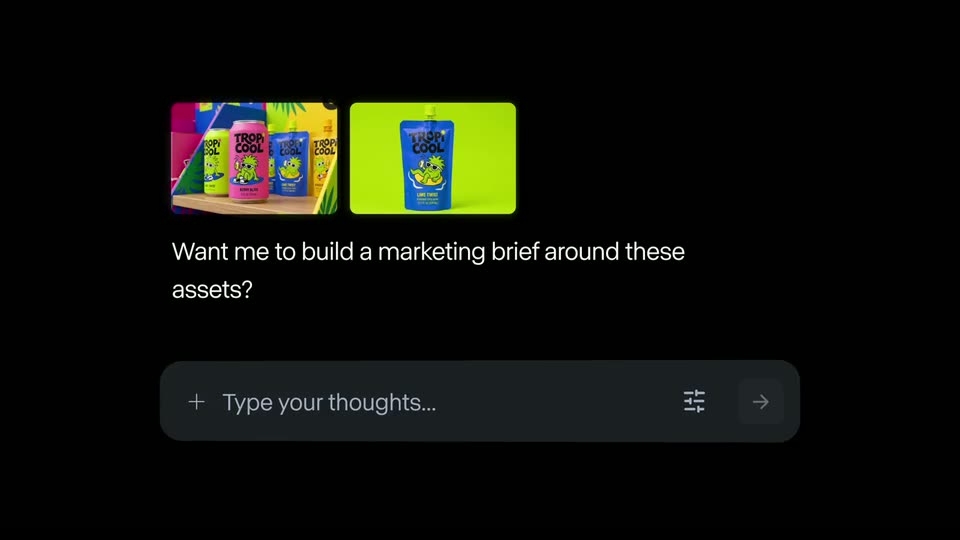
Two product shots of colorful drink cans and pouches sit at the top left of a black screen. A line of white text types out beneath them, then a dark rounded input bar with a placeholder and icons fades in along the bottom.
On-screen text: “Want me to build a marketing brief around these assets?”
Techniques: Kinetic type
Camera: Static
18 · Feature reveal · 0:22–0:22
Extreme close-up of a dark rounded chat bubble on a black field, a thin plus mark at its left edge. The reply types out letter by letter, completing in under a second, while a small one-line prompt sits above the bubble.
On-screen text: “Want me to build a marketing brief around these”, “Yes, definitely.”
Techniques: UI zoom
Camera: Static
19 · Feature reveal · 0:22–0:22
A dark rounded panel holds a light slider icon and a white square button with a right arrow. A white cursor taps the button; the slider icon fades to black and the button nudges right as the cursor jumps to its top edge.
On-screen text: “Yes, definitely.”
Techniques: Cursor demo
Camera: Static
20 · Feature reveal · 0:22–0:25
On a white card, the headline “Generate marketing briefs” types in letter by letter on the left as the TROPiCOOL brief on the right swaps from a title line to full text: brand overview, taglines, then target audience fading in.
On-screen text: “Generate marketing briefs”, “TrROPiCOOL— Marketing Brief”, “Brand overview”, “TROPiCOOL is a playful, youth oriented CPG beverage offering fruit-forward drinks (Berry Blast, Lime Twist, Mango Daze) in cans, bottles and mixed packs. The m”, “Brand taglines”, ““Stay cool, be kind”/ “Real fruit. No bad vibes””, “Target audience”, “Primary: Gen Z (16-24), active, culturally”
Techniques: Kinetic type
Camera: Static
21 · Feature reveal · 0:25–0:25
Two product photos, a shelf of colorful pouches and a blue pouch on lime green, sit above a white line that types out 'Shall we turn this int'. A dark input bar with a plus, placeholder text, and send arrow rests below on a black background.
Techniques: Kinetic type
Camera: Static
22 · Feature reveal · 0:25–0:26
A blue drink can with a cartoon frog on a lime-green card floats over a black field, above a large white headline reading into an ad campaign. The composition drifts as a dark rounded panel with a blinking cursor and placeholder text slides up to fill the lower frame.
On-screen text: “s into an ad campaign?”
Techniques: 3D mockup, Masking
Camera: Static
23 · Feature reveal · 0:26–0:27
A dark rounded pill sits centered on black. A thin blue plus icon holds on the left while the phrase types in from the left, each letter brightening from dim gray to full white until the period lands.
On-screen text: “Let's do it.”
Techniques: Kinetic type
Camera: Static
24 · Feature reveal · 0:27–0:29
A black headline sits left of center while four colorful Tropi Cool ad cards fade in as a 2x2 grid on the right. A cursor arrow hovers below the grid, and the word variations fills from gray to black.
On-screen text: “Create endless ad variations”
Camera: Static
25 · Feature reveal · 0:29–0:30
A white product gallery shows rows of Tropi Cool can and pouch mockups scrolling left at different speeds, a cursor hovers on the blue card, and a pink can card slides to center as a green card enters from the right.
Techniques: Cursor demo, Parallax
Camera: Pan
26 · Feature reveal · 0:30–0:32
A row of rounded Tropi Cool product cards scrolls horizontally across a plain white background at a steady pace, while a mouse cursor hovers over the cards and drags the strip.
Techniques: Cursor demo
Camera: Pan
27 · Feature reveal · 0:32–0:35
A flat product card of a blue pouch drink on a beach sits left of a black two-line headline. The packaging copy crossfades from Chinese to Bengali, then the card blurs and slides across the headline to exit.
On-screen text: “Localize for any market”
Techniques: Morph
Camera: Static
28 · Feature reveal · 0:35–0:38
A collage of colorful Tropi Cool product cards shuffles on the right, tiles sliding and swapping positions, while the left headline switches from “Take it to every platform” to “Analyze what’s wor”.
On-screen text: “Take it to every platform”, “Analyze what's wor”
Techniques: Kinetic type
Camera: Static
29 · Feature reveal · 0:38–0:39
On a white background, a 2x3 grid of rounded product images cycles through different shots while the words Analyze and what's working. sit on either side, the right phrase gaining a period.
On-screen text: “Analyze”, “what's working.”
Camera: Static
30 · Feature reveal · 0:39–0:40
A two-column grid of six cards, mixing product creatives, an analytics dashboard and blurred color blocks, floats on a light gray field with the words Analyze and what's working on either side. The right and middle cards fade out in sequence while a black cursor drifts across the center.
On-screen text: “Analyze”, “what's working”
Techniques: Cursor demo
Camera: Static
31 · Feature reveal · 0:40–0:41
A black background holds a tilted stack of two cards in 3D: a colorful abstract image and a white analytics dashboard. A large black cursor arrow hovers over them as the stack rotates. A dark input field with a plus icon and placeholder text sits to the right.
Techniques: 3D mockup
Camera: Static
32 · Feature reveal · 0:41–0:43
A dark composer panel scales up at center as a cursor hovers the add button. A pink drink can and a white analytics chart card sit above an empty input row with a send button on the right.
Techniques: Cursor demo, UI zoom
Camera: Static
33 · Feature reveal · 0:43–0:44
A dark chat input panel on black shows two attached files, a pink Tropi Cool can ad labeled Image_01 and a white analytics dashboard labeled Image_02. Below them, the prompt types out character by character: Redesign my ads based on this campaign data, ending on a period.
Techniques: Kinetic type
Camera: Static
34 · Feature reveal · 0:44–0:45
A thin circle outline sits left of the words Analyzing data on a black field. The text and ring brighten with a soft lavender glow at the midpoint, then fade back toward black.
On-screen text: “Analyzing data”
Camera: Static
35 · Feature reveal · 0:45–0:46
On a black field, an outlined ring and the label 'Analyzing data' sit top left. Two rounded cards hold below: a white analytics dashboard on the left and a pink TROP COOL drink graphic on the right. The composition stays static.
On-screen text: “Analyzing data”
Camera: Static
36 · Feature reveal · 0:46–0:47
A white analytics dashboard and a pink Tropic Cool drink creative sit side by side on black. Below them, white text types out word by word: Analysis complete. Let's produce some high-performing variants.
On-screen text: “Analysis complete. Let's produce some high-performing variants.”
Techniques: Split screen, Kinetic type
Camera: Static
37 · Other · 0:47–0:48
White caption on black reads “Analysis complete. Let's produce some high-performing variants.”, then a 2x2 grid of flat TROPi COOL packaging mockups fills the frame, one tile a hand holding a pink can. A dark overlay fades in over the grid as the white headline “Scale your marketing” locks in center.
On-screen text: “Analysis complete. Let's produce some high-performing variants.”, “Scale your marketing”
Camera: Static
38 · Other · 0:48–0:51
Low-angle shot of a person in a denim jacket looking up at a brick building wrapped in bright Tropi Cool billboards, with a white caption centered in frame. It cuts to a person in a blue hoodie sitting on a park bench holding a giant soda can.
On-screen text: “Scale your marketing”
Camera: Static
39 · Other · 0:51–0:53
A breakdancer in a blue tee and orange shorts spins into a handstand freeze on a sunlit playground, shot wide with a fisheye lens. Centered white text reveals word by word across the action.
On-screen text: “Scale your marketing”, “And drive more revenue”
Techniques: Kinetic type
Camera: Pan
40 · Other · 0:53–0:55
A low-angle shot follows a giant green inflatable soda can mascot, printed with a cartoon lime in sunglasses, as it struts toward the camera down a crowded city street of yellow taxis and pedestrians. White text “And drive more revenue” holds centered over the figure.
On-screen text: “And drive more revenue”
Camera: Static
41 · CTA · 0:55–0:57
A small looping clip of a pink 3D can character dancing in a blue room sits center on a white field, flanked by gray “Get started at” on the left and black “app.runwayml.com” on the right. The text stays fixed while the character moves.
On-screen text: “Get started at”, “app.runwayml.com”
Camera: Static
42 · Outro · 0:57–1:01
A static black end card holds the white lowercase runway wordmark centered in frame. A small Get started at caption sits just above it, and the locked-off shot holds without motion for the full length.
On-screen text: “Get started at”, “runway”
Camera: Static