1:14
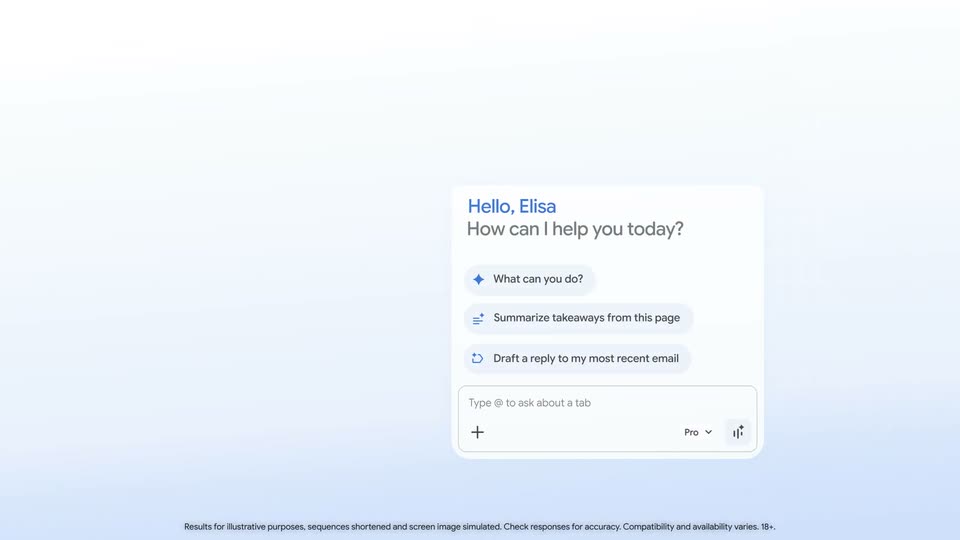

Google - We’re introducing major updates to Gemini in @GoogleChrome for MacOS,
Google · AI · Jan 2026
Ideogram · Oct 2024 · 0:45 · AI-annotated
Ideogram’s 0:45 launch film runs 37 scenes, about 1.2 s each. The product shows up at 0:02 and 6 features are revealed. The call to action lands at 0:40 (89% in). The video alternates pastel gradient title cards with tight UI demos, each feature announced by a two-line headline and proven by a quick cursor-driven interaction, then closed by a URL card that morphs into the logo. Signature moves are the bold/light weight split headlines, the pink selection marquee, and rapid 3D render inserts that keep the pace near 49 cuts per minute.
Is this your launch? to your site or press kit.
Google · AI · Jan 2026
Ramp · Finance · Apr 2026
A tilted polaroid of a stone statue slides left and lands on a white upload card. As it settles in the center, the card's dashed drop zone fills with light blue against a soft blue-to-pink gradient.
Camera: Static
A white rounded pill button reading Magic Fill, paired with a dashed selection icon and sparkles, sits centered on black and scales up to fill the frame.
Techniques: UI zoom
Camera: Static
A marble David head in a white spacesuit floats before a starfield, palm raised, then a quick cut shows the same head wearing a gold crown in a chandelier-lit ballroom crowded with crowned men.
Camera: Static
Close-up of a marble statue head wearing VR goggles labeled IDEOGRAM, holding a pistol against a dark neon-lit background. A cut swaps the setting to a bright gallery party with balloons and a crowd, the head now wearing a striped party hat.
Techniques: 3D mockup
Camera: Static
A woman in a gray hoodie and blue mask stands in a brick courtyard as a radial zoom blur bursts from her. The shot then resolves into a 3D diorama of the same courtyard, with a large white cursor and a small 3D figure on a platform.
On-screen text: “Introducing”
Techniques: 3D mockup, Morph
Camera: Pull out
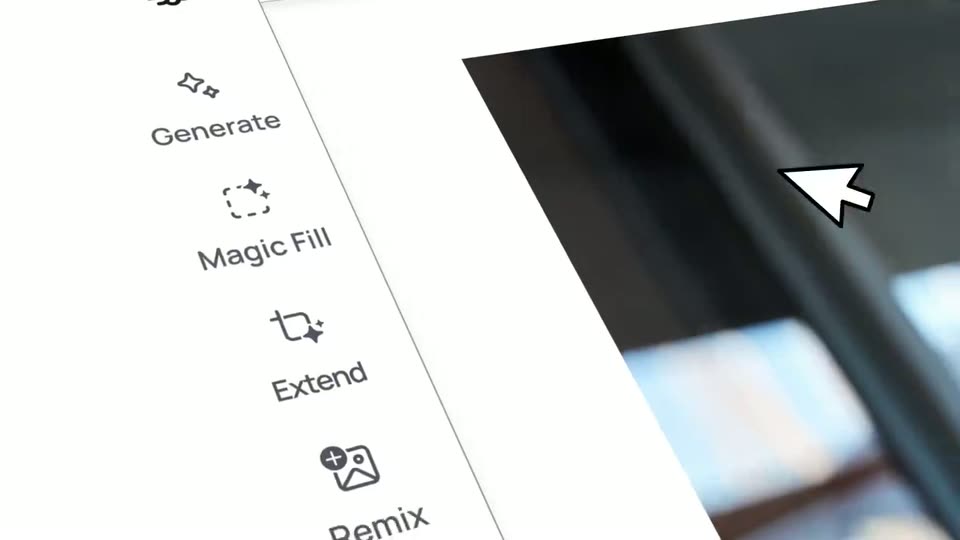
A hamburger icon and the word Introducing sit centered on white, then slide to the top-left corner and shrink into a small header card. A vertical toolbar of line icons with labels (Generate, Magic Fill, Extend, Remix, Select, Pan, Upload, Download) appears along the left edge.
On-screen text: “Introducing”
Techniques: Kinetic type
Camera: Static
A flat product UI shows a left tool rail and a white canvas framed in pink. The words Ideogram Canvas cycle through generated styles, from bold black to colorful Halloween to handwritten script. A cursor clicks the right arrow in a bottom-right pager, the counter advancing from 1/4 to 4/4.
Techniques: Cursor demo
Camera: Static
A soft pastel gradient, blue to pink, fills a locked-off frame. The centered line “Immerse yourself” holds in the middle, with “Immerse” in bold black and “yourself” in a thin weight. The text stays still for the duration.
On-screen text: “Immerse yourself”
Camera: Static
A tilted 3D interface panel shows a vertical menu beside a blurred dark image. A cursor glides to the Magic Fill row and clicks it, the row highlights and its dashed icon fills into a pink blob.
On-screen text: “Immerse yourself”
Techniques: 3D mockup, Cursor demo, Morph
Camera: Static
A light editor view with a smiling woman's portrait zooms into the top toolbar. A cursor glides right and hovers a wavy brush icon that tints pink, just left of a black Next button.
Techniques: UI zoom, Cursor demo
Camera: Push in
A cursor paints a purple stroke over the hair in a photo of a smiling woman, the stroke widening across the canvas. The view reframes to the top toolbar as the cursor reaches the Next button, the masked hair appearing as a black cutout on pink.
Techniques: Cursor demo, UI zoom
Camera: Push in
A white prompt bar types out “artist holding a self portrait” while a cursor glides to the black Magic Fill button and presses it. Below, the top of a woman’s head sits inside a red selection box on a purple-pink gradient.
On-screen text: “Draw over parts of the image you want to change.”, “Next”
Techniques: Cursor demo
Camera: Static
A soft mint-to-pink gradient holds two centered lines of black text: a thin “in an” above a bold “imaginary world.” The bold line snaps into place with a quick horizontal motion blur.
On-screen text: “in an”, “imaginary world.”
Techniques: Kinetic type
Camera: Static
A smiling woman's face sits as a jagged cutout over a shifting pink-to-blue gradient inside a bordered card. A small progress label in the top-left ticks from 88% to 99% complete while the gradient hue pans.
On-screen text: “in an”, “imaginary world.”
Techniques: Masking
Camera: Static
A smiling woman in a grey cap faces the camera in a studio, colorful paintings on the wall behind her, a palette and brushes to the right. A small inset at the lower left shows her holding a self-portrait canvas. The photo rests on a cyan-to-pink gradient.
Camera: Static
A split screen frames a smiling woman in a black top before a colorful mural on the left and the same woman holding a watercolor portrait card on the right. The composition sits inside a soft mint-to-pink gradient border and holds still.
Techniques: Split screen
Camera: Static
An artist in a white shirt smiles and holds up a small framed self-portrait in a studio whose walls are covered with colorful paintings. The camera zooms out from a close-up of her face to a wide shot of the room, revealing a workbench with paint supplies.
Camera: Pull out
A soft pastel gradient washes the frame as two centered lines of black text hold still: bold “Composite” above a lighter “different elements.” The shot is locked-off with no motion, the words resting in the middle of the open background.
On-screen text: “Composite”, “different elements.”
Camera: Static
A 3D soda can with a sunset skyline label and white wordmark tilts on a pink-and-blue gradient, then cuts to a white-bearded man in a tuxedo holding the can to his face, eyes closed.
On-screen text: “Composite”, “different elements.”
Techniques: 3D mockup
Camera: Static
An older man in a tuxedo holds a pink and black Ideogram can to his face under a white wedding marquee, then a cut shows the same can resting on a stone in a bar lit by string lights.
Camera: Static
A woman in an office holds up a soda can printed with a cityscape and the IDEOGRAM wordmark, her mouth open in surprise. The shot cuts to a hand holding the same can against a snowy mountain and sky backdrop.
Camera: Static
A locked-off card centers the headline 'generate your own text', with 'generate' in bold and the rest in a light weight, on a soft cyan-to-pink gradient. A small Ideogram wordmark is present and nothing moves.
On-screen text: “IDEOGRAM”, “generate your own text”
Camera: Static
The Ideogram interface frames a photo of a hand holding a branded can against snowy mountains. A pink-to-purple gradient panel slides in from the right, carrying the purple headline PREMIUM DESIGN MADE EASY. The left toolbar lists tools and the frame stays locked off.
On-screen text: “PREMIUM DESIGN MADE EASY”
Camera: Pull out
A design-tool interface with a left tool rail frames a canvas showing a hand holding a cityscape can beside a yellow balloon. A purple gradient bar wipes across the lower right corner as the handwritten caption is written in, then the bar slides out, leaving the white script on the image.
On-screen text: “this is pure magic.”
Techniques: Kinetic type, Masking
Camera: Static
A soft pastel gradient fills the frame, holding a centered headline. The thin word “Easily” sits above the bold line “organize ideas”, which eases up from a brief horizontal blur into sharp focus.
On-screen text: “Easily”, “organize ideas”
Techniques: Kinetic type
Camera: Static
A white image-editing interface with a left tool rail displays a grid of sample photos. A cursor drags a pink selection marquee around the bottom row of images while the top row of photos clears. A caption reads organize ideas.
On-screen text: “organize ideas”
Techniques: Cursor demo
Camera: Static
A design-tool canvas with a left toolbar. Two images, each inside a red selection box with corner handles, scale up in place while cursor arrows grip their corners, the left portrait and the right product shot growing to fill the frame.
Techniques: Cursor demo
Camera: Static
A centered line of text holds on a soft pastel gradient that fades from mint on the left to pink on the right. The word “or” sits in a light weight while “connect them.” is bold, and the frame stays locked and still throughout.
On-screen text: “Or connect them.”
Camera: Static
On a plain off-white background, the tilted label “Magic Fill” with a dashed-circle icon slides up out of frame as “Extend” with a tag icon and a black cursor arrow slides in from the lower right, then exits right; a small caption “Or connect them.” stays still.
On-screen text: “Or connect them.”, “Magic Fill”, “Extend”
Techniques: Kinetic type
Camera: Static
A prompt bar holding the text a woman holding a frame displaying soda sits over two reference photos as a cursor clicks the Extend button. The view then cuts to a canvas with a left toolbar, where the woman's image rests on a pink field inside a purple selection frame.
Techniques: Cursor demo
Camera: Pull out
A product interface shows a left toolbar of tool icons and an open Extend menu at the top. A photo of a woman holding a framed picture fills the canvas, then the image regenerates to a wider crop as the headline Even match text styles. appears across it.
On-screen text: “Even match text styles.”
Camera: Static
A static sentence reads “Even match text styles.” centered on a soft pastel gradient background. The first half of the text is in a regular weight, while the second half is bold.
On-screen text: “Even match text styles.”
Camera: Static
A white image-editing UI reframes from a tight crop to the full layout, with the caption “Even match text styles.”; a left icon rail, a canvas of Care Bears on a brick road, and a “Walking on Sunshine” wordmark on the right, “magic” letters in the sky.
On-screen text: “Even match text styles.”
Techniques: UI zoom
Camera: Pull out
Two lines of black text sit centered on a soft pastel gradient that fades from pale cyan on the left to pink on the right. The top line is light weight, the bottom line bold, and the bottom line settles from a brief ghosted overlap into a clean state.
On-screen text: “The only limit is”, “your imagination.”
Camera: Static
A 3D astronaut in a white suit with pink stripes floats in a teal and magenta nebula, cradling a cracked planet. The camera pushes in on the gloved hands as a small man holding a CREATE sign scales up from a blue splat on the sphere.
On-screen text: “CREATE”, “The only limit is”, “your imagination.”
Camera: Push in
A man in a dark shirt holds a wooden plaque reading CREATE, a small bird perched on its left corner, against a teal starfield with floating dark rock shards. The plaque scales up toward the camera until the letters fill and blur the frame.
On-screen text: “CREATE”
Techniques: Parallax
Camera: Push in
On a soft pastel gradient, “What will you create?” fades in centered, then shrinks and lifts up as “ideogram.ai” types out below. The URL then morphs into the bold “ideogram” wordmark as a brain-shaped logo with motion lines draws in to its left.
On-screen text: “What will you create?”, “ideogram.ai”
Techniques: Kinetic type, Morph
Camera: Static