1:35
What's Figma? [2019]
Figma · Design · Oct 2019
Backdrop · Nov 2026 · 1:22 · AI-annotated
Backdrop’s 1:22 launch film runs 38 scenes, about 2.2 s each. The product shows up at 0:30 and 3 features are revealed. The call to action lands at 1:17 (93% in), over a voiceover. The video cuts between a live-action sales drama and clean UI motion graphics at a brisk 129 BPM tempo, moving from a failed call to a product reveal and three feature demos. Signature moves include typed-out search bars, 3D-tilted interface cards, and a recurring green highlight that marks key phrases.
Is this your launch? to your site or press kit.
Figma · Design · Oct 2019
Anthropic · AI · Oct 2026
A woman in a white shirt sits at a desk in a sunlit brick loft, a blurred laptop lid filling the foreground. She reads the screen, her small smile fading into a furrowed, skeptical frown while the camera holds a static close view.
Camera: Static
A solid black screen holds across the entire clip, a blank transition point with no visible content, text, logo, or motion.
Camera: Static
A woman with dark hair in a white collared shirt holds a close-up, gazing forward with a tense, focused expression. Soft daylight lights her face against a blurred backdrop of tall windows and brick buildings.
Camera: Static
A white Google homepage fills the frame, locked off. In the rounded search bar, the query types out letter by letter behind a blinking caret, while the two buttons below settle into focus.
Techniques: Cursor demo
Camera: Static
A close-up of a white article page shows a paragraph on the HMW framework. The text begins doubled and ghosted, then resolves into one clean line while a green highlight bar marks a key phrase.
Camera: Static
A high-angle shot holds on a woman in a white top, dark hair pulled back, gazing down with a pensive look. White sans-serif words, oh, i should and have, pop in at scattered sizes around her, then a large light-green italic serif asked settles below her chin.
On-screen text: “oh,”, “i should”, “have”, “asked”
Techniques: Kinetic type
Camera: Pull out
On a black background, a YouTube search bar types out the query letter by letter, the view pulling back from a tight crop on the field to reveal the red YouTube logo and menu icon at left.
Techniques: UI zoom
Camera: Static
A dark video feed is tilted in 3D perspective, thumbnails stacked on the left, titles and channel names slanting on the right. A white arrow cursor slides in from the right edge and stops over a thumbnail.
Techniques: 3D mockup, Cursor demo
Camera: Static
A man in a teal shirt sits on a blue couch, speaking into a studio microphone and gesturing with his hands. The footage plays in a tilted, rounded-corner video card floating over a blurred, darkened copy of the same scene.
Camera: Push in
A woman in a white shirt sits before a window, gazing off-camera with a furrowed brow. White bold sans words stack on the left as she speaks, then a large glowing pale-green italic serif phrase fills the lower frame.
On-screen text: “Why”, “didn't I”, “say that?”
Techniques: Kinetic type
Camera: Pull out
Close-up of a chat interface with a water-drop mascot and the placeholder “What should we work on?”. A sales-call question types itself into the prompt box letter by letter while the frame slowly pushes in on the input field.
Techniques: UI zoom
Camera: Static
A dark-haired woman in a white shirt sits at a desk in a sunlit brick loft, her mouth slightly open in concern as she stares at the laptop in front of her. The camera slowly pushes in on her face.
Camera: Push in
A white background holds a vertical band of fine gray streaks on the right, locked in heavy motion blur. The band jitters horizontally while the left third stays clean, reading as a fast wipe or pan across a textured surface.
Camera: Static
A defocused list of numbered persuasion principles sharpens as the camera zooms in, settling on item four, where a green highlight marks the phrase Sell the outcome in their words.
Techniques: UI zoom
Camera: Pan
A simulated text-message conversation on a white background with a soft vignette. A green bubble asks about post-call regret, a typing indicator appears, then gray and green replies pop in one by one while the thread scrolls up.
Techniques: Kinetic type
Camera: Static
A woman in a white shirt sits at a desk in a sunlit brick loft, looking at a laptop with a surprised expression as she speaks. Subtitles slide in at the bottom and the Backdrop logo scales in at the end.
On-screen text: “What?”, “You don't need to deal”, “with that. Just use”, “Backdrop.”, “What is Backdrop?”
Techniques: Kinetic type
Camera: Static
A woman in a white shirt sits at a desk facing a laptop in a sunlit brick loft, smiling as she reads the screen. The camera holds a static medium close-up while a green light leak grows across the right side of the frame.
Camera: Static
White serif “Meet” scales over blurred green stripes, then the frame clears to a pale green gradient as a dark green rounded icon with a light green “Qo” mark scales in at center. The tagline “The first live sales assistant” appears left of the icon.
On-screen text: “Meet”, “The first live sales assistant”
Techniques: Kinetic type, Masking
Camera: Static
On a soft green-to-teal gradient, the white serif line “The first live sales assistant” sits centered with a small rounded logo mark at its right. The line dissolves as the dark green words “that does” scale up in the center.
On-screen text: “The first live sales assistant”, “that does”
Techniques: Kinetic type
Camera: Static
On a white background, the words 'that does not suck' fade in one by one in a dark serif. A light green highlight swipes behind 'not suck' and a gray I-beam cursor lands at the end.
On-screen text: “that does not suck”
Techniques: Kinetic type
Camera: Static
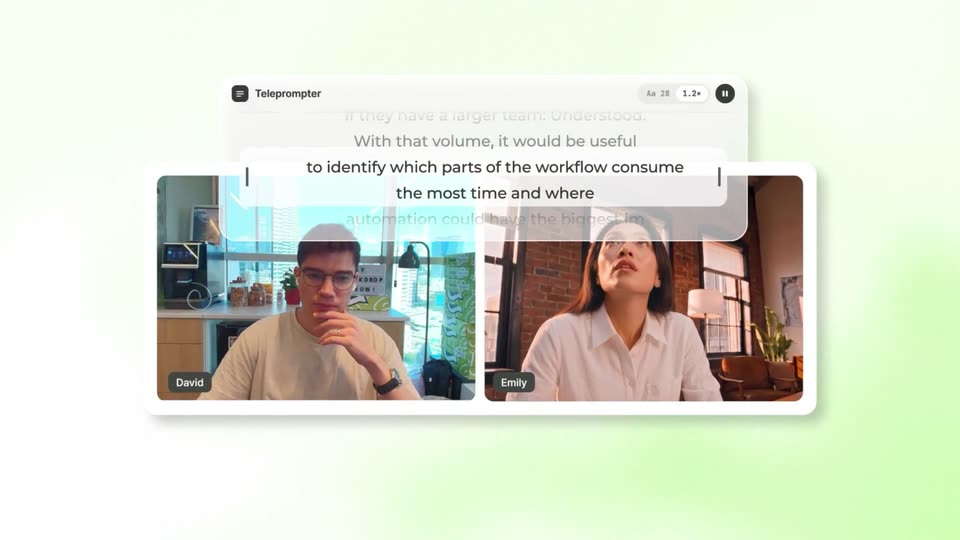
A teleprompter card with scrolling script text sits above two side-by-side video tiles of a man with glasses and a woman in a white shirt, both in home offices. They glance up toward the text. The card resolves from a faded ghost into a crisp view.
Techniques: Split screen
Camera: Pull out
A video call card with a teleprompter bar floats on a green gradient as note bubbles with sales prompts pop out and scatter across the frame. A cursor glides from bubble to bubble, turning two of them green on hover.
Techniques: 3D mockup, Cursor demo
Camera: Static
White suggestion chips blur and scatter away over a video call window on a green gradient, then a white timeline panel with tabs and prompt buttons slides up along the bottom of the call.
Camera: Push in
A blurred office video call sits behind a white UI panel. The panel shows a row of interview-stage cards and a cursor taps the Pain card, which highlights and fills its progress bar from 1 to 10 while a second panel slides up listing suggested prompts and status rows.
Techniques: Cursor demo
Camera: Static
A white app card in 3D perspective floats on a green background with pale squiggle shapes. It scales up and tilts as its category bars fill to 10, then slides up and fades, revealing a row of framework chips ringed by floating label pills.
On-screen text: “SPICED”, “SPIN”, “MEDDPICC”, “YOUR OWN”
Techniques: 3D mockup
Camera: Push in
On a bright green field with pale wavy strokes, a row of white slider cards labeled Situation, Pain, Impact, Event, Process, Small talk, Next steps scatters into 3D space, drifting at different depths past floating pill tags, then the white serif line One step forward fades in at center.
On-screen text: “One step forward”
Techniques: 3D mockup, Parallax
Camera: Pull out
A light three-column calendar grid fills the frame with colored event blocks in each day. A white pill holding the green Backdrop mark and the word Analysing fades in at the center while the surrounding events populate.
Camera: Static
A light email inbox view fills the frame, the list of sender names and subject lines scrolling up briefly before settling. A white rounded pill with a green square logo and the words “Finding context” hovers over the middle rows.
Camera: Static
A team chat thread scrolls down past member messages and a Google Calendar event alert; a “Building call brief” status pill and a “1/9 meeting notes” file card appear in the thread, one after the other.
Techniques: UI zoom
Camera: Static
A white meeting-overview card slides in over a fading chat view and settles on a light green grid as its date, title, body copy and a dark green pill button populate, then the frame locks off.
Camera: Static
A white meeting card sits on a pale green grid background. The card, headed 'Meeting overview' with body copy and a green 'Show more' button, slides down a few pixels while the frame stays locked.
Camera: Static
A white document card on a pale green grid shows a meeting transcript. The date Oct 10 slides into place above the dark green serif title and gray body text, in a locked-off close-up.
Camera: Static
A white note card on a green grid background displays a meeting transcript, then cuts to a meeting goals section with updated body text.
Camera: Static
A close-up of a white note card on a pale green grid. The card content swaps from an Oct 12, Meeting goals entry to an Oct 13, Meeting follow-up entry, each with a gray date, a dark green serif title and gray serif body lines. The frame stays locked off.
Camera: Static
A green dot-grid app icon with a blue badge morphs into a dark maroon rounded square bearing a light green four-petal mark, centered on a pale mint background. Below it, the serif words 'miss' and 'the moment' scale and settle in, building the tagline.
On-screen text: “Never”, “miss”, “the moment”, “again”
Techniques: Morph, Kinetic type
Camera: Static
A rounded-square app icon sits centered on a pale green grid background. Its inner glyph morphs from a person-and-circle mark into a double-loop monogram as the lowercase word “again” below clears.
On-screen text: “again”
Techniques: Morph
Camera: Static
A dark rounded square icon holding a light green loop mark sits centered on a green gradient with a faint dot grid. The word backdrop fades in beneath the icon, locking the logo in place for the sign-off.
On-screen text: “backdrop”
Camera: Static
A dark green rounded-square icon with a light green mark sits centered above the lowercase wordmark 'backdrop' on a green gradient with a faint grid. The frame is static and locked off.
Camera: Static