1:35

What's Figma? [2019]
Figma · Design · Oct 2019
Wajo AI · Sep 2026 · 2:34 · AI-annotated
Wajo AI’s 2:34 launch film runs 68 scenes, about 2.3 s each. The product shows up at 0:10 and 5 features are revealed. The call to action lands at 2:22 (93% in), over a voiceover. The video alternates live-action skits in a brick-walled studio with 3D phone mockups and flat two-panel UI screens on white, anchored by the smiling Fo face and drifting pastel pixel confetti. Pacing runs near eight cuts per minute, and each beat follows the same pattern: a task is stated in a caption bar, the phone mockup demos Fo handling it, and the mascot reacts.
Is this your launch? to your site or press kit.
Figma · Design · Oct 2019
FlowManual · Real Estate and Construction · Aug 2026
Figma · Design · Jun 2026
A woman in a black sweatshirt sits in a green armchair against a brick wall, speaking to camera; a phone stands on a wooden cube beside her. Chat bubbles pop in on the left while a lower-third name caption and subtitles lock in below.
On-screen text: “I'm Shivani”, “Shivani Poddar”, “Founder and CEO | Wajo”, “and today”, “Shivani?”, “I'm excited to introduce you to...”, “Hey? Are you ready for lunch?”, “Still good to meet for lunch yes?”, “NG 💔”, “Shivani?? Just say yes or no 😡”
Camera: Pull out
A woman in a black sweatshirt sits in a green armchair before a brick wall, checking her phone; a phone with a pink gradient screen stands on a wooden table beside her. A name caption and chat bubbles appear over the locked-off shot as subtitles caption her lines.
On-screen text: “Shivani Poddar”, “Founder and CEO | Wajo”, “lunch yes?”, “Shivani?? Just say yes or no”, “Hang on.”, “Oh Sh***.”, “I forgot, I have a lunch date, guys.”
Camera: Static
A woman in a black top and white pants sits in a green armchair in a brick studio holding a phone, then stands and walks off. The wide shot reveals cameras and lighting rigs around the set.
On-screen text: “I forgot, I have a lunch date, guys.”, “I have to go.”
Camera: Pull out
A phone mockup stands upright on a wooden table against a blurred brick wall. Its screen flips from a FaceTime call view to a chat message with a food photo as the device rotates in 3D.
On-screen text: “That's okay.”, “I've got a table booked”
Techniques: 3D mockup
Camera: Pan
A smartphone in 3D perspective stands on a wooden table against a blurred brick wall, its chat screen showing a message, a restaurant card and a ride card. The same elements reappear enlarged to the right, animating in sequence, while italic captions read the voiceover below.
On-screen text: “I've got a table booked”, “coming to pick you up in five minutes.”
Techniques: 3D mockup, UI zoom
Camera: Push in
A woman in a black top and white pants walks through a brick-walled office hallway holding a phone, then turns and walks away past a tripod and ring light. The camera tracks her movement. Subtitles caption the dialogue at the bottom.
On-screen text: “Thanks, Fo you're life saver.”, “You can take it from here.”, “My pleasure, Shivani.”
Camera: Push in
A smartphone stands on a wooden table before a blurred brick wall, its call screen glowing pink with a timer. A round white avatar with two black eyes pops out of the screen and drifts left as the camera pushes in. A caption reads “My pleasure, Shivani.”
On-screen text: “You can take it from here.”, “My pleasure, Shivani.”
Techniques: 3D mockup
Camera: Push in
A white cartoon face with a winking eye and open smile is revealed through an expanding oval mask, framed by a multicolor gradient ring and small drifting colored squares. An italic caption bar sits centered at the bottom.
On-screen text: “I'm Fo, your personal agent”
Techniques: Masking, Particles
Camera: Static
A white circular mascot with two black eyes and a smile sits centered on a white field, ringed by drifting colored confetti squares. It tilts and spins into a 3D ring, the face distorting as it flips, while the confetti scatters outward. A caption holds at the bottom.
On-screen text: “I'm Fo, your personal agent”
Techniques: Particles
Camera: Static
A grid of iOS-style app cards and icons floats in 3D perspective on a white field, centered on a smiling face badge. Red notification badges tick upward on Mail and Messages as the camera slowly pushes in; a dark caption bar carries the voiceover.
On-screen text: “I'm Fo, your personal agent”, “that actually gets shit done for you.”
Techniques: 3D mockup
Camera: Push in
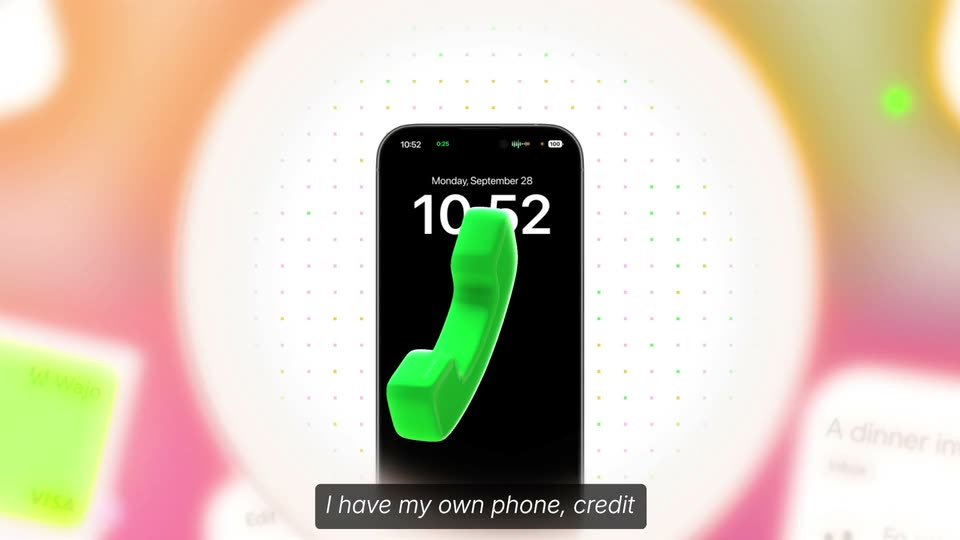
A 3D field of floating app icons, cards and red badges surrounds a watch face; a glossy green handset floats in front. The camera pushes in as the field blurs away and the watch face morphs into a phone screen on a pink dot-grid background.
On-screen text: “that actually gets shit done for you.”, “I have my own phone, credit card, and I'm 100% secure.”
Techniques: 3D mockup, Parallax, Morph
Camera: Push in
A 3D iPhone mockup floats on a white background dotted with pastel plus marks. Its screen shifts from a lock screen with a green 3D receiver icon to the Wajo app, showing a purple and a green card. A black caption bar sits at the bottom.
On-screen text: “I have my own phone, credit”
Techniques: 3D mockup
Camera: Push in
A flat phone mockup rests on a white field of small pink, green and yellow dots. Inside, a fanned stack of Wajo cards rotates and settles into one pink VISA card above a balance tile, with a dark caption bar at the bottom.
On-screen text: “I have my own phone, credit card, and I'm 100% secure.”
Camera: Push in
A white round mascot with two black oval eyes and a small smile sits centered on a pink field of multicolored confetti dots. Six white pill-shaped speech bubbles with short questions slide in around it. A dark caption bar holds the subtitle at the bottom.
On-screen text: “card, and I'm 100% secure.”
Camera: Push in
A pink confetti-dot background frames six rounded speech bubbles with humorous privacy questions around a central white badge. A simple black smiley face is revealed inside the badge as the bubbles fade in. A dark caption strip at the bottom swaps its line.
On-screen text: “card, and I'm 100% secure.”, “Why is my calendar full of Brenda's colonoscopy appointments??”, “Wait who TF is Jack? Are you sending me his plane tickets?”, “Wait, whose bank balance is this? Because it's definitely not mine!”, “Who's Kevin and why are you reminding me to pay his alimony?”, “Why did I get an email from an AA sponsor? I haven't signed up for that!”, “Why did 40 lbs of cat litter just show up at my door? I don't even have a cat.”, “Unlike other agents,”
Techniques: Masking
Camera: Push in
A white round face with oval eyes and a smile sits center on a pale polka-dot field, ringed by six grey speech bubbles of user questions. The layout holds steady as a dark rounded caption bar at the bottom shows the line.
On-screen text: “you don't have to worry about me”
Camera: Static
A white cartoon face with a smile floats in a polka-dot room ringed by chat bubbles posing awkward questions. The bubbles stretch into vertical ribbons that drop into a pixelated black vault with a padlock as the face frowns, while the camera pushes in toward the lock.
On-screen text: “you don't have to worry about me”, “leaking any sensitive information”
Techniques: 3D mockup, Morph, Parallax
Camera: Push in
A white rounded card with a simple black face sits on a polka-dot background. A gray bar wipes across the card and clears, the face's eyes morph, and a gray crescent draws in on the right edge while a black pixel blob below disappears.
On-screen text: “leaking any sensitive information”, “you tell me.”
Techniques: Morph
Camera: Static
A brick-walled lounge set with a gray armchair and wooden side table; a phone mockup stands on the table with a small round face icon floating above it. The camera dollies in toward the phone while caption text sits in a dark box at the bottom.
On-screen text: “Let's start with this”, “launch video.”, “you tell me.”
Camera: Push in
A single white profile card with a line-art face, name and role sits center on a white field dotted with a grid of small pink, yellow and green squares. The card then fans out into four tilted cards showing four crew members, each with a Hired tag, while a cursor hovers over the rightmost card. A dark caption bar reads at the bottom.
On-screen text: “I hired four crew members,”
Techniques: Cursor demo
Camera: Static
Four illustrated crew profile cards fan out over a confetti-dotted background, then morph into circular avatars as a 3D phone mockup rises from the bottom showing a flight booking. A dark caption box updates at the bottom.
On-screen text: “I hired four crew members,”, “I flew them in and”
Techniques: Morph, 3D mockup
Camera: Static
A 3D iPhone mockup sits on a white field of drifting colored squares. The travel app screen scrolls down from the San Francisco flight card to the passenger list as cartoon avatars pop in around the phone and a caption narrates the booking.
On-screen text: “flew them in”, “and booked their hotels and Ubers.”
Techniques: 3D mockup, Particles
Camera: Static
A phone in 3D perspective on a white background shows a map route and an UberX fare card, framed by drifting multicolored confetti squares. A dark caption bar at the bottom reads and booked their hotels and Ubers.
On-screen text: “and booked their hotels and Ubers.”
Techniques: 3D mockup, Particles
Camera: Static
A 3D phone mockup shows a San Francisco map with hotel and ride cards. A green hotel booking panel slides up from the bottom to cover the map while multicolored confetti streams past the right edge.
On-screen text: “and booked their hotels and Ubers.”, “All booked by robots and cubers.”
Techniques: 3D mockup, Particles
Camera: Static
A 3D phone mockup on a white field shows the Wajo app with a green VISA card; Uber and Booking.com transaction cards fly from the margins into the screen, then the display switches to a black 11:00 lock screen with a smiley icon as colorful pixel confetti falls.
On-screen text: “All paid on my own credit card.”, “Oh, 11 a.m. already.”
Techniques: 3D mockup, Particles
Camera: Pull out
A 3D-rendered phone stands centered on a pale pixel-squared backdrop, its black lock screen showing 11:00 and a white smiling face icon. Colored confetti squares drift across the screen and background as the caption Oh, 11 a.m. already. sits at the bottom.
Techniques: 3D mockup, Particles
Camera: Static
A front-facing iPhone on a light pixelated background shows the lock screen at 11:00 with a white smiling face and falling confetti squares. A lunch notification banner slides across the middle, then a white hand reaches in from the left toward the face.
On-screen text: “Oh, 11 a.m. already.”
Techniques: Particles
Camera: Static
A front-facing iPhone mockup in 3D sits on a light gray backdrop, its lock screen showing an 11:00 time and a lunch notification. A white cartoon ghost with a pointing hand gestures at the banner from the right, while a dark caption bar holds the line below.
On-screen text: “I should probably order lunch for the crew.”
Techniques: 3D mockup
Camera: Static
Two flat call panels sit side by side, a pink Fo side and a blue El Taco Loco side, each with a circular avatar. Live transcripts type out word by word with pink and blue highlight chips, switching between English and Spanish, while black feature badges pop in at left.
On-screen text: “0.32s”, “Persistent Memory”, “0.17s”, “Multi Language”, “0.21s”, “Own Credit Card”
Techniques: Split screen, Kinetic type
Camera: Pull out
An iPhone lock screen shows 11:31 and a notification from NG: “The plumbing still isn’t fixed!”. A white circular icon on the right morphs from a calm smile into a face pointing up, as white italic captions read “Shivani’s partner just messaged the family group chat,”.
On-screen text: “Shivani's partner”, “just messaged the family group chat,”
Techniques: 3D mockup, Morph
Camera: Static
A tilted iPhone mockup on a checkered background shows a family group chat scrolling up as a white blob character peeks from the right edge, pointing at the screen. It cuts to an assistant chat typing a reply while pink and green confetti squares pop.
On-screen text: “just message the family group chat,”, “the plumbing still isn't fixed.”, “Okay, I'm calling five plumbers now”
Techniques: UI zoom, Particles
Camera: Push in
A tilted phone mockup on a white background with drifting pink and green confetti. The chat screen crossfades into a list of five plumber call cards as a white cartoon character with a pointing hand slides from the right to the left. A dark caption bar updates at the bottom.
On-screen text: “Okay, I'm calling five plumbers now”, “and negotiate the best option.”
Techniques: 3D mockup, Particles
Camera: Pull out
A front-facing phone mockup shows a list of five plumbing company contacts with black phone icons. A small white round mascot with a gloved hand points at the last row, while pink and green confetti dots sit on a white background and a caption bar runs along the bottom.
On-screen text: “and negotiate the best option.”
Camera: Pull out
On a pink halftone background, a white circle holds a cartoon face with a hand near its mouth, labeled 'Fo'. Below a dotted line, the sentence appears word by word as an orange highlight slides behind the spoken words, the line scaling down to fit.
On-screen text: “Fo”, “Hi! I'm calling about a plumbing repair.”
Techniques: Kinetic type
Camera: Pull out
A white cartoon avatar with black oval eyes and a small smile sits on a pink dithered grid above a dotted divider. Below, a call transcript line scales in, its spoken words highlighted in an orange chip, then the line swaps to the next question.
On-screen text: “Hi! I’m calling about a plumbing repair.”, “What's your availability?”
Techniques: Kinetic type
Camera: Static
Five vertical phone cards, one per plumber brand, sit side by side with colored pixel headers. Messages type in beneath each with an audio waveform. Four cards gray out and slide away, leaving two, while a dark caption box narrates the hang-ups. The frame cuts to a phone showing the call list and a sad face.
On-screen text: “In this case,”, “two plumbers hang up on Fo,”, “maybe because they thought it was Al.”, “Since the plumbers don't have a site or an MCP,”
Techniques: Masking, Split screen, UI zoom
Camera: Pan
A flat phone mockup shows a list of plumber call entries scrolling upward, with a sad-face mascot at the right. The phone then slides right, revealing two line-art cards: a person on a phone and a waving robot.
On-screen text: “Since the plumbers don't have a site or an MCP,”
Techniques: Split screen
Camera: Pull out
A horizontal carousel of white cards with black line icons and labels (woman at laptop, man on phone, robot with calendar, man holding a handset) scrolls left to right in front of a phone mockup that shifts from blurred to in focus. A round white character face drifts from top left to top right, its expression changing, while a hand points at it and caption pills roll along the bottom.
On-screen text: “Book online”, “Call them”, “Book via MCP”, “Since the plumbers don't have a site or an MCP,”, “Use a human to call them”, “Fo decides to use one if its”
Techniques: Parallax
Camera: Pull out
A tilted phone mockup sits on a white field between two line-art cards, one showing a person on a call, the other a person pointing. The cards fall away as the phone slides down, its screen switching from a call list to a video call.
On-screen text: “real trained human executive assistants”
Techniques: 3D mockup
Camera: Static
A small video player with colored crop corners and a dark play button sits on a pixelated white background. A cursor clicks play, the footage of a woman with glasses expands to full screen, and a black check badge plus a white smiley icon pop in around her as she speaks.
On-screen text: “real trained human executive assistants”, “to get the task done.”, “Real human's to do tasks”, “Hi, CG Plumb, how can I help you?”, “Hey, I was wondering if you guys have any”
Techniques: Cursor demo
Camera: Push in
A woman with glasses and hoop earrings holds a phone and talks to camera in a home hallway, a white round chatbot face icon floating at left. A black caption bar at the bottom shows the subtitle line. The frame stays locked-off and still.
On-screen text: “Hey, I was wondering if you guys have any”, “availability tomorrow for Hoboken?”
Camera: Push in
A smartphone mockup rotates from a tilted 3D angle to a flat front view, revealing a full chat thread of blue and gray bubbles. A white cartoon face with a pointing hand shrinks to a smiling blob. Gray background pixels turn multicolored. A dark caption box swaps text.
On-screen text: “availability tomorrow for Hoboken?”, “Hey, Shivani.”
Techniques: 3D mockup
Camera: Pull out
A 3D iPhone mockup centers on white over a pixelated multicolored face and black oval eyes. The screen morphs from a chat thread into a September calendar of colored blocks, a pink voice waveform pill at the right edge. A dark caption pill at the bottom carries the update.
On-screen text: “Quick update.”, “I scheduled the plumber for 12:30”
Techniques: 3D mockup, Morph
Camera: Static
A 3D phone mockup on a white field of colored pixel squares shows a calendar app with event blocks. A cartoon white hand with a smiling face points at the screen beside a pink audio waveform, then drops as the waveform fades. A dark caption bar sits at the bottom.
On-screen text: “I scheduled the plumber for 12:30”
Techniques: 3D mockup
Camera: Push in
A 3D phone mockup angles in over a field of colored squares, showing a calendar of colored event blocks. The view reframes to a front-on close-up as a Bank of America payment notification drops in and the calendar blurs behind it, while a caption reads the voiceover.
On-screen text: “tomorrow”, “Oh, and I noticed your gym”
Techniques: 3D mockup, UI zoom
Camera: Push in
A smartphone mockup floats centered over a white field of scattered colored squares. The screen pulls into focus, shifting from a blurred Bank of America payment alert to a sharp fitness app showing a gym class and a memberships row, while a caption sits at the bottom.
On-screen text: “Oh, and I noticed your gym”, “charged you again this morning.”
Techniques: 3D mockup
Camera: Pan
A 3D phone mockup of a fitness app sits on white with scattered colored pixels. The interface scrolls from home to a payment page and a chat thread. A doodled face and pointing hand drift from left to right as a pink waveform sweeps across. Italic captions narrate the cancellation.
On-screen text: “charged you again this morning.”, “So I went ahead and canceled”, “the duplicate membership.”
Techniques: 3D mockup
Camera: Pan
A phone mockup in 3D perspective, tilting gently, displays a voice-note chat. A blue bubble's waveform pulses and its timer counts up as a dark caption at the bottom types out the transcription. Pastel confetti squares dot the white background.
On-screen text: “I've been meaning to do that for a year now.”
Techniques: 3D mockup
Camera: Static
A woman in a black top and white trousers walks through an open-plan office with exposed wooden beams and brick walls, the camera tracking her past a blurred plant in the foreground.
Camera: Pull out
A phone stands upright on a wooden table before a blurred brick wall, its screen showing an incoming call with a pink gradient and a face avatar. A white circular face icon drifts down from the upper left toward the device. A dark caption box sits at the bottom.
On-screen text: “Oh. You're back.”
Techniques: 3D mockup
Camera: Static
A woman in a black top and white cropped pants sits in a green armchair against an exposed brick wall, gesturing with her hands as she speaks. A black caption bar with white text is locked at the bottom of the frame.
On-screen text: “Oh. You're back.”, “So, like I was saying,”
Camera: Static
A woman in a black sweatshirt and white pants sits in a green armchair before a brick wall, talking and gesturing with both hands. A white caption on a dark pill sits at the bottom of the locked-off medium shot.
On-screen text: “So, like I was saying,”
Camera: Static
A green-to-pink gradient with floating white squares frames a left timeline of years, the black highlight pill stepping from 2022 to 2026. White profile cards stack on the right, then the frame widens into a multi-column grid of scrolling cards.
On-screen text: “for most of the last decade,”, “this kind of hands-on help”, “was something only the world's”, “billionaires could afford.”
Techniques: Particles
Camera: Pull out
A flat grid of profile cards, each with a headshot, name, rate and job title, fills the frame. A tilted 3D phone mockup then scales up in the center, showing a Messages app thread, while a black caption bar sits at the bottom.
On-screen text: “billionaires could afford.”
Techniques: 3D mockup
Camera: Pull out
A 3D phone mockup sits centered on white. Its screen shifts from a Messages list to a chat view where a blue bubble types in. Small colored confetti squares scatter around the device, and a dark caption bar reads at the bottom.
On-screen text: “Now, with Fo, you just text it,”
Techniques: 3D mockup, Particles
Camera: Static
A front-facing iPhone mockup sits centered on a white field with small colorful confetti squares drifting around it. On screen, a chat with contact Fo shows a blue sent bubble about a birthday dinner, then two gray reply bubbles fade in one after another. A dark caption bar at the bottom reads the line about texting Fo.
On-screen text: “Now, with Fo, you just text it,”
Techniques: Particles
Camera: Static
Two phone mockups float on a white field scattered with pastel confetti squares. The rear phone shows an email inbox, the front a chat thread with a smiling avatar. The front phone scales up toward the camera while a dark caption pill reads “or email it, or call it.”
On-screen text: “or email it, or call it.”
Techniques: 3D mockup, Particles, UI zoom
Camera: Push in
An iPhone mockup sits centered on a white background, its screen showing an incoming call with a smiling avatar and a running timer. Small pink, gray, and yellow squares drift around it. A dark caption bar at the bottom updates as the call continues.
On-screen text: “or email it, or call it.”, “It will meet you where you are”
Techniques: 3D mockup, Particles
Camera: Push in
A front-facing phone mockup on a white field with drifting confetti squares shows a chat app. A greeting fades, a black bubble appears asking to find a cleaner, then a gray reply lists a candidate with price and time.
On-screen text: “and will take care of any mundane task”, “that you send its way.”
Camera: Static
A 3D phone mockup, angled on a white field with drifting confetti squares, shows a chat that updates in place: the request shortens and a booking confirmation slides in while the device turns to face the camera.
Techniques: 3D mockup, Particles
Camera: Static
Pastel pixel squares drift around the edges of a black frame while a white, rounded 3D object tumbles through the center with heavy motion blur. A pink pixel block pops up at the bottom, then a white caption line settles in.
On-screen text: “The first 1,000 users to sign up for Fo”
Techniques: Particles
Camera: Push in
A tilted green-to-pink invite ticket with the WAJO mark scales down and rotates into a white frame edged by a pastel border and pixel clusters. A black blob mascot sits on its right edge while a dark caption bar reads at the bottom.
On-screen text: “The first 1,000 users to sign up for Fo”
Techniques: 3D mockup
Camera: Static
The Wajo settings page scrolls up and the view pushes in on three invite cards, each with a dark Give access button, while a dark caption pill at the bottom carries white text across the frame.
On-screen text: “The first 1,000 at Wajo to sign up for Fo”, “at Wajo.ai”
Techniques: UI zoom
Camera: Pull out
A single WAJO invite card tops a white screen above a dark caption pill. The view pulls back into a full grid of pastel invite cards, each with a distinct headline and a black 'Give access' button, filling the frame edge to edge.
On-screen text: “get OG Poe, with unlimited tasks,”
Camera: Pull out
A full-bleed grid of colorful invite cards, each with a prompt line and a black Give access pill, scrolls slowly upward. A black lower-third caption at the bottom center swaps from the first line to the second.
On-screen text: “get OG Poe with unlimited tasks,”, “and full group chat access.”
Camera: Pull out
Faint product cards dissolve out of the top of a pale, softly glowing frame, leaving a centered pill button that fills from a gradient outline to solid dark as a cursor hovers it; a dark caption sits below.
On-screen text: “Join Wajo.ai”, “and full group chat access.”
Techniques: Cursor demo
Camera: Static
A yellow pill button with a pixel W logo and the text Join Wajo.ai sits centered on white, a black cursor hovers over it. The button turns green and scales up as a bottom caption fades out.
On-screen text: “and full group chat access.”
Techniques: Cursor demo
Camera: Static
A pink “Join Wajo.ai” button with a cursor sits amid falling pastel confetti, then the button drops away to reveal the black WAJO logo as the confetti fades out, leaving the mark alone on white.
On-screen text: “Join Wajo.ai”, “WAJO”
Techniques: Particles, Cursor demo
Camera: Push in