0:51
Explore
CapCut - Introducing CapCut Video Studio, a timeline-free way to create videos
CapCut · Mar 2026 · 1:16 · AI-annotated
- Length
- 1:16
- Scenes
- 49 · 1.6 s avg
- Product on screen
- 0:04
- Features shown
- 8
- Call to action
- 1:08 · 89%
- Voiceover
- Yes
00:00:00 / 01:16:06
CapCut’s 1:16 launch film runs 49 scenes, about 1.6 s each. The product shows up at 0:04 and 8 features are revealed. The call to action lands at 1:08 (89% in), over a voiceover. A CapCut Video Studio launch built as a cold open of a sketching creator that dissolves into a floating 3D workspace, then a steady march of headline-led feature chapters (build, create, draft, visualize, chat, batch, refine, cinematic) each demoed on a pale blue canvas with a gliding teal cursor. It closes on a generated cinematic montage and a tagline over the brand mark, with crisp type-on headlines, scroll-and-dolly camera moves, and morphing assets as its signature moves.
Footage neededEstimated needs: 11 capture groups — your screens or recordings · 1 official logo — reused across the film · 12 filmed passages — shoot, supply or replace · 2 graphic passages — draw or supply · 4 3D passages — build or supply
Is this your launch? to your site or press kit.
More like this
1:46
0:19
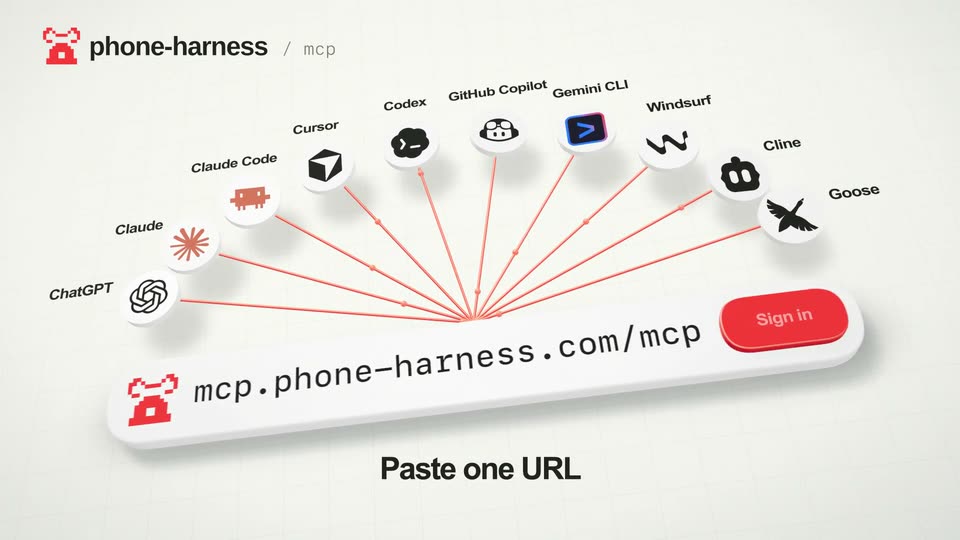

shawn - Introducing: Phone Harness MCP 🔌 Any agent that supports MCP can now
Phone Harness · B2B · Nov 2026
CapCut - Introducing CapCut Video Studio, a timeline-free way to create videos, scene by scene
· 49 scenes as text
01 · Hook · 0:00–0:00
Over-the-shoulder shot of a man in orange glasses sketching a face in a spiral notebook at a wooden desk. A small orange lamp glows on the left, an open notebook and mug sit nearby, and a laptop showing a line drawing is on the right.
On-screen text: “CapCut”
Camera: Push in
02 · Hook · 0:00–0:01
A man in orange glasses and a dark turtleneck sits at a wooden desk in a sunlit home office, typing on a laptop, then turns to flip through an open sketchbook beneath an orange lamp. An easel with pinned character sketches stands at left.
On-screen text: “CapCut”
Camera: Static
03 · Hook · 0:01–0:02
A man in a navy turtleneck and orange glasses sits at a desk, flipping the pages of an open book. Behind him, a wooden easel holds sheets of sketches and a laptop rests on the table. The CapCut logo sits in the top left corner.
On-screen text: “CapCut”
Camera: Static
04 · Hook · 0:02–0:02
A man in orange glasses and a dark turtleneck sits at a wooden desk, tapping the table with one hand and holding a pen in the other, then leans back. A sketchbook, orange lamp and laptop sit before him; an easel of sketches stands behind.
On-screen text: “CapCut”
Camera: Static
05 · Hook · 0:02–0:03
A bearded man in a navy turtleneck and orange glasses lifts a pencil portrait and places it on a wooden easel already holding several sketch sheets, in a softly lit studio with a plant behind.
On-screen text: “CapCut”
Camera: Static
06 · Hook · 0:03–0:04
A pencil portrait of a woman is pinned to a wall among taped-up gesture sketches. The camera starts tight on the face and slowly pulls back, revealing the surrounding sheets and masking tape.
On-screen text: “CapCut”
Camera: Pull out
07 · Product intro · 0:04–0:08
A 3D CapCut editor workspace drifts in perspective as the camera dollies across floating assets, a woman's portrait clip, a link card, a line-art face and a story text block, then settles on three side-by-side clips: a gray placeholder, a woman in black, a yellow car on a desert road.
On-screen text: “https://screencraft.org/blog/101-epic-...”
Techniques: 3D mockup, Parallax, UI zoom
Camera: Static
08 · Product intro · 0:08–0:08
A horizontal strip of rounded video clips scrolls left across a pale blue background, showing a rider on a white horse, a yellow car seen from above, a coffee cup, an orange car at sunset, and a cartoon mountain landscape, with a small white icon pill fixed at the left edge.
Camera: Pan
09 · Product intro · 0:08–0:09
A pale interface shows a horizontal strip of rounded video thumbnails scrolling left: a desert, an anime rider on a rocket, and a woman floating over a planet. A small vertical icon toolbar sits at the left edge and the CopCut logo marks the top left corner.
Camera: Pull out
10 · Product intro · 0:09–0:10
Three rounded media cards track left on a pale blue canvas: a red sunset over mountains, a vertical phone frame playing a 3D woman jetpacking above a planet, and a fantasy portrait tagged Image, with a white icon toolbar pinned to the left edge.
Camera: Pan
11 · Product intro · 0:10–0:14
Scattered rounded image cards float on a pale blue canvas while the headline “Let's meet CapCut Video Studio with Dreamina Seedance 2.0” builds line by line in the center. The camera pulls back to reveal the full CapCut workspace and its AI agent input bar, a teal cursor hovering.
On-screen text: “Let's meet”, “CapCut Video Studio”, “with Dreamina Seedance 2.0”
Techniques: Kinetic type, UI zoom, Cursor demo
Camera: Pull out
12 · Feature reveal · 0:14–0:21
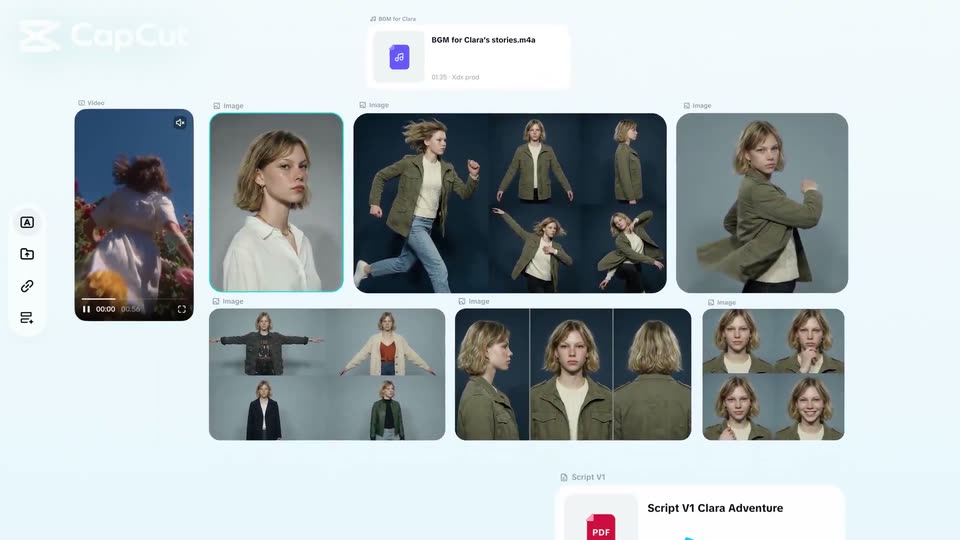
A CapCut workspace under the heading Build your character shows a portrait card with a teal ring as a cyan cursor types a prompt and clicks send. A grid of character images pops in row by row, then video, audio and PDF chips slide in.
On-screen text: “Build your character”
Techniques: Cursor demo
Camera: Pull out
13 · Feature reveal · 0:21–0:22
The CapCut editor fills the frame, a canvas of photo clips and a video preview beside an AI chat panel with prompt suggestions. A teal cursor glides from the image grid down to the script PDF card.
Techniques: Cursor demo
Camera: Push in
14 · Feature reveal · 0:22–0:23
A CapCut composer box fills with a typed prompt and a row of asset chips for Clara, Video 1, Script V1 and BGM, which reflow as a cyan cursor glides across them. Below the box, the line Create with anything builds up in bold black.
On-screen text: “Create with anything”
Techniques: Cursor demo, Kinetic type
Camera: Static
15 · Feature reveal · 0:23–0:26
A cyan cursor glides to the black send button on a CapCut prompt box and clicks it, then the box slides right off frame while the caption stays below.
On-screen text: “Create with anything”
Techniques: Cursor demo
Camera: Static
16 · Feature reveal · 0:26–0:27
The CapCut logo marks the top left as the headline “Draft your story” centers above. A photo card labeled “Character 1”, showing a woman in an olive jacket, scales up from a small thumbnail to full size at center, while a slim icon toolbar appears at the left edge.
On-screen text: “Draft your story”
Camera: Push in
17 · Feature reveal · 0:27–0:27
A pale UI canvas displays the headline Draft your story. A rounded portrait card labeled Character 1 slides slightly left, and a second card labeled Video brief 1 appears to its right with form fields.
On-screen text: “Draft your story”
Camera: Static
18 · Feature reveal · 0:27–0:29
A light interface holds the headline Draft your story at the top. A character card and a video brief panel sit on the left while the view pans right to bring a storyboard panel into frame, showing a timestamped list of thumbnails and a snow-scene video preview.
On-screen text: “Draft your story”
Camera: Pull out
19 · Feature reveal · 0:29–0:31
The CapCut storyboard interface scrolls downward through character cards, video brief panels and storyboard lists. A video preview on the right plays a woman in a blue jacket, then a desert spaceship scene, as the layout reveals additional briefs.
Camera: Push in
20 · Feature reveal · 0:31–0:35
A light-blue screen shows a two-column editor: a list of captioned thumbnails on the left, a video preview of a starship on the right. A cursor hovers a row as its caption types itself in, then the frame pans right to center the preview, which switches to a disc-shaped craft.
On-screen text: “Visualize each scene”
Techniques: Cursor demo, UI zoom
Camera: Push in
21 · Feature reveal · 0:35–0:36
The CapCut editor opens on a rounded preview frame showing a metallic UFO hovering over a desert, golden dust plumes rising from its thrusters. Below, a timeline of clip thumbnails and a play button sit on a white background.
Camera: Static
22 · Feature reveal · 0:36–0:36
The CapCut editor plays a sunset clip of a woman driving in its preview window as the timeline below advances, the cyan selection box sliding right across thumbnails.
Camera: Static
23 · Feature reveal · 0:36–0:37
The CapCut editor interface fills the frame on a pale background. A rounded preview window plays an armored truck speeding through a desert behind a fireball, while a thumbnail timeline runs along the bottom and a playhead marker steps rightward.
Camera: Static
24 · Feature reveal · 0:37–0:38
A locked-off view of the CapCut editor: a rounded preview window plays desert battle footage, soldiers sprinting past a helicopter in a dust cloud, with a thumbnail timeline and advancing playhead below. The preview cuts to an explosion as the clip plays.
Camera: Static
25 · Feature reveal · 0:38–0:39
A CapCut editor screen shows a video preview of a woman in a black tank top standing before a fiery explosion. Below, a horizontal timeline of clip thumbnails runs with a playhead advancing and a timecode ticking up.
Camera: Static
26 · Feature reveal · 0:39–0:40
The CopCut editor shows a video preview of a woman before an explosion; the view zooms into her face, then pulls back to reveal a canvas of image cards with blue selection outlines.
Techniques: UI zoom
Camera: Pull out
27 · Feature reveal · 0:40–0:42
A flat CapCut project dashboard pans left to right across a grid of portrait cards and a text block. A teal cursor hovers over one portrait as the Key elements panel on the right lists visual style, character, music and platform fields.
Techniques: Cursor demo
Camera: Pull out
28 · Feature reveal · 0:42–0:44
A CapCut chat panel is shown in close-up. A prompt line with a small photo chip reads “Now make Fantasy Clara a hunter.” A cyan cursor drifts downward and a gray caption “Chat for inspiration” fades in at the bottom.
On-screen text: “Chat for inspiration”
Techniques: UI zoom, Cursor demo
Camera: Pull out
29 · Feature reveal · 0:44–0:47
A white chat card sits on a pale blue background. The frame opens zoomed on its top, then pulls back as the AI types three story options. The view scrolls to suggestion chips, then the card clears to an empty state and a teal gradient placeholder fades in.
Techniques: UI zoom
Camera: Pan
30 · Feature reveal · 0:47–0:49
Zoomed into a grid of teal placeholders on a pale blue canvas, an archer image scales into the top-left cell. The view pulls back to reveal the full editor interface: nine generated frames of an archer and dragon fill the grid, flanked by side panels, under the headline.
On-screen text: “Batch-generate shots”
Techniques: UI zoom
Camera: Pull out
31 · Feature reveal · 0:49–0:55
A CapCut editor shows a woman in a field; the caption “Refine every detail.” builds word by word below. A prompt bar types a weapon change and the rifle morphs into a bow; a model menu picks Seedream 4.5, then the backpack morphs into a leather quiver.
On-screen text: “Refine every detail.”
Techniques: Kinetic type, Morph
Camera: Static
32 · Feature reveal · 0:55–0:56
A CapCut storyboard grid of nine video clips, blurred at first, snaps into sharp focus as a cyan cursor arrow glides from the top-left thumbnail toward the center. A left toolbar and a storyboard sketch frame the edges.
Techniques: Cursor demo
Camera: Static
33 · Feature reveal · 0:56–0:56
A CapCut workspace with a 3x3 grid of adventure stills, a character sketch and reference photos blurs out to white as a centered pill reading “Video”, “Sora 2” and “16:9” fades in.
Camera: Static
34 · Feature reveal · 0:56–0:59
A light-blue CapCut prompt field types a scene, a model dropdown opens and picks Dreamina Seedance 2.0, then the view reframes onto a black circular up-arrow button. A bold black headline builds word by word along the bottom.
On-screen text: “Go cinematic with Dreamina Seedance 2.0”
Techniques: Kinetic type, UI zoom
Camera: Pan
35 · Feature reveal · 0:59–1:00
A white rounded card sits on a pale blue field. A teal cursor arrow slides up and taps a dark circular button, which fills with a glowing cyan up-arrow.
Techniques: Cursor demo
Camera: Static
36 · Feature reveal · 1:00–1:01
A person with short blond hair, a white blouse and a dark corset sprints across a dry golden field holding a wooden bow. The handheld camera tracks them from the side under a grey overcast sky, the grass and trees blurring with the fast movement.
Camera: Push in
37 · Feature reveal · 1:01–1:02
A close profile of a woman with wind-blown hair in a dry field under a grey sky, then the camera whip-pans right, blurring past her into the distant trees and grass.
Camera: Pan
38 · Feature reveal · 1:02–1:02
An extreme close-up of a woman's eye pulls back to a tight close-up of her face as she looks off to the side, her expression tense against a soft, out-of-focus outdoor background.
Camera: Push in
39 · Feature reveal · 1:02–1:03
A lone person stands in a wide grassy field under a heavy gray sky. A large gray armored dragon lunges in from the left, its head and neck filling the foreground, streaked with motion blur as it rushes forward.
On-screen text: “CapCut”
Camera: Pull out
40 · Feature reveal · 1:03–1:04
A horned, muscular CGI beast with red eyes roars and grips a wooden staff with a blade, framed against a gray cloudy sky. The creature's jaw opens and head tilts between frames; the CapCut watermark sits in the top left.
Camera: Static
41 · Feature reveal · 1:04–1:05
A low-angle medium shot of a gray horned CGI beast with glowing red eyes, its jaw snapping open in a snarl against a cloudy sky, a blurred limb swinging at the left edge.
Camera: Push in
42 · Feature reveal · 1:05–1:06
A green-skinned ogre-like creature sprints toward the camera across a dry grass field, swinging a bone-wrapped axe, dust kicking up at its feet under a dark stormy sky. The shot is heavily motion-blurred.
Camera: Pull out
43 · Feature reveal · 1:06–1:08
A grey horned monster swings a double-bladed axe overhead against a cloudy sky, the white CapCut logo fixed in the top-left corner. A brief white interface panel with a dragon illustration flashes mid-shot.
On-screen text: “CapCut”
Camera: Push in
44 · CTA · 1:08–1:08
A pale blue CapCut canvas: a rounded clip of a roaring goat sits center, then a text field types Dre with a cyan caret as two more clips, one showing the letter S with selection handles, slide in from the edges.
Techniques: Kinetic type, Cursor demo
Camera: Pull out
45 · CTA · 1:08–1:08
On a pale blue background, the word Direct is typed in black with a blinking cyan caret at center. Rounded video and illustration tiles drift at the edges, a CapCut clip top left, a hatted woman top right, a creature bottom right, a staffed woman bottom left.
On-screen text: “Direct”
Techniques: Kinetic type
Camera: Pull out
46 · CTA · 1:08–1:09
On a pale blue field, video thumbnails drift and reposition around a centered black headline that types out “Direct Your Next Story” behind a thin cyan cursor; a small “Dreamina Seedance 2.0” caption sits bottom left.
On-screen text: “Direct Your Next Story”, “Dreamina Seedance 2.0”
Techniques: Kinetic type, Parallax
Camera: Pull out
47 · CTA · 1:09–1:11
A collage of product video cards, tagged with labels like 'Knowledge sharing' and 'Product video', drifts across a pale blue field at different depths. The dark headline 'Direct Your Next Story' stays fixed in the center.
On-screen text: “Direct Your Next Story”
Techniques: Parallax
Camera: Pull out
48 · Outro · 1:11–1:12
A black CapCut logo holds the top center while the white web-app home screen scales up from a small panel into the lower half, bringing the left sidebar and a row of template thumbnails into view.
Camera: Pan
49 · Outro · 1:12–1:16
The CapCut wordmark sits centered above a tilted 3D mockup of the web interface. A teal cursor glides in from the left and hovers over the Video Studio menu item, which lights up with a white pill.
On-screen text: “CapCut”
Techniques: 3D mockup, Cursor demo
Camera: Static