0:19

shawn - Introducing: Phone Harness MCP 🔌 Any agent that supports MCP can now
Phone Harness · B2B · Nov 2026
Ideogram · Aug 2024 · 0:51 · AI-annotated
Ideogram’s 0:51 launch film runs 49 scenes, about 1.1 s each. The product shows up at 0:06 and 7 features are revealed. The call to action lands at 0:28 (56% in). A fast-cut launch film that opens on a montage of the word CREATE rendered in a dozen materials, then settles into a soft pastel gradient system where each feature is announced by a centered two-line headline and demoed with a tilted 3D UI panel and a gliding white cursor. The pacing is relentless in the first half (roughly a cut every second) and slows to locked-off title cards for the value props, before a hard tonal shift to near-black for the API reveal and a chromatic-aberration logo sting.
Is this your launch? to your site or press kit.
Phone Harness · B2B · Nov 2026
Ahrefs · Aug 2026
A black-and-white shot of an Einstein-like man at a chalkboard underlines the word CREATE, then a hard cut reveals a color airplane on a tarmac carrying the same word in blue across its fuselage.
On-screen text: “CREATE”
Camera: Static
Two quick live-action cuts show the word CREATE being formed: handwritten in wet sand on a beach, then painted in bold black by a woman on a canvas with red, orange and blue drips.
On-screen text: “Create”, “CREATE”
Camera: Static
A witch in a green robe and black hat holds her hands out as the word CREATE burns in flames across her chest. The scene hard-cuts to an animated cat in a top hat and suit holding a white banner reading CREATE in a neon night street.
On-screen text: “CREATE”
Techniques: Kinetic type
Camera: Static
A flat-lay of pink, purple and yellow flowers spells the word CREATE on a blue background, then dissolves into a newspaper front page carrying the same word as its masthead, the page pulling into focus.
On-screen text: “CREATE”
Techniques: Kinetic type, Morph
Camera: Static
A close-up of white paper shows CREATE in multicolored crayon letters, framed by scattered crayons and scribbles. It cuts to a painted red-bearded man holding a black placard with CREATE in outlined, shape-filled capitals against a chalkboard wall. The word scales slightly.
On-screen text: “CREATE”
Techniques: Kinetic type
Camera: Static
A white-frosted cake with a piped rainbow and the word CREATE in teal icing, lit by candles, gives way to a glass of milk whose splash spells Create, droplets scattering. The word scales between the two shots on a locked-off frame.
On-screen text: “CREATE”
Techniques: Morph, Kinetic type
Camera: Static
A pastel gradient field holds a large bold black create that scales down and shifts right as What will you assembles beside it, forming What will you create? The line then blurs and drifts off to the left, leaving the empty gradient.
On-screen text: “create”, “What will you create?”
Techniques: Kinetic type
Camera: Static
A white humanoid robot with gold joints paints on an easel in a studio; the frame cuts to a macro of floral-painted nails dipping a brush into a pink polish bottle, then back to the robot. The word CREATE scales in.
On-screen text: “CREATE”
Techniques: Kinetic type
Camera: Static
A white-suited astronaut with a glowing blue back panel stands on rocky ground, facing a smoking dark wreck overhead. A hard cut jumps to an extreme close-up of a green human eye as a gloved hand reaches toward the upper lid.
Camera: Static
A panda stands on snow before a banner reading ARE YOU READY FOR VERSION 2.0?, then the shot cuts to a long-haired rocker in a bandana and leather jacket screaming into a microphone under bright stage lights.
Camera: Push in
On a pale blue-to-pink gradient, the ideogram mark and bold wordmark sit centered beneath the thin word Introducing. Small line-drawn icons, a cube, smiley, four-petal flower, star and trash can, orbit the lockup in a motion-blurred ring.
On-screen text: “Introducing”, “ideogram 2.0”
Camera: Static
On a soft pastel gradient, the static title “Introducing ideogram 2.0” sits centered with the black logo mark. Blurry line-drawn icons, a cube, smiley face, sparkle and box, drift in a slow orbit around the text on a locked frame.
On-screen text: “Introducing”, “ideogram 2.0”
Camera: Static
A centered black headline asks 'What's your color palette?' on a soft pastel gradient, the bold second line scaling slightly. Thin outline cursor arrows drift around the text, one sliding toward the right edge.
On-screen text: “ideogram 2.0”, “Introducing”, “What's your”, “color palette?”
Techniques: Kinetic type
Camera: Static
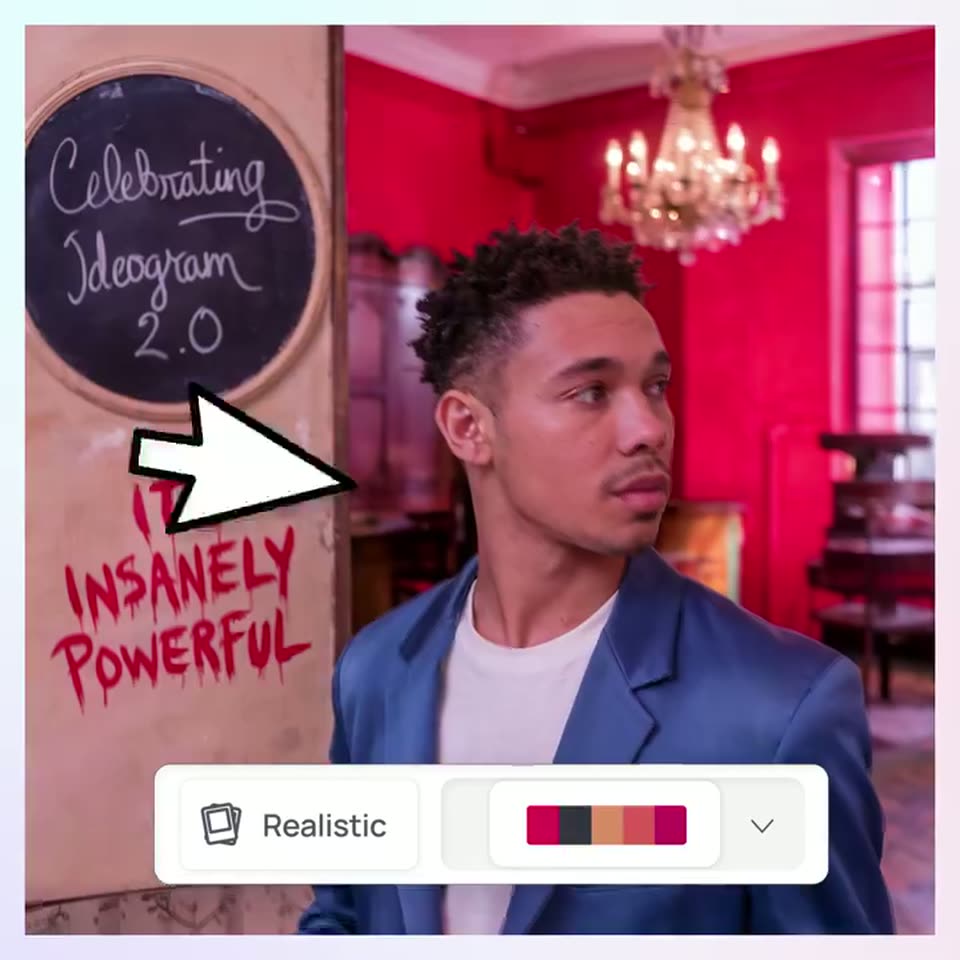
A man in a blue blazer stands in a red room beside a chalkboard reading “Celebrating Ideogram 2.0.” A large white cursor moves from the board to a color-palette swatch on the bottom UI bar, then to the dropdown chevron.
On-screen text: “What's your”, “color palette?”
Techniques: Cursor demo
Camera: Static
A generated portrait of a freckled woman in a flower crown and purple dress sits right of a blue door bearing a chalkboard and red handwritten text. A white UI bar at the bottom holds a Realistic button and a five-color palette, a cursor resting at its right edge.
Techniques: Cursor demo
Camera: Static
An older man in a blue hoodie stands in a pink-lit room beside a wall with a chalkboard reading 'Celebrating Ideogram 2.0' and pink graffiti 'IT'S INSANELY POWERFULL'. A white UI bar with a 'Realistic' toggle and color palette sits at the bottom, a cursor pointing at it.
Camera: Static
A woman in a floral blouse stands in a pink room beside a teal door marked with a chalkboard slogan and painted lettering. A white UI bar with a Realistic button and a color palette sits at the bottom, a black cursor pointing at the palette.
Techniques: Cursor demo
Camera: Static
A blue-tinted film still of a young boy holding up his hand fills the frame, with a white control bar at the bottom showing a Realistic style chip and a color palette. A cursor hovers over the palette and a dropdown chevron appears.
Techniques: Cursor demo
Camera: Static
A centered two-line question, What's your signature style?, sits on a soft mint-to-pink gradient. The second line scales in and the word style? snaps to bold weight, holding the rhythm of the line.
On-screen text: “What's your”, “signature style?”, “Design”, “Realistic”, “Anime”
Techniques: Kinetic type
Camera: Static
A portrait of a long-haired person at a chrome vintage microphone fills the frame against a dark bokeh-light background. A white pill bar at the bottom lists Realistic, Design and Anime style options. A two-line headline scales in over the image.
On-screen text: “What's your”, “signature style?”
Techniques: Kinetic type
Camera: Static
A locked-off close-up of a woman with rainbow powder in her hair and on her face, with a white selector bar at the bottom holding Realistic, Design and Anime buttons. A white cursor arrow slides in from the left and rests over the photo.
Techniques: Cursor demo
Camera: Static
An underwater scene of jellyfish over coral fills the frame, with a white style bar at the bottom listing Realistic, Design and Anime buttons. A cursor slides right from Realistic toward Design, and the Design label scales up on hover.
Techniques: Cursor demo
Camera: Static
A painterly illustration of a pistol-holding shooter under Olympic rings switches to a flat geometric portrait of two women in hats as a cursor taps the Design button on a bottom style toolbar.
Techniques: Cursor demo
Camera: Static
A flat design-tool screen shows a generated illustration that swaps from a wedding invitation to a cartoon beer carrier. A cursor travels along the bottom style bar from the Design button toward the Anime button.
Techniques: Cursor demo
Camera: Static
An anime-style image fills the frame, switching from a koala on a branch to a portrait of a woman in a blue headscarf. A white bar at the bottom lists Realistic, Design and Anime, the Anime tab outlined, as a cursor pointer slides from the tab up into the image.
Techniques: Cursor demo
Camera: Static
A product canvas shows an anime illustration of a horned bull reading a newspaper on a toilet, a cursor hovering over it, then crossfades to an anime girl peeking from a glowing tree. A bottom bar lists Realistic, Design and Anime buttons, with Anime highlighted.
Camera: Static
A pale pastel gradient holds the static headline while two tilted, white-bordered photo cards slide in from the bottom-left and top-right corners, showing a stained-glass cathedral and a boy eating a cookie.
On-screen text: “Create stunning”, “realistic images.”
Camera: Static
A collage of polaroid-style photos, a bee on a flower, a boy eating a cookie, a stained-glass window and a dog, scatters across a light background. The woman's portrait card slides forward and enlarges, then the layout reopens and the headline appears.
On-screen text: “Create stunning realistic images.”
Camera: Pan
A centered black headline reads “Premium design made easy.” with “easy.” set in bold, held static on a soft pastel gradient that fades from pale cyan at the left to light pink at the right.
On-screen text: “Premium design”, “made easy.”
Camera: Static
A static vintage logo holds on a black field: a white marshmallow with a smiling face and flames on top, set against a striped rainbow sunset. Arched distressed letters read BURNT OUT above and BUT OPTIMISTIC sits below, all locked off with no motion.
On-screen text: “BURNT OUT”, “BUT OPTIMISTIC”
Camera: Static
A static overhead photo of assorted glazed and sprinkled donuts. A dark brown rounded rectangle in the center displays the text 'Indulge in a DONUT WONDERLAND!', with a pink donut illustration replacing the letter O.
On-screen text: “Indulge in a”, “DONUT”, “WONDERLAND!”
Camera: Static
A cartoon podcast logo reading SNACK QUEST PODCAST in yellow and white sits amid smiling food characters on a yellow starburst, then hard cuts to a synthwave RETRO MIAMI wordmark over pink houses, a police car and a striped sunset.
On-screen text: “SNACK QUEST PODCAST”, “RETRO MIAMI”
Camera: Static
A centered caption reads “Even the details.” on a pale gradient that fades from mint in the top left to soft pink in the bottom right. The frame holds still with no motion.
On-screen text: “Even the details.”
Camera: Static
A white prompt card, tilted in 3D against a soft blue-to-pink gradient, holds a serif paragraph about a dog's birthday photo. The camera pushes in on the body copy, sharpening the center lines, while a small fixed caption reads Even the details.
On-screen text: “Even the details.”
Techniques: 3D mockup, UI zoom
Camera: Push in
A pale gradient background, cyan at the top left fading to pink at the bottom right, holds the centered line In seconds. The word seconds eases out of a soft motion blur into a crisp black bold face while In stays in a light weight.
On-screen text: “In seconds.”
Camera: Static
A tilted white settings panel floats over a soft pink gradient, its top controls softly blurred. A flat white arrow cursor glides up from the bottom edge and presses the black Generate button, which darkens on the click.
On-screen text: “In seconds.”
Techniques: 3D mockup, Cursor demo
Camera: Static
A tilted 3D browser window shows an image generator with a prompt line and a Generate button above four results of a dog with a pink bowtie at a cake. The camera swings it from a side angle toward the front as a result card lifts out of the grid.
Techniques: 3D mockup
Camera: Static
A black smartphone mockup rotates from a tilted side view to face the camera against a cyan-to-pink gradient. On its screen, a photo grid of a dog at a birthday party settles into place under a header, and an App Store badge sits at the bottom.
On-screen text: “Available on the”
Techniques: 3D mockup
Camera: Pull out
A pale gradient background holds centered black text and a small App Store badge, both static. A smartphone interface slides up from the bottom edge, revealing its status bar and a Generate button.
On-screen text: “Available on the”, “App Store”, “Available on the App Store”
Camera: Static
A 3D phone mockup tilts and rotates on a soft cyan-to-pink gradient, its screen shifting from the prompt field to the visibility options. Static black headlines read 'Available on the App Store', then 'Not enough?'.
On-screen text: “Available on the App Store”, “Not enough?”
Techniques: 3D mockup
Camera: Pull out
A pale cyan-to-pink gradient holds the centered line “Not enough?” in dark sans-serif. A black rounded bar at the top edge slides out of frame, then the question blurs and moves off, clearing the space.
On-screen text: “Not enough?”, “Introducing the”, “ideogram API”
Techniques: Kinetic type
Camera: Static
On a near-black field, faint concentric orbit lines with small dots rotate slowly around the center. A motion-blurred logo mark sits left of the title, while the kicker and title hold still, the title carrying a red-and-blue chromatic split.
On-screen text: “Not enough?”, “Introducing the”, “ideogram API”
Camera: Static
A block of API request code on a black background eases from soft blur into sharp focus, framed by thin light corner brackets. The static headline holds in place while the code lines resolve.
On-screen text: “Introducing the”, “ideogram API”
Camera: Pull out
A block of teal code over a glitched, scan-lined beach image clears to reveal a clean anime-style tropical beach: palm trees frame turquoise water and a large pink-lit cloud over a distant island.
Camera: Static
A hand-drawn illustration of a round brown and white cat sits centered on a plain beige background, holding two spotted fish up to its eyes like binoculars. The frame stays locked off with no motion for the full clip.
On-screen text: “10111”
Camera: Static
A mirror-finish gold hippo figurine crouches in a shallow gold bowl, set before a wall of carved hieroglyphs with a gold turtle shell at left. The locked-off close-up holds on the reflective surface with no motion.
Camera: Static
A white-suited astronaut with a dark reflective visor stands centered in a neon corridor, flanked by mirrored suits on either side. Pink and cyan light bathe the set, with a faint pulse in the glow.
Camera: Static
A masonry grid of photos on a dark background scrolls rapidly with heavy motion blur, then slows and stops, settling on a corgi in a top hat and bow tie at the center column.
Techniques: Speed ramp
Camera: Pull out
On a near-black background, the tagline fades in above the URL ideogram.ai. The text then gives way to the ideogram logo, a cloud mark with motion lines beside the bold wordmark, while an App Store badge rests at the bottom.
On-screen text: “What will you create?”, “ideogram.ai”, “Available on the App Store”
Techniques: Kinetic type
Camera: Static