2:20

Executor Demo
Executor · B2B · Aug 2026
Ressl · Dec 2025 · 2:50 · Full motion · AI-annotated
Ressl’s 2:50 launch film runs 7 scenes, about 24 s each. The product is on screen from the first frame and 1 feature is revealed. There is no explicit call to action; a voiceover carries the film. A founder-led screen recording pairs a static browser window with a picture-in-picture speaker, and cuts only when the story moves to a new feature. The pacing is slow and explanatory, built on cursor navigation and tab switching that reveal the agent's analysis, plan, code, and deployment outputs one panel at a time.
Is this your launch? to your site or press kit.
Executor · B2B · Aug 2026
usebits_inc · Feb 2026
Klaus AI · B2B · Feb 2026
Films whose music sounds like this one, voice left out
primitive · Technical demonstration / Tutorial
RetroFix · Voiceover
A browser window shows the resslai Tickets dashboard with stat cards and a ticket table, static throughout. A small video inset in the bottom right shows a woman speaking and gesturing. Subtitle captions roll at the bottom. Near the end, a cursor clicks Create Ticket, opening a form modal.
On-screen text: “Hey YC, I'm Arushi Gandhi”, “and we're building Ressl AI.”, “RevOps teams often have to”, “work with an outsourced”, “consulting firm that has”, “specialized Salesforce skills or”, “hire a full-time Salesforce”, “admin in-house to make sure”, “that their instance is configured”, “the way they want it to.”
Techniques: Cursor demo
Camera: Static
A browser dashboard lists tickets with colored status badges as a hand cursor glides down the rows. A small video of a woman speaking sits in the lower right corner, and a black caption pill reads along the bottom edge.
On-screen text: “Salesforce and the agent gets”
Techniques: Cursor demo
Camera: Static
A browser window displays the ressl.ai Tickets dashboard, a table of user stories with colored status badges. A white hand cursor glides down the rows while a small video of a talking woman sits in the bottom-right corner and white caption lines swap at the bottom.
On-screen text: “Salesforce and the agent gets”, “to work.”, “So one of our customers was”
Techniques: Cursor demo
Camera: Static
A browser window shows the ressLai ticket dashboard on a dark blue backdrop. A hand cursor clicks through the Analysis, Plan, Execution, Code and Deployment tabs, swapping the right panel content, while a woman gestures in a small video-call box at the bottom right.
On-screen text: “So one of our customers was”, “looking for a field to be created”, “in the account object which”, “counts the number of children”, “accounts that parent account”, “has. So he told the agent, the agent”, “came up with an analysis and”, “a plan and got our customer's”, “approval. Is this what you were looking”, “to do the customer said yes, which then moved to the execution output, which is changelog space, which is where the agent would get a user confirmation from the”
Techniques: Cursor demo
Camera: Static
A dark browser window shows the Ressl AI Tickets dashboard, a list of user stories with colored status pills. A cursor hovers on the heading, then clicks Chat with Org in the sidebar, opening a chat view. A small video of a gesturing woman sits bottom right, with subtitles below.
On-screen text: “developing new flows within”, “Salesforce writing Apex”, “classes, making changes in”, “your page layout, setting up”, “validation rules, setting up new”, “users, all of these things which”, “would individually take a lot of”, “time, a lot of clicks, a lot of”, “complexity having to hire”, “specialized folks can now all be done by Ressl instead.”
Techniques: Split screen, Cursor demo
Camera: Static
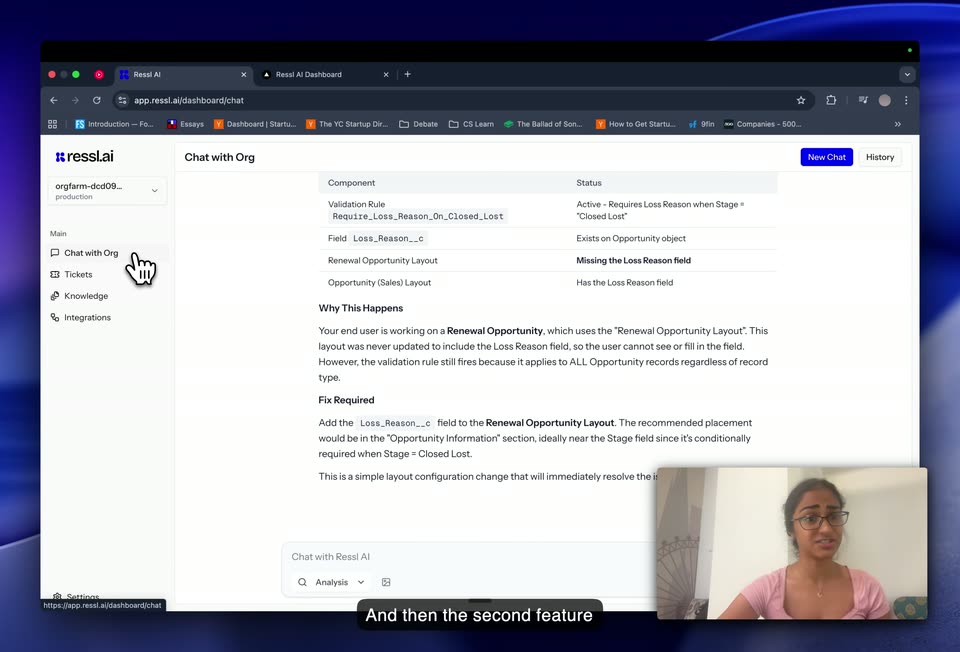
A browser window shows the Ressl AI dashboard: a left sidebar and a chat panel listing components, statuses and a fix. A hand cursor hovers over the Chat with Org menu item. A presenter sits in a video call inset at the bottom right, with a caption at the bottom.
On-screen text: “And then the second feature”
Techniques: Cursor demo
Camera: Static
A browser window shows the ressLai 'Chat with Org' screen; a cursor hovers as the AI chat thread scrolls to a numbered root-cause summary. A woman in a pink top gestures in a small picture-in-picture at the bottom right while white subtitles run along the bottom.
On-screen text: “what is called chat with your org”, “which very well understands”, “because it has access to your”, “metadata, your Apex, all”, “publicly available information”, “on Salesforce documentation”, “as well as some proprietary”, “information that our team”, “has built into it”, “So you can ask things like my end user is coming is getting this error in Salesforce, what could be the issue it will read the relevant files and come up with a”
Techniques: Cursor demo
Camera: Static