1:37
Explore
00:00:00 / 00:28:00
- Length
- 0:28
- Scenes
- 16 · 1.8 s avg
- Product on screen
- 0:18
- Features shown
- 2
- Voiceover
- No
- Views
- 603 on X
as of November 17, 2026
Raylight’s 0:28 launch film runs 16 scenes, about 1.8 s each. The product shows up at 0:18 and 2 features are revealed. There is no explicit call to action. The video is a fast montage of 3D turntables and exploded views, each two-line caption claim followed by a cut of product renders, and it closes on a slow pull-back to a dusk desk that reveals the name. Signature moves are the camera pull-backs that reveal the full scene, the blur-to-focus title reveals, and the snap-together assembly animations, all cut to a steady 123 bpm pulse.
Footage neededEstimated needs: 1 filmed passage — shoot, supply or replace · 14 3D passages — build or supply
Is this your launch? to your site or press kit.
More like this


Similar soundtrack
Films whose music sounds like this one, voice left out
0:40

Leap - Introducing Leap, the mobile trading app designed for high performanc
Leap · Cinematic electronic
0:42
Unveil | Intelligent Eyewear | Samsung
Samsung · Electronic, EDM
0:42
Black Forest Labs - FLUX Video Upscale: 2K and 4K for Video Create videos in 2K or 4K wi
FLUX · Electronic dance music
Raylight - Raylight now imports 3D models. GLB, FBX, OBJ, USDZ, STL, or a zip., scene by scene
· 16 scenes as text
01 · Hook · 0:00–0:01
A dark macOS Downloads window floats in 3D perspective against a gray backdrop, a second settings panel peeking at the top right. A file row stays highlighted in blue while a white hand cursor drops onto it, selecting the entry.
Techniques: Cursor demo
Camera: Pull out
02 · Hook · 0:01–0:02
A laptop sits on a wooden desk beside a potted plant, its screen showing a desktop with a file manager and a terminal window listing files, one row highlighted blue. A cursor hovers over the terminal while the screen edge glows orange and purple.
Techniques: 3D mockup
Camera: Pull out
03 · Hook · 0:02–0:03
A laptop on a wooden desk displays a video editor with a preview of black headphones and a multitrack timeline. The view pulls back slightly to reveal a potted plant on the left and a mug on the right.
Techniques: 3D mockup
Camera: Pull out
04 · Feature reveal · 0:03–0:04
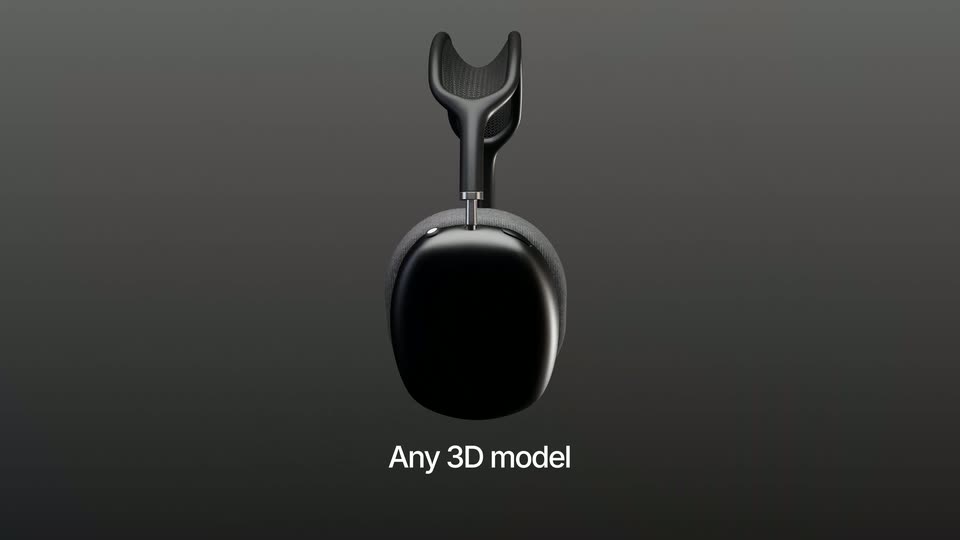
A 3D model of black over-ear headphones hangs against a dark background. The framing shifts from a close-up of the ear cup to a full view of the device, with the text at the bottom.
On-screen text: “Any 3D model”
Techniques: 3D mockup
Camera: Static
05 · Feature reveal · 0:04–0:06
A black headphone model assembles and rotates in the center of a dark gray backdrop. It is then replaced by a tilted keyboard with blue and orange keys. A white caption at the bottom reads Any 3D model, then switches to Drop it in.
On-screen text: “Any 3D model”, “Drop it in”
Techniques: 3D mockup
Camera: Static
06 · Feature reveal · 0:06–0:07
A mechanical keyboard floats in exploded view on a dark gray backdrop. The black keycap layer, clear switch layer and base with blue underglow separate, then snap back together as the camera drops to a low front angle. Orange accent keys stand out.
Techniques: 3D mockup
Camera: Push in
07 · Feature reveal · 0:07–0:09
A black North Face boot heel and lugged sole fill the frame on a flat gray background. The locked-off camera holds still as light slowly builds across the surface, revealing the tread texture of the rubber sole.
Techniques: Light sweep
Camera: Static
08 · Feature reveal · 0:09–0:10
Macro close-up of a chair backrest: dark woven mesh stretched inside a curved matte-gray frame, against a soft gray gradient. The shot holds with a slow lateral drift across the texture.
Camera: Static
09 · Feature reveal · 0:10–0:12
A ring of black over-ear headphones rotates slowly around the center of a dark gray frame, each unit angled in 3D perspective. The white text “Animate every part” holds still in the open middle of the circle.
On-screen text: “Animate every part”
Techniques: 3D mockup
Camera: Pull out
10 · Feature reveal · 0:12–0:14
A 3D render of the front nose of a blue and red Mercedes-AMG F1 car fades up from darkness as the focus sharpens and the camera slowly pulls back, revealing the star badge on the grille and sponsor decals.
On-screen text: “Animate”, “every part”
Techniques: 3D mockup
Camera: Pan
11 · Feature reveal · 0:14–0:16
A dark racing shoe tumbles in 3D against a gray backdrop. As it rotates, lighting builds to reveal a blue upper printed with Red Bull, Michelin and H&R logos and a Mercedes star.
Techniques: 3D mockup
Camera: Pull out
12 · Feature reveal · 0:16–0:17
A close-up of a blue Formula 1 rear engine cover carrying Red Bull, Michelin and H&R livery. The camera pans slowly left across the carbon fiber surface against a plain gray backdrop.
Techniques: 3D mockup
Camera: Pull out
13 · Feature reveal · 0:17–0:18
A glossy black rounded pod with two white earbud stems rotates slowly on a dark gray background. Small 'MICHELIN' text slides across the frame while a large 'RedBull mn' caption holds still.
On-screen text: “MICHELIN”, “MICHELIN”, “RedBull mn”
Techniques: 3D mockup, Kinetic type
Camera: Static
14 · Feature reveal · 0:18–0:18
A pair of white earbuds hovers above a charging case as its lid flips open, revealing the empty wells. The case and buds drift in a slow 3D orbit against a dark gray gradient.
Techniques: 3D mockup
Camera: Static
15 · Product intro · 0:18–0:20
A white two-line headline on a dark gradient background begins blurred and out of focus, then sharpens and scales up into a crisp centered title, framed by a thin border.
On-screen text: “The motion canvas for you and your agents”
Techniques: Kinetic type
Camera: Static
16 · Product intro · 0:20–0:28
A 3D dusk office: a monitor on a wooden desk shows the headline, which dissolves into “Made in Raylight”, then into the R logo, as the camera pulls back to reveal the lamp, mug, plant, and sunset city windows.
On-screen text: “The motion canvas for”, “you and your agents”, “Made in Raylight”, “R”
Techniques: Kinetic type, 3D mockup
Camera: Pull out