
0:28
Explore
Introducing 3D Transforms in Framer — Rotate, Skew, Perspective & more on a freeform canvas
Framer · Apr 2024 · 0:46 · Full motion · AI-annotated
- Length
- 0:46
- Scenes
- 17 · 2.7 s avg
- Product on screen
- 0:02
- Features shown
- 1
- Voiceover
- No
- Views
- 213K on YouTube
as of November 21, 2026
00:00:00 / 00:46:25
- Length
- 0:46
- Scenes
- 17 · 2.7 s avg
- Product on screen
- 0:02
- Features shown
- 1
- Voiceover
- No
- Views
- 213K on YouTube
as of November 21, 2026
Framer’s 0:46 launch film runs 17 scenes, about 2.7 s each. The product shows up at 0:02 and 1 feature is revealed. There is no explicit call to action. Built as a slow title sequence of centered white type over black, then a 3D showcase of tilted cards and a dashboard demo, the video holds long on each card and cuts quickly between type and motion at a steady tempo. Its signature moves are the blue light ribbon tracing 3D edges and the 3D-tilted poster cards that carry the 3D Transforms story.
No filming indicatedEstimated needs: 1 capture group — your screens or recordings · 1 official logo — reused across the film · 3 graphic passages — draw or supply · 7 3D passages — build or supply
Is this your launch? to your site or press kit.
More like this

Introducing 3D Transforms in Framer — Rotate, Skew, Perspective & more on a freeform canvas, scene by scene
· 17 scenes as text
01 · Hook · 0:00–0:00
A dark, nearly black background with a faint dark blue gradient visible in the lower half.
Camera: Static
02 · Hook · 0:00–0:02
A dark device corner sits in 3D perspective on a black background. A thin blue rim light brightens along the rounded edge, tracing the corner as the clip progresses.
Techniques: 3D mockup, Light sweep
Camera: Static
03 · Product intro · 0:02–0:03
A black frame holds a single centered white line reading Framer Presents. The text stays locked and still for the full duration, with no motion, reveal or camera movement.
On-screen text: “Framer® Presents”
Camera: Static
04 · Product intro · 0:03–0:04
White title text holds centered on black, then clears to reveal a dark device surface in 3D perspective, its lower edge traced by a thin glowing blue line that drifts across the bottom of the frame.
On-screen text: “Framer® Presents”
Techniques: 3D mockup
Camera: Static
05 · Product intro · 0:04–0:05
Two black rounded slabs float in 3D perspective on a black field. A cyan glint races along each beveled edge, the outlines flaring from dim blue to bright white-blue as the light passes.
Techniques: Light sweep
Camera: Static
06 · Product intro · 0:05–0:08
White text “A Spring Update” holds centered on a black background, locked off. The text exits and a dark surface in 3D perspective appears, its corner outlined by a thin glowing blue edge.
On-screen text: “A Spring Update”
Camera: Static
07 · Product intro · 0:08–0:09
On a black field, thin blue lines trace the angular edges of an abstract 3D corner. A bright blue beam flares along the left edge, widening into a glowing streak, while a small orange glint flashes at the central vertex before fading back to blue.
Techniques: Light sweep
Camera: Static
08 · Product intro · 0:09–0:11
The phrase 'Without Limits' is centered on a black background. The text remains completely static throughout the short clip.
On-screen text: “Without Limits”
Camera: Static
09 · Product intro · 0:11–0:13
On black, a small blue geometric logo forms in the center, traced by thin gray wireframe lines. The white tagline Without Limits overlays the logo at the start, then fades as the logo brightens and its strokes rearrange.
On-screen text: “Without Limits”
Camera: Static
10 · Product intro · 0:13–0:15
A white flag-shaped logo mark sits centered on a black field. It reveals from a thin diagonal sliver to its full two-part shape, a top triangle and a pointed banner, over the clip's short duration.
Techniques: Masking
Camera: Static
11 · Product intro · 0:15–0:16
A solid black frame fills the screen for the full duration. No elements, text, or motion are visible; the shot holds as a blank cut.
Camera: Static
12 · Feature reveal · 0:16–0:19
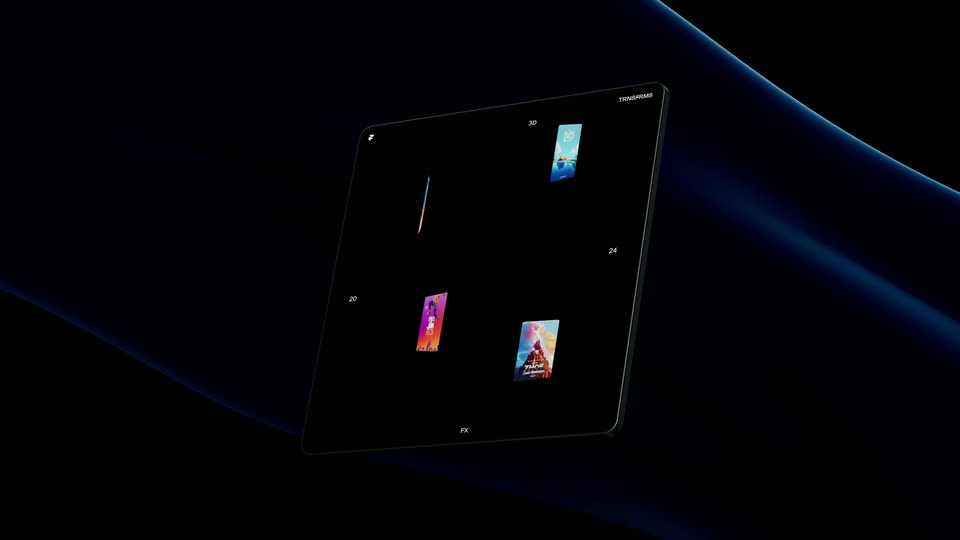
A black tablet hovers at an angle in 3D perspective over a dark field with a curved blue ribbon of light. Its screen shows a grid of photo albums, and the thumbnails cycle through different covers while the device holds a locked, tilted framing.
Techniques: 3D mockup
Camera: Static
13 · Feature reveal · 0:19–0:23
A row of movie poster cards floats in 3D perspective on black, tilted diagonally. A hand cursor moves across them, and a white label pops up under each card as it is highlighted, while the camera pans along the row.
On-screen text: “Elio”, “Luca”, “Thor”, “Batman”, “Onward”
Techniques: 3D mockup, Cursor demo
Camera: Static
14 · Feature reveal · 0:23–0:26
A tablet hovers at a steep angle in 3D space above dark blue fabric waves. On its screen the word Slide sits over a row of colorful posters that scroll sideways along the bottom edge.
On-screen text: “Slide”
Techniques: 3D mockup
Camera: Pull out
15 · Feature reveal · 0:26–0:31
A dark, tilted list of movie titles in 3D perspective; a white cursor moves down the rows as tilted poster cards pop in beside them. The camera pulls back to reveal a large gray Slide word above a row of poster cards.
On-screen text: “Slide”
Techniques: 3D mockup, Cursor demo, UI zoom
Camera: Static
16 · Feature reveal · 0:31–0:36
A dark dashboard of UI panels. The center card holds the word Slide above a row of movie posters skewed in 3D that slides left in a loop. Cursors drag a color wheel and a cover along a year timeline in the left panel.
On-screen text: “Slide”
Techniques: 3D mockup, Cursor demo
Camera: Static
17 · Feature reveal · 0:36–0:46
A dark field holds a slow blue silk ribbon flowing diagonally. Centered white text shows “Introducing 3D Transforms”, then crossfades to “Now in Framer”, while the ribbon drifts and dims to black.
On-screen text: “Introducing 3D Transforms”, “Now in Framer”
Camera: Pull out