0:53


October 2026 Launch: BYO Agents
Airtable · Productivity · Oct 2026
Harvey · Sep 2026 · 0:55 · AI-annotated
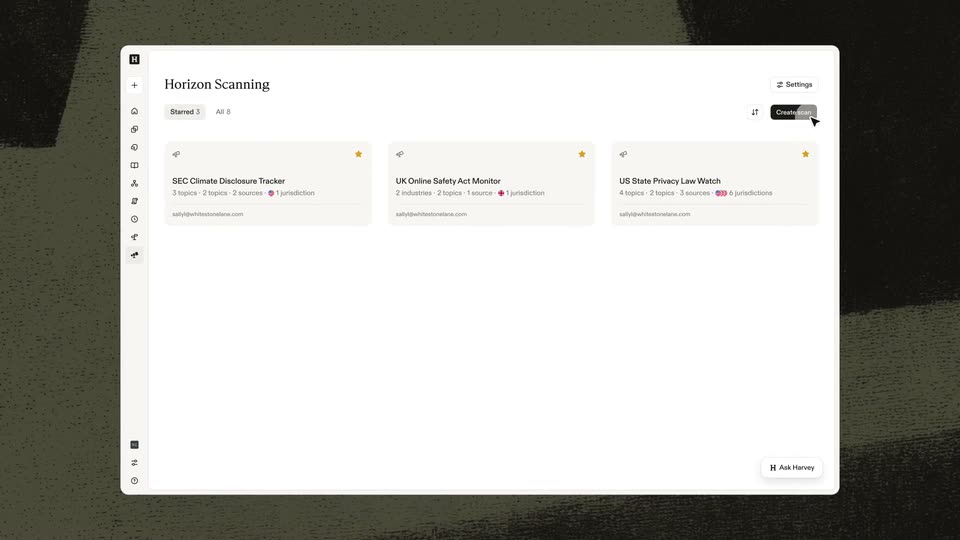
Harvey’s 0:55 launch film runs 11 scenes, about 5.0 s each. The product shows up at 0:08 and 1 feature is revealed. There is no explicit call to action. The video opens on a cold cut of the scan form, names the product on a textured title card, then hands the screen to the interface in one unbroken flow of cursor moves and deep zooms. Signature moves: 3D-tilted app panels, zoom-ins on modals and digest cards, and a grainy olive brushstroke backdrop that bookends every UI shot.
Is this your launch? to your site or press kit.
A white modal form for an EU Pay Transparency Directive Scan settles onto a dark grainy backdrop. Text types into the tracking field, flag chips and topic tags fill the rows, then a cursor glides to the Create scan button.
Techniques: Cursor demo
Camera: Static
A textured olive-green backdrop of dark brushstroke shapes holds a centered title. “Introducing” sits above “Harvey Horizon Scanning”, the first word in serif, the rest in bold sans. The lines hold, then blur and dissolve as the shapes shift.
On-screen text: “Introducing”, “Harvey Horizon Scanning”
Camera: Static
A tilted 3D panel of the Horizon Scanning app floats over a dark textured backdrop. A cursor glides in from the right, moves to the Create scan button and clicks it, popping open a centered Describe scan modal with a text field.
Techniques: 3D mockup, Cursor demo
Camera: Static
A 'Describe scan' modal fills the frame over the dimmed app, the view zooming in on it. The placeholder line is replaced by a typed sentence, then a cursor clicks Continue and a loading spinner appears.
Techniques: UI zoom, Cursor demo
Camera: Push in
A white Create scan modal sits centered over a dimmed dashboard list of scan cards. A cursor travels down the form, pausing at the Jurisdictions and Topics chip fields, then rests on the black Create button.
Techniques: Cursor demo
Camera: Pull out
A white dashboard card zooms to the center of a dark frame as the weekly digest text types in and three development rows populate the list below.
Techniques: UI zoom
Camera: Pull out
A light web-app window on a dark textured backdrop zooms into its weekly-digest card while the surrounding interface dims. A cursor then hovers a footnote number, opening a small source tooltip with a View button.
Techniques: UI zoom, Cursor demo
Camera: Push in
A cursor hovers over a row in a dimmed news list, then the view reframes into the right-hand detail panel as it expands to full width. The cursor slides down to the Draft email button.
Techniques: Cursor demo, UI zoom
Camera: Pan
A browser window shows a German news article beside an AI assistant chat panel. The panel moves from 'Answering' to a finished memo card, then a cursor hovers over the card. The frame zooms in slightly to focus on the panel.
Techniques: UI zoom, Cursor demo
Camera: Push in
A muted olive field framed by dark grainy texture holds a single line of white serif text, centered and locked off for the full duration.
On-screen text: “Catch every change that matters”
Camera: Static
A locked-off title card over a dark olive, stippled texture with black abstract blocks at the frame edges. The white serif word Harvey holds centered while the tagline Catch every change that matters rests on frame; nothing moves.
On-screen text: “Catch every change that matters”, “Harvey”
Camera: Static