0:53


October 2026 Launch: BYO Agents
Airtable · Productivity · Oct 2026
Shipper · Apr 2026 · 0:27 · AI-annotated
Shipper’s 0:27 launch film runs 11 scenes, about 2.5 s each. The product shows up at 0:02 and 1 feature is revealed. There is no explicit call to action. The video is built as a kinetic type-card opening that names the promise and then the product, followed by one continuous screen demo that zooms, reframes and cursor-drives through the website-to-app conversion flow. Its signature moves are the bar-retract text reveal, the 3D perspective on the app window, and brisk cuts near 117 bpm that keep the flow moving.
Is this your launch? to your site or press kit.
Airtable · Productivity · Oct 2026
Cursor · Developer tools · Oct 2025
On a white field, a row of thin gray vertical bars sits to the left of the word Introducing. The bars retract while the word slides left to center and deepens from light to dark gray.
On-screen text: “Introducing”
Techniques: Kinetic type
Camera: Static
On a white background, the word Introducing slides in small and centered, then gives way to the headline Website to App, which scales up to dominate the frame.
On-screen text: “Introducing”, “Website to App”
Techniques: Kinetic type
Camera: Static
On a green gradient, the word Convert glows in green and scales in, then the line Convert websites to mobile apps fades in white and centered. A second line, With Claude on Shipper, follows in the same white type. The frame stays locked off throughout.
On-screen text: “Convert websites to mobile apps”, “With Claude on Shipper”
Techniques: Kinetic type
Camera: Static
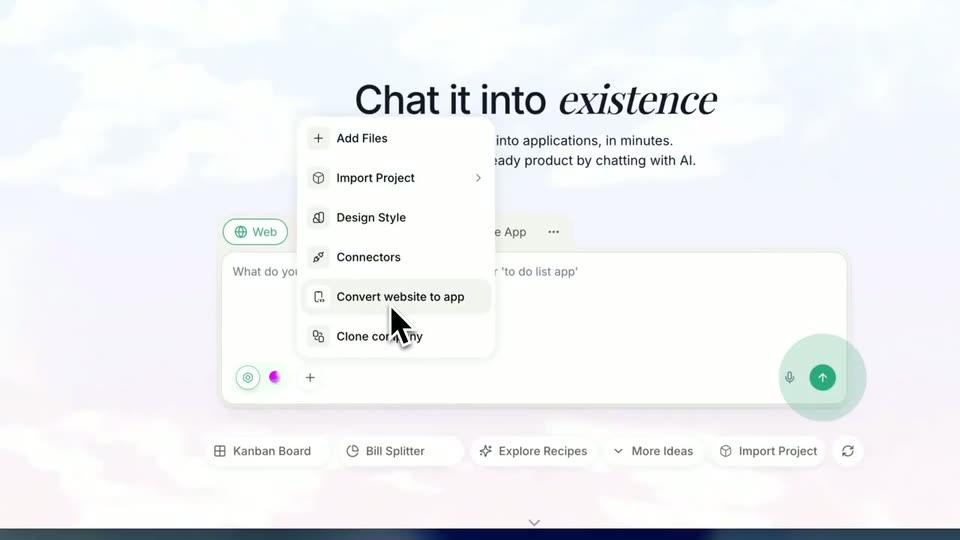
A flat browser view of the Shipper site zooms into the hero headline, then reframes to a section pairing a left menu with a tilted 3D phone mockup and a tooltip card. A cursor hovers over the menu item 'Convert website to app' as the layout settles.
On-screen text: “With Claude on Shipper”
Techniques: UI zoom, Cursor demo, 3D mockup
Camera: Push in
A white modal dialog sits centered over a dimmed app screen. A cursor types a short URL into the address field, and the green Convert to app button fills from pale to solid as the text appears.
Techniques: Cursor demo
Camera: Static
A product landing page with the headline Chat it into existence and a chat prompt box zooms into the full app interface, where a left chat panel and a right AI Generating Code panel with a puzzle illustration appear. A cursor hovers in the center.
Techniques: UI zoom
Camera: Pull out
The Ovnara app interface sits in 3D perspective over a blurred blue background. On the right, an isometric line illustration swaps between a chip and a potted plant while the step list below updates its status. The left chat panel shows a task list with progress states ticking forward.
Techniques: 3D mockup
Camera: Static
A desktop builder window with a chat panel sits left of a phone mockup showing a Twitter feed. The view zooms onto the phone, a hand cursor scrolls the feed, then taps the profile tab to open a profile page that scrolls up.
Techniques: UI zoom, Cursor demo
Camera: Push in
A desktop builder window pairs a chat panel on the left with a phone mockup on the right running a Twitter clone. A cursor scrolls the profile and home feeds, tapping the bottom nav icons, then the window scales back onto a blurred desktop with a left icon rail.
Techniques: Cursor demo, UI zoom
Camera: Pull out
A dark green gradient background lightens to pale gray as a white rounded tile with a black serif S holds center-left, and the serif wordmark shipper resolves from a horizontal blur into focus beside it.
Camera: Static
The shipper logo, a mint-green rounded square holding a black serif S next to the word shipper in black serif, sits centered on a plain white background, static for the full shot.
Camera: Static