0:22

Offstream: Streamlined carbon compliance for project developers
Offstream · B2B · Jul 2024
Pinch · Aug 2025 · 1:16 · Full motion · AI-annotated
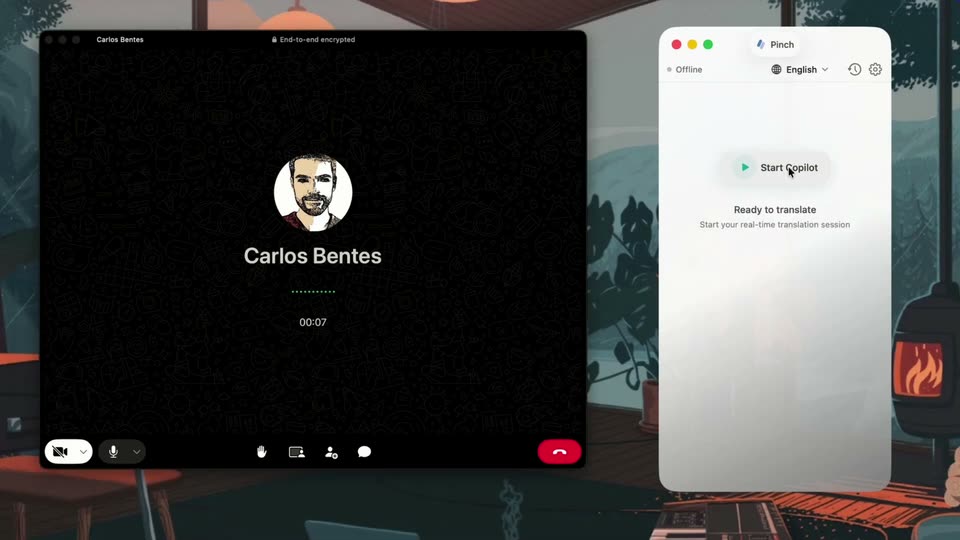
Pinch’s 1:16 launch film runs 5 scenes, about 15 s each. The product is on screen from the first frame. The call to action lands at 1:11 (93% in), over a voiceover. A single locked-off screen demo: a dark call window and the light Pinch panel sit side by side over an illustrated room, with a cursor performing setup while a live Portuguese-to-English conversation streams into the panel. Pacing is slow and steady, cutting only to a centered phone mockup for the translated audio, and closing on a static brand card with the URL.
Is this your launch? to your site or press kit.
Offstream · B2B · Jul 2024
Subtrace · B2B · Feb 2025
Films whose music sounds like this one, voice left out
Daily · Corporate tech presentation
Marble · News broadcast soundtrack
A dark video call window and a light Pinch panel sit side by side over an illustrated room. The call window shows a caller's circular avatar, name, and ringing status; the panel shows a Start Copilot button and a ready-to-translate note. The frame stays locked-off.
Camera: Static
Two app windows sit side by side over an illustrated room: a dark call screen with an avatar and a running timer, and a light translation panel. A cursor opens the language menu, clicks Start Copilot, and the panel switches to a live listening state as subtitles appear below.
On-screen text: “Hey, Carlos.”, “let me turn on Pinch so you can speak Portuguese.”, “All right, now you should hear me in Portuguese.”
Techniques: Split screen, Cursor demo
Camera: Static
A front-facing smartphone mockup rests centered on a plain beige background, its purple call screen showing the contact Christian and a grid of call controls. A dark gray headline What Carlos hears holds above the phone, then exits as the frame stays locked and static.
On-screen text: “What Carlos hears”
Camera: Static
A dark video call window and a light Pinch translation panel sit side by side over an illustrated room. The call timer counts up while Portuguese and English messages stream into the panel; a cursor clicks the mic button, turning it green, and English captions appear at the bottom.
On-screen text: “enjoy your trip.”, “I'm very jealous.”, “see you later.”
Techniques: Split screen, Cursor demo
Camera: Static
A locked-off end card on a light gray background. The Pinch logo sits at the top, the URL www.startpinch.com is centered below it, and the line Now available for Mac sits at the bottom. All elements remain static for the full duration.
On-screen text: “www.startpinch.com”, “Now available for Mac”
Camera: Static