0:38
Explore
Screen Studio - There is a major new update coming soon to Screen Studio! The update
Screen Studio · Jun 2024 · 0:30 · AI-annotated
- Length
- 0:30
- Scenes
- 8 · 3.8 s avg
- Product on screen
- 0:05
- Features shown
- 1
- Voiceover
- No
00:00:00 / 00:30:04
Screen Studio’s 0:30 launch film runs 8 scenes, about 3.8 s each. The product shows up at 0:05 and 1 feature is revealed. There is no explicit call to action. The video is a 30 second tour built around a 3D tilted editor window that floats over a warm mesh gradient, zooming in for UI close-ups and pulling back to the full window as a recurring bookend. A single cursor drives every action, and the tour ends on the playful watermelon cursor payoff before the final pull-back.
No filming indicatedEstimated needs: 3 capture groups — your screens or recordings · 2 3D passages — build or supply
Is this your launch? to your site or press kit.
More like this
0:32

Descript - Vibe editing is here. Any job, any video. Underlord’s got it.
Descript · Design · May 2025
0:45
Screen Studio - There is a major new update coming soon to Screen Studio! The update, scene by scene
· 8 scenes as text
01 · Hook · 0:00–0:05
A dark video-editor window floats in 3D perspective over a warm pink and orange gradient. The view zooms into the timeline strip, a cursor clicks a small layout toggle, then the camera pulls back to the full window.
Techniques: 3D mockup, UI zoom, Cursor demo
Camera: Push in
02 · Demo · 0:05–0:09
A tilted 3D mockup of a video editor floats on a pink-orange gradient. The preview switches from a multi-window desktop to a single talking-head clip, then blurs and zooms. A cursor rests on the timeline while a right panel lists background and wallpaper options.
Techniques: 3D mockup, Cursor demo
Camera: Static
03 · Demo · 0:09–0:11
A dark Screen Studio window sits on a colorful gradient background. A cursor moves across the interface, hovering over the preview, the play controls and the right-hand properties panel, while the timeline and a face-cam preview stay still.
Techniques: Cursor demo
Camera: Push in
04 · Feature reveal · 0:11–0:12
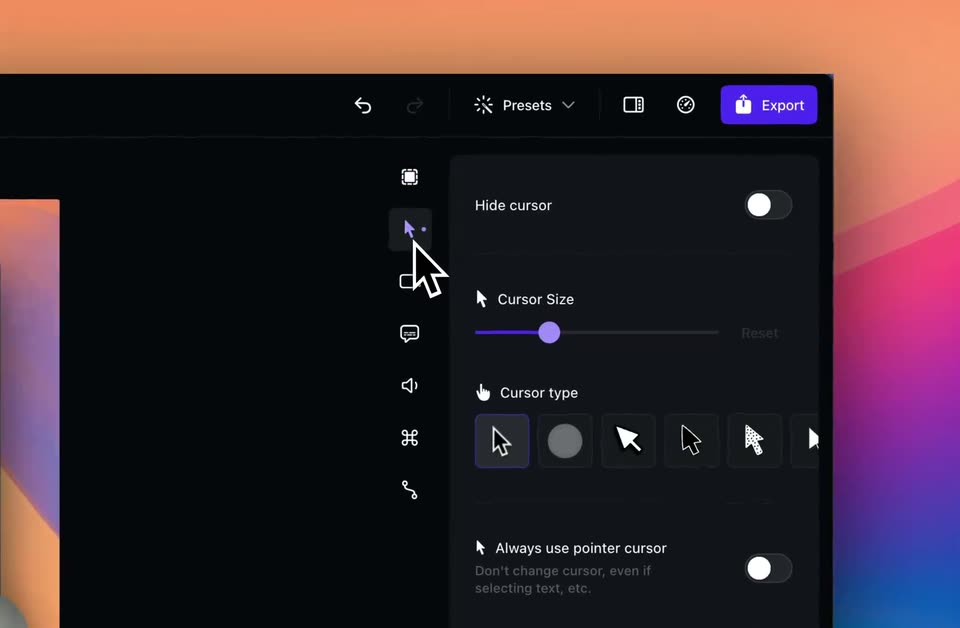
A dark app interface is shown with a slight zoom; a white arrow cursor slides down the left icon rail and clicks the cursor icon, swapping the right panel from a Background wallpaper list to cursor settings with a size slider and style buttons.
Techniques: UI zoom, Cursor demo
Camera: Push in
05 · Feature reveal · 0:12–0:17
A dark settings panel fills the frame. A white outlined cursor moves to the Cursor type row and scrolls it left across arrow and emoji icons. It selects a watermelon cursor, then the panel scrolls down to Cursor variants, where the cursor clicks another watermelon icon.
Techniques: Cursor demo
Camera: Pan
06 · Demo · 0:17–0:17
A horizontal slide pans left across a wide composite, revealing a music streaming app with a webcam video on the left while the dark cursor-settings panel slides off to the right, a wireframe cube resting on the dark edge.
Techniques: Split screen
Camera: Push in
07 · Demo · 0:17–0:19
A close-up of a music player interface shows the Flume album Things Don't Always. A hand cursor taps a green play button as the track list shifts, with a small webcam feed of a man in the lower-right corner.
Techniques: Cursor demo
Camera: Pan
08 · Demo · 0:19–0:30
A dark tracklist UI close-up shows a watermelon emoji cursor over a row and a small webcam video of a man. The view reframes to an editing timeline with a cycling speed readout, then pulls back to reveal the editor window tilted in 3D over a pink and blue gradient.
Techniques: Cursor demo, UI zoom, 3D mockup
Camera: Pull out