1:25

Instaplay: Make or Play Anything
General Context Labs · Consumer · Aug 2026
Descript · May 2025 · 0:32 · AI-annotated
Descript’s 0:32 launch film runs 16 scenes, about 2.0 s each. The product shows up at 0:03 and 1 feature is revealed. There is no explicit call to action; a voiceover carries the film. The video alternates full-frame serif claims on a periwinkle gradient with flat UI mockups, cutting at a quick, steady pace of about twenty cuts a minute. Signature moves are the typing caret that builds each prompt letter by letter and the black cursor that clicks the round indigo send button, with the robot mascot marking the Underlord reveal.
Is this your launch? to your site or press kit.
General Context Labs · Consumer · Aug 2026
Canva · Design · Oct 2026
Ahrefs · Aug 2026
On a soft blue-purple gradient, large white serif words appear in sequence, centered: “Never”, then the line grows to “Never edit video”, then it is replaced by “alone again”.
On-screen text: “Never”, “Never edit video”, “alone again”
Techniques: Kinetic type
Camera: Static
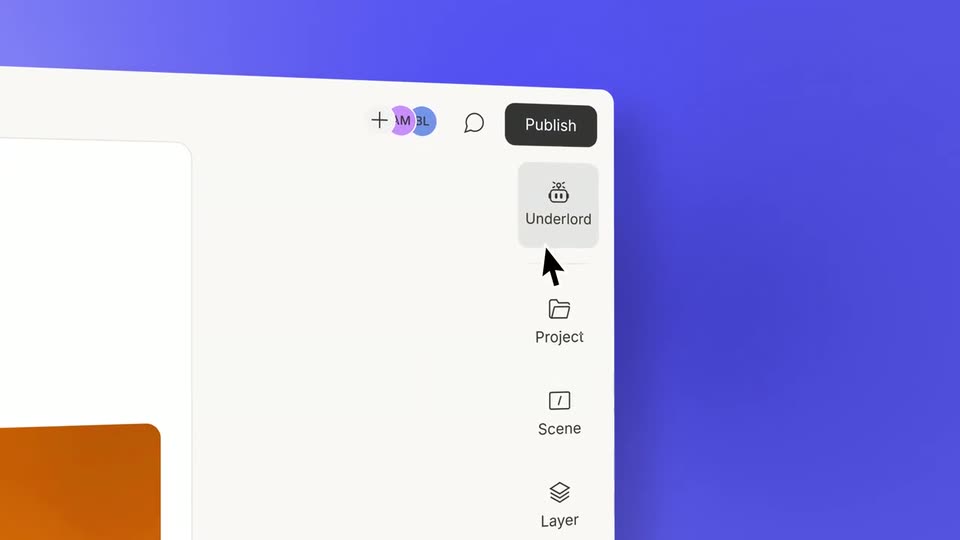
A flat browser window sits on a purple background, showing a document on the left and an orange video panel with a woman on the right. The camera pans right and zooms in to reveal the top toolbar with a Publish button and a vertical sidebar of icons.
Techniques: UI zoom
Camera: Push in
A white app panel sits in 3D perspective on a blue backdrop. Its open dropdown menu lists icon rows, and a black cursor glides up to rest on the top row, which fills with a light gray highlight.
Techniques: 3D mockup, Cursor demo
Camera: Static
A tilted app window floats over a blue gradient. The camera slides down to the Underlord chat bar, where a cursor clicks the input field and types “Can you...” next to a purple send button.
Techniques: 3D mockup, UI zoom, Cursor demo
Camera: Push in
A white background holds a single line of dark gray sans-serif text that scales up from small to full size. The word Can you forms first, then three dots and a thin vertical bar complete the line.
On-screen text: “Can you...”
Techniques: Kinetic type
Camera: Static
A close-up of a chat card titled Underlord sits on a purple background. The prompt types out letter by letter in the white input field, then a black cursor arrow glides up and hovers the round blue send button.
On-screen text: “Can you...”
Techniques: Cursor demo
Camera: Static
On a plain white background, a three-line headline types itself out behind a thin vertical cursor. The letters fill in sequence, settling from light gray to dark, until the full sentence reads across the frame.
On-screen text: “Add PiP layouts wherever it makes sense?”
Techniques: Kinetic type
Camera: Static
A black arrow cursor with a white outline drifts down and right across a white rounded card, closing in on a purple circular button with a white up arrow, and stops at its lower edge. The frame stays locked off throughout.
On-screen text: “Add PiP layouts”, “wherever it makes”, “sense?|”, “K”
Techniques: Cursor demo
Camera: Static
On a white card with a gray top bar, a sentence types out letter by letter behind a blinking caret, darkening as it appears. It first reads “Add zooms to hide jump cuts?”, then the first word clears and begins retyping as “W”.
On-screen text: “Add zooms to hide jump cuts?”, “W zooms to hide jump cuts?”
Techniques: Kinetic type
Camera: Static
On a white background, the question “Where do I need b-roll?” types out word by word behind a thin vertical caret, wrapping to a second line.
On-screen text: “Where do I need b-roll?”
Techniques: Kinetic type
Camera: Static
A white prompt card reading “Where do I need b-roll?” fills the frame on a blue field. The view pulls back to reveal a tight grid of matching cards, each holding a different editing request such as converting to vertical or exporting in 4k.
Techniques: UI zoom
Camera: Pull out
On a white field, a large dark gray line reads “Can you...” with a blinking caret and three dots popping in. It is then replaced by a smaller line, “Edit this video for me?”, that slides in beneath a pale gray top bar.
On-screen text: “Can you...”, “Edit this video for me?”
Techniques: Kinetic type
Camera: Static
A black arrow cursor with a fading motion trail glides up to a blue circular button holding a white up arrow, set on a white rounded card over a gray surface with a blue panel at the right edge.
Techniques: Cursor demo
Camera: Static
A light gray chat card on an indigo field. The robot icon and Underlord header settle in as the title scales down to size. A Thinking... status types out, then a white response bubble fills with text typed character by character behind a blinking caret.
Techniques: Kinetic type
Camera: Pull out
On a blue gradient background, white serif words build the line “Meet your new AI co-editor...”, then the Underlord app icon and wordmark scale in, and the wordmark restyles into a sans-serif lockup.
On-screen text: “Meet your new”, “AI co-editor...”, “Underlord”
Techniques: Kinetic type
Camera: Static
The white descript logo and wordmark sit centered on a soft blue-violet gradient. The frame is locked off and the mark holds still for the full length of the clip.
On-screen text: “descript”
Camera: Static