0:31
Rithwik Pattikonda - Email. LinkedIn. Phone. Ads. ALL automated. Introducing Money Printe
Money Printer · Nov 2026
Daily · Aug 2026 · 3:28 · AI-annotated
Daily’s 3:28 launch film runs 31 scenes, about 6.7 s each. The product shows up at 0:12 and 2 features are revealed. The call to action lands at 2:58 (86% in), over a voiceover. The video cuts between a talking-head presenter and full-screen dark data panels, using a split-screen layout to pair narration with animated benchmark tables, latency counters, and pipeline diagrams. Its signature moves are the pulsing blue orb, purple highlight sweeps across table rows, counting-up figures, and halftone dot-wave fields that mask into logo cards.
Is this your launch? to your site or press kit.
Money Printer · Nov 2026
Webflow · Design · Oct 2026
Aerogen Systems · Industrials · Aug 2026
A split screen shows a man in a black t-shirt resting his chin on his hand, gazing at a screen on the left, while a glowing blue and purple orb holding a row of small white squares pulses on the right against black.
Techniques: Split screen
Camera: Static
Split screen: a man in a black t-shirt sits at a desk with a tablet, talking, on the left; on the right a glowing blue-purple orb pulses on black, its center icon morphing between dots and vertical bars.
Techniques: Split screen, Morph
Camera: Static
A black frame holds a left-aligned title block. The small purple kicker and the larger white headline fade in from dim to full brightness, then hold on a locked-off frame.
On-screen text: “PHONEBENCH • RESULTS”, “PhoneBench Alpha 1”
Camera: Static
A dark benchmark results table fills in row by row, score bars extending and figures updating as each model's data appears. The Pipercat PhoneLLM 30B Alpha 1 row is highlighted with a purple outline. A dim portrait of a person fades in along the right edge.
Camera: Static
Split layout: a dark results table titled PhoneBench Alpha 1 fills the left, rows of model names with blue score bars, the Pipewheel PhoneLLM 30B Alpha 1 row lit in purple; a presenter in a black tee talks on the right. A purple frame draws around the score column and a small bullseye icon pops in beside it as he gestures.
Techniques: Split screen
Camera: Static
A dark model-results table fills the left as a man speaks to camera on the right. A purple box slides from the timing column to the cost column, a lightning icon morphs into a dollar sign, then the highlighted row jumps to the top and the rest dim.
On-screen text: “PHONEBENCH · RESULTS”, “PhoneBench Alpha 1”
Techniques: Split screen, Morph
Camera: Static
A black results card on the left shows PhoneBench Alpha 1 figures, 72.3% score, 331ms TTFAT and $0.0025 per minute, beside a man in a black t-shirt talking to camera on the right. The numbers fade in at the start; the presenter panel widens at the end.
On-screen text: “PHONEBENCH · RESULTS”, “PhoneBench Alpha 1”, “Pipecat PhoneLLM 30B Alpha 1”, “SCORE (T = 0.0)”, “72.3%”, “wins + draws vs K=16 tournament reference”, “TTFAT · P50”, “331ms”, “p95 ~600ms · floor 197ms”, “COST / MIN', '$0.0025', 'dedicated on Modal (H200)'”
Techniques: Split screen
Camera: Pan
A man in a black t-shirt faces the camera, raising both open hands in a stop gesture, then lowers them as he keeps talking. A blurred monitor behind him shows lines of code and a glowing blue circular logo.
On-screen text: “PI”
Camera: Pull out
A man in a black t-shirt speaks to the camera in a dim room, framed in a static medium close-up. Behind him a blurred blue circular graphic glows on the left and a monitor of green code lines sits on the right.
Camera: Static
A black line-drawn cat M logo draws itself in and scales up to the center of a white field carrying a faint rippling halftone dot pattern.
Camera: Static
A man in a black t-shirt speaks to camera in a locked-off medium close-up, centered before a large blurred monitor showing code and a blue ring logo. He gestures lightly while talking. At the end the frame slides left, leaving a black bar on the right.
Techniques: Masking
Camera: Pan
A man in a black tee speaks at camera left while a dark session panel right types a task, tool calls and a patch summary, its token counter climbing. The panel exits, leaving him full frame, then a white pill with cycling status text slides up over the dimmed shot.
On-screen text: “Mulling it over...”, “Weighing options...”, “Considering angles...”, “Double-checking...”
Techniques: Split screen, Kinetic type
Camera: Push in
A man in a black t-shirt sits centered, speaking to camera and gesturing with both hands. Behind him a left monitor glows with a blue ring logo and a right monitor shows blurred lines of code, both softly out of focus. The framing stays locked and steady throughout.
Camera: Static
Split screen: a man talks to camera on the left in a dark, code-lit room; on the right a vertical line joins a user icon to a robot icon. A latency figure counts from 0 to 2,016 ms as a dot drops the line and the robot spins a ring, labeled reasoning model.
On-screen text: “latency”, “187 ms”, “142 ms”, “236 ms”, “0 ms”, “616 ms”, “thinking...”, “reasoning model”, “2,016 ms”
Techniques: Split screen
Camera: Static
On black, a vertical line links two person icons to a robot icon below, with sparkles beside each node. A latency counter ticks up from 3,316 to 3,549 ms beside the bottom node, which carries the label reasoning model and a thinking... caption, then the frame cuts to black.
On-screen text: “latency”, “3,316 ms”, “reasoning model”, “thinking...”
Camera: Static
A man in a black t-shirt speaks to camera, framed chest-up, in a room with two monitors behind him, one showing a blue circular graphic and one showing code. The shot fades in from black.
Camera: Pan
Split screen: a dark benchmark table on the left shows model rows with score bars; its purple highlight slides from PhoneLLM 30B Alpha 1 to GPT-4.1. Right, a man in a black tee talks to camera before a blurred server rack. The frame dissolves in from a full close-up.
Techniques: Split screen
Camera: Static
Split screen: a man in a black shirt talks on the right in a dark room lit by green code; on the left a benchmark table of model names and scores clears out and a new two-column header row fades in.
Techniques: Split screen
Camera: Static
Split screen: a black table of model names and token counts builds row by row on the left, numbers ticking up, then dims out, while a man in a black tee talks to camera on the right against a blurred code wall.
Techniques: Split screen
Camera: Static
A man in a black t-shirt talks to the camera, centered in frame, with two out-of-focus monitors behind him, one showing a glowing blue ring and the other lines of code. He gestures with his hands as he speaks. The camera holds a static medium close-up.
Camera: Pan
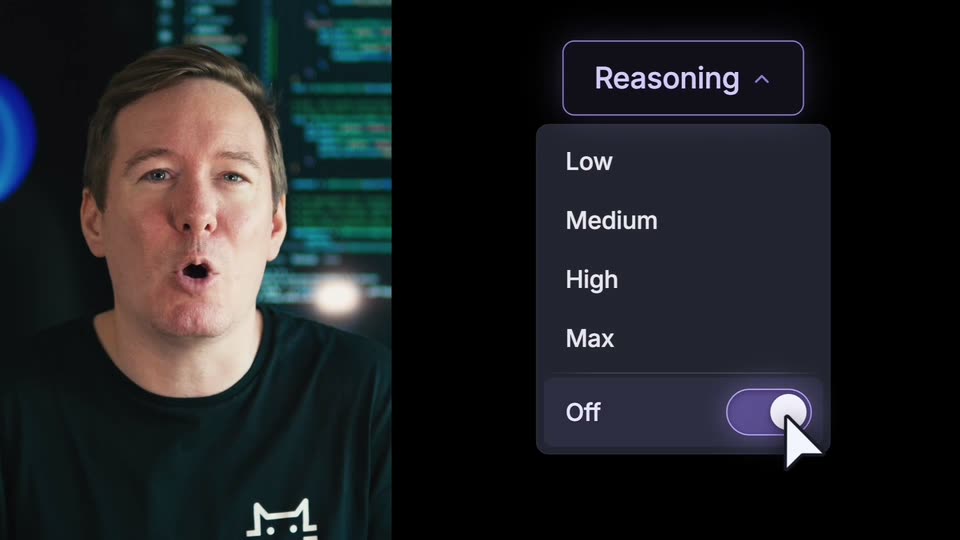
Split screen: a man talks on the left before a dark code wall. On the right, a cursor clicks the Reasoning dropdown, a menu of Low, Medium, High, Max and an Off toggle opens, the cursor flips the toggle, and the panel tilts in 3D, fading to the off toggle.
Techniques: Split screen, Cursor demo, 3D mockup
Camera: Static
A split screen shows a man in a black GitHub tee on the left against a dark code backdrop, while a toggle switch flips on the right. The knob slides right as radiating lines collapse into concentric rings.
Techniques: Split screen, Morph
Camera: Static
A single toggle switch with a light gray knob on a dark rounded track sits right of center on a black background. The icon holds still, then dims and fades out to black over the short shot.
Camera: Static
A man in a black t-shirt stands centered and speaks to camera, framed from the chest up. Two large monitors fill the background, one showing a blue circular mark, the other lines of code. He raises both hands in a shrug near the end. The shot stays locked off.
On-screen text: “1”
Camera: Static
A man in a black t-shirt speaks to the camera, centered in a medium close-up. A blurred blue circular logo with white squares sits left, a code editor glows right. He raises a hand to gesture mid-sentence.
Camera: Static
A man in a black shirt sits centered before two dark monitors, one with a blue ring, one with code. The frame splits: a left black panel holds two numbered circles and the word EVALUATE, while a vertical line and scan lines cross his face on the right.
On-screen text: “1”, “2”, “EVALUATE”
Techniques: Split screen
Camera: Pan
Split screen: a man in a black tee speaks on the right against blurred terminal screens. On the left, a six-node pipeline labeled EVALUATE to OBSERVE lights up in sequence with a purple glow, then fades into a bar chart that grows upward above two buttons, EVALS and BENCHMARKS.
On-screen text: “EVALUATE”, “DATA”, “VERIFY”, “TRAIN”, “DEPLOY”, “OBSERVE”, “EVALS”, “BENCHMARKS”
Techniques: Split screen, Kinetic type
Camera: Static
Split screen: a man in a black tee talks on the right against a code backdrop, while on the left a purple bar chart gives way to a glowing sparkle tile that multiplies into a ring of six tiles, then fades to black.
On-screen text: “1”, “2”, “×”
Techniques: Split screen
Camera: Static
A man in a black t-shirt speaks to camera before a blue orb and code screen. At 4s he shrinks into a right panel over a dark dot-wave field, and two white URL cards labeled DOWNLOAD MODEL and CODE slide in on the left.
On-screen text: “DOWNLOAD MODEL”, “huggingface.co/pipecat-ai/phonellm-alpha-1”, “CODE”, “github.com/pipecat-ai”
Techniques: Split screen, Kinetic type
Camera: Static
A man in a dark t-shirt holds a neutral pose on the right over a blue abstract backdrop. A dark halftone dot field expands from the left across the frame, masking him out, while a small line logo drifts to center.
Techniques: Masking
Camera: Static
A white line-drawn cat logo, two pointed ears and dot eyes, holds center on a dark background of fine dots that ripple in slow waves like cloth, the mark brightening from gray to white over the first second.
Camera: Static