
0:31
Explore
Offstream: Streamlined carbon compliance for project developers
Offstream · Jul 2024 · 0:22 · Full motion · AI-annotated
- Length
- 0:22
- Scenes
- 7 · 3.2 s avg
- Product on screen
- 0:00
- Call to action
- 0:18 · 82%
- Voiceover
- No
- Views
- 358 on YouTube
as of November 24, 2026
00:00:00 / 00:22:13
- Length
- 0:22
- Scenes
- 7 · 3.2 s avg
- Product on screen
- 0:00
- Call to action
- 0:18 · 82%
- Voiceover
- No
- Views
- 358 on YouTube
as of November 24, 2026
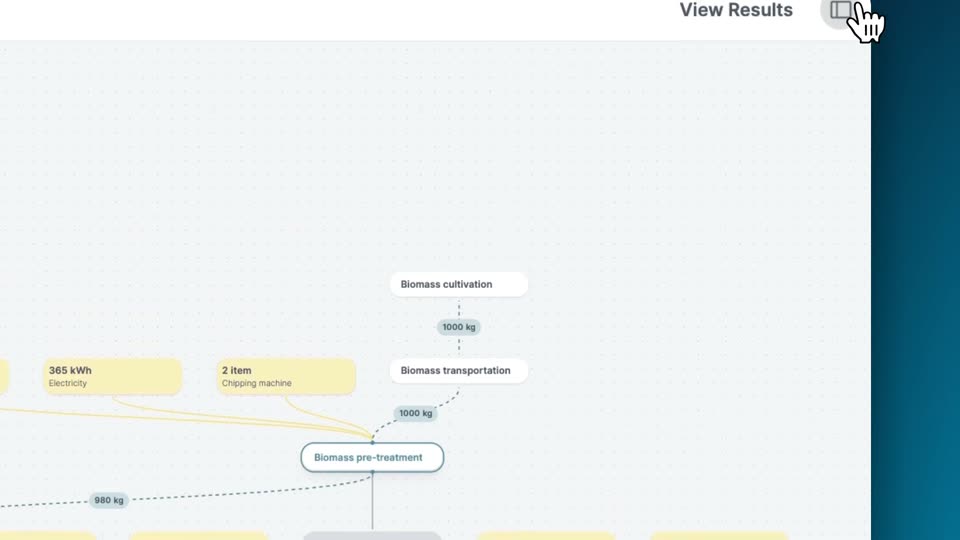
Offstream’s 0:22 launch film runs 7 scenes, about 3.2 s each. The product is on screen from the first frame. The call to action lands at 0:18 (82% in). A single continuous UI walkthrough on a deep blue field: the Offstream LCA canvas is panned, a details panel is opened and a value edited, then the view pulls back to the emissions chart before a lock-off brand card with the URL. Pacing is slow and uncut, driven by sliding panels, smooth zooms and a single grab-hand cursor, with the white-on-blue palette and the recurring aperture logo as the signature look.
No filming indicatedEstimated needs: 2 capture groups — your screens or recordings · 1 official logo — reused across the film
Is this your launch? to your site or press kit.
More like this

1:16

Pinch for Mac
Pinch · B2B · Aug 2025
1:06

superglue (YC W25) - product demo
superglue · B2B · Feb 2025
Offstream: Streamlined carbon compliance for project developers, scene by scene
· 7 scenes as text
01 · Product intro · 0:00–0:05
A white OFFSTREAM interface card sits on a dark blue field, its LCA flowchart of small yellow and gray nodes filling the canvas. The view zooms into the diagram as a grab-hand cursor drags it, panning across nodes such as Biomass pre-treatment and Biochar post processing.
Techniques: UI zoom, Cursor demo
Camera: Push in
02 · Demo · 0:05–0:06
A cursor clicks the menu icon in the top right, and a details panel slides in from the right listing the Biomass pre-treatment fields. The cursor then grabs the panel's left edge and drags it left, widening the panel over the flowchart.
Techniques: Cursor demo, Split screen
Camera: Pull out
03 · Demo · 0:06–0:08
A process flow diagram fills the left of the screen while a View Results panel opens on the right. A cursor clicks the Inputs tab, then the 365 kWh Electricity row, and the panel swaps to an Electricity detail form with Type, Name, Amount and Unit fields.
Techniques: Cursor demo
Camera: Pull out
04 · Demo · 0:08–0:13
A white Electricity form panel slides in over a pale process-flow diagram. A cursor clicks the up-arrow to raise the Amount from 365 to 368, then types 'renewable energy' into the Description field, and the panel slides out to the right.
Techniques: Cursor demo
Camera: Static
05 · Demo · 0:13–0:15
A detail panel with form fields slides off to the right, revealing a Sankey flow diagram that pans out to show the full process. A white hand cursor hovers near the View Results button in the top corner.
Techniques: Cursor demo, UI zoom
Camera: Static
06 · Demo · 0:15–0:18
A cursor hovers over the Export button on a zoomed-in carbon emissions chart, then the frame pulls back to reveal the full OffiCe Dream dashboard with sidebar, tabs and stacked bar chart on a blue background.
Techniques: Cursor demo, UI zoom
Camera: Pull out
07 · CTA · 0:18–0:22
On a dark blue gradient, the Offstream aperture logo and wordmark fade in at center, then the URL www.useoffstream.com fades in below. The frame stays locked off.
On-screen text: “www.useoffstream.com”
Camera: Static