0:36

Arc on Windows. Download now.
The Browser Company · Productivity · Apr 2024
Tana · Nov 2026 · 1:22 · AI-annotated
The video alternates cream serif title cards with 3D-tilted interface mockups over a soft multicolor gradient, each feature announced by a single serif line and closed by a caption. Cuts land on a steady 103 bpm pulse, with circular mask reveals and slow push-ins as the signature moves.
The Browser Company · Productivity · Apr 2024
Noodle Seed · Oct 2026
Figma · Design · Jun 2026
On a near-black background, the Google Meet logo fades in, then shifts left as the Microsoft Teams, Zoom, Whereby, Slack huddles, Discord and Webex logos fade in one by one to its right, forming a row. White name labels appear beneath each, then fade as the row dissolves to black.
On-screen text: “Google Meet”, “Microsoft Teams”, “Zoom”, “Whereby”, “Slack huddles”, “Discord”, “Webex”
Camera: Static
A small faceted logo mark in brown, orange and teal sits dead center on a near-black field, haloed by a soft circular glow. The mark holds still while the light behind it breathes gently.
Camera: Static
A small faceted triangular logo with a warm-to-cool gradient and a white center dot glows at the center of a near-black field, then dissolves to black.
Camera: Static
A laptop in 3D perspective on black shows a four-person video call above a dark meeting dashboard. The screen blurs as a chat panel slides in from the right, revealing an agent prompt field.
Techniques: 3D mockup
Camera: Static
A six-tile video call grid blurs and dims as a dark side panel slides in from the right, showing two agent icons and a private message field.
Camera: Static
A locked-off capture of a meeting screen: a top toolbar and four live participant tiles sit above a shared spec sheet showing three states of a timeline card. Small white cursors rest on the tiles. Nothing moves.
Camera: Static
A video call interface with six participant tiles in a two-by-three grid sits in 3D perspective on a black background, fading up from dim to full brightness. The window shows the meeting controls and the live participant feeds.
Techniques: 3D mockup
Camera: Static
A dark messaging panel floats on the right over a blurred six-person video-call grid. The panel shows a Weekly sync header, two circular agent icons, and a private message field, all static.
Camera: Static
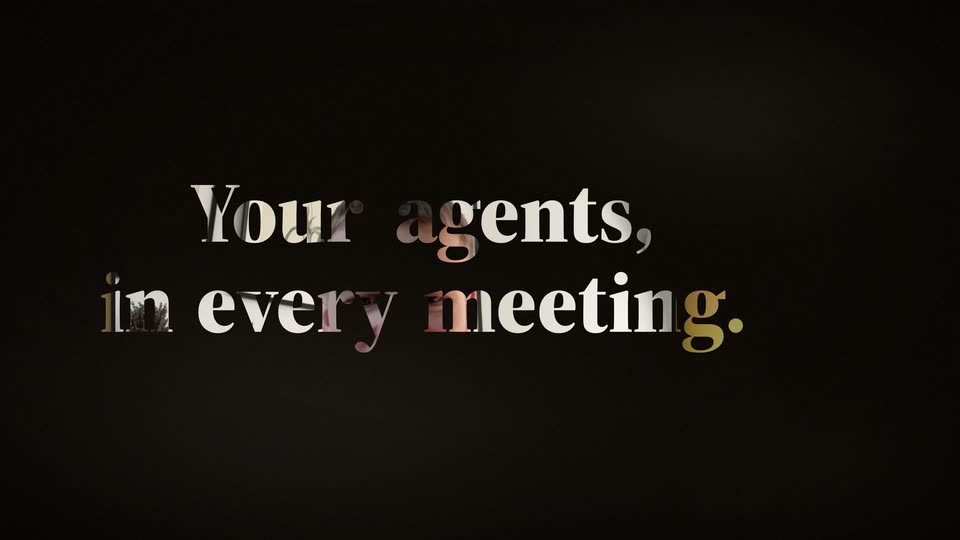
On a plain cream background, the black serif line “Your agents,” holds center while a second line fades in word by word below it: “in every” first, then “meeting.” in orange. The frame stays locked off throughout.
On-screen text: “Your agents,”, “in every”, “meeting.”
Techniques: Kinetic type
Camera: Static
Oversized cropped type on black reads “Your agents, in every meeting.” while a circular mask opens over a Google Meet call of a man in a home office. The call window then fills the frame against a blurred rainbow gradient.
On-screen text: “Your agents,”, “in every meeting.”
Techniques: Kinetic type, Masking
Camera: Static
A Google Meet video call window and a Tana panel sit side by side on a colorful gradient background. The call features a man in a room with framed art, while the panel shows an agent chat interface with icons and a text input field.
Techniques: Split screen
Camera: Static
On a cream background, the serif phrase “Your data,” sits small and centered in gray and orange, then scales up and drops toward the lower center as it turns black and a thin horizontal line cuts across it.
On-screen text: “Your data,”
Techniques: Kinetic type
Camera: Static
A six-person video call grid fills a dark app window over a colorful gradient, with a floating Claude card at the center. The view slowly zooms into the grid as the large “Your data.” heading behind the window slides out of frame.
On-screen text: “Your data.”
Techniques: UI zoom
Camera: Push in
A video call grid with three participants sits on the left while a Claude chat panel on the right types out a reply. A blue bar chart and a text bubble slide in, comparing commit counts to January.
Camera: Push in
A video meeting interface floats in 3D perspective against a colorful gradient backdrop, six participants talking in a grid beside a chat panel with a blue bar chart, as the camera slowly pushes in.
Techniques: 3D mockup
Camera: Static
A 3D-angled Google Slides window on the left displays a slide reading Q4 2026 Board Update with a tana logo, beside two stacked video call tiles showing four people. The blurred multicolor gradient background stays still as the whole mockup pushes in slightly.
Techniques: 3D mockup
Camera: Push in
A presentation editor fills the frame: a slide titled Q4 2026 Board Update sits center, thumbnails on the left, four video-call tiles on the right. An AI chat bubble above the slide switches from a loading prompt to a checkmark, and the left thumbnails refresh.
Camera: Static
A presentation app displays a slide titled Velocity significantly increased, with a bar chart of gray January bars and taller blue bars for the last four weeks. The view zooms in from the full layout, including the slide panel and a video call, to a tighter framing on the slide.
Techniques: UI zoom
Camera: Static
A presentation screen shows a bar chart slide beside a video call sidebar. The caption 'in the meeting.' sits centered in white serif. The interface blurs out, leaving the caption sharp against the softened background.
On-screen text: “in the meeting.”
Camera: Static
A black serif word, Designs, sits centered on a cream field and eases smaller as the orange word change drops in beside it, completing the headline.
On-screen text: “Designs change in the meeting.”
Techniques: Kinetic type
Camera: Pull out
Black serif text “Designs change” scales up to fill the frame, then the view opens to a 3D perspective of a video call window. A circular cutout in the center reveals a design page, with a chat panel docked on the right.
On-screen text: “Designs change”
Techniques: Kinetic type, 3D mockup, Masking
Camera: Static
A video call window with four participants sits above a Figma canvas showing a meeting-help page; a chat panel on the right logs a request and the assistant's reply. The window then widens, revealing a second page on the canvas.
Techniques: Split screen, UI zoom
Camera: Push in
A video call bar with four participants sits above a 3D stack of the Learn page, its headline and feature grid facing forward, while a chat panel runs along the right. The camera zooms in, centering the perspective page and pushing the call tiles out of frame.
Techniques: 3D mockup, UI zoom
Camera: Push in
A close-up of the Tana Learn page, showing the “What do you want to do with your meetings?” heading and a grid of feature cards, zooms out to reveal the full interface with a meeting list on the right.
Techniques: UI zoom
Camera: Pull out
A meeting app window sits on a soft gradient background: a control bar, four participant video tiles, and a shared screen that scrolls down to a dark-mode page titled What do you want to do with your meetings? with a grid of feature cards.
Camera: Static
A dark-mode meeting app screen on a blurred gradient background: four participant video tiles above a shared dark dashboard with a headline and a grid of feature cards. The large white serif word “while” fades in at the center.
On-screen text: “while”
Techniques: Kinetic type
Camera: Static
A blurred video-call screen with four participant tiles sits behind a centered white serif line. “while you” is already on screen, then “talk.” pops in to complete the phrase on a locked-off frame.
On-screen text: “while you”, “talk.”
Techniques: Kinetic type
Camera: Static
A cream card holds the black serif headline, then a circular mask opens from the center to reveal the agent chat UI, a video call on the left and a message field on the right.
On-screen text: “while you talk.”, “The deck is ready”
Techniques: Masking
Camera: Static
A dark video-call screen splits the frame: a man in a tile on the left talks while the Claude panel on the right types the query, then shows a seat chart and summary card. The scene ends reframed on a desktop with the call in a window.
Techniques: Split screen
Camera: Pull out
A flat screen capture sits on a multicolor gradient. A Google Meet window shows a man in a green shirt talking, with a small self-view in the corner. Beside it, a dark agent panel displays a line chart and a status line that updates to “Checked PostHog”.
Camera: Static
A video call shows a man on the left and a dark Claude panel on the right. A cursor taps Nudge Claude, then the panel scrolls and a pricing message with a $30 x 98 = $2,940 formula slides in.
Techniques: Cursor demo
Camera: Static
A flat Google Meet window shows a man on a video call, set on a multicolor gradient. A dark Claude Nudge panel sits to the right, its pricing paragraph scrolling up. The man's head and gaze shift slightly as he listens.
Camera: Static
A man in a video call fills the left, listening, while the right chat panel scrolls to reveal a Google Slides thumbnail. The framing tightens on his face as the new slide card appears.
Techniques: UI zoom
Camera: Push in
A split view pairs a video call on the left, a man in a plant-filled room, with a dark Claude chat on the right. A message card updates a Google Slides deck as its counter ticks from 1 of 5 to 2 of 5 slides while the thread scrolls.
Techniques: Split screen
Camera: Push in
A presentation editor window sits on a multicolor gradient desktop. The slide area switches from a stats slide with three gray cards to a table slide, and the left thumbnail strip gains a third selected thumbnail.
On-screen text: “Agents”
Camera: Static
A presentation editor window sits at an angle over a multicolor gradient, the open slide showing a billing table. The view pushes in, flattening the perspective to frame the heading and the table.
Techniques: 3D mockup, UI zoom
Camera: Static
A shared Slides window on a multicolor gradient desktop shows a slide reading “Annual billing saves Acme $5,900 a year” above a billing comparison table. The window gently scales up while a meet.google.com share bar with a Stop sharing button stays pinned at the bottom.
Camera: Static
A blurred app window fills the frame, its right edge a pale blue sidebar and left edge a warm wash. The black serif phrase before you hang up. holds centered and still in the middle.
On-screen text: “before you hang up.”
Camera: Static
A circular cutout on a cream background frames a bar chart titled Weekly Commits. Eight bars rise from stubs to full height, gray for January and blue for October, while a large 5x glyph flashes in the center and fades.
Techniques: Masking
Camera: Static
A fixed circular lens on a cream background cycles through product views: a docs landing page, an empty state with one card, a fanned set of slide documents in 3D, then a dark disc holding a gradient 3D prism.
Techniques: Masking, 3D mockup
Camera: Static
A faceted cube mark with an orange-to-blue gradient sits centered on a near-black background with a soft glow. The white serif wordmark “tana” fades in beside it, then the italic tagline and small “tana.inc” URL fade in below on a locked-off frame.
On-screen text: “tana”, “Bring your agents into the meeting.”, “tana.inc”
Techniques: Kinetic type
Camera: Push in