
1:50
Explore
Arc on Windows. Download now.
The Browser Company · Apr 2024 · 0:36 · AI-annotated
- Length
- 0:36
- Scenes
- 40 · 0.9 s avg
- Product on screen
- 0:09
- Call to action
- 0:31 · 85%
- Voiceover
- Yes
- Views
- 193K on YouTube
as of November 11, 2026
00:00:00 / 00:36:15
- Length
- 0:36
- Scenes
- 40 · 0.9 s avg
- Product on screen
- 0:09
- Call to action
- 0:31 · 85%
- Voiceover
- Yes
- Views
- 193K on YouTube
as of November 11, 2026
The Browser Company’s 0:36 launch film runs 40 scenes, about 0.9 s each. The product shows up at 0:09, with social proof. The call to action lands at 0:31 (85% in), over a voiceover. The video opens with a pixel-art nostalgia montage of the early web, then pivots to a flat-color card system that delivers stats and the product reveal, before a rapid-fire UI tour of the browser. Signature moves include the retro pixel cursor, rolling-digit odometer counters, and hard cuts between flat color fields and tight UI close-ups.
Footage neededEstimated needs: 4 capture groups — your screens or recordings · 1 official logo — reused across the film · 1 filmed passage — shoot, supply or replace · 1 3D passage — build or supply
Is this your launch? to your site or press kit.
More like this

Similar soundtrack
Films whose music sounds like this one, voice left out
1:04

Touchmark - Market for future inference capacity
Touchmark · Electronic dance music with a retro-futuristic, high-energy style
1:14

Google - We’re introducing major updates to Gemini in @GoogleChrome for MacOS,
Google · Modern electronic pop
0:23
Introducing: Native Edits - Create and edit your marketing content
Native AI · Electronic Dance Music
Arc on Windows. Download now., scene by scene
· 40 scenes as text
01 · Hook · 0:00–0:01
A cluttered vintage desk holds a CRT monitor displaying the Windows 95 boot logo, flanked by a PC tower and a second monitor, with a small webcam on top. The shot is locked off; a heavy blue color cast over the frame fades out to natural tones.
Camera: Push in
02 · Hook · 0:01–0:01
Tight close-up of a retro window title bar on a light blue background, showing gray minimize, maximize and close buttons. A large pixelated white cursor rises from below and presses the minimize button.
Techniques: Cursor demo
Camera: Static
03 · Hook · 0:01–0:02
A retro gray browser menu lists Start Page, Search the Internet, and Read Newsgroups. A white arrow cursor slides down and stops on Search the Internet, which highlights dark blue with white text. Locked-off close-up.
Techniques: Cursor demo
Camera: Static
04 · Hook · 0:02–0:02
A pixelated arrow cursor and hourglass wait icon sit beside a search box on a light gray background. A black pixel border snaps into place as the word flower types itself letter by letter into the box.
Techniques: Cursor demo, Kinetic type
Camera: Static
05 · Hook · 0:02–0:03
A slightly tilted browser window fills the frame. Inside the page, a yellow sunflower painting reveals itself from top to bottom, the lower half emerging from black until the full image is visible.
Techniques: Masking
Camera: Static
06 · Hook · 0:03–0:04
A retro Windows 95 desktop with side icons and a taskbar; the interface clears to a plain teal field while the bold white headline completes word by word into “You've been waiting.”
On-screen text: “You've been waiting.”
Techniques: Kinetic type
Camera: Static
07 · Hook · 0:04–0:05
A black pixelated X mark built from stepped squares sits centered on a plain light field. It rotates a quarter turn while scaling up, then locks off.
Camera: Static
08 · Social proof · 0:05–0:06
A deep blue frame shows three rounded tiles with oversized white digits that roll through values like an odometer; the caption 'since Dec 11. 2023' scales in along the bottom edge.
On-screen text: “since Dec 11. 2023”
Techniques: Kinetic type
Camera: Static
09 · Social proof · 0:06–0:09
A dark blue rounded card on a blue field shows a six-digit counter whose digits roll upward as the total climbs. A white caption sits below it; at the end the card slides up to reveal a blurred interface.
On-screen text: “Beta Testers Onboarded since Dec 11, 2023”
Techniques: Kinetic type, Masking
Camera: Static
10 · Product intro · 0:09–0:10
A pixelated gray toolbar with three icon buttons sits against a shifting blue-to-purple background. A white pixel cursor glides left to right across the buttons, pausing over each.
On-screen text: “Beta Testers Onboarded since Dec 11, 2023”
Techniques: Cursor demo
Camera: Static
11 · Product intro · 0:10–0:10
Macro close-up of a white Start button with a pixelated red, green, blue and yellow icon on a lavender panel; the frame begins soft and racks into focus as the button drifts slightly.
Techniques: 3D mockup
Camera: Static
12 · Product intro · 0:10–0:11
A pixelated white arrow cursor hovers over a small multicolored icon on a dotted-border Start button, rendered in a retro pixel style. The frame stays locked on the close-up of the button.
Techniques: Cursor demo
Camera: Static
13 · Product intro · 0:11–0:11
A locked-off close-up of the green Windows Start button in the lower-left corner. The glossy button, with its four-pane colored flag and white lowercase start label, slides up slightly, revealing more of the muted purple desktop below and less of the pale blue bar above.
Camera: Static
14 · Product intro · 0:11–0:11
Extreme close-up of a glossy dark blue Windows start button on a purple desktop. The white four-pane flag and the word start sit on the button, and the label slides slightly while the frame stays locked.
Techniques: Kinetic type
Camera: Static
15 · Product intro · 0:11–0:12
Close-up of a Windows taskbar showing the Start button and Internet Explorer icon on a blue bar. A white arrow cursor slides left from the browser icon and comes to rest beside the Start button.
Techniques: Cursor demo
Camera: Static
16 · Product intro · 0:12–0:13
A close-up of a dark taskbar with a cursor on the Windows logo cuts to a light interface, zooming in on the logo tile.
Techniques: UI zoom
Camera: Static
17 · Product intro · 0:13–0:14
A locked-off Windows desktop shows a sunlit green mountain wallpaper, a bottom taskbar with a search field and app icons, and two desktop icons at the top left. A white arrow cursor rests in the open blue sky.
Camera: Static
18 · Product intro · 0:14–0:15
A blue Windows desktop shows the Arc browser icon with a white cursor resting on it. The shot cuts to the word Finally, centered in white on the same flat blue field.
On-screen text: “Finally”
Techniques: Cursor demo
Camera: Static
19 · Demo · 0:15–0:16
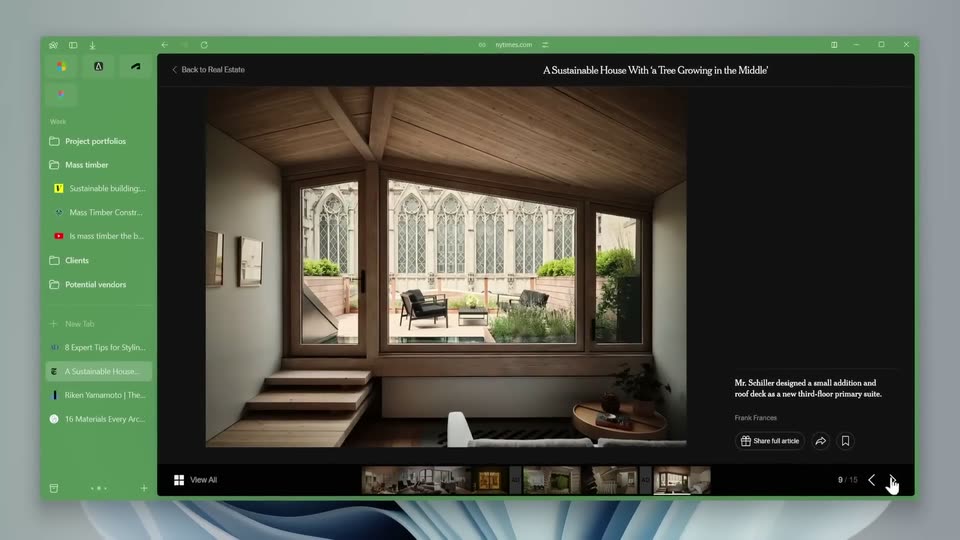
A green notes app window fills the frame, showing an architectural article with a 3D interior render of a wood-ceilinged room. The render zooms and pans right to reveal a caption block, while a cursor rests on the bottom-right navigation arrow.
On-screen text: “Finally”
Techniques: UI zoom
Camera: Static
20 · Demo · 0:16–0:17
Close-up of a white search card over a blurred wooden interior. The query japandi interior types in letter by letter, a thin caret trailing the text, while the green-highlighted suggestion updates to match and a second line reads japandi interior design.
Techniques: Kinetic type
Camera: Static
21 · Demo · 0:17–0:18
A close-up of a search dropdown over a warm interior photo. The top field reads “japandi interior design” with the word “design” boxed in green, while the matching suggestion below is filled with a green highlight. The frame stays locked and static.
Camera: Static
22 · Demo · 0:18–0:19
A static browser window displays the AD shopping page: a white header with menu links, a large interior photo of a gallery wall with framed art and a vase of white flowers, and a subscription banner along the bottom.
Camera: Static
23 · Demo · 0:19–0:19
A pale green sidebar of saved folders slides in from the left over a listing card with an interior photo and a pink Reserve button. A web page showing a brick pavilion photo and a 3D brick model sits in a right-hand split view.
Techniques: Split screen
Camera: Static
24 · Demo · 0:19–0:20
A light green sidebar lists saved folders and links, a cursor slides down the list and X icons appear beside two entries, while a living room photo and an article headline fill the right panel.
Techniques: Cursor demo
Camera: Static
25 · Demo · 0:20–0:21
Two browser windows sit side by side on a pale green desktop: an Airbnb listing on the left, a museum exhibitions page on the right. A cursor slides in over the right page as its content shifts up, enlarging the sculpture photo.
Techniques: Split screen, Cursor demo
Camera: Static
26 · Demo · 0:21–0:22
A document article about a brick sculpture at Storm King Art Center fills the screen center, with a light-green sidebar of list items on the left and a blurred page behind. A white cursor rests at the document's right edge. The frame is static.
Camera: Static
27 · Demo · 0:22–0:22
A browser view splits into a left tab list and a right video panel. A white cursor hovers the lofi hip hop radio tab while the list scrolls up, revealing upstate ny winery. The right panel plays an animated girl at a desk with a price overlay.
Techniques: Cursor demo
Camera: Static
28 · Demo · 0:22–0:23
A green panel lists collection names beside a living room photo preview. A white cursor hovers over the list as the Living Room Photos row slides up and the highlighted Bleutral row slides down, swapping their order.
Techniques: Cursor demo
Camera: Static
29 · Demo · 0:23–0:24
A green-tinted file browser panel with three folder icons and a hovering cursor fades in on the left, while a building photo with a dark and white bar sits on the right. The labels Work and Potential vendors slide into place.
Techniques: Cursor demo
Camera: Static
30 · Demo · 0:24–0:25
A locked-off close-up of a two-panel document interface. The left panel holds lines of body text, the right panel shows a photo of green foliage under a header bar. A cursor hovers the split-view button, popping an Open Split View tooltip.
Techniques: Cursor demo
Camera: Static
31 · Demo · 0:25–0:26
A green desktop app frames two browser panes side by side, showing a Vox article on wood construction and a New York Times story on a house with a tree; both pages switch to new content.
Techniques: Split screen
Camera: Static
32 · Demo · 0:26–0:26
Two side-by-side browser windows show the MoMA website, both scrolling down through event cards and article text. A purple sidebar on the left lists saved tabs and projects.
Camera: Static
33 · Demo · 0:26–0:28
A Windows desktop with a file explorer, a YouTube video and a recipe browser window zooms into a settings dropdown listing Mica (default) and Acrylic, where a cursor hovers over Acrylic.
Techniques: UI zoom, Cursor demo
Camera: Static
34 · Demo · 0:28–0:29
A close-up of a phone screen shows a folder list, Kitchen remodels and Plants & flowers, over a blurred colorful wallpaper, with a light webpage panel bearing the green heading Petra at the right; the frame pans slowly right, revealing more of the page.
On-screen text: “Mica (default)”, “SA”, “R”, “Acryhic”
Camera: Push in
35 · Demo · 0:29–0:29
Close-up of a settings panel: a white cursor clicks the sun/moon toggle, flipping it right as the color swatches below fade from dark to pastel and the pink panel on the left lightens.
Techniques: Cursor demo
Camera: Static
36 · Demo · 0:29–0:29
Inside a file manager window, a pink sidebar lists app icons and folders beside a dotted-grid canvas. A white cursor glides down the canvas as a small dot travels with it, shifting from pink to orange.
Techniques: Cursor demo
Camera: Static
37 · Demo · 0:29–0:31
A browser page with large recipe headlines fades out, dissolving into a green-themed browser that shows a Japandi design article and an Instagram feed of interior photos side by side.
On-screen text: “Recipes”, “Spicy Peanut Noodles”, “Squid Ink Linguini with Roasted”
Techniques: Kinetic type, Split screen
Camera: Static
38 · CTA · 0:31–0:33
A solid blue background holds centered white text that swaps in sequence: “Arc is on Windows”, then “Download now”, then “arc.net”. Each line stays still on a locked-off frame, with no motion between them.
On-screen text: “Arc is on Windows”, “Download now”, “arc.net”
Camera: Static
39 · CTA · 0:33–0:35
On a blue-purple desktop, the selected Microsoft Edge icon and the Recycle Bin sit side by side. A 'Move to Recycle Bin' option pops in, then the Edge icon crossfades out, leaving the Recycle Bin alone with a small white square at its corner.
On-screen text: “arc.net”
Techniques: Cursor demo
Camera: Static
40 · Outro · 0:35–0:36
A white outline logo, a four-pane window overlapped by a curved arc on its left edge, holds centered on a flat blue field. The frame stays locked and static for the duration.
Camera: Static