0:57

Creative SaaS Launch Video | FrenchFry
FrenchFry · Nov 2026
VidRush’s 2:57 launch film runs 53 scenes, about 3.3 s each. The product shows up at 0:19, with social proof. The call to action lands at 2:37 (89% in), over a voiceover. The video alternates a presenter in a white studio, dark UI screen captures, and 3D renders, moving from an iceberg metaphor through a full workflow demo to pricing and a URL call to action. Signature moves are floating X post cards, a 3D iceberg dive, and a persistent dark caption bar that tracks the voiceover.
Is this your launch? to your site or press kit.
FrenchFry · Nov 2026
Wondercraft · Jan 2026
The Browser Company · Productivity · Apr 2024
Films whose music sounds like this one, voice left out
Enrich Labs · Modern corporate tech promotional video
Raycast · Tech tutorial / Software demonstration
Fish Audio · Modern electronic, upbeat
A presenter in a cream sweater gestures in a white studio beside a laptop on a pedestal. X post cards fade in and float in 3D around him, some blurred in the depth. A dark caption bar at the bottom cycles through the spoken line.
On-screen text: “Claude Opus 5.5”, “changed video editing forever,”, “but we just killed it.”
Techniques: 3D mockup
Camera: Static
A presenter in a cream sweater stands by a white pedestal holding a MacBook, gesturing as floating X post cards drift past and dissolve. Subtitles sit in a dark bar at the bottom. The shot cuts to a 3D iceberg rising from turquoise water.
On-screen text: “but we just killed it.”, “Editing one video”, “is just the tip of the iceberg.”
Camera: Static
A blue iceberg rises from the sea under a clear sky. White tweet cards about AI video editing float in 3D space around it, multiplying from three to a dozen. A dark caption bar at the bottom reads the line.
On-screen text: “is just the tip of the iceberg.”
Techniques: 3D mockup
Camera: Static
The camera starts on a 3D iceberg above blue water with a bubble reading 'AI can edit a video,' then dives underwater to reveal the larger submerged mass with a bubble reading 'A real production operation.' Captions read 'is just the tip of the iceberg.' then 'Underneath is everything.'
On-screen text: “AI can edit a video”, “is just the tip of the iceberg.”, “A real production operation”, “Underneath is everything”
Camera: Pan
A 3D-rendered iceberg at the waterline, its submerged mass filling the frame, as a list of feature chips builds row by row on the right under the header 'A real production operation.' The camera slowly tilts down while captions roll along the bottom.
On-screen text: “Underneath is everything”, “A real production operation”, “Creative quality”, “Studio-grade pacing”, “Motion graphics and 3D”, “Pro sound design”, “Trained on your references”, “serious content teams”, “Long-form”, “Full documentaries, not clips, One brief, one finished film, Runs in the cloud, laptop closed”
Techniques: Kinetic type
Camera: Push in
A glowing blue crystal floats in dark teal water on the left while a two-column feature list panel on the right fades out. Subtitles sit in a dark bar at the bottom, and the frame drifts down into open water.
On-screen text: “And Claude Code just wasn't built”, “for any of it.”
Camera: Pan
A black screen holds a white caption centered at the bottom, reading 'for any of it.' The frame stays still and locked-off for the full duration, with no motion or additional elements.
On-screen text: “for any of it.”
Camera: Static
A glowing white vidrush wordmark fills the dark frame in close-up, then scales back to reveal the full logo with its dot-cluster mark on the left. A caption pill reads Introducing Vidrush V2, at the bottom.
On-screen text: “for any of it.”, “Introducing Vidrush V2,”, “vidrush”
Techniques: Kinetic type
Camera: Pull out
The vidrush wordmark with a dot-cluster icon scales in at center as the dark background brightens into a blue-to-orange gradient. A V2 badge appears beside it, the tagline An Agent-Native slides in above, and a bottom caption pill switches from Introducing Vidrush V2, to an agent-native video.
On-screen text: “Introducing Vidrush V2,”, “An Agent-Native”, “an agent-native video”
Techniques: Kinetic type
Camera: Static
A white headline builds over a dark navy field while tilted 3D panels of a video workspace rotate and blur below. The clip cuts to a man in a cream sweater gesturing beside a laptop on a pedestal in a white studio.
On-screen text: “An Agent-Native”, “Video Production Workspace”, “an agent-native video”, “production workspace.”, “People have already used Vidrush”
Techniques: Kinetic type, 3D mockup
Camera: Push in
A man in a cream sweater stands next to a white pedestal with a laptop. A blue line graph animates in behind him, rising to the top right, while the headline “1 Billion” appears in the top left.
On-screen text: “People have already used Vidrush”, “to garner over a billion tracked”, “1 Billion”, “long-form views on YouTube.”
Techniques: Kinetic type, Masking
Camera: Pull out
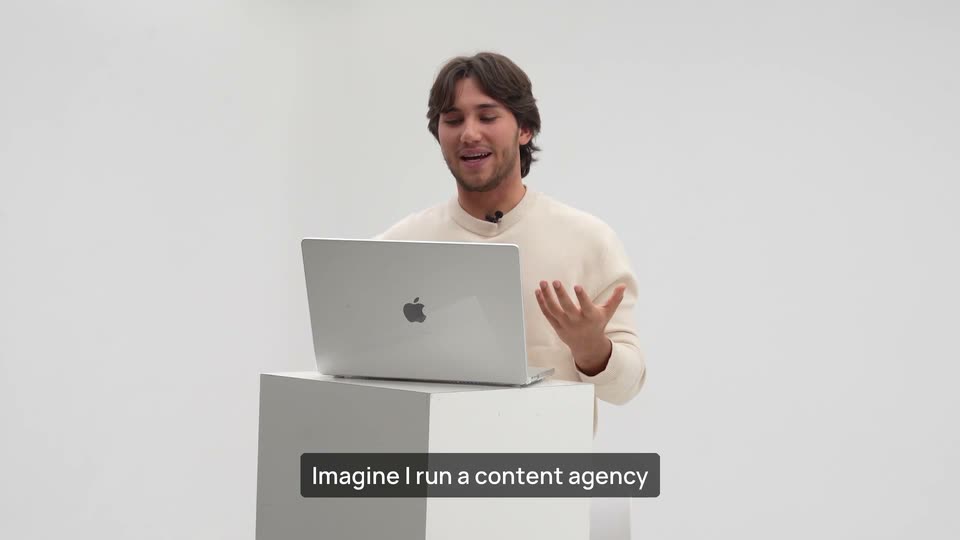
A man in a cream sweater stands behind a white cube pedestal holding a closed silver laptop, gesturing as he talks to camera against a plain white wall. Subtitles in a dark box sit at the bottom of the locked-off frame.
On-screen text: “Let me show you how.”, “Imagine I run a content agency”, “and one of our clients”, “is a logistics company.”
Camera: Static
A man in a cream sweater stands behind a white pedestal with an open silver laptop, gesturing with one hand as he speaks. A dark caption box at the bottom holds the subtitle. The frame is locked-off against a plain white backdrop.
On-screen text: “is a logistics company.”
Camera: Static
A dark brand profiles dashboard fills the frame, a grid of profile cards under a left icon rail. A cursor glides from the create card up to the blue New brand profile button. A caption line at the bottom swaps text.
On-screen text: “is a logistics company.”, “First, I set up a brand profile for them.”
Techniques: Cursor demo
Camera: Static
A dark dashboard lists brand profile cards; a cursor clicks the blue New brand profile button, the view switches to an empty form, and the name Acme Coffee is typed into the name field.
On-screen text: “First, I set up a brand profile for them.”
Techniques: Cursor demo
Camera: Push in
A dark brand-profile interface scrolls down from the name field through the color palette and logo sections. A cursor hovers over the left menu, and white captions at the bottom explain the setup.
On-screen text: “First, I set up a brand profile for them.”, “Their fonts, colors and logos.”
Techniques: Cursor demo
Camera: Pull out
A dark settings page types a YouTube link into a train-on-a-video field, the Analyze button flips to Analyzed, and a style summary writes itself. The view scrolls past script and sourcing panels, then cuts to a Slack thread with a brief.
On-screen text: “Then I upload a reference video”, “and Vidrush trains”, “on the editing style they want.”, “and I add their script”, “and compliance requirements too.”, “Then their marketing lead”, “messages me on Slack.”
Techniques: UI zoom, Cursor demo
Camera: Static
A dark messaging interface shows a channel chat; the camera pushes in on a client brief message with a PDF attachment. White caption boxes cycle along the bottom, then the frame pulls back as the brief text is highlighted.
On-screen text: “They want an 18-minute video”, “with animated maps,”, “3D animation,”, “real footage and the production quality”, “of a professional documentary.”
Techniques: UI zoom, Cursor demo
Camera: Static
A crossfade resolves into the creation screen, the brief field centered under the heading. The cursor glides from the brief text to the blue send button as the bottom caption swaps from one line to the next.
On-screen text: “So I just paste the client's brief,”, “hit generate and come back”
Techniques: UI zoom, Cursor demo
Camera: Push in
A man in a cream sweater stands behind a white pedestal holding a silver laptop in a plain white set. He gestures at the open lid, lowers it shut, then rests both hands on the closed laptop while speaking. Dark caption boxes appear at the bottom of the frame.
On-screen text: “hit generate and come back”, “after it's done.”
Camera: Static
A man in a cream sweater and light jeans stands in a white studio beside a pedestal holding a laptop, gesturing as he speaks. Subtitle captions swap in at the bottom of the locked-off frame.
On-screen text: “after it's done.”, “Vidrush V2 then goes off”, “and agentically goes online,”
Camera: Static
A dark product UI shows a left card morphing from a B-roll search into a media library, a 3D depot render, and a Benelux route map, while a timeline editor sits on the right. The view zooms into the timeline as the map clip lands on it.
On-screen text: “and agentically goes online,”, “finds B-roll as well as connects”, “to the client's database of B-roll”, “and sources the right clips”, “Then it creates 3D animations”, “as well as 2D animations”, “and places them on the timeline.”
Techniques: Morph, UI zoom
Camera: Push in
A dark video editor interface fills the frame. The preview window shows a night highway with trucks and a timestamp, while the timeline below holds a row of clips. A black caption box at the bottom reads “and places them on the timeline.”
On-screen text: “and places them on the timeline.”
Camera: Push in
A man in a cream sweater stands in a white studio beside a pedestal holding a laptop, gesturing as he talks, then raises a phone. A white notification banner with a logo appears top right reading 'Logistics documentary is done'.
On-screen text: “About an hour later, I get a notification”, “from Vidrush saying the video is done.”, “Vidrush”, “now”, “Logistics documentary is done”, “So let's check it out.”
Camera: Static
A man in a cream sweater stands behind a white pedestal with a closed laptop, hand resting on it, against a plain white wall. A caption box reads at the bottom. The shot cuts to a 3D scene where a small rendered version of him sits at a desk with a laptop, beside floating interface panels showing a video player and timeline.
On-screen text: “So let's check it out.”
Techniques: 3D mockup
Camera: Static
A presenter in a cream sweater stands behind a white pedestal with a laptop, beside a floating brief checklist and a large video player. The player scrubs from a 3D warehouse view to aerial truck footage while checkmarks appear on the checklist, and a caption bar updates at the bottom.
On-screen text: “So let's check it out.”, “The pacing,”
Techniques: Cursor demo
Camera: Static
A man in a cream sweater gestures at a laptop on a white desk. On the right, a video player mockup scrubs through dark map and 3D warehouse footage, its timeline dragged by a cursor; a brief checklist ticks off items top left. White captions run along the bottom.
On-screen text: “the motion graphic, the sound design,”, “it all actually feels professional”
Techniques: Split screen, Cursor demo
Camera: Static
A man in a cream sweater talks and gestures at a white desk with a laptop, subtitles below. A brief card on the left ticks its last item; a player on the right scrubs from an isometric 3D warehouse to real street footage as a cursor drags the timeline.
On-screen text: “THE BRIEF”, “18 minute video”, “Real footage”, “Animated maps”, “3D animation”, “Documentary quality”, “Your editing style”, “it all actually feels professional”, “because we told Vidrush V2 taste.”
Techniques: Cursor demo
Camera: Static
A man in a cream sweater and light jeans stands in a white studio, gesturing with both hands as he talks. A silver laptop sits open on a white plinth to his right. A dark caption box with white text appears at the bottom of the frame.
On-screen text: “In fact, the visuals and sound design”
Camera: Static
A video editor interface fills the frame, its preview showing a man in a beige sweater gesturing beside an open laptop on a white pedestal. A timeline of clips and audio tracks runs below, and a bottom caption updates as the playhead advances.
On-screen text: “In fact, the visuals and sound design”, “for this entire launch video”
Camera: Pull out
A video editor screen shows a preview of an iceberg video with floating chat cards and a pill label, then an underwater shot where feature tags fade in. The view zooms into the preview window while bottom captions swap phrases.
On-screen text: “were made with VidRush V2.”, “All I had to do was just record”
Techniques: UI zoom
Camera: Push in
A video editor interface fills the frame: the preview window shows a presenter gesturing beside a laptop on a podium, above a multi-track timeline with clips and waveforms, and a task panel on the right. Subtitles appear at the bottom of the preview as the playhead advances.
On-screen text: “All I had to do was just record”, “and upload it into Vidrush.”
Camera: Static
A screen recording of the VidRush editor fills the frame. The preview window cycles through the dotted brand logo, a dark-to-orange gradient, and the words An Agent-Native, while the timeline and a right-hand chat panel stay in place. A dark caption box at the bottom reads the voiceover.
On-screen text: “and upload it into Vidrush.”, “And this works for virtually any style,”
Camera: Static
A dark video editor fills the frame, with a timeline of clips along the bottom and a chat panel on the right. The central preview window plays a 3D truck clip, then cuts to a row of stick figures, while a white caption sits at the bottom.
On-screen text: “And this works for virtually any style,”
Camera: Static
The editing tool's canvas plays a stickman animation: six figures hold up tan blocks that rise and fall above their heads. A timeline and a right-hand task panel frame the canvas, while white captions at the bottom swap from 'stickman animation,' to '3D, crime, talking head,'.
On-screen text: “stickman animation,”, “3D, crime, talking head,”
Techniques: Kinetic type
Camera: Static
The editor's 3D viewport shows a transparent room with stairs on a white slab, a red figure glowing inside. The camera pushes in and orbits the model. A white caption reading 3D, crime, talking head sits across the timeline below.
On-screen text: “3D, crime, talking head,”
Techniques: 3D mockup
Camera: Static
A dark video editor interface shows a preview with a 3D jaw and a skull photo. A red outline traces the jawline while the caption sits over the timeline.
On-screen text: “3D, crime, talking head,”
Camera: Static
A screen recording of a video editor shows a talking-head clip in the preview, where a blue caption box pops in over the speaker. Below, the timeline with waveform and purple AI tool buttons stays static while a white caption line appears at the bottom of the preview.
On-screen text: “3D, crime, talking head,”
Camera: Static
A video editor screen plays a 3D night scene of a warehouse with parked trucks and glowing lamps in the center preview, framed by a timeline below and a side panel right, with a caption box reading launch videos and more. at the bottom.
On-screen text: “launch videos and more.”
Camera: Static
The screen shows an animation editor: a preview window plays a flat space scene with a clocked satellite and an envelope, above a four-track timeline of labeled clips. A white caption sits across the lower center.
On-screen text: “launch videos and more.”
Camera: Static
A dark video-editor interface fills the frame, its timeline and toolbars framing a preview canvas. On the canvas a glowing map of Iceland, teal land with an orange interior and red cracks, shifts slowly as a purple line crosses it. A white caption reads over the timeline.
On-screen text: “launch videos and more.”, “Now the cool part.”
Camera: Static
A dark video editor screen fills the frame, its central preview showing a man in a cream sweater behind a white podium with a silver laptop. He talks and gestures with one hand. A black caption box at the bottom reads Now the cool part.
On-screen text: “Now the cool part.”
Camera: Push in
A man in a cream sweater stands behind a white pedestal holding a closed silver laptop. He gestures with an open hand while speaking, then looks down toward the laptop. A dark caption box sits centered at the bottom of the frame.
On-screen text: “Now the cool part.”
Camera: Static
A screen capture of a video editor: rainy bus preview on top, multi-track timeline below, agent panel at right, a man at a laptop in a small bottom-left inset. The frame zooms onto the timeline as a cursor drags a clip. White captions track the voiceover.
On-screen text: “It opens in a full editor”, “so I can just move”
Techniques: Cursor demo, UI zoom
Camera: Push in
Zoomed into the timeline and agent panel, the editor screen pulls back to the full window as the agent chat types a request and ticks steps. A file browser slides in from the left, named cursors move over the preview and timeline, and a presenter webcam sits in the corner.
On-screen text: “or adjust the assets myself”, “or just ask the agent”, “to make complex adjustments for me.”, “And everything lives”, “in one shared cloud workspace.”, “So our entire team can collaborate,”, “reuse assets”, “and produce videos in parallel.”
Techniques: UI zoom, Cursor demo
Camera: Pull out
A video editor interface fills the frame as four named cursors in different colors glide across the file browser, preview, timeline and chat panel. A white caption, “and produce videos in parallel,” holds at the bottom.
On-screen text: “and produce videos in parallel.”
Techniques: Cursor demo
Camera: Static
A man in a cream sweater stands in a white studio beside a white pedestal holding an open laptop, gesturing with his hands while speaking. A dark rounded caption bar with white text sits at the bottom center of the locked-off frame.
On-screen text: “and produce videos in parallel.”, “Vidrush V2 starts at just”
Camera: Static
A man in a cream sweater stands in a white studio beside a pedestal holding a laptop, gesturing as he speaks. A gray rounded card fades in on the right showing the Vidrush V2 price of $0.80. White subtitles run along the bottom.
On-screen text: “Vidrush V2 starts at just”, “Vidrush V2”, “Starts at”, “$0.80”, “per final minute of video”, “80 cents per final minute of video.”
Camera: Static
A man in a cream sweater stands behind a white pedestal holding a closed silver laptop, gesturing with his hands as he speaks against a plain white wall. A dark caption bar with white text sits along the bottom of the frame.
On-screen text: “Vidrush V2”, “Starts at”, “$0.80”, “per final minute of video”, “And for anyone already using Claude Code,”
Camera: Static
Split screen: left, a presenter in a cream sweater gestures behind a white pedestal holding a MacBook; right, the Vidrush interface slides in as a cursor opens the Connectors menu, toggles Vidrush on, types a prompt and sends it, revealing a chat reply.
On-screen text: “And for anyone already using Claude Code,”, “we've also built an MCP”, “so Claude can just use Vidrush's”, “production infrastructure as well.”
Techniques: Split screen, Cursor demo
Camera: Pan
A man in a cream sweater stands in a white studio next to a pedestal with an open laptop, gesturing as he speaks. A gray card fades in on the right with the Vidrush V2 logo, Out in beta today, and a white vidrush.ai pill; subtitles run at the bottom.
On-screen text: “Claude proved AI can edit videos,”, “but we built Vidrush V2”, “so you can run your entire”, “production operation with AI.”, “Vidrush V2”, “Vidrush V2 is out in beta today.”, “Out in beta today”, “vidrush.ai →”, “Try it at vidrush.ai.”
Camera: Static
A black screen holds static text, centered and locked off: the title Vidrush V2, the line Out in beta today, and the URL vidrush.ai with an arrow.
On-screen text: “Vidrush V2”, “Out in beta today”, “vidrush.ai →”, “Try it at vidrush.ai.”
Camera: Static
A white dotted play icon and the lowercase wordmark vidrush sit centered on a black background, holding still on a locked-off frame before fading to black.
Camera: Static