1:25
Explore
The Browser Company - Arc on Windows is finally here. No more waitlists, no more betas. D
Arc · Apr 2024 · 0:36 · AI-annotated
- Length
- 0:36
- Scenes
- 40 · 0.9 s avg
- Product on screen
- 0:13
- Call to action
- 0:31 · 85%
- Voiceover
- Yes
00:00:00 / 00:36:15
Arc’s 0:36 launch film runs 40 scenes, about 0.9 s each. The product shows up at 0:13, with social proof. The call to action lands at 0:31 (85% in), over a voiceover. A retro pixel-art cold open under a radio voiceover, a rolling beta-tester counter, and a Windows start-button montage lead into a rapid locked-off tour of the Arc interface on Windows, closing on flat blue title cards. Signature moves: hard cuts near 69 per minute, pixel-to-vector transitions, rolling digit counters, and the Arc mark fusing with the Windows window.
Footage neededEstimated needs: 5 capture groups — your screens or recordings · 1 official logo — reused across the film · 1 filmed passage — shoot, supply or replace · 1 graphic passage — draw or supply · 1 3D passage — build or supply
Is this your launch? to your site or press kit.
More like this

0:36

Arc on Windows. Download now.
The Browser Company · Productivity · Apr 2024
1:13
HyperFrames - script based editing is live in HyperFrames Studio edit long-form an
HyperFrames · Oct 2026
The Browser Company - Arc on Windows is finally here. No more waitlists, no more betas. D, scene by scene
· 40 scenes as text
01 · Hook · 0:00–0:01
A desk of vintage hardware, a central CRT monitor playing the Windows 95 boot logo, a tower left and a dark monitor right. A heavy blue color wash covers the frame and lifts to natural color in the first half, on a locked-off shot.
Camera: Push in
02 · Hook · 0:01–0:01
A close-up of a retro window title bar with three beveled square buttons on a dark strip against a blue gradient. A pixelated white arrow cursor rises from the bottom edge and stops over the leftmost button.
Techniques: Cursor demo
Camera: Static
03 · Hook · 0:01–0:02
A three-item dropdown menu fills a locked-off close-up. A white arrow cursor slides down from the top edge and rests on the middle line, which flips to a dark blue highlight with white text.
Techniques: Cursor demo
Camera: Static
04 · Hook · 0:02–0:02
Close-up of a pixelated input field on a pale background. A black arrow pointer and hourglass icon sit inside the box, then the word flower types in letter by letter in a segmented pixel font, leaving a thin text cursor at the end.
Camera: Static
05 · Hook · 0:02–0:03
A grey browser window frames a white page where a Van Gogh sunflowers painting reveals from the top down, the black band below it shrinking until the full image fills the canvas.
Techniques: Masking
Camera: Static
06 · Hook · 0:03–0:04
A retro Windows desktop, teal wallpaper with a left column of icons and a Start button, clears its chrome to a plain teal field as the white bold headline 'You've been waiting.' builds word by word at center-left.
On-screen text: “You've been waiting.”
Techniques: Kinetic type
Camera: Static
07 · Social proof · 0:04–0:05
A black angular logo mark, a square outline with an arrow and a pixelated checkerboard core, rotates and scales on a plain off-white background, the frame locked off.
On-screen text: “X”
Camera: Static
08 · Social proof · 0:05–0:06
A deep blue frame holds three rounded tiles with large white digits that roll and flip to change values, like a counter. A small lavender caption reading since Dec 11 2023 sits at the bottom edge. The frame stays locked off.
On-screen text: “since Dec 11 2023”
Techniques: Kinetic type
Camera: Static
09 · Social proof · 0:06–0:09
On a solid blue field, a dark rounded counter with six digit cells rolls its numbers upward like an odometer, climbing from 10230 to 171824, while a static caption sits beneath it.
On-screen text: “Beta Testers Onboarded since Dec 11, 2023”
Techniques: Kinetic type
Camera: Static
10 · Other · 0:09–0:10
A soft-focus close-up of a pixelated retro interface row holding three square buttons. Two white arrow cursors drift left across the buttons, from the right pair to the left pair, over a dark blue gradient.
On-screen text: “Beta Testers Onboarded since Dec 11, 2023”
Techniques: Cursor demo
Camera: Static
11 · Other · 0:10–0:10
A shallow-focus close-up holds a pixelated Start button with a four-color pixel logo, set in a light gray bar over teal and purple fields. The button slides into frame while the camera stays locked off.
Camera: Static
12 · Other · 0:10–0:11
A tight locked-off close-up of a pixelated interface button reading Start, with a white pixel cursor arrow resting on its left edge. The dotted-border button sits on a light gray panel above a flat purple field, and the label shifts a few pixels within the frame.
Techniques: Cursor demo
Camera: Static
13 · Other · 0:11–0:11
A locked-off extreme close-up of the glossy green Windows 7 Start button. The four-pane flag logo and white lowercase start label drift slowly leftward against a purple and blue desktop corner.
Techniques: Kinetic type
Camera: Static
14 · Other · 0:11–0:11
A blurred close-up of the Windows start button, a dark pill with a white flag and lowercase start, sits on a purple interface. The label slides slightly while the frame stays locked.
Techniques: Kinetic type
Camera: Static
15 · Other · 0:11–0:12
A defocused close-up of a Windows taskbar shows the start orb and the Internet Explorer icon. A white arrow cursor glides left from the browser icon toward the start button as the word start slides in.
On-screen text: “start”
Techniques: UI zoom, Cursor demo
Camera: Static
16 · Other · 0:12–0:13
A close-up of the Windows taskbar begins out of focus, a white cursor resting on the dark start button beside the search icon. The image sharpens and the frame reframes onto the blue four-pane logo tile on a pale background.
Techniques: Cursor demo, UI zoom
Camera: Static
17 · Product intro · 0:13–0:14
A Windows 11 desktop with a green mountain wallpaper and a bottom taskbar fills the frame. A cursor drifts diagonally down the empty desktop while the This PC and Arc icons sit at the top left.
Techniques: Cursor demo
Camera: Static
18 · Product intro · 0:14–0:15
A flat blue desktop holds the colorful Arc icon in the center, a white cursor arrow resting on its edge. The icon zooms toward the viewer, then the word Finally lands in white italic at the center.
On-screen text: “Finally”
Techniques: Cursor demo, UI zoom, Kinetic type
Camera: Static
19 · Demo · 0:15–0:16
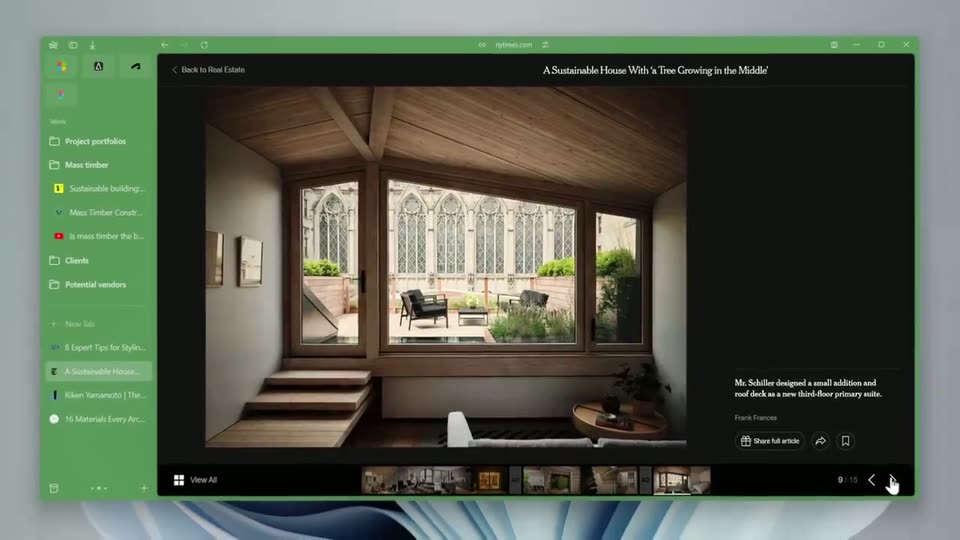
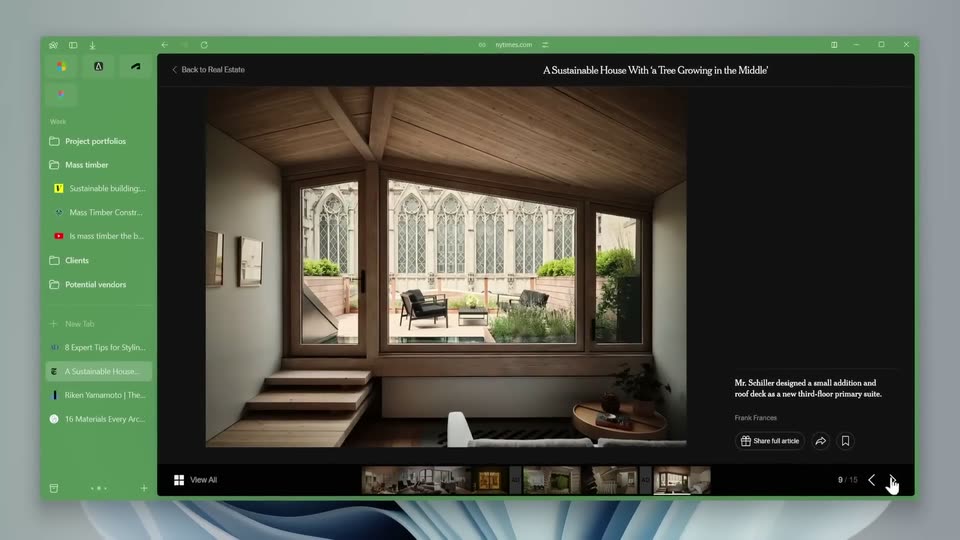
A green notes application window shows a project viewer with a photo of a wooden room and tall windows. A search bar opens over the viewer and the word japan is typed, listing two suggestions below, under a large static headline.
On-screen text: “Finally”
Techniques: Cursor demo
Camera: Static
20 · Demo · 0:16–0:17
Close-up of a search bar floating over a blurred wooden interior. The query types out letter by letter from 'japandi in' to 'japandi interior', a green highlighted suggestion mirrors it in sync, and a second suggestion reads 'japandi interior design'.
Camera: Static
21 · Demo · 0:17–0:18
A locked-off close-up of a search bar reading “japandi interior design,” the word design highlighted in a green block, above two suggestion rows, the second one filled green. A blurred wooden interior sits in the background.
Camera: Static
22 · Demo · 0:18–0:19
A static browser window on a soft blue-gray backdrop displays the Architectural Digest homepage. A living room photo fills the page, showing framed art, a vase of white blossoms, and a fireplace, with a subscription banner along the bottom.
Camera: Static
23 · Demo · 0:19–0:19
A split screen shows a home listing on the left as a sidebar slides open to reveal a folder list, and a right column of two brick-sculpture photos with captions.
Techniques: Split screen
Camera: Static
24 · Demo · 0:19–0:20
A pale green sidebar lists folders and saved entries beside a document preview showing a sunlit living room. A white cursor arrow glides down the list, and small black X marks pop in next to two entries.
Techniques: Cursor demo
Camera: Static
25 · Demo · 0:20–0:21
Two browser windows sit side by side on a pale background. The left holds an Airbnb listing with a living room photo and a pink Reserve button. The right holds a museum page titled Past Exhibitions with sculpture photos; a cursor glides down the page as the top header collapses.
Techniques: Split screen, Cursor demo
Camera: Static
26 · Demo · 0:21–0:22
A browser window shows a Storm King Art Center article with a photo of a red clay dome sculpture on grass. A pale green sidebar lists saved items left, a thumbnail panel right. A white cursor rests at the right edge; the frame holds still.
Camera: Static
27 · Demo · 0:22–0:22
A pale green browser sidebar lists bookmarks and tabs while a cursor hovers a highlighted row that shifts up one place. The right pane holds a flat illustration of a girl in headphones at a desk under a lamp, with a dark product card showing a price and view count.
Techniques: Cursor demo
Camera: Static
28 · Demo · 0:22–0:23
A green interface panel lists rows that slide into place as a white cursor hovers over a highlighted row, while a photo of a living room with a woven lamp and framed print fills the right pane.
Techniques: Cursor demo
Camera: Static
29 · Demo · 0:23–0:24
A green browser window shows a left sidebar of colored app icons above a Work folder list, next to a webpage with a building photo. A white cursor hovers a triangle icon, popping a truncated tooltip that then fades as the icons settle into place.
Techniques: Cursor demo
Camera: Static
30 · Demo · 0:24–0:25
A locked-off close-up of a document window with a green header. A cursor hovers over a round split-view button and a tooltip labeled Open Split View fades in above it. A white text panel and a photo of green foliage occupy the left and lower areas.
Techniques: Cursor demo
Camera: Static
31 · Demo · 0:25–0:26
A green workspace with a left sidebar and two browser panels. The middle panel switches from a Vox article on wood to a rain barrel guide, while the right panel swaps a 3D house cutaway for a video thumbnail.
Camera: Static
32 · Demo · 0:26–0:26
Two flat browser windows sit side by side on a dark backdrop beside a macOS sidebar. The left shows the MoMA homepage with a black sculpture banner and an orange card, the right shows a MoMA article page, and both pages swap their content mid-clip.
Techniques: Split screen
Camera: Static
33 · Demo · 0:26–0:28
A close-up of a dropdown menu on a light interface lists two material options, Mica (default) marked with a blue bar and Acrylic, while a mouse cursor hovers over Acrylic. The frame stays locked off with a dark monitor showing a magazine cover at the right edge.
Techniques: Cursor demo
Camera: Static
34 · Demo · 0:28–0:29
A product interface shows a folder list beside a partially visible webpage. The frame drifts slowly to the right, sliding the colorful wallpaper off the left edge and revealing more of the page's green headline and body copy.
Camera: Push in
35 · Demo · 0:29–0:29
A close-up UI panel holds a white cursor on a sun-moon toggle. The toggle flips left, a row of round swatches shifts from dark saturated hues to pale pastels, and the left panel lightens from deep magenta to soft pink. The dotted canvas and blue slider stay still.
Techniques: Cursor demo
Camera: Static
36 · Demo · 0:29–0:29
A browser window shows a dotted-grid canvas with a pink dot; a cursor arrow drifts down from the dot toward the lower right. The left sidebar lists app icons and folders.
Techniques: Cursor demo
Camera: Static
37 · Demo · 0:29–0:31
A tilted 3D browser mockup on a green gradient shows a Reddit page with large black recipe headlines overlaid. It crossfades to a green design-tool layout holding a Japandi article and an Instagram grid. A cursor rests at the lower left.
On-screen text: “Recipes:”, “Spicy Peanut Noodles”, “linguini with Roaste”
Techniques: 3D mockup
Camera: Static
38 · CTA · 0:31–0:33
A solid blue field holds three centered white headlines that swap in sequence: 'Arc is on Windows', then 'Download now', then the URL 'arc.net'. Each line sits still for a beat before the next replaces it on the same locked-off frame.
On-screen text: “Arc is on Windows”, “Download now”, “arc.net”
Camera: Static
39 · Outro · 0:33–0:35
A Windows desktop on a blue-purple gradient shows the selected Microsoft Edge icon beside the Recycle Bin. A 'Move to Recycle Bin' menu label appears as the Edge icon slides into the bin and fades out, leaving the Recycle Bin highlighted.
On-screen text: “arc.net”
Techniques: Cursor demo
Camera: Static
40 · Outro · 0:35–0:36
A white line-art logo, a stylized letter A overlapping a tilted four-pane window, sits centered on a flat blue field. The frame is locked off and the mark holds static for the full shot.
Camera: Static