1:33
Lovable - Introducing a smarter Lovable that is 71% better at solving complex t
Lovable · Developer tools · Jan 2026
HyperFrames · Oct 2026 · 1:13 · AI-annotated
HyperFrames’s 1:13 launch film runs 31 scenes, about 2.4 s each. The product shows up at 0:04 and 3 features are revealed. The call to action lands at 0:56 (76% in), over a voiceover. The video runs on a repeating prompt loop: a typing command bar issues an instruction, a chat panel ticks it off with green checks, and the result plays as a UI mockup or a live-action clip, closing on a logo card. Pacing is fast and bouncy at 143 BPM, with blur-and-pop transitions, green highlight-box captions, and a recurring green blob mascot that bridges the interface scenes.
Is this your launch? to your site or press kit.
Lovable · Developer tools · Jan 2026
Loom · Productivity · Aug 2023
Runway · AI · Oct 2026
A white Finder window sits over a colorful gradient background as a white headline fades in above it. A green blob mascot slides across the window, a stack of video clips pops up beneath it, and a dock of icons rises from the bottom before the frame blurs.
On-screen text: “65 minutes of podcast footage”
Techniques: Kinetic type
Camera: Push in
A dark app interface opens on the Make page with an empty drop zone; rows of audio and video files slide in, the view pushes in on the list, and a green blob mascot hops beside the glowing Let's go button.
Techniques: UI zoom
Camera: Push in
A mint-green blob mascot with a face and blue feet pops up from behind a green button, inflates into a rounded panel, then morphs into a dark Claude Code screen listing four recordings.
Techniques: Morph
Camera: Static
A dark task panel is shown in close-up. The first line, Reading 4 recordings, completes as its spinner turns into a green check and the text brightens, while two other tasks below keep partial arc icons. A video thumbnail sits at the right edge.
Camera: Static
A dark project interface with a task checklist and a video player zooms into the player, filling the frame with a man in glasses speaking into a microphone. White text then builds word by word across the lower left, the final words in green, before fading out.
On-screen text: “Transcribing as Peter talks”, “Hyperframes is a freaking amazing tool”
Techniques: UI zoom, Kinetic type
Camera: Push in
A man with glasses sits at a microphone, the room dimmed to a dark backdrop. A small green word scales in above a large bold white line that fades up to full size, both centered over his face.
On-screen text: “Introducing”, “script-based editing”
Techniques: Kinetic type
Camera: Static
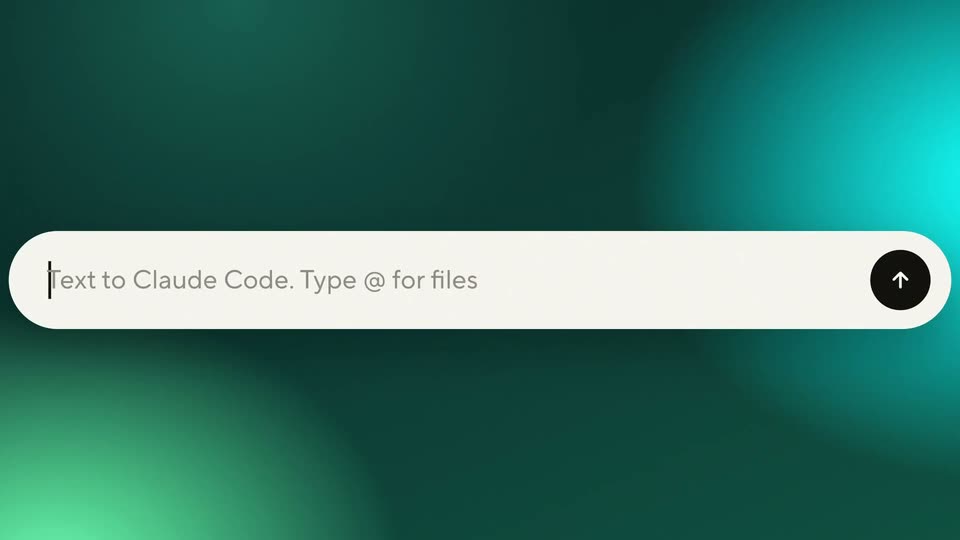
A white command bar on a blurred teal gradient types a prompt character by character, then a cursor clicks the black circular send button and the text lifts into a speech bubble above the now empty field.
On-screen text: “Introducing”, “script-based editing”
Techniques: Cursor demo
Camera: Static
Three rounded chat cards float in 3D over a teal gradient. The white instruction bubble scales in, then the dark status card switches from a spinner to a green check. A green play control that turns into a pause icon rests by the input bar.
Techniques: 3D mockup
Camera: Pull out
Flat dark two-pane script editor. A cursor taps a word to pop a context menu; a green blob mascot bounces through the left panel while edit chips stack up, then the script rewrites itself with strikethroughs.
Techniques: Cursor demo
Camera: Pull out
Two dark app panels sit side by side on black. The left, titled Claude Code, shows a chat with a green input box; the right, on the Script tab, lists a Storyboards clip with a thumbnail. A small floating card with a green waveform pops up over the row.
Techniques: Split screen
Camera: Static
A dark editing timeline with a green waveform. A Storyboards clip card, tagged -1.9 s and ringed in green, scales up to center frame, then the view pulls back to show the full episode strip of three clips, the middle one selected.
Techniques: UI zoom
Camera: Pan
A dark UI titled “The whole episode” shows an episode timeline of three labeled clips over a green waveform. The clips compress and the waveform flattens as the duration drops from 35:22 to 32:41, with a quick defocus blur.
On-screen text: “The whole episode”
Camera: Static
A white command bar on a teal gradient fills as text types out. A cursor moves to the black arrow button and clicks. The bar shrinks into a pill with a green play button, and a result card with an avatar slides in above.
Techniques: Kinetic type, Cursor demo, Morph
Camera: Static
A chat interface on a teal gradient shows task cards; a spinner ticks into green checks and the title switches from “Making” to “Made the intro reel”. A green play badge overlaps the input bar, then a cut reveals a man in glasses talking before striped slats.
Camera: Static
A bespectacled man in a black tee talks to camera against a wood-slat wall, gesturing as bold white captions with green highlight boxes pop in phrase by phrase. Huge ANYTHING AND EVERYTHING letters fill the frame, then the shot pulls back to reveal the clip inside a dark editor UI.
On-screen text: “SO YEAH, WE WANT”, “HYPERFRAMES TO BE ABLE”, “TO DO HONESTLY”, “ANYTHING”, “AND”, “EVERYTHING”, “THAT A VIDEO EDITING TOOL”
Techniques: Kinetic type, UI zoom
Camera: Pull out
A dark editor interface shows a man in a video preview on the left and a transcript panel on the right, where two green pill labels fade in beneath the quote. A cyan tag and a filmstrip timeline sit along the bottom.
Camera: Static
A dark video editor shows a man speaking in the left preview, a transcript with a teal highlight on the right, and a thumbnail timeline below. The view zooms in as a rounded mask isolates the preview, blurring the surrounding panels.
Techniques: UI zoom, Masking
Camera: Pan
A rounded chat bar on a teal gradient holds a small video thumbnail of two men at the left. The bar widens and types the prompt “Now cut it into vertical clips for socials.” while a cursor blinks, and a mouse pointer hovers the send button.
Techniques: Cursor demo
Camera: Static
A three-bubble chat on a teal gradient; the bottom dark bubble updates from a spinning loader and Cutting vertical clips to a green check and Cut 6 vertical clips, above a white input bar with a green play shape.
Camera: Pull out
A black screen holds a horizontal row of square video thumbnails, each a creator's face with a caption and timestamp. The row pans rightward to reveal new clips while a white headline at the top pulls from blur into focus.
On-screen text: “Here are your clips for social, explained and cut”
Camera: Pull out
A dark feed of vertical video tiles scrolls horizontally. Each tile shows a person speaking with a colored caption overlaid and a timestamp below. The row pans steadily, new tiles sliding in at the edge.
Camera: Pan
A blurry, out-of-focus image of a person on a screen sits on the left edge of a dark background. White text, One podcast, appears beside it. The image fades out, and a clean YouTube cut appears on the right.
On-screen text: “One podcast,”, “a clean YouTube cut”
Camera: Static
On a black background, white text reads “One podcast,” on the left while a central rounded video card cycles: a YouTube player with a man, then a horizontal clip, then two tilted vertical clips. The right-side text swaps from “a clean YouTube cut” to “an intro reel” to “six vertical clips.”
On-screen text: “One podcast,”, “a clean YouTube cut”, “an intro reel”, “six vertical clips”
Camera: Static
On a plain cream background, the line “Now you can instantly edit” slides in with a brief motion blur, then a mint green highlight box fades in behind the word “edit”.
On-screen text: “Now you can instantly edit”
Techniques: Kinetic type
Camera: Static
A light gray frame holds the black headline, the word edit boxed in teal. The view slides left, pushing the text off the left edge and revealing a row of out-of-focus portrait cards, each with a teal button, on the right.
On-screen text: “Now you can instantly edit”
Camera: Push in
A wall of vertical video clips on a light gray background, mostly the same bespectacled man in a black shirt plus one in a cap, each with a green caption bar at the bottom, the grid snapping into focus from a blur.
Camera: Pull out
A grid of captioned talking-head clips scrolls slowly. In the center, a teal rounded pill scales up from a small dot into a large badge, revealing the word podcasts in black over the moving tiles.
On-screen text: “podcasts”
Techniques: Kinetic type
Camera: Static
A centered headline reads “Now you can instantly edit podcasts”, with “podcasts” set in a glowing teal gradient pill that scales up slightly. Behind the text, a heavily blurred teal location-pin shape grows from the center until it fills the frame.
On-screen text: “Now you can instantly edit podcasts”
Techniques: Kinetic type
Camera: Static
A green pin-shaped mascot with a white face and two dot eyes bounces vertically over a blurred white card on a white-to-blue gradient. Two cyan triangles shift from its sides to its feet as the card behind scales up.
Camera: Static
The HyperFrames wordmark settles at center on a white-to-blue gradient as a white V outline above it scales away. Green triangle mascots with eyes pop in at right, a green frame flashes around the wordmark, then Studio in green appears and a pill badge Script-based editing fades in below.
On-screen text: “HyperFrames Studio”, “Script-based editing”
Techniques: Kinetic type
Camera: Static
A black screen holds the title HyperFrames Studio, which scales into place, with a small dash and the line Script-based editing held still beneath it, locked-off frame.
On-screen text: “HyperFrames Studio”, “-”, “Script-based editing”
Techniques: Kinetic type
Camera: Static