2:13


Introducing Sites in Codex
OpenAI · AI · Jun 2026
Perplexity · Feb 2026 · 1:34 · Full motion · AI-annotated
Perplexity’s 1:34 launch film runs 39 scenes, about 2.4 s each. The product is on screen from the first frame. There is no explicit call to action; a voiceover carries the film. Built as a flat cream stage where a wordmark collapses into a search bar, then three prompt-to-result case studies play out in locked-off frames, capped by a scrolling capabilities montage and a line-drawn icon that redraws into the pinwheel logo. The signature moves are type that writes itself, white cards that morph into task lists and dashboards, serif headlines fading in word by word, and slow pans across dense spreadsheets, all held at a deliberate, unhurried pace.
Is this your launch? to your site or press kit.
OpenAI · AI · Jun 2026
OpenAI · AI · Sep 2026
Films whose music sounds like this one, voice left out
Figure AI · Electronic
Resin Technologies · Electronic dance music (trance/progressive house)
Edgerun · Synthwave, future bass, and cinematic electronic
A locked-off cream background holds the centered headline 'Introducing perplexity computer', gray at first, darkening to teal. A white rounded card slides in behind the words, then the text collapses into a search bar with a magnifying glass and gray placeholder, a cursor hovering at its right edge.
On-screen text: “Introducing”, “perplexity computer”
Techniques: Morph
Camera: Static
A locked-off close-up of a pill-shaped segmented control on a cream background. A dark-outlined cursor drifts to the right segment, moving the white highlight from the left Ask segment to the right Computer segment, whose label scales and darkens while a monitor icon appears.
Techniques: Cursor demo
Camera: Static
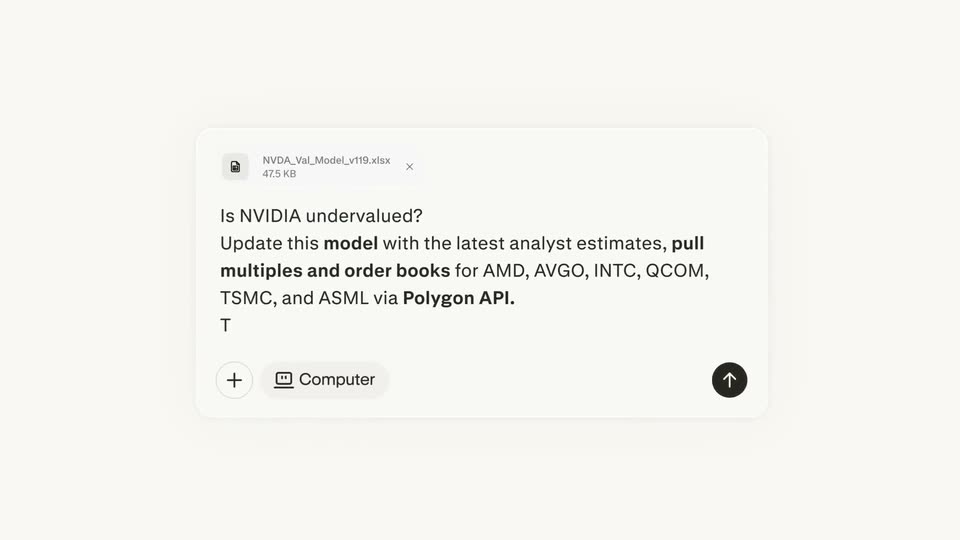
On a cream background, a zoomed-in white input card pulls back to full size as a cursor types a multi-line NVIDIA prompt with an xlsx file attached; the card expands with each line, then the cursor clicks the send button and the card fades out.
Techniques: UI zoom, Kinetic type, Cursor demo
Camera: Static
A plain cream background holds the centered gray title Running Subagents. The locked-off frame stays still, with the text occupying about 4% of the frame height.
On-screen text: “Running Subagents”
Camera: Static
A cream-colored interface lists subagent tasks under a small gray header. Rows with icons and model badges fade in from pale gray to dark text, stacking downward one after another, on a locked-off frame.
Camera: Static
A light task-list interface scrolls through agent actions and model steps, then dissolves to a plain cream field where serif text fades in word by word.
Techniques: Kinetic type
Camera: Pan
On a cream background, a serif intro sentence assembles line by line, then the bold heading '1. Is NVIDIA undervalued?' slides in, and a dense paragraph of valuation figures fills the top of the frame. The frame stays locked off.
On-screen text: “Here's the synthesis of NVIDIA's valuation - let me walk”, “you through it:”, “1. Is NVIDIA undervalued?”, “On trailing numbers, NVDA looks expensive at 47x LTM P/E and 25x EV/Revenue. But the forward picture tells a different story. At consensus FY2027E revenue of ~$”
Techniques: Kinetic type
Camera: Static
A cream page of serif text scrolls upward. A gray numbered heading and a comparison table slide into view above a paragraph, the document panning steadily with no camera move.
Camera: Static
A cream-colored financial report scrolls upward. It opens on a comparison table of NVIDIA against AMD, Intel and other peers, then moves past a heading into a bulleted list of bull-case catalysts.
Camera: Pan
Gray serif body copy scrolls up and exits the top of a cream background, then the single word “Here” fades in at the left margin in the same typeface.
On-screen text: “market cap, perfection is priced in. The stock needs continued execution on Rubin, sustained hyperscaler spend, and no macro shocks. The PEG of 0.37x suggests, ”, “”, “the market is still discounting AI.”, “Here”
Techniques: Kinetic type
Camera: Static
A serif headline wipes in from left to right on a cream background. A rounded file chip with a document icon and a cursor arrow fades in beneath it, then a quarterly P&L spreadsheet fades in over the lower half.
On-screen text: “Here is the updated model with the biggest changes highlighted:”
Techniques: Kinetic type
Camera: Push in
A wide quarterly P&L spreadsheet fills the frame, its columns panning left to right to reveal the forecast years, then a light-blue caption fades in centered over the grid.
On-screen text: “Here is the updated model with the biggest changes highlighted:”
Camera: Push in
On a cream background, two serif lines appear above white file cards with document and globe icons; a cursor hovers over the second card, then a dark 3D supply-chain dashboard scales up to fill the frame.
On-screen text: “Here is the updated model with the biggest changes highlighted:”, “NVDA_Val_Model_v120.xlsx”, “And deployed the Supplier and Customer visualization:”, “NVDA Supplier and Customer Flow”
Techniques: Kinetic type, Cursor demo, 3D mockup
Camera: Static
A dark supply-chain dashboard shows a central NVIDIA financial card flanked by supplier and customer lists. The frame zooms in on the center card, then the whole view blurs as two white headline lines fade in across the screen.
On-screen text: “Here is the updated model with the biggest changes highlighted:”, “And deployed the Supplier and Customer visualization:”
Techniques: UI zoom
Camera: Push in
A cream interface scrolls upward past serif message lines and white rounded cards: an Excel file, a globe-icon link, and a scheduled tasks card, then the view empties.
Camera: Static
A white rounded prompt card sits centered on a cream background. Prompt text types in line by line, the closing sentence in bold, then a cursor glides in and hovers the black send button.
Techniques: Cursor demo
Camera: Static
A white prompt card on a cream background holds a task instruction; a cursor clicks the send button, then the card morphs into a vertical stack of four status cards labeled Downloading, Trimming, Adding and Rendering.
Techniques: Cursor demo, Morph
Camera: Static
Four white progress cards sit stacked on a cream field; their dotted bars fill and percentages tick up, then the stack fades out as a portrait video card with a man and a white caption fades in.
On-screen text: “AND, AND YOU KNOW, I THINK, I THINK THAT'S WHAT WE SEE ON CLOUD.”
Camera: Static
A centered phone mockup on a pale background shows a man in a blue shirt talking, with white all-caps captions and yellow keyword highlights updating below. A white Ready for Review card slides in, a green cursor taps it, then the phone blurs out.
On-screen text: “AND, AND YOU KNOW, I THINK, I THINK THAT'S WHAT WE SEE ON CLOUD.”, “CLOUD IS VERY UNDIFFERENTIATED.”, “MODELS ARE MORE DIFFERENTIATED THAN CLOUD,”
Techniques: Cursor demo
Camera: Static
A prompt about buying Walter White's house types itself into a white chat input card on a cream background, key phrases in bold, the card expanding as lines fill. A cursor then slides in and clicks the round send button.
Techniques: Kinetic type, Cursor demo
Camera: Static
A white prompt card holding a typed request about Walter White's house sits centered on a cream background, then morphs into a research table with a progress bar and skeleton rows.
Techniques: Morph
Camera: Static
A white research table fills the frame, rows typing in agent numbers, source sites and results while a timer counts up. It cuts to three report pages fanned in 3D perspective, the front one titled Operating Expenses.
On-screen text: “Operating Expenses — Base Case”
Techniques: 3D mockup
Camera: Pull out
Three report pages, a property listing, an expenses spreadsheet and a data table, sit fanned on a light gray field, tilted in 3D, then rotate flat. A white chat bar slides up from the bottom, revealing a Computer option and an up-arrow button.
Techniques: 3D mockup
Camera: Static
Blurred document cards sit behind a white input bar where a prompt types out letter by letter. A cursor clicks the dark send button, then the documents fade away, leaving the bar centered on a light background.
Techniques: Kinetic type, Cursor demo
Camera: Static
A white chat input card sits at the bottom of a cream screen, showing the typed line and a Computer chip. A cursor taps the round send button, the card fades out, and a gray reply line slides in at center.
Techniques: Cursor demo, Kinetic type
Camera: Static
A gray headline slides in above a white Slack connection card on a cream background. A cursor moves to the gray Connect button and clicks it, and the button swaps to a green Connected pill.
On-screen text: “I'll set up competitive monitoring for you.”
Techniques: Cursor demo
Camera: Static
A cream screen shows a fading headline and a Slack connection card with a green Connected pill, which slide up and dissolve as a Ready for Review notification card with a teal dot and a 1s ago stamp fades in at center.
On-screen text: “I'll set up competitive monitoring for you.”
Camera: Static
A white notification card sits centered on a plain off-white field, with a teal header and a dark body line. A hollow cursor glides in from the lower right, taps the card's corner, and the card shrinks and fades out, leaving the cursor on the empty background.
Techniques: Cursor demo
Camera: Static
A centered serif headline reads Connect to thousands of apps on a cream background. Colorful app logos float around the perimeter and drift slowly outward, then the text and icons fade out together.
On-screen text: “Connect to thousands of apps”
Camera: Push in
A flat browser window shows a dark science article page that scrolls slightly, while a large serif headline on the right reads Computer researches, the second word fading in.
On-screen text: “Computer”, “researches”
Techniques: Kinetic type
Camera: Static
A column of web app interface mockups scrolls upward on the left, showing a medal tracker, a WISE observatory view and a dark portfolio panel. On the right, a large serif headline holds 'Computer' while its second word swaps from researches to builds to codes.
On-screen text: “Computer researches”, “Computer builds”, “Computer codes”
Techniques: Kinetic type
Camera: Pan
A column of interface screens scrolls upward on the left, passing a pink 3D scene, a clock app and a dark scan view. On the right, the serif headline Computer schedules stays fixed.
On-screen text: “Computer”, “schedules”
Camera: Pan
A white layout holds a flat clock widget with a settings sidebar on the left while a two-line serif headline sits on the right. The word schedules dips to gray mid-clip and returns to black.
On-screen text: “Computer schedules”
Camera: Static
A vertical column of product interface screens scrolls upward on the left, showing a pink desert illustration app, a white analog clock design tool, and a dark screen. On the right, a static serif headline reads in black and gray.
On-screen text: “Computer”, “creates”
Camera: Pan
A 3D-tilted app window sits on the left of a cream background beside a large black serif headline reading Computer creates. The window rotates into a steeper 3D angle revealing a grid of colorful image tiles while the headline fades to gray.
On-screen text: “Computer creates”
Techniques: 3D mockup
Camera: Pan
On a cream field, the serif word Computer fades in, then works. completes the centered sentence. The finished line holds, then the card cuts to a small black outline icon of a screen on a stand, centered on a gray background.
On-screen text: “Computer works.”
Techniques: Kinetic type
Camera: Static
A small black line icon, a rounded rectangle with two dots above a horizontal bar, sits centered on a cream field. It tilts and its strokes redraw into a four-bladed pinwheel, the rotation easing through the transform.
Techniques: Morph
Camera: Static
A black line-drawn star mark and the lowercase word perplexity sit centered on a cream field. The lockup snaps from partial focus to sharp, then the whole logo defocuses and blurs as the clip ends.
On-screen text: “perplexity”
Camera: Static
A flat charcoal gray background fills the entire frame, then the field darkens and resolves to solid black by the end of the clip. No elements, text or motion appear.
Camera: Static