0:56

Kimi.ai - Meet Kimi K3
Moonshot AI · Jul 2026
Perplexity · May 2026 · 2:05 · AI-annotated
Perplexity’s 2:05 launch film runs 52 scenes, about 2.4 s each. The product shows up at 0:06 and 7 features are revealed. There is no explicit call to action. The video alternates cream serif statement cards with slow, parallaxed UI flythroughs, introducing one feature per beat with a single serif word label. Pacing is deliberate at about one cut per minute, with text resolving from blur, screens tilting into 3D, and the line-drawn laptop icon recurring as the brand anchor.
Is this your launch? to your site or press kit.
Moonshot AI · Jul 2026
Apollo · Sep 2026
Anthropic · AI · Jun 2026
A two-line serif sentence builds word by word in the center of a cream background, scaling up as it settles. A small dark terminal window slides in from the bottom-left corner at the end.
On-screen text: “Finance work depends on”, “trusted data, source checks, and team decisions.”
Techniques: Kinetic type
Camera: Static
A centered serif headline sits on a cream background while UI panels drift in the corners.
On-screen text: “Finance work depends on”, “trusted data, source checks, and team decisions.”
Techniques: Kinetic type
Camera: Pull out
Product screenshots, a code editor, list views and documents sit at the edges of a white frame and drift slowly outward. A centered black serif headline scales in over them, its two lines overlapping mid-animation.
On-screen text: “Finance work depends on”, “trusted data, source checks, and team decisions.”
Techniques: Kinetic type
Camera: Pull out
Flat screenshots of finance dashboards, code editors, and chat apps tile a pale background and drift at different speeds, creating depth. A centered serif headline scales gently over the middle.
On-screen text: “Finance work depends on”, “trusted data, source checks, and team decisions.”
Techniques: Kinetic type, Parallax
Camera: Pull out
A black line-drawn laptop icon sits centered on a cream field as a two-line serif tagline fades in beneath it. The icon then slides left and a thin capsule outline extends to its right while the tagline fades out.
On-screen text: “Computer for Professional Finance brings the work into one trusted flow.”
Techniques: Morph
Camera: Static
A black laptop icon and an outlined pill sit on a cream background. Company wordmarks, CarbonArc, Morningstar, PitchBook, Daloopa, fill the pill one at a time, each holding still, then the whole lockup fades out.
On-screen text: “CarbonArc”, “MORNINGSTAR”, “PitchBook”, “DALOOPA”
Techniques: Kinetic type
Camera: Static
A flat prompt box on a cream field sits under a black laptop icon. A long prompt types out line by line, key phrases in bold, while the box grows and the layout drifts down; the icon's face flickers.
Techniques: Kinetic type
Camera: Push in
A rounded input card holding a typed prompt and a model selector fades out, leaving a plain cream screen. A serif response line and a small green terminal-style icon settle in at the left as the card's ghost dissolves into the new text.
Camera: Pan
A cream product screen holds a serif headline above a gray task list with four unchecked boxes and a small teal terminal icon at the lower left. The layout stays static across the clip.
Camera: Pan
On a plain cream background, a serif headline reads “Pulling META historicals from Daloopa”, with “META” in pale blue, scaling up into place. A small teal laptop icon with quotation marks sits beneath it. A faint task checklist fades out at the top.
On-screen text: “Pulling META historicals from Daloopa”
Techniques: Kinetic type
Camera: Static
A light cream document view shows a serif heading above an indented task list with circular checkbox icons and a small teal laptop glyph. The whole text block slowly scales up over the shot.
Techniques: Kinetic type
Camera: Pull out
A spreadsheet mockup titled META Platforms, Inc. (NASDAQ: META) scales up and centers on a white background as a checklist from the previous screen fades out at the top.
Camera: Pull out
A flat spreadsheet mockup sits centered on a cream field, its teal Workbook Index and row of pill tabs visible. A cursor drifts to the top-right corner, then the view zooms into the Latest Earnings sheet, filling the frame with a quarterly revenue table.
Techniques: Cursor demo, UI zoom
Camera: Push in
A spreadsheet titled Meta Platforms (META) | Latest Earnings Model fills the frame. The view zooms in on a row of figures while a cursor hovers over a cell, popping a yellow source callout. The screen then blurs as a small Daloopa app window fades in at center.
Techniques: UI zoom, Cursor demo
Camera: Push in
The dalooa app UI fills the frame, a dark sidebar and a META filing panel beside a cash flow table; the camera zooms into the table as the 36,214 cell glows yellow, then cuts to a cream card with the serif word Research.
On-screen text: “Research is only the start.”
Techniques: UI zoom
Camera: Push in
On a cream background, black serif text fades in line by line. The first line reads Research is only the start., then a second line Build ... appears beneath it, each word resolving from a soft blur into focus.
On-screen text: “Research is only the start.”, “Build ...”
Techniques: Kinetic type
Camera: Static
A cream card with centered light-gray serif text reading “Research is only the start. Build ...” fades out, then a 3D-tilted view of a presentation app fades in, showing a Meta Platforms equity research slide with a cursor.
On-screen text: “Research is only the start.”, “Build ...”
Techniques: 3D mockup
Camera: Pan
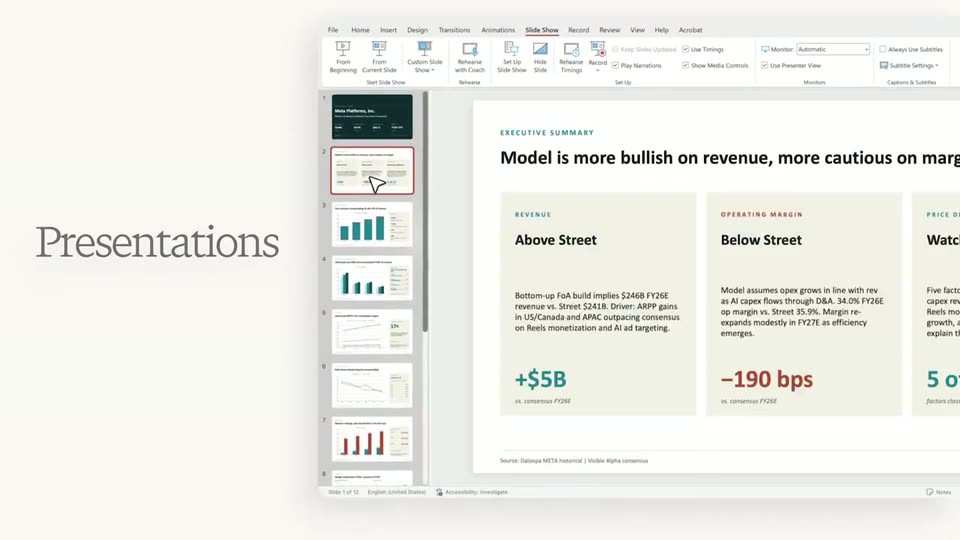
A pale panel holds the serif word Presentations at left. On the right, a screen capture of a presentation app, showing a dark Meta Platforms slide with revenue figures, slides in and settles into frame.
On-screen text: “Presentations”
Camera: Pan
A light gray Presentations label sits at left beside a presentation app window showing an executive summary slide. The view then zooms into the window onto a horizontal bar chart of Q4E ad revenue mix.
On-screen text: “Presentations”
Techniques: UI zoom
Camera: Pan
A pale dashboard interface occupies the left, its metric cards and line chart drifting as a cursor hovers the chart. A white equity-tracker card slides in from the right, revealing a green Meta intraday line chart beneath a static serif headline.
On-screen text: “Dashboards”
Techniques: Cursor demo
Camera: Pan
A flat Trace equity-tracker card for META slides right on a cream background, revealing a column of quarterly readout tiles, while the serif label Apps fades from gray to black on the left. A cursor hovers over the green intraday line, showing a price tooltip.
On-screen text: “Apps”
Techniques: Cursor demo
Camera: Pan
A close-up of an earnings memo with an intraday chart and a hovering cursor pulls back to reveal the full memo app, a left sidebar of timestamped entries, and a large gray Memos label stacked on the right.
On-screen text: “Memos”
Techniques: UI zoom, Cursor demo
Camera: Pan
A plain off-white frame holds a large light-gray serif word that fades in toward the center, while a small card with an icon sits at the left and a tiny label with an icon appears at the right.
On-screen text: “Workflows”
Camera: Static
A dimmed grid of workflow template cards fills a cream screen as a large serif headline fades in word by word at the center. The headline dissolves, the cards brighten into four labeled sections, and a cursor appears at the bottom left.
On-screen text: “Workflows for the way finance teams actually work”, “Investment Banking”, “Insurance · Brokerage”, “Asset Managers · Public Equities”, “Real Estate”
Techniques: Kinetic type
Camera: Push in
A large outlined cursor hovers over the central card in a light grid of workflow tiles. The card scales into a white form dialog asking what stock to analyze, with dropdown fields and a Run analysis button, the cursor resting at the lower left.
Techniques: Cursor demo, UI zoom
Camera: Push in
A white form card eases into place on a light gray field while a serif headline 'Start from a structured task.' fades in above. NVDA is typed into the ticker field, then a cursor highlights several driver-category pills and moves to the Run analysis button.
On-screen text: “Start from a structured task.”
Techniques: Cursor demo
Camera: Static
A light two-panel stock analysis form fades out on an ivory background as a serif sentence dissolves in at center, leaving the line and a small teal status icon in the left column.
On-screen text: “I'll run a comprehensive driver analysis on NVDA over 10 years.”
Camera: Static
On a cream background, a serif prompt line fades and slides up to reveal a left-aligned 'Starting model build' list with checkmark and arrow sub-items. The list then scrolls up, and a globe-icon line about validating NVDA data slides in with a small 'sec' timer badge.
Camera: Pan
A pale task feed scrolls up, the text darkening as it moves. The model-build steps slide upward, revealing an embedded spreadsheet whose title row and table of contents fill the lower half of the frame.
Techniques: UI zoom
Camera: Pull out
A spreadsheet mockup on a pale background shows its title and contents list with a brief double-image as the content settles, under a gray caption. The view then reframes wider to reveal the sheet inside a browser window while a cursor moves across it.
On-screen text: “Validating NVDA historical revenue and segment data”, “SEC 14”
Techniques: Cursor demo
Camera: Push in
A light-gray screen frames an Excel window. A static white two-line headline sits at the top. The sheet shifts from a driver table beside a horizontal bar chart to a wider guidance-versus-actuals table beside a diverging bar chart.
On-screen text: “Leading Indicators - What Moves NVDA 1-2 Quarters Out”, “Guidance vs Actuals - the Beat Cadence”
Camera: Static
A spreadsheet window fills the frame, showing a quarterly data table, an interpretation note, and two bar charts in green and red. The view stays static with no cursor or motion.
Camera: Static
A spreadsheet window displays a multi-line stock chart tracking NVDA and several peers from 2016 to 2026 on a log scale. A white command bar slides up at the bottom right, revealing a Daloopa label and a Claude Opus 4.7 model selector with a microphone icon.
Camera: Static
A spreadsheet with a multi-line stock chart fills the frame as the view zooms into a white chat input bar. The prompt types out word by word above a Daloopa chip and a Claude Opus 4.7 model selector, ending on the full sentence.
On-screen text: “Can you keep this model up to date and send me daily memos?”
Techniques: UI zoom, Kinetic type
Camera: Push in
A prompt input box reading 'Can you keep this model up to date and send me daily memos?' floats over a stock chart, then slides up and fades out to reveal a daily memo dated Monday, Apr 20, 2026, as the label 'Schedule updates' fades in on the right.
On-screen text: “Schedule updates”
Camera: Push in
A flat daily-monitor report card with a dark teal header and a grid of green figures sits on the left. A large serif tagline reads on the right. The layout holds static across the clip.
On-screen text: “Schedule updates when the facts change.”
Camera: Static
A vertical feed of report cards scrolls upward on a light gray field. Each card carries a dark-green header with a weekday and date, a one-line headline, and a six-tile stat grid. The black serif tagline on the right stays fixed throughout.
On-screen text: “Schedule updates when the facts change.”
Camera: Pan
A flat report card with a teal header and a grid of market figures sits on the left against a pale background, paired with a two-line serif caption on the right. The composition holds steady with no visible motion.
On-screen text: “Schedule updates when the facts change.”
Camera: Static
A white report card with a teal header crossfades from a Thursday summary to a Friday summary, the two states overlapping mid-transition, while a static serif headline holds to the right on a light gray field.
On-screen text: “Schedule updates when the facts change.”
Techniques: Morph
Camera: Static
A cream field. The previous headline, “Schedule updates when the facts change”, dissolves out as “Computer meets you where your team works” fades in, centered in a serif face. The frame stays locked off.
On-screen text: “Computer meets you where your team works”
Camera: Static
A centered black serif headline is locked on a white field while a chat interface fades in below it. The headline then clears as the interface sharpens and fills the frame.
On-screen text: “Computer meets you where your team works”
Camera: Pan
A Teams chat view with a conversation and a file preview card fills the frame, then the camera zooms into the left sidebar, reframing on the Computer entry as a cursor hovers beside it.
Techniques: UI zoom, Cursor demo
Camera: Push in
A Teams chat window zooms in on the Perplexity Computer header, then a user message with a timestamp fades in near the bottom of the empty pane.
Techniques: UI zoom
Camera: Static
A Perplexity chat interface fills with a typed response, the view scrolling up through summary bullets and a forecast table. A cursor moves to the Download button, and an Excel file card slides in below it.
Techniques: Cursor demo
Camera: Push in
A light chat panel with financial bullet points and a spreadsheet file card ghosts out as a cursor hovers the Download button, then the view cuts to the full spreadsheet interface showing the model assumptions table and a right-side panel.
Techniques: Cursor demo
Camera: Pan
A financial spreadsheet fills the screen, dense rows of figures and source notes. The view zooms and pans across the sheet, ending on a column of source annotations and a note box at the lower right.
Techniques: UI zoom
Camera: Push in
A spreadsheet and a chat panel fill the frame as a prompt types itself into the input, then the assistant streams an answer while source cells update in place. The screen fades to white and the Computer logo settles in the center.
On-screen text: “Computer for Professional Finance.”
Camera: Static
A black line-art laptop icon with a face floats centered on a cream field. A two-line serif headline reveals beneath it, bolding the word 'trusted'. A faint grid of finance screens, charts and an earnings review fades in behind as a backdrop.
On-screen text: “Computer for Professional Finance.”, “Built for trusted financial work.”
Techniques: Kinetic type
Camera: Pull out
A black computer-face logo and a two-line serif headline sit centered on white, framed top and bottom by a faded grid of financial spreadsheet and chart windows.
On-screen text: “Computer for Professional Finance.”, “Built for trusted financial work.”
Camera: Pan
A centered white card holds a line-drawn laptop icon above a two-line serif headline, while a collage of financial spreadsheet screenshots pans horizontally around the edges.
On-screen text: “Computer for Professional Finance.”, “Built for trusted financial work.”
Techniques: Parallax
Camera: Pan
On a cream background, a small dark computer icon holds center while the line 'Computer for Professional Finance.' fades in word by word to its left in light gray serif. The icon and text then fade out, leaving the plain field.
On-screen text: “Computer for Professional Finance.”
Techniques: Kinetic type
Camera: Static
On a cream field, a black star outline resolves into a square-and-star glyph, then the lowercase wordmark perplexity slides in from the right and locks beside it, holding as a centered logo lockup.
On-screen text: “perplexity”
Techniques: Kinetic type
Camera: Static