0:56
Explore
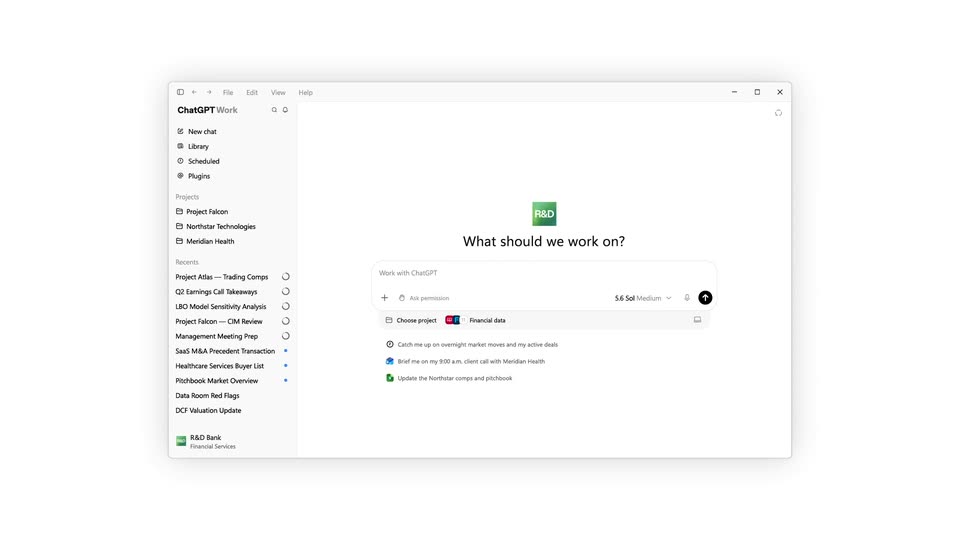
OpenAI - Now available: ChatGPT for Financial Services. This is a tailored Ch
ChatGPT for Financial Services · Sep 2026 · 1:21 · AI-annotated
- Length
- 1:21
- Scenes
- 24 · 3.4 s avg
- Product on screen
- 0:00
- Features shown
- 3
- Voiceover
- No
00:00:00 / 01:21:07
ChatGPT for Financial Services’s 1:21 launch film runs 24 scenes, about 3.4 s each. The product is on screen from the first frame and 3 features are revealed. There is no explicit call to action. The video alternates locked-off kinetic typography cards with tight close-ups of the interface, announcing each feature with a bold headline before zooming into the demo. Pacing is slow and deliberate at roughly one cut every forty seconds, with signature moves like word-by-word type builds, toggle flips and line-drawn charts that trace back to their sources.
No filming indicatedEstimated needs: 4 capture groups — your screens or recordings · 1 official logo — reused across the film · 1 graphic passage — draw or supply
Is this your launch? to your site or press kit.
More like this
1:26


Introducing Claude Science (now in beta)
Anthropic · AI · Jun 2026
1:29

The new Apple TV 4K: The ultimate cinematic experience.
Apple · Hardware · Oct 2026
OpenAI - Now available: ChatGPT for Financial Services. This is a tailored Ch, scene by scene
· 24 scenes as text
01 · Product intro · 0:00–0:07
On a plain white background, the bold black line “Financial work your team” holds fixed while a second line cycles through colored words: trace in orange, verify in green, cancel in red, use in black. The block then swaps to “With ChatGPT for Financial Services.”
On-screen text: “Financial work your team”, “can trace”, “can verify”, “can cancel”, “can use”, “With ChatGPT”, “for Financial Services”
Techniques: Kinetic type
Camera: Static
02 · Product intro · 0:07–0:08
A headline reads “With ChatGPT for Financial Services” as a tight crop on the DCF Valuation Update row and the R&D Bank card pulls back to reveal a stacked list of deal documents.
On-screen text: “With ChatGPT”, “for Financial Services”
Techniques: UI zoom
Camera: Static
03 · Feature reveal · 0:08–0:09
A flat ChatGPT Work window scales into the center of a white frame, its sidebar and prompt box settling into place. A large dark-gray “Research” word scales in over the main panel.
On-screen text: “Research”
Techniques: Kinetic type
Camera: Pull out
04 · Feature reveal · 0:09–0:10
On a plain white background, the bold black headline begins as the word 'Research' and expands in place into the full phrase 'Research any company', centered in a locked-off frame.
On-screen text: “Research any company”
Techniques: Kinetic type
Camera: Static
05 · Feature reveal · 0:10–0:13
Centered on a white background, the phrase 'using built-in' appears word by word in black, a small toggle flips to blue and 'data' enters in blue, then the text is swapped for a rounded chat input bar showing a model selector and send button.
On-screen text: “using built-in”, “data”
Techniques: Kinetic type
Camera: Static
06 · Feature reveal · 0:13–0:23
A white chat input card zooms out to reveal a typed prompt about Huron Consulting. A plugins bar slides in below, opening a dropdown of financial-data sources with blue toggle switches. A hand cursor flips the toggles on, then moves to the black send button.
Techniques: UI zoom, Cursor demo
Camera: Pull out
07 · Feature reveal · 0:23–0:28
Centered black sans-serif text builds word by word on a pale background, reading “Understand what changed”, then swaps to “and what's driving it”, then to “Powered by GPT-6 Astra” with the model name in blue.
On-screen text: “Understand what changed”, “and what's driving it”, “Powered by GPT-6 Astra”
Techniques: Kinetic type
Camera: Static
08 · Feature reveal · 0:28–0:31
A small green dot with a yellow ring sits at the center of a white frame, then fades out as the gray word Thinking slides in from the left.
On-screen text: “Thinking”, “Powered by GPT-6 Astra”
Techniques: Kinetic type
Camera: Static
09 · Feature reveal · 0:31–0:35
On a plain white background, a left-aligned task log builds line by line as gray entries with small icons slide in, listing HURN searches and metrics. The log then clears and a black sentence types out at the top left with a blinking caret.
Techniques: Kinetic type
Camera: Static
10 · Feature reveal · 0:35–0:40
A plain white card holds a left-aligned text block that types in line by line. As new lines and a revenue table appear at the bottom, the whole block scrolls upward to keep the latest text in view.
On-screen text: “Huron (Nasdaq: HURN) helps hospitals, universities and businesses improve operating performance,”
Camera: Pull out
11 · Feature reveal · 0:40–0:42
A light document screen scrolls upward through dense analysis text, ending on a paragraph with reaction icons above an empty input bar. The bar shows a placeholder prompt and a model selector at the bottom right.
Camera: Pan
12 · Feature reveal · 0:42–0:48
A black bold sans headline writes itself word by word on white, ending on “evidence” with a dotted underline. A blue 3 pops in, a hand cursor clicks the word, a quote card slides in from the right, and the camera zooms into the source transcript.
On-screen text: “Trace the analysis back to the evidence.”
Techniques: Kinetic type, Cursor demo, UI zoom
Camera: Pull out
13 · Feature reveal · 0:48–0:54
A desktop screen shows a two-panel document view; the right side opens a Financial Charts tab and a blue four-year stock price line draws itself across the axes. The window reframes in and out, and a cursor hovers over the left panel.
Techniques: UI zoom, Cursor demo
Camera: Pull out
14 · Feature reveal · 0:54–0:57
A spreadsheet with a stock-price line chart zooms in on the plot. A cursor tracks along the blue line, and a white tooltip follows it, updating the date and closing share price as it moves.
Techniques: UI zoom, Cursor demo
Camera: Push in
15 · Feature reveal · 0:57–0:58
A close-up of a light stock chart shows a blue price line, a crosshair, and a tooltip reading the date and closing share price as a black cursor hovers. It cuts to a plain background where the headline Create materials types in letter by letter, ending on a green rounded square.
On-screen text: “Create materials”
Techniques: Cursor demo, Kinetic type
Camera: Static
16 · Feature reveal · 0:58–1:00
On a plain white background, the bold black headline “Create materials” is centered with three small Office file icons, green, red and blue, to its right. The icons fade from translucent to solid, then a second line, “in your firm’s style.”, appears below the headline.
On-screen text: “Create materials”, “in your firm's style.”
Camera: Static
17 · Feature reveal · 1:00–1:04
A light chat interface shows an AI answer on healthcare financing and a Financial Charts attachment. A prompt about building a ppt slide types itself into the input field, then a cut lands on a blank document headed Create materials in your firm's style.
Camera: Static
18 · Feature reveal · 1:04–1:06
A white dialog asks what style the presentation should use, listing an upload card and a dark blue Pitchbook slide; the panel morphs into a file picker as a hand cursor hovers over the Powerpoint row.
Techniques: Morph, Cursor demo
Camera: Static
19 · Feature reveal · 1:06–1:07
A light chat panel shows a message and a PowerPoint file card over a blurred green gradient. A hand cursor glides across the file row and the empty input box while the message text scrolls up one line.
Techniques: Cursor demo
Camera: Static
20 · Feature reveal · 1:07–1:10
A locked-off desktop UI shows a chat panel on the left and a PowerPoint earnings slide on the right. A hand cursor hovers over the Open in control, then the view settles on the full slide with chart and callout boxes.
Techniques: Cursor demo
Camera: Pull out
21 · Other · 1:10–1:15
On a plain light background, the black heading “Built for” holds center while a colored word below cycles: banking in blue, equity research in red, wealth management in green, asset management in orange, each sliding in with motion blur. A small 3D laptop and a traffic chart card float beside the first word.
On-screen text: “Built for”, “banking”, “equity research”, “wealth management”, “asset management”
Techniques: Kinetic type, 3D mockup
Camera: Static
22 · Outro · 1:15–1:17
On a white field, the headline “With ChatGPT for Financial Services” settles in the center as “ChatGPT” scales in blue. Around it, flat financial graphics drift into place: a blue bar chart, a pie chart, a green line chart, a file card and a spreadsheet sheet, plus small orange and yellow icons.
On-screen text: “With ChatGPT”, “for Financial Services”
Camera: Static
23 · Outro · 1:17–1:18
On a plain off-white background, a small dark dot at the center scales and morphs into a three-lobed logo: a gray trefoil outline around a pink inner triangle and pink center dot. The tagline With ChatGPT scales up while for Financial Services holds still.
On-screen text: “With ChatGPT”, “for Financial Services”
Techniques: Morph
Camera: Static
24 · Outro · 1:18–1:21
A black outline logo shaped like a rounded knot or G sits centered on a plain white background. It remains still in a locked-off frame.
On-screen text: “G”
Camera: Static