1:22


Ed.ai in 1 minute
Ed.ai · May 2026
Parsewise’s 0:31 launch film runs 10 scenes, about 3.2 s each. The product shows up at 0:06 and 1 feature is revealed. There is no explicit call to action. Three-beat feature launch: a sky-and-mountain problem beat, a long screen-recording demo of the Tags workflow, and a logo lockup close. The style pairs a serif display voice with a clean sans UI, holds the blue brand palette, and uses soft white washes plus blur-to-focus transitions to move between the illustrated setup and the product screens.
Is this your launch? to your site or press kit.
Ed.ai · May 2026
Judgment Labs · Nov 2026
Vercel · Developer tools · May 2023
Films whose music sounds like this one, voice left out
NeoSigma · Electronic, Chiptune
General Translation · Ambient Electronic
Exploitforge · Cinematic electronic / Ambient
A blue sky with a cloud-wrapped peak holds a scatter of tilted white file chips (PDF, Word, Email, Image) that drift in. A serif headline reads across the top, then the chips flip to dark and relabel with plain descriptions, before the whole frame washes to white.
On-screen text: “One claim. 86 documents. What's what?”, “It's a bumper photo”, “Opening them one by one takes ages.”, “It's the police report”, “It's an email”
Techniques: Masking
Camera: Push in
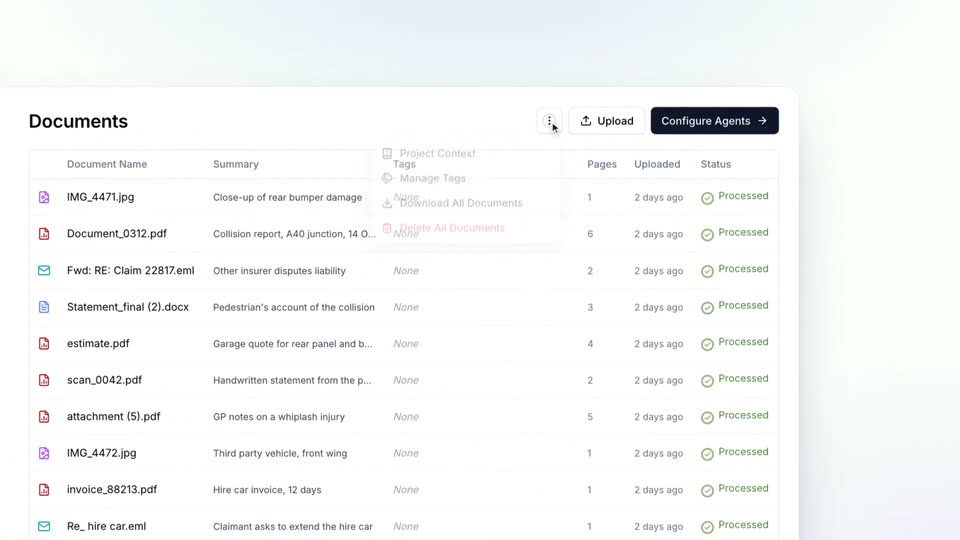
The Parsewise Documents screen fades in as a cursor clicks the three-dot menu, opens the dropdown, and selects Manage Tags. The background darkens and the Manage Tags modal, with a New Tag button and a No tags yet empty state, opens in the center.
Techniques: Cursor demo
Camera: Push in
A Manage Tags dialog fades in over a dimmed documents list. A cursor clicks the Name field and types Document type, then fills the Description box with a list of document kinds before moving to the Create and apply button.
Techniques: Cursor demo
Camera: Push in
A light document table scrolls upward as colored tag chips, Photo, Police report, Correspondence, Witness statement, Repair estimate, Medical report, fade into the Tags column row by row. The Documents header and Upload button stay fixed at the top.
Camera: Pan
A white file list scrolls vertically as new rows slide in from the top; on the bottom row the grey None label is replaced by a blue Correspondence tag.
Camera: Pull out
A close-up of a document table with file icons and tag pills zooms out to reveal the full panel header. A cursor opens an overflow menu, then a Manage Tags modal pops up over the dimmed list.
Techniques: UI zoom, Cursor demo
Camera: Pull out
A product screen defocuses, then snaps into focus on a Documents page. A white Manage Tags modal sits centered, listing a Document type row with edit, copy and delete icons, while a cursor hovers over the dark New Tag button.
Camera: Pan
Over a dimmed documents screen, a cursor types into the Name and Description fields of a Manage Tags dialog. The dialog closes, the list zooms in, and green source tags pop in beside the blue type tags before the frame blurs.
Techniques: Cursor demo, UI zoom
Camera: Push in
Four tilted document chips float over a blurred file list, then snap into four tag columns. A serif headline reads “One claim. 86 documents. Sorted.” with “Sorted.” in a blue highlight, and a small caption “Tags, now on the Documents page” fades in below.
On-screen text: “One claim. 86 documents. Sorted.”, “Tags, now on the Documents page”
Techniques: 3D mockup, Kinetic type
Camera: Static
A dark navy geometric logo mark slides left on a pale off-white background as the wordmark Parsewise assembles letter by letter to its right, settling into a centered lockup.
On-screen text: “Parsewise”
Techniques: Kinetic type
Camera: Static