1:53
Best AI SaaS Product Video | Apollo
Apollo · Sep 2026
Judgment Labs · Nov 2026 · 0:45 · AI-annotated
Judgment Labs’s 0:45 launch film runs 10 scenes, about 4.5 s each. The product shows up at 0:11 and 1 feature is revealed. There is no explicit call to action. The video is built as one continuous UI walkthrough that moves from an angry support email to a typed rubric, a Slack action, the alert it fires, and the logo, with transitions hidden inside the interface motion. Signature moves are the character-by-character typing, the yellow highlight on the complaint, the 3D window tilt, and the schematic that shrinks into the logo mark.
Is this your launch? to your site or press kit.
Apollo · Sep 2026
Runway · AI · Oct 2026
horizontal. · Industrials · Oct 2026
A flat browser-window wireframe fades in from transparent on a pale gray backdrop. The mockup pairs a dark purple sidebar of placeholder bars with a white content panel holding skeleton rows and a bottom input field.
Camera: Static
A browser window frames an email client: a dark purple inbox list on the left, a white thread on the right. The quoted email body loads line by line as gray placeholder bars fade out, with key phrases highlighted. The view then zooms into the thread.
Techniques: UI zoom
Camera: Push in
A light chat interface scrolls through a message from John Appleseed, revealing an embedded customer email card. The view reframes onto the email body, where two phrases gain yellow highlights as the complaint comes into focus.
Techniques: UI zoom
Camera: Pan
A close-up of an angry customer email, two phrases highlighted in yellow, zooms out to reveal the full email client as a floating card with a purple sidebar and a comment thread below, then holds.
Techniques: UI zoom
Camera: Pull out
A flat browser window with a dark purple sidebar shows an email thread. The thread scrolls to reveal three internal team replies, then a soft white gradient wipes up from the bottom, fading the whole scene to white.
Techniques: Masking
Camera: Static
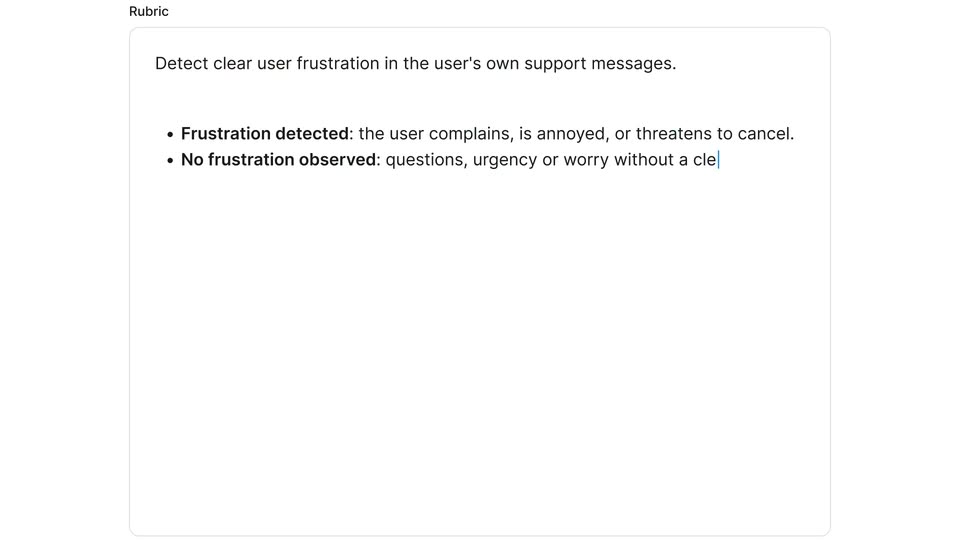
A white rounded card titled 'Rubric' fills the frame on a pale background. A thin blue caret types a definition and three bullet points, character by character, top to bottom, while the rest of the card stays empty.
Techniques: Kinetic type
Camera: Pan
A cursor expands an Actions panel, toggles a Slack notification on, selects a channel and saves. The view reframes to a full rubric page, a red confirmation toast appears, then a dark Slack notification slides in top right and opens into a Slack channel card.
Techniques: Cursor demo, UI zoom
Camera: Pull out
A dark-purple chat window mockup tilts in 3D, then rotates flat as the view zooms into the white alert panel. A cursor drifts down to the Open trace button, which fills red on hover.
Techniques: 3D mockup, UI zoom, Cursor demo
Camera: Push in
A close-up of a trace card with dates and an Open trace button, a cursor hovering, fades and scales down into a thin line schematic with two salmon blocks that shrinks toward the center.
Techniques: Morph
Camera: Static
A red geometric logo mark sits centered on a white field. Faint gray construction grid lines frame it at first, then fade out to leave the clean mark alone.
Camera: Static