0:45
Judgment Labs - Introducing Judgment Actions Your judges can now take action automat
Judgment Labs · Nov 2026
Vercel · May 2023 · 0:45 · AI-annotated
Vercel’s 0:45 launch film runs 23 scenes, about 2.0 s each. The product shows up at 0:07 and 1 feature is revealed. There is no explicit call to action. The video runs as one continuous in-browser demo: a problem headline, then a cursor that selects, edits, and publishes page elements while cyan circuit lines trace the interface, closing on a feature title card and logo sign-off. Signature moves are the 3D page flips, the wireframe selection boxes, and the maze-to-light-burst image swap, cut hard on a fast pulse.
Is this your launch? to your site or press kit.
Judgment Labs · Nov 2026
Perplexity · AI · May 2024
Judgment Labs · Nov 2026
A bold white headline fades in on a dark background, first “Content editing” then “takes time.” The frame then pulls back to reveal the words inside a tilted browser window mockup showing the Enigma site header and a Learn more link.
On-screen text: “Content editing”, “takes time”
Techniques: Kinetic type, UI zoom, 3D mockup
Camera: Pull out
A dark browser window shows the Enigma homepage: a circular maze icon above the bold white headline 'Content editing takes time'. The headline scales as the maze brightens, and a red cursor moves to the Learn more link, briefly revealing a comment pin and toolbar.
Techniques: Kinetic type, Cursor demo
Camera: Static
Close-up of a dark product page with a large white headline. A light comment card from Cody, 1h, reading Too much time! fades in, a red cursor clicks its checkmark, then the card, headline and Learn more link fade out as the cursor moves to the share icon in the bottom toolbar.
Techniques: Cursor demo, UI zoom
Camera: Static
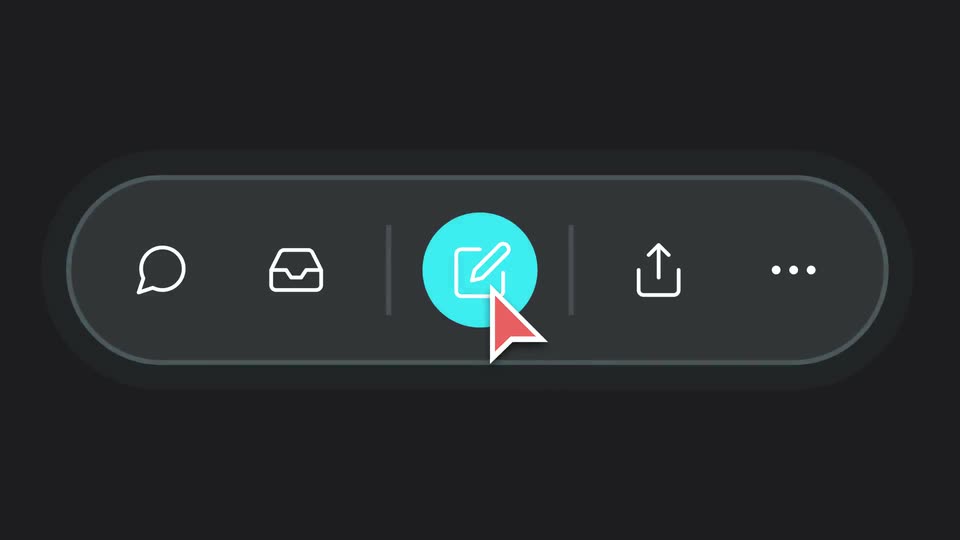
A dark pill toolbar with white line icons sits centered on a near-black field. A red-and-white cursor glides up from the lower right and clicks the central edit icon, which fills with a cyan circle as the toolbar outline lights up cyan.
On-screen text: “Learn more →”
Techniques: Cursor demo
Camera: Static
A dark rounded toolbar with a glowing cyan outline holds five white line icons. A coral cursor arrow points at the central cyan edit button while a vertical cyan line drops down from the top edge into the bar.
Techniques: Cursor demo
Camera: Static
A dark browser mockup of the Enigma site sits in 3D perspective, showing a circular maze icon above the white headline Content editing takes time and a floating icon toolbar. Thin teal wireframe lines draw around the headline, then the view zooms into the top navigation bar.
Techniques: 3D mockup, UI zoom
Camera: Static
A dark navigation bar holds the Enigma logo and menu labels while a cyan circuit-style line draws a right-angled box around the word Platform, with the frame locked off.
Camera: Static
A dark browser mockup of the Enigma homepage sits in 3D perspective with a cyan glow. The page assembles: nav items settle into the top bar, a circular maze graphic and the white headline fade in inside cyan-outlined boxes, and a share toolbar rests at the bottom.
Techniques: 3D mockup
Camera: Static
A locked-off close-up of a dark mock webpage with an oversized white headline cropped to “ting” and “e”. A thin cyan selection frame runs down the right side; a red cursor arrow glides in from below and rests on a cyan Edit button at the frame's corner.
Techniques: Cursor demo
Camera: Static
A white bold headline reads 'Content editing takes time' inside a cyan box on a dark background. The box flips into a 3D-tilted panel showing an article editor with a title field and a Publish button; a Learn more button and a cursor stay below.
On-screen text: “Content editing takes time”
Techniques: 3D mockup
Camera: Static
A white document editor card sits centered on a dark background, holding the headline Content editing takes time and a toolbar, with a circular maze graphic above and a Learn more button below. A red cursor rests at the card's lower right corner. The frame holds still.
On-screen text: “Learn more →”
Camera: Static
A flat document editor with a cyan border sits on a dark background. The heading is typed, backspaced, then retyped as 'Content editing at your fingertips'. The word is selected, the cursor clicks the red swatch to recolor it coral, then clicks Publish.
On-screen text: “Learn more →”
Techniques: Kinetic type, Cursor demo
Camera: Static
A flat browser mockup of a dark Enigma site shows a circular maze icon above a hero headline. A red block and white ribbon carrying the headline collapse into a clean cyan-outlined box while a red cursor drifts across the lower right.
On-screen text: “Content editing at your fingertips”
Techniques: Morph, Cursor demo
Camera: Static
A dark interface close-up frames a circular maze image inside a teal selection box. A red cursor slides left to hover the Edit button, which highlights teal. A large white and coral headline spans the lower half of the frame.
On-screen text: “ntent editing”, “our fingertips”
Techniques: Cursor demo
Camera: Static
A red-tinted file card holding a maze image opens from a vertical mask into a white card with a cyan outline. A starburst image with a white hand icon slides in from the bottom right, crosses the card, and exits to the right.
Techniques: Masking
Camera: Static
A dark UI card shows a header image slot with a red cursor over an empty gray frame. A blue-and-red hyperspeed image fills the frame, then the cursor moves to the Publish button and clicks it.
Techniques: Cursor demo
Camera: Static
A dark browser window holds a hero section where a red square image morphs into a circle of radiating blue and red light trails, above the static headline 'Content editing at your fingertips' with 'fingertips' in coral.
Techniques: Morph
Camera: Static
A flat browser window shows the Enigma landing page over a coral oval on dark maroon. A circular image of red and blue rays sits above the white and coral headline Content editing at your fingertips, with a Learn more link and icon toolbar below. The frame is static.
Camera: Static
A grid of dark product cards sits on a maroon background crossed by diagonal coral ribbons. Each card holds a website view or article, and the circular radial-burst graphics inside them flash between a dim maze pattern and bright red and cyan rays.
Camera: Static
A masonry grid of dark interface cards fills the frame, each pairing a radial burst of blue and red light streaks with a white headline. The grid slowly scales up while the bursts pulse outward.
Techniques: UI zoom
Camera: Static
On a dark charcoal background, a thin red rectangular outline tilts and rotates in 3D around the centered headline. The small red kicker “Introducing” sits above the large “Visual Editing”, which shifts from gray to white with a soft drop shadow as the frame swings.
On-screen text: “Introducing”, “Visual Editing”
Camera: Static
A red 3D frame unfolds from a bent open panel into a flat tilted rectangle on a dark background. The headline on the front gives way to a white S and a white triangle inside the frame.
On-screen text: “Introducing”, “Visual Editing”
Techniques: Morph
Camera: Static
On a dark charcoal field, a white S logo with a gray offset shadow sits beside a thin plus sign and a white triangle. A coral rectangular outline framing the trio fades out early, then a small gray caption fades in centered below. The frame stays locked.
On-screen text: “Available for Enterprise Customers”
Camera: Static