0:49
Explore
Ghost St Badmus - today we’re launching @StrikeHoundAI. software has never been easier
Exploitforge · Nov 2026 · 0:53 · Full motion · AI-annotated
- Length
- 0:53
- Scenes
- 18 · 3.0 s avg
- Product on screen
- 0:04
- Features shown
- 11
- Call to action
- 0:49 · 92%
- Voiceover
- No
- Views
- 7.7K on X
as of November 22, 2026
00:00:00 / 00:53:13
- Length
- 0:53
- Scenes
- 18 · 3.0 s avg
- Product on screen
- 0:04
- Features shown
- 11
- Call to action
- 0:49 · 92%
- Voiceover
- No
- Views
- 7.7K on X
as of November 22, 2026
Exploitforge’s 0:53 launch film runs 18 scenes, about 3.0 s each. The product shows up at 0:04 and 11 features are revealed. The call to action lands at 0:49 (92% in). The video is built as one continuous walkthrough: a two line threat statement, a logo reveal, then a step by step tour of the dark dashboard where a drifting cursor and a fixed lower left caption introduce each feature. Pacing is slow and steady around 96 bpm, with slow zooms and crossfades instead of hard cuts, keeping the near black interface flat so the white type and cursor motion carry the story.
No filming indicatedEstimated needs: 13 capture groups — your screens or recordings · 1 official logo — reused across the film
Is this your launch? to your site or press kit.
More like this

2:35

Pratap Ranade - Today, we’re excited to unveil Heaviside-1, @arenaphysica's second ge
Arena Physica · Sep 2026
1:21

Seijin Jung - Today, we're introducing Agent Conversion Optimization → Muse, Insti
Enrich Labs · Nov 2026
Similar soundtrack
Films whose music sounds like this one, voice left out
1:08
Ben Vinegar - We messed up. We built an AI PM, but nobody wants another agent. The
Modem · Modern electronic, minimalist tech launch soundtrack
0:58
3D YC Startup Launch Video | Neuron Industries $10M Billboard Announcement
Neuron Industries · Electronic, Ambient
0:26
Arushi Gandhi - Introducing Benchmark Router - one place to run public benchmarks on
Ressl · Electronic, Chiptune
Ghost St Badmus - today we’re launching @StrikeHoundAI. software has never been easier, scene by scene
· 18 scenes as text
01 · Problem · 0:00–0:04
On a dark gradient background, a centered white headline fades in, then a second line wipes in from left to right. Each line holds briefly in the middle of the frame.
On-screen text: “Attackers aren't waiting.”, “They're looking for a way in.”
Techniques: Kinetic type, Masking
Camera: Static
02 · Product intro · 0:04–0:06
A white question line reveals word by word on a black background, then the white wolf-head logo and the StrikeHound wordmark appear centered below it.
On-screen text: “What if you found it first?”
Techniques: Kinetic type
Camera: Static
03 · Product intro · 0:06–0:09
A centered white hound-head logo and bold StrikeHound wordmark sit on black with a gray tagline below, then the lockup slides to the top-left corner as a dimmed dark security dashboard fades in behind it, showing stat cards, a findings list and a donut chart.
On-screen text: “Put a hacker on your team.”
Techniques: Morph
Camera: Static
04 · Demo · 0:09–0:11
A dark security dashboard fills the frame with stat cards, a prioritized findings list, and a severity donut chart. A cursor drifts across the rows and the left sidebar. A white headline anchors the lower-left corner.
On-screen text: “DASHBOARD”, “See what needs attention.”
Techniques: Cursor demo
Camera: Push in
05 · Demo · 0:11–0:12
A dark security dashboard fills the frame with stat cards, a critical findings list and a severity donut chart. The view zooms into the interface while a cursor hovers at the left edge. A small label and a bold white headline sit at the bottom.
On-screen text: “DASHBOARD”, “See what needs attention.”
Techniques: UI zoom
Camera: Push in
06 · Feature reveal · 0:12–0:17
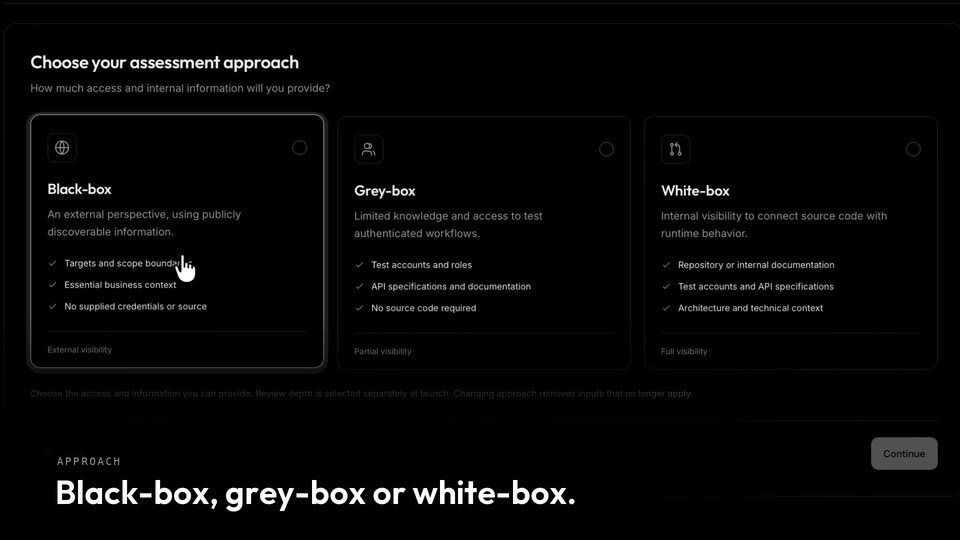
A dark pentest dashboard lists six test cards; the frame zooms in as the cursor hovers the Web App card. The view cuts to an approach screen, the cursor selects the Grey-box card, then moves to the Continue button. A bold caption sits at the bottom left.
On-screen text: “NEW PENTEST”, “Web apps, APIs, mobile, cloud and code.”, “APPROACH”, “Black-box, grey-box or white-box.”
Techniques: UI zoom, Cursor demo
Camera: Push in
07 · Feature reveal · 0:17–0:18
A dark settings screen shows three plan cards, Standard, Verified and Deep, each with a stacked-paper icon and a short description. The whole card row pans left and settles into place while a white headline stays fixed at the bottom left, and a hand cursor drifts from the bottom right toward the Deep card.
On-screen text: “REVIEW DEPTH”, “Choose how deep it goes.”
Techniques: Parallax, Cursor demo
Camera: Static
08 · Feature reveal · 0:18–0:22
A dark authorization form is shown in close-up. A cursor clicks the last checkbox, then the view shifts up to reveal the Start pentest button, which the cursor presses. A bold white headline anchors the bottom.
On-screen text: “AUTHORIZATION”, “Confirm you’re authorized. Then launch.”
Techniques: Cursor demo
Camera: Pull out
09 · Feature reveal · 0:22–0:25
A dark two-panel interface reframes onto the right-hand Recon activity log, where timestamped entries scroll in as a live feed. A cursor drifts across the rows while a headline sits at the bottom left.
On-screen text: “RECON”, “Watch it work, live.”
Techniques: UI zoom, Cursor demo
Camera: Push in
10 · Feature reveal · 0:25–0:28
A dark dashboard crossfades from a timestamped recon log to a test-planning panel with a five-step progress tracker; a cursor sits on the interface. The left caption swaps from “Watch it work, live.” to “Agents plan the tests.”
On-screen text: “RECON”, “Watch it work, live.”, “ATTACK SWARM”, “Agents plan the tests.”
Camera: Static
11 · Feature reveal · 0:28–0:32
A dark assessment dashboard scrolls up to show a four-step progress pipeline and agent status cards, then moves to a live findings feed where new findings stack in beside a timestamped activity log. A cursor drifts over the list.
On-screen text: “TESTING”, “Then run them.”, “LIVE FINDINGS”, “Findings surface while it runs.”
Techniques: Cursor demo
Camera: Push in
12 · Feature reveal · 0:32–0:33
A dark vulnerability list scrolls up on the left as a right panel with a running timer and finding counts fades in. A small caps label and a large white headline sit at the bottom left.
On-screen text: “LIVE FINDINGS”, “Findings surface while it runs.”
Techniques: Split screen
Camera: Pan
13 · Feature reveal · 0:33–0:36
A dark dashboard shows a severity donut chart, vulnerability class bars and an open vs fixed panel. The view reframes to a critical finding detail page as a cursor clicks a Take action button. A white caption anchors the bottom of the frame.
On-screen text: “RESULTS”, “Every finding, ranked by severity.”
Techniques: Cursor demo, UI zoom
Camera: Static
14 · Feature reveal · 0:36–0:43
A dark security finding report scrolls down through its sections: summary, impact, retest buttons, auto fix repository pickers, and annotated Python code. A cursor hovers over controls, and a large white caption with a small gray eyebrow swaps at the bottom for each section.
On-screen text: “FINDING DETAIL”, “Impact and evidence for every finding.”, “TEST”, “Fixed it? Retest in one click.”, “AUTO FIX”, “Or let Auto fix draft the patch.”, “CODE REVIEW”, “Patches with inline vulnerability notes.”
Techniques: Cursor demo
Camera: Push in
15 · Feature reveal · 0:43–0:46
A dark code editor displays Python source with lines 43 to 48 shaded in a blue band; a white cursor hovers at the right edge and the list drifts up a few lines. Below, a small label and a bold headline hold still.
On-screen text: “SECURE CODE REVIEW”, “Traced to the exact lines in your code.”
Camera: Push in
16 · Feature reveal · 0:46–0:48
A dark web-application assessment dashboard fills the frame, its stat cards and severity bar dimming as a large white headline holds at the lower left. The interface stays flat and locked off while the overlay text remains the focus.
On-screen text: “Share a report your team can act on.”
Camera: Static
17 · Feature reveal · 0:48–0:49
A dark assessment-details screen for a web application pentest fills the frame, showing stat cards for findings, open issues and critical items above a severity bar chart. The page drifts slowly downward while a large white tagline stays locked at the bottom.
On-screen text: “Share a report your team can act on.”
Camera: Static
18 · CTA · 0:49–0:53
A white hound-head logo hovers above centered white text on a near-black field. The two tagline lines blur in word by word, then a thin pill button with the URL fades in beneath, the frame staying locked off.
On-screen text: “Find the way in.”, “Close it before they do.”, “strikehound.ai”
Techniques: Kinetic type
Camera: Static