0:52
Explore
NeoSigma - This week, we launched NeoEval, our flagship evaluation engine. It al
NeoSigma · Nov 2026 · 0:47 · AI-annotated
- Length
- 0:47
- Scenes
- 15 · 3.2 s avg
- Product on screen
- 0:05
- Features shown
- 2
- Call to action
- 0:39 · 83%
- Voiceover
- No
00:00:00 / 00:47:42
NeoSigma’s 0:47 launch film runs 15 scenes, about 3.2 s each. The product shows up at 0:05 and 2 features are revealed. The call to action lands at 0:39 (83% in). The video argues with data-viz metaphors on a black grid: a dot field of production sessions turns into orange signal dots, then flowing lines into a 4x4 eval grid, then a sequence diagram and a regression grid. Motion is mechanical and restrained, with wipes, line-draws and morphs timed to a steady pulse, monospace captions anchoring each beat and a single orange accent carrying the failures.
No filming indicatedEstimated needs: 1 capture group — your screens or recordings · 1 official logo — reused across the film · 7 graphic passages — draw or supply
Is this your launch? to your site or press kit.
More like this
1:18


Inbenta Encore – Cinematic Product Story Video
Inbenta · Jun 2026
0:26

Limnion Teaser
Limnion · B2B · Oct 2026
NeoSigma - This week, we launched NeoEval, our flagship evaluation engine. It al, scene by scene
· 15 scenes as text
01 · Hook · 0:00–0:01
On a black background, two small white squares start at the center and slide apart to the edges, opening a gap that reveals the text Your product between them.
On-screen text: “Your product”
Techniques: Masking
Camera: Static
02 · Hook · 0:01–0:03
A black screen holds the centered white phrase “Your production data”, flanked by two small square dots. The phrase is then replaced by a small rounded tile containing a 3D wireframe cube floating over a perspective grid with a diagonal light beam.
On-screen text: “Your production data”
Techniques: Light sweep
Camera: Static
03 · Hook · 0:03–0:03
A dark grainy field holds a centered rounded square panel: a 3D wireframe cube over a red-and-white dot grid, then a perspective grid of white slats. Small monospace labels fade into the left and right margins.
On-screen text: “ASKED FOR A 60 SECOND VIDEO.”, “READING TRACES”, “MADE FOR A TWO MINUTE VIDEO.”, “FLAGGING SESSIONS”, “LINKED A CHART THAT”, “CLUSTER”
Camera: Static
04 · Hook · 0:03–0:05
A dark grid backdrop holds two columns of small step labels flanking a central rounded card. Inside the card, orange particle lines stream into a grid of squares, then the diagram resolves into a connected node graph with one red node. The labels stay static throughout.
On-screen text: “ASKED FOR A 60 SECOND VIDEO.”, “MADE A TWO MINUTE VIDEO.”, “READING TRACES”, “PERSONA, GOAL, CONSTRAINTS”, “SIMULATING USER”, “BUILDING EVALS”, “FLAGGING SESSIONS”, “LINKED A CHART THAT WOULDN'T OPEN”, “CLUSTERING FAILURES”, “FRESH PER EVAL`, `CREATING SANDBOX`, `FULL RUN + TRACE`, `RUNNING VERIFIERS`, `PASS`, `FAIL`, `REGRESSION”
Techniques: Particles, Morph
Camera: Static
05 · Product intro · 0:05–0:06
A small rounded card holding a sunset-over-water photo scales up and blurs until it fills the frame as a soft orange-to-grey gradient. The brand wordmark NeoEval then fades in at the lower right over the blurred backdrop.
On-screen text: “NeoEval”
Techniques: Masking
Camera: Static
06 · Product intro · 0:06–0:09
On a dark grid, a white monogram mark fills in at the top right while the wordmark NeoEval holds at the bottom right. A dot matrix in the lower left flickers, some dots turning orange, then the frame fades to black.
On-screen text: “NeoEval”
Camera: Static
07 · Product intro · 0:09–0:13
A black field shows a faint wall of dim text in the background. A white sans headline builds word by word across three lines, reading The Eval Engine for your Production Data. The reveal is steady, each word fading in in sequence.
On-screen text: “The Eval Engine for your Production Data”
Techniques: Kinetic type
Camera: Static
08 · Problem · 0:13–0:14
On a black field, a faint list of failure scenarios paired with binary codes fills the left side, then dissolves away to leave a small grid of dots beneath the spaced header PRODUCTION SESSIONS.
On-screen text: “PRODUCTION SESSIONS”
Camera: Static
09 · Problem · 0:14–0:17
A wide grid of small gray dots wipes in from left to right on black beneath a small “PRODUCTION SESSIONS” label. A white sentence holds centered at the bottom, then the grid and text fade out to black.
On-screen text: “PRODUCTION SESSIONS”, “Your most valuable data is already in production.”
Techniques: Masking
Camera: Static
10 · Problem · 0:17–0:29
A dark dot grid labeled PRODUCTION SESSIONS fills with orange dots, each tagged by a small quote bubble, then the dots pulse with rings. The grid morphs into flowing lines that feed a 4x4 grid of gray tiles labeled EVALS while bottom captions swap.
On-screen text: “PRODUCTION SESSIONS”, ““That's not what I asked for.””, “Every piece of user feedback and frustration is a signal to capture.”, “THUMBS DOWN”, ““The link doesn't open.””, “USER REWROTE THE ANSWER”, ““Try again.””, ““Why is this blank?””, “These signals are sparse, and they matter most.”, “NeoEval turns them into failures you can replay.”
Techniques: Morph
Camera: Pull out
11 · Feature reveal · 0:29–0:33
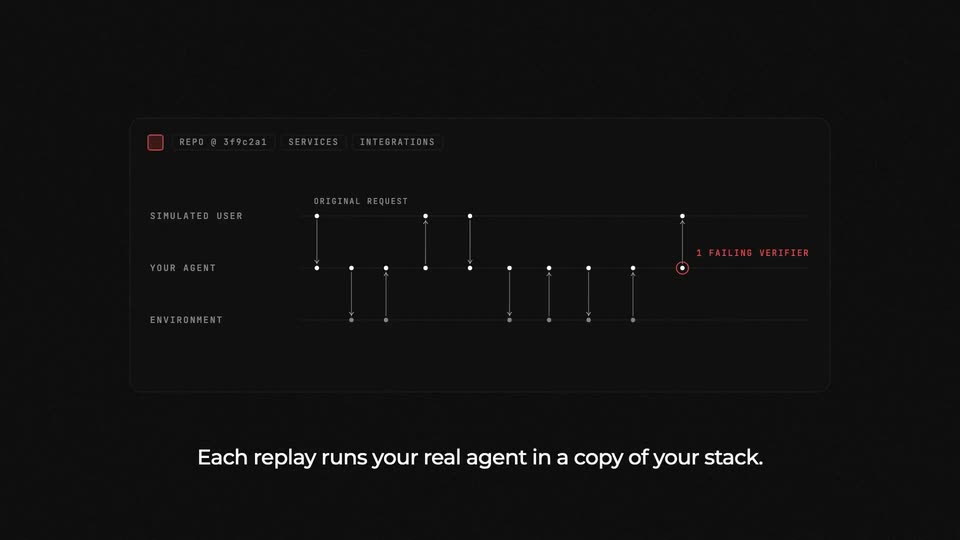
A dark UI panel shows a sequence diagram drawing itself across three lanes, Simulated User, Your Agent, Environment, as arrows and dots appear left to right. A top-left status square turns red beside a red 1 Failing Verifier label on the agent lane. A white caption sits below.
On-screen text: “Each replay runs your real agent in a copy of your stack.”
Camera: Static
12 · Feature reveal · 0:33–0:34
A dim schematic of the Bloom AI system, with monospaced row labels and a node network, fades out as a 4x4 grid of dark rounded squares materializes in the center, the bottom-right cell glowing red.
Techniques: Morph
Camera: Static
13 · Feature reveal · 0:34–0:39
On black, a 4x4 grid of rounded squares brightens from gray to white, then checkmarks draw in. One tile flashes a red X tagged REGRESSION; the bottom-right red tile is tagged FIXED. A REPO hash sits above and a caption below. The grid fades out.
On-screen text: “Test every change against them before it ships.”, “REGRESSION”, “FIXED”
Camera: Static
14 · CTA · 0:39–0:42
On a black field, a 4x4 grid of rounded squares, shaded gray to white, holds the right side while the white label [Get started] with orange brackets fades in on the left. The squares then drift apart and reassemble into a stylized arch mark.
On-screen text: “[Get started]”
Techniques: Morph
Camera: Static
15 · Outro · 0:42–0:47
On a near-black grid background, a small white dot grows into a line-drawn ns monogram. The wordmark NeoSigma appears beside it as a thin outline, then fills solid white, and the small caption NeoEval fades in below.
On-screen text: “NeoSigma”, “NeoEval”
Techniques: Kinetic type
Camera: Static