
1:26
Explore
00:00:00 / 03:50:12
- Length
- 3:50
- Scenes
- 39 · 5.9 s avg
- Product on screen
- 0:00
- Features shown
- 4
- Voiceover
- Yes
- Views
- 213K on YouTube
as of November 23, 2026
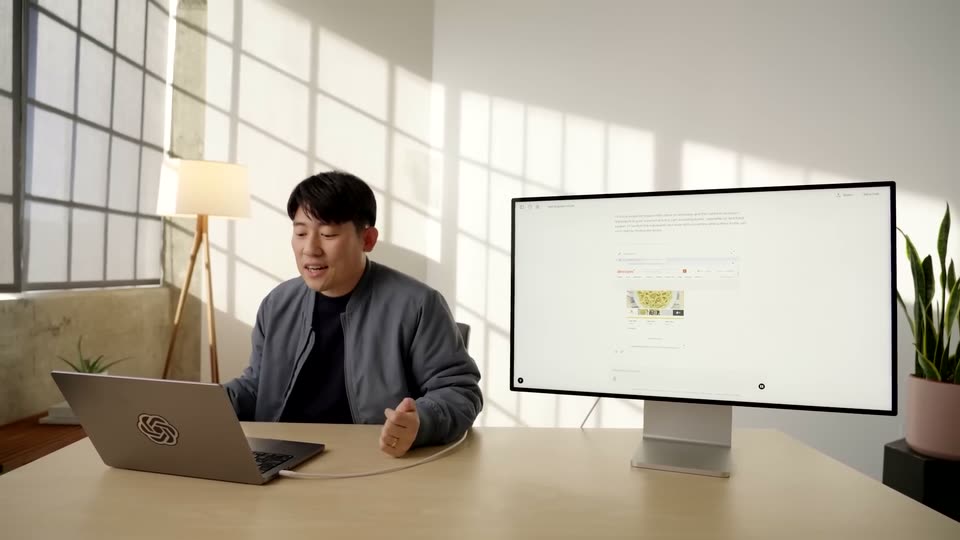
OpenAI’s 3:50 launch film runs 39 scenes, about 5.9 s each. The product is on screen from the first frame and 4 features are revealed. There is no explicit call to action; a voiceover carries the film. Opens on a locked title card and a host intro, then runs one continuous live demo of the agent buying groceries, with the host pausing to name each feature (human interface, chain of thought, clarifying questions, human control) before a closing thank you. The look is bright and white on white, alternating static talking-head shots with screen captures and 3D monitor renders, all held in soft natural window light with steady locked-off framing.
Footage neededEstimated needs: 6 capture groups — your screens or recordings · 18 filmed passages — shoot, supply or replace · 2 3D passages — build or supply
Is this your launch? to your site or press kit.
More like this


Similar soundtrack
Films whose music sounds like this one, voice left out
1:44

Conifer Demo Video
Conifer
2:26

Novaflow Launch Video
Novaflow
1:51

cmux - the terminal built for multitasking
cmux · Technical voiceover
Demonstrating Operator, scene by scene
· 39 scenes as text
01 · Product intro · 0:00–0:03
A potted snake plant stands against a pale wall with soft window shadows. Large white titles remain locked at the top and bottom while the leaves sway gently.
On-screen text: “Operator”, “Research Preview”
Camera: Static
02 · Product intro · 0:03–0:08
A man in a gray jacket sits at a desk in a sunlit room, speaking and gesturing in front of a laptop with the OpenAI logo. It cuts to a close-up of the laptop screen showing the Operator interface with travel prompts.
Camera: Static
03 · Product intro · 0:08–0:17
A laptop on a wooden desk is shot at a low angle, its screen showing the Operator interface with a prompt bar, category tabs and a grid of travel example cards. The frame stays locked and still throughout.
Camera: Static
04 · Demo · 0:17–0:27
A man in a gray jacket sits at a desk, talking and gesturing toward a laptop bearing a swirl logo sticker. A large monitor on the right shows a white interface. The static medium shot sits in a bright loft with window light and a floor lamp.
Camera: Static
05 · Demo · 0:27–0:37
The Operator interface opens on a wide view with the Travel tab and suggestion cards. The frame zooms in as a hand cursor types instacart into the prompt field, the app chip switches to Instacart, and the prompt list updates to grocery tasks. The cursor hovers over the first prompt.
Techniques: UI zoom, Cursor demo
Camera: Push in
06 · Demo · 0:37–0:50
A man in a gray jacket sits at a desk with a laptop in front of him and a large monitor showing a white task list to his right. He faces the camera, gesturing with both hands as he speaks, then looks down and types on the laptop in a sunlit room with a floor lamp.
Camera: Static
07 · Demo · 0:50–0:51
A white Operator interface shows a text field and a list of Instacart prompts. A hand cursor hovers over the first prompt as the prompts fade from grey to black and the field text changes.
Camera: Static
08 · Demo · 0:51–1:10
A white interface opens tight on the typing line, then reframes wider to show the bold “Operator” heading centered above. A prompt types out letter by letter beneath it, flanked by a paperclip, an Instacart tag, and a black up-arrow button.
Techniques: UI zoom, Kinetic type
Camera: Pull out
09 · Demo · 1:10–1:19
A man in a gray jacket sits at a wooden desk, talking while looking at a laptop with a swirl logo sticker. A monitor to his right shows a white chat interface. Sunlight casts a window grid shadow on the wall. Static medium shot.
Camera: Static
10 · Demo · 1:19–1:30
Over-the-shoulder, locked-off shot of a person dictating into a laptop. The Operator chat on screen types out the spoken grocery request word by word. A blurred shoulder sits in the foreground, and hands gesture at the bottom edge.
Camera: Static
11 · Demo · 1:30–1:37
A monitor in 3D perspective on a stand shows a chat app against a blurred bright room. A user message sits at top; a typing dot pulses, then the operator's reply types out below. A Thinking panel with an Instacart row fades in. The frame stays locked.
Techniques: 3D mockup
Camera: Static
12 · Demo · 1:37–1:43
A man in a gray jacket sits at a desk with a laptop, gesturing as he speaks. A large monitor to his right shows a white document interface with a block of text. Sunlight streams through a windowed wall behind him. The shot ends in a quick blur.
Camera: Push in
13 · Demo · 1:43–1:44
A man in a grey sweater sits at a desk beside a large monitor. The image racks focus from a soft blur to the screen, revealing a chat window where a recipe task is being worked through.
Camera: Push in
14 · Demo · 1:44–1:47
A laptop screen shows an agent task titled Add linguine recipe: a paragraph of body copy sits above a browser window loading an Allrecipes page with a blue Spaghetti with Canned Clams Recipe button. The shot starts soft and angled, then racks focus and squares up to the screen.
Camera: Pan
15 · Demo · 1:47–1:51
A man in a gray jacket sits at a desk, gesturing with his hand while speaking. A laptop sits in front of him and a monitor on the right shows a recipe page. The frame is static and locked-off.
Camera: Static
16 · Feature reveal · 1:51–1:57
A man in a gray jacket sits at a desk, gesturing with both hands as he speaks, a laptop with an OpenAI logo on the left and a large monitor on the right showing a scrolling browser page with a food photo.
Camera: Static
17 · Feature reveal · 1:57–2:03
Over a blurred shoulder, a laptop on a wooden desk shows the interface: a chat prompt on the left, a browser window on allrecipes.com on the right. The recipe page scrolls past an ingredients photo and video thumbnail as the left panel collapses, reframing onto the browser.
Techniques: UI zoom
Camera: Static
18 · Feature reveal · 2:03–2:06
A browser results page for linguine recipes scrolls upward as a large black cursor hovers over the recipe cards. A grid of dish thumbnails and a Copilot Answer card with a video thumbnail fill the frame.
Techniques: Cursor demo
Camera: Pan
19 · Feature reveal · 2:06–2:07
A large black cursor arrow holds center over a dimmed browser window showing recipe results, with thumbs up and down icons below. The cursor stays still across the shot.
Techniques: Cursor demo
Camera: Static
20 · Feature reveal · 2:07–2:09
A tilted dark tablet floats on a white background, displaying a recipe page with a pasta photo and an ingredient list. A white cursor arrow glides down the screen. Thumbs up and down icons sit below the device.
Techniques: 3D mockup, Cursor demo
Camera: Pull out
21 · Feature reveal · 2:09–2:10
A browser window shows an Instacart recipe page with a dark recipe card listing ingredients, nutrition and substitutions. A cursor rests at the card's bottom edge. Below the window, a thumbs-up icon and a 'Message Operator' caption with a paperclip slide into place.
On-screen text: “Message Operator”
Techniques: Cursor demo
Camera: Pull out
22 · Feature reveal · 2:10–2:17
A man in a gray bomber jacket sits at a desk in a sunlit room with window shadows, gesturing with both hands as he speaks to camera. A laptop with a knot sticker faces him, and a tablet with a white screen stands at the right edge.
Camera: Static
23 · Feature reveal · 2:17–2:22
A static screen capture of the Allrecipes.com site in a browser. A hand cursor sits over the header search field as the query “linguine with clams” is typed in letter by letter. A left sidebar lists the agent's steps, its status tag toggling between Clicking and Typing.
Techniques: Cursor demo
Camera: Static
24 · Feature reveal · 2:22–2:27
A browser window on the Allrecipes site fills the frame, showing a grid of linguine with clams recipe cards. A left sidebar lists the agent's steps, adding new lines as it works, while a hand cursor icon hovers at the top left.
Camera: Static
25 · Feature reveal · 2:27–2:28
A two-pane operator view: a left log lists the agent's steps, ending on a spinning Clicking indicator, while a hand cursor hovers in the gap. The right pane holds a static Allrecipes recipe page for Linguine with Clams.
Techniques: Cursor demo
Camera: Static
26 · Feature reveal · 2:28–2:31
A man in a gray jacket sits at a desk with a laptop, gesturing with his open hand as he speaks. A bright window with a grid of light fills the background, a floor lamp stands left, a tablet screen shows a white interface at the right edge.
Camera: Static
27 · Feature reveal · 2:31–2:43
Over a blurred shoulder, an angled laptop on a wooden desk shows the agent's chat panel and a browser. The browser switches from the Allrecipes recipe page to a new tab, then shows instacart.com in the address bar. The step list adds a line, “Adding ingredients to Instacart cart.”
Techniques: 3D mockup
Camera: Static
28 · Feature reveal · 2:43–2:47
A man in a gray jacket sits at a desk with a laptop, speaking to the camera. A monitor on the right shows a document. He looks down at the screen, then up, and gestures with his hand. Static medium shot in a bright room.
Camera: Static
29 · Feature reveal · 2:47–2:59
A left panel logs the agent's steps, appending a new line at the end, while its status label toggles between Clicking and Typing. A hand cursor hovers over the Allrecipes page at right, where a search field appears with a typed query.
Techniques: Cursor demo
Camera: Static
30 · Feature reveal · 2:59–3:06
A man in a gray jacket sits at a desk in a sunlit room, typing on a laptop with a swirl logo sticker. A monitor to his right shows a chat interface with recipe text. He looks down at the screen and speaks. Static medium shot.
Camera: Static
31 · Feature reveal · 3:06–3:12
A locked-off close-up of a monitor showing the agent interface: a task list, an embedded Instacart store page, and a recipe message, while “Use Gus's” is typed into the input. It cuts to a man at a desk with a laptop, the monitor beside him.
Camera: Static
32 · Feature reveal · 3:12–3:17
A man in a gray jacket sits at a desk with a laptop, speaking, while a monitor on the right displays a chat interface. A recipe answer appears in the chat box as he talks. The bright room has a window and a floor lamp.
Camera: Static
33 · Feature reveal · 3:17–3:28
A browser window shows the Instacart store page filling in from grey placeholders to product grids, beside a left panel logging the operator's steps. A cursor clicks the search bar, a popular-searches dropdown opens, and the cursor types 'white onion'.
Techniques: Cursor demo
Camera: Static
34 · Feature reveal · 3:28–3:33
A split screen shows an automation log on the left and a live Instacart browser on the right. The store page loads from gray placeholders into onion product cards while a cursor hovers the search field; left-panel steps highlight in sequence.
Techniques: Split screen, Cursor demo
Camera: Static
35 · Feature reveal · 3:33–3:41
A man in a gray jacket sits at a bright desk, talking to camera and gesturing with his left hand. A laptop with a ChatGPT sticker faces him, and a monitor on the right shows a chat interface with a task list. The static medium shot holds throughout.
Camera: Static
36 · Feature reveal · 3:41–3:45
A laptop on a desk displays the Instacart cart page at an angle, a blurred person in the foreground. A cursor glides to the green checkout button and clicks it, the button switching to a three-dot loading state. The frame stays locked off.
Techniques: Cursor demo
Camera: Static
37 · Feature reveal · 3:45–3:46
A split layout pairs an agent task list on the left with an Instacart browser window on the right. The browser pane switches from a wine recommendation row to a checkout page showing delivery address and time slots.
Techniques: Split screen
Camera: Static
38 · Feature reveal · 3:46–3:48
A browser window displays the Instacart checkout form next to a chat panel that logs each step of an automated grocery order. The page stays still while a cursor hovers near the bottom right corner.
Camera: Static
39 · Outro · 3:48–3:50
A smiling man in a gray jacket sits at a desk facing the camera in a sunlit room. A laptop with a logo sticker sits open in front of him, and a monitor to the right displays a chat interface. He speaks to the camera as the shot holds steady.
Camera: Static